
Anyone who has had groceries delivered to their door has used grocery delivery software, even without noticing. It is the system that shows what is in stock, takes the order and payment, and sends a rider to the door. For a supermarket, a convenience store or a delivery startup, owning that system instead of paying commission to a big app can change the whole business. This guide explains what grocery delivery software is, how it works and how you can run your own.
What is grocery delivery software?
Grocery delivery software is an online system for selling groceries and managing the orders and delivery behind them. On the customer side it is a website and app where people browse products, add to a cart, pay and track the delivery. On the store side it is an admin dashboard that manages the product catalog, inventory, pricing, orders, riders, payments, customers and reports.
It automates the whole ordering process so it runs around the clock without staff at a till. A customer can order their weekly shop at 11 p.m. from their phone, pay securely and schedule delivery, while the store is closed. And because it is software you own, you keep the customer relationship and the full order value instead of handing a commission to a national delivery app on every basket.
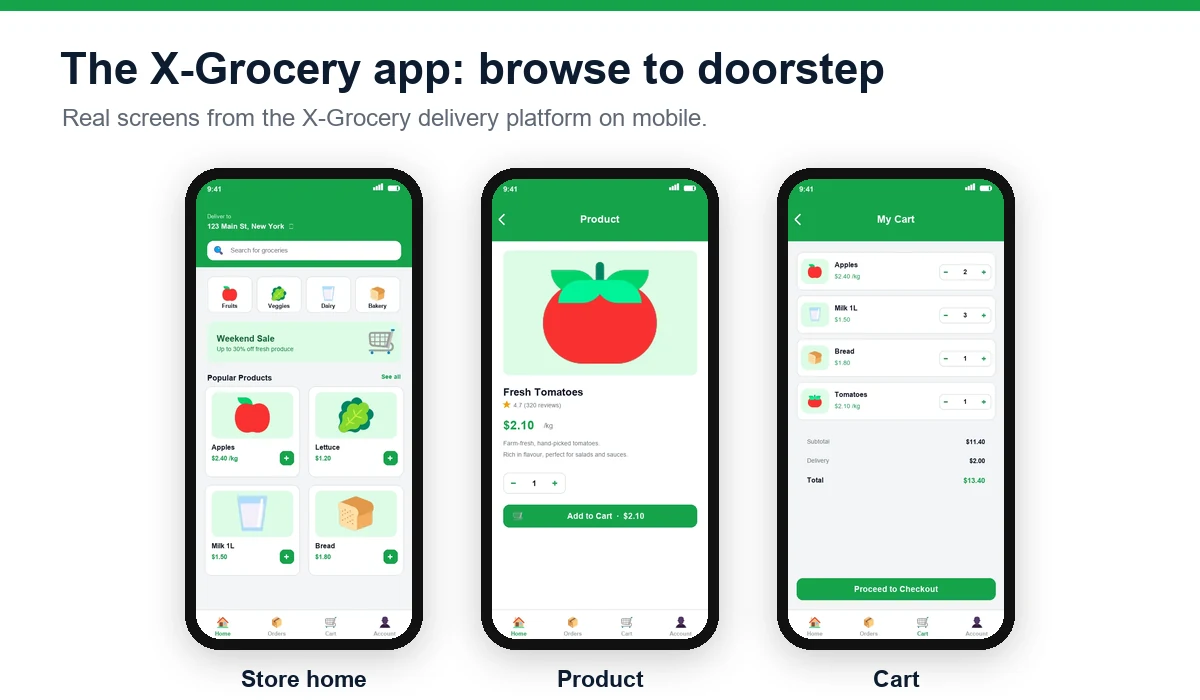
How online grocery ordering works
Whatever the store, the flow is consistent, and understanding it shows exactly what the software does for you.
- Browse. The customer searches or browses categories and sees only products that are genuinely in stock, with live prices.
- Add to cart. They build a basket, adjust quantities and see the running total, including any delivery fee.
- Checkout and pay. They choose a delivery slot and address, then pay securely by card, wallet or cash on delivery.
- Fulfil. The store receives the order, picks and packs the items, and assigns a rider, while stock updates automatically.
- Deliver and track. The rider delivers to the door, and the customer tracks the order live from packing to arrival.
Who uses grocery delivery software?
- Supermarkets and grocery chains offering online ordering alongside their stores.
- Convenience and neighbourhood stores taking local orders without a big app's commission.
- Dark stores and delivery-only kitchens built entirely around online fulfilment.
- Pharmacy, bakery and specialty food shops adding delivery to their offer.
- Multi-vendor grocery marketplaces listing many stores and earning a commission.
What grocery delivery software manages
Older systems handled little more than a shopping cart. A modern platform is modular and runs the whole operation from one dashboard.
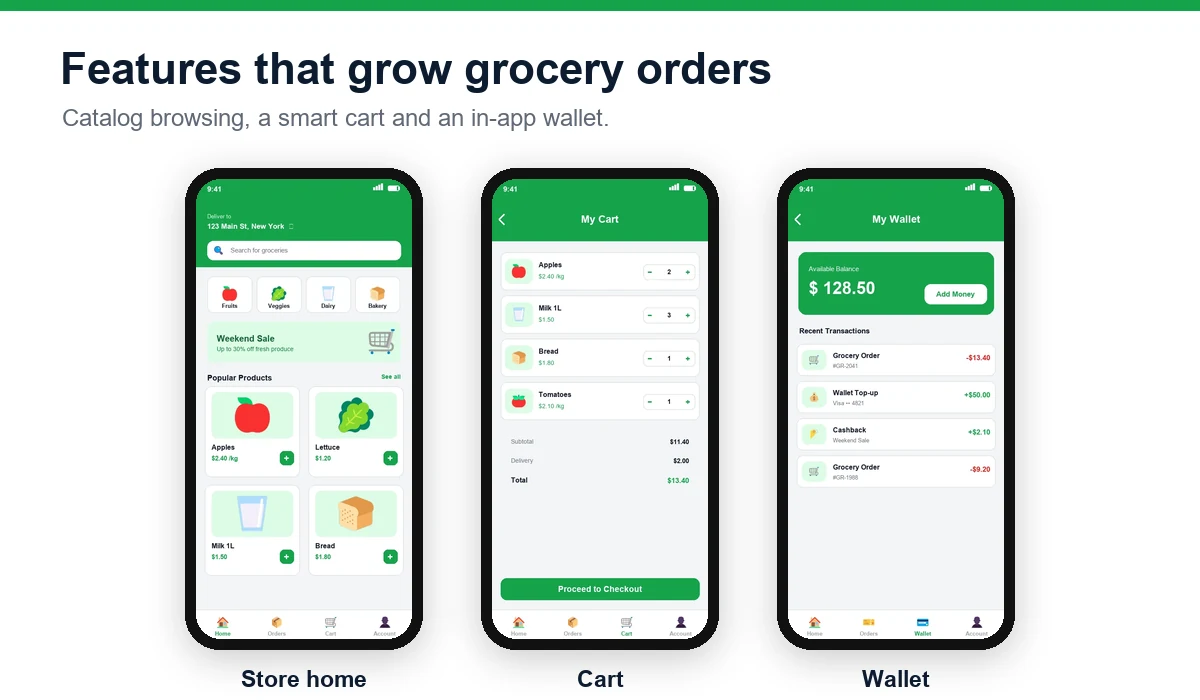
- Product catalog: categories, variants, units, prices and images.
- Inventory and stock: live stock levels that update as orders are placed.
- Orders: a clear queue from new to packed, out for delivery and completed.
- Delivery and riders: rider assignment, zones, slots and live tracking.
- Payments and wallet: gateways, cash on delivery, refunds and customer wallets.
- Multi-store and vendors: several branches or independent stores on one platform.
- Offers and coupons: discounts, bundles and promo codes.
- Reports: sales, best-sellers, delivery performance and payouts.
Our X-Grocery platform includes all of these as modules, so you switch on exactly what your store needs.
Why own your grocery platform instead of renting a spot on a big app?
National delivery apps bring customers, but they charge a heavy commission on every order, hold the customer relationship and control how you appear next to rivals. Owning your platform flips that around:
- You keep the full order value that would otherwise lose a commission on every basket.
- You own the customer data and can market offers and new products directly.
- You control the brand from browse to doorstep, not an app listing.
- You set your own rules on pricing, delivery fees and zones.
Many stores use both: big apps for reach, and their own site to take direct, commission-free orders from the customers they already serve.
Key features that matter
When you compare grocery platforms, these features separate a professional system from a basic cart.
| Feature | Why it matters |
|---|---|
| Live inventory | Stock updates as orders arrive, preventing sold-out surprises. |
| Delivery zones and slots | Customers choose a time; you control where and when you deliver. |
| Rider management and tracking | Assign riders and let customers follow the order live. |
| Secure payments and COD | Cards, wallets and cash on delivery with automatic invoices. |
| Multi-store and vendors | Run several branches or a full marketplace. |
| Reports and exports | Sales, best-sellers and payouts in PDF and Excel. |
We cover these in depth in our guide to grocery delivery app features.
The technology behind it
A capable platform such as X-Grocery is built on Laravel, a secure and widely used framework, and runs on standard web hosting, so it is affordable to operate. It connects to payment gateways for secure checkout, supports cash on delivery, multiple currencies and languages out of the box, and can run as a multi-vendor marketplace where other stores list while you earn a commission. Because you receive the full source code, nothing stops you customising the design or workflows later.
Big-app commission vs owning your platform
It is worth understanding the money, because this is usually why stores build their own platform. When a customer orders through a national app, that app can take a large percentage of the order as commission, plus charge the customer a fee on top. On the slim margins of groceries, that commission can erase the profit on a basket entirely. Your own platform takes direct orders with no commission to anyone, so more of every order stays with you. The smart approach is to use big apps for the reach they bring while steadily moving loyal customers to your own site, where each order is worth far more.
How grocery software helps different stores
The same platform solves very different problems depending on who uses it:
- A supermarket adds online ordering with delivery slots and its own riders, keeping customers who would otherwise use an app.
- A convenience store serves its neighbourhood with fast local delivery and no commission to a middleman.
- A dark store runs entirely online, built around picking, packing and rapid delivery.
- A marketplace operator lists many stores, approves them and earns a commission on every order.
Mistakes to avoid when choosing grocery software
- Picking a basic cart. A plain online shop with no delivery zones, riders or inventory cannot run real grocery delivery.
- Forgetting mobile. Most grocery orders happen on phones, so a clumsy mobile checkout quietly costs you most of your sales.
- Ignoring cash on delivery. In many markets, COD is essential; without it customers abandon the order.
- Renting instead of owning. A closed, hosted system holds your customer data and limits your branding. Owning the source code keeps you in control.
- Underestimating inventory. Without live stock, you sell items you do not have and disappoint customers at the door.
Common questions
Does it keep stock accurate?
Yes. Live inventory updates as orders are placed, so you do not sell items that are out of stock, and staff see exactly what to pick and pack.
Can customers pay cash on delivery?
Yes. Alongside cards and wallets, cash on delivery is supported, which is essential in many markets.
Can I run several branches or vendors?
Yes. The platform supports multi-store and multi-vendor operation, so you can run branches yourself or list independent stores and earn a commission.
Do I need technical skills to run it?
No. The platform is managed from a dashboard, and our team can install, brand and configure it for you. You receive the full source code for custom changes later.
Online grocery vs a walk-in store
Many store owners weigh up whether online ordering is worth it alongside their shop, so it helps to see plainly what it adds. A walk-in store serves only the customers who physically come in, during opening hours, limited by the aisles and tills you have. Online ordering serves customers wherever they are, at any time, with no limit on how many can browse at once, and it captures the people who simply will not or cannot come to the shop, whether they are busy, elderly, far away or just prefer delivery. The physical store still matters for walk-in trade and as a fulfilment base, and the best setup links the two: the same live inventory powers both, so an item sold on the shelf updates online and vice versa. That way you avoid selling what you do not have, you reach customers the shop alone would miss, and the same stock earns from two channels instead of one. Online grocery does not replace your store; it extends its reach to everyone who would rather shop from their phone.
How grocery delivery software improves the customer experience
It is easy to focus on what the software does for the store, but customers feel the difference too, and that is what makes them reorder. Instead of walking to the shop and queuing, a customer browses the whole range from the sofa, sees live prices and offers, and builds a basket in a few minutes. They choose a delivery slot that suits them rather than taking time out of their day, pay however they prefer including cash on delivery, and track the order from packing to the doorstep so they know exactly when the rider will arrive. A saved basket makes the weekly shop a two-minute job, and an in-app wallet speeds up checkout. If something is out of stock, a clear substitution and refund process keeps them informed rather than frustrated. All of this builds the trust and convenience that turn a first order into a weekly habit, which is the foundation of a profitable grocery business and the thing that keeps customers off commission-charging apps.
What to look for when buying grocery software
If you are comparing options, a few questions quickly separate a serious platform from a weak one. Ask whether you receive the full source code and own your customer data, because anything less locks you in. Confirm it has live inventory, not just a product list, so you never sell what you do not have. Check that it supports the payment methods your customers actually use, especially cash on delivery and local wallets. Make sure it handles delivery zones, slots and rider assignment properly, because delivery is what makes grocery different from a normal online shop. Look for multi-store and multi-vendor support if you plan to grow into branches or a marketplace, and multi-currency and multi-language if you serve more than one community. Insist on a live demo and place a real test order yourself, including a refund or substitution, since nothing reveals quality faster than using the system as a customer would. Finally, check what support is included, because the first busy weeks are when you most need a responsive team behind you.
X-Grocery: ready-made grocery delivery software
X-Grocery is an all-in-one, AI-assisted online grocery and delivery platform built on Laravel, covering products, orders, inventory, multi-store vendors, riders, payments and offers from one dashboard, with cash on delivery, multi-currency, multi-language and multi-vendor support and the full source code included. It comes in three one-time packages:
| Package | Price (one-time) | Best for |
|---|---|---|
| Basic | $299 | A single store launching online with a guide. |
| Professional | $599 | Full installation and server setup included. |
| Enterprise | $1000 | Large, multi-vendor marketplaces with complete setup. |
Every plan includes six months of support. See the live feature list and request a demo on the X-Grocery product page. If you are also exploring other online stores, read our guide on how to start an online store.
In short
Grocery delivery software is what turns a store into an online one that sells around the clock and delivers to the door, without losing a commission on every order to a big app. Whether you run one shop or a chain, owning the system means owning the customers and the order value. If you would like to see it working for your store, message our team and we will walk you through it.