

LinkedIn rewards people who use it with a plan. A strong profile gets found by recruiters and clients; a focused network brings relevant opportunities; consistent activity builds trust; and the right paid plan saves hours of searching. This roadmap puts those pieces in order, so you never waste time or money on the wrong step.
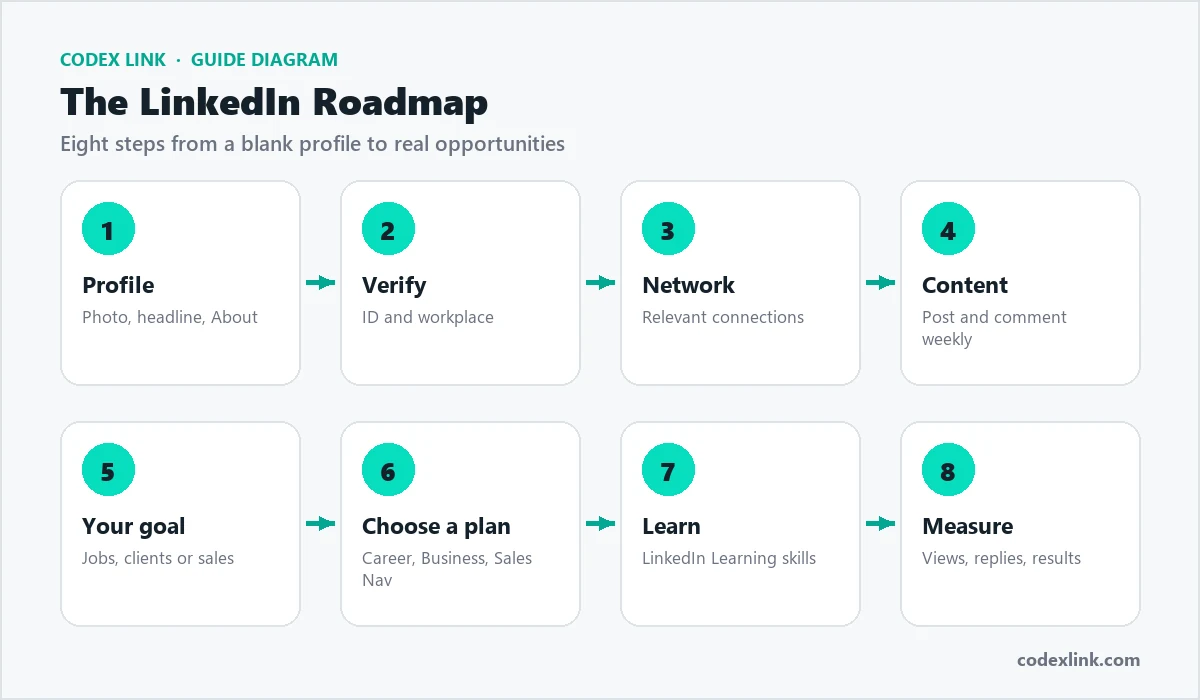
Step 1: Build a complete profile
Your profile is your landing page. Recruiters, clients and partners decide in seconds whether to contact you, and LinkedIn's search ranks complete, relevant profiles higher.
- Photo: a clear, friendly headshot with a plain background.
- Banner: a background image that shows what you do or your company brand.
- Headline: not just your job title. Say who you help and how, using the keywords people search for.
- About section: three short paragraphs: what you do, results you have achieved, and how to contact you.
- Experience: achievements with numbers where possible, not just duties.
- Skills: add the skills that match the roles or clients you want.
- Custom URL: change your profile link to linkedin.com/in/yourname.
A weak headline and a strong one:
Weak:   Marketing Manager at ABC Company
Strong: Marketing Manager | Helping SaaS brands grow leads with
SEO and LinkedIn Ads | B2B Content StrategyStep 2: Verify your identity
A verification badge shows that LinkedIn has confirmed who you are. Verified profiles are more trusted by recruiters and buyers, and verification is becoming more important as fake profiles grow.
- Identity verification: usually through a partner such as Persona or CLEAR, using a passport or national ID depending on your country.
- Workplace verification: through your company email address, if your employer is supported.
Requirements differ by country. In Pakistan, Nigeria and Bangladesh, verification normally needs an e-passport with a chip; in India it normally uses Aadhaar through DigiLocker. See our LinkedIn verification guide and verification requirements by country.
Step 3: Grow a relevant network
Quality beats quantity. Connect with people in your industry, target companies, past colleagues, classmates and potential clients.
- Import your contacts and connect with people you know.
- Follow companies you want to work with or sell to.
- Send personalised connection requests that say why you want to connect.
- Join and contribute to relevant groups.
A connection note that gets accepted:
Hi Sara, I enjoyed your post on hiring remote developers.
I run a small software team in Lahore and work on similar
challenges. Would be great to connect and follow your work.
Step 4: Post and engage consistently
Activity keeps you visible. You do not need to post every day; one or two useful posts a week, plus thoughtful comments on others' posts, builds a strong presence.
- Share lessons from your work, short case studies and practical tips.
- Use clear first lines; LinkedIn shows only the start of a post before "see more".
- Comment with real insight on posts by people in your industry.
- Reply to every comment on your own posts.
Step 5: Use LinkedIn for your goal
For job seekers
Turn on Open to Work (visible to recruiters only if you prefer), set job alerts, apply early, and message the hiring manager or recruiter after applying. Our guide on how to find a job on LinkedIn covers this in depth.
For freelancers and agencies
Position your profile around one clear service, post client results, and reach out to decision-makers with a helpful first message. See how to get clients on LinkedIn.
For sales teams and business owners
Build lists of target companies and decision-makers, track them and reach out with relevant messages. This is where Sales Navigator becomes valuable. See LinkedIn lead generation for business.
For recruiters
Search by skills, experience and location, and reach passive candidates. See how to find candidates on LinkedIn.
Step 6: Choose the right paid plan
Upgrade only when a paid feature solves a real problem. Each plan is designed for a different goal.
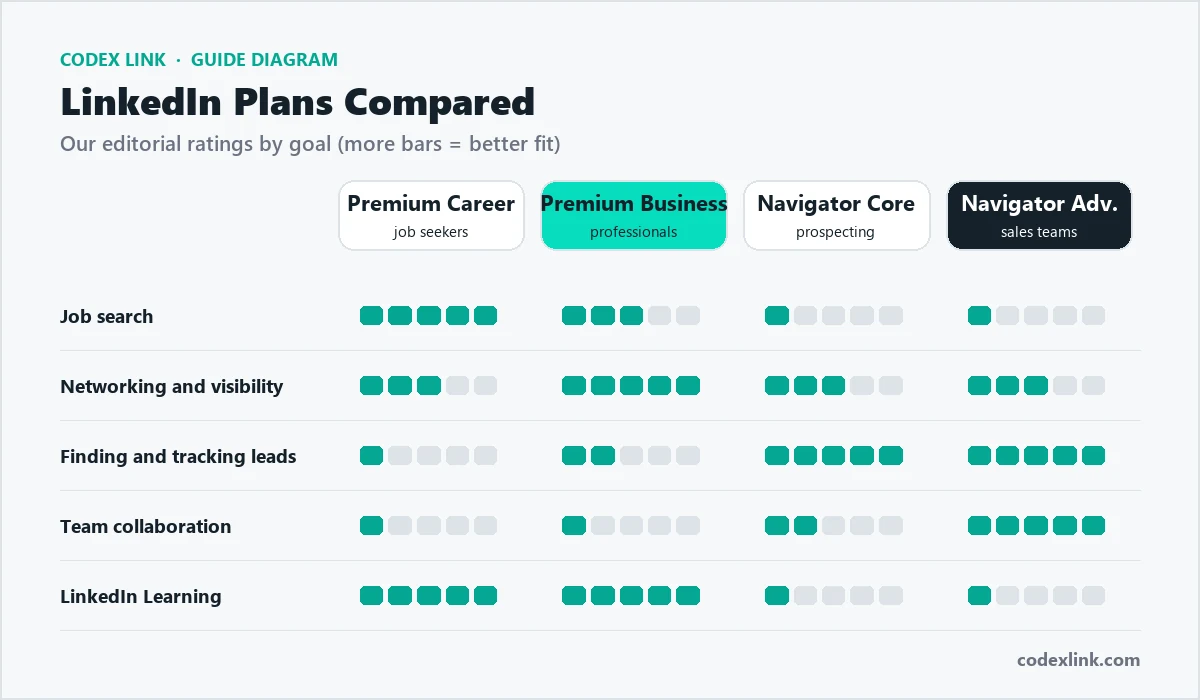
| Plan | Best for | Key features |
|---|---|---|
| Premium Career | Job seekers | InMail credits, who viewed your profile, applicant insights, LinkedIn Learning |
| Premium Business | Professionals and owners | More InMail, unlimited browsing, company insights, LinkedIn Learning |
| Sales Navigator Core | Sales and lead generation | Advanced lead and account search, saved lists, alerts, more InMail |
| Sales Navigator Advanced | Sales teams | Team features, sharing, more integrations |
| Recruiter Lite | Hiring | Advanced candidate search and recruiting tools |
Detailed guides: Premium Career, Premium Business, Sales Navigator, plans compared and which subscription is best.
Step 7: Learn new skills with LinkedIn Learning
Premium plans include LinkedIn Learning, a large library of video courses on business, technology and creative skills. Certificates of completion can be added to your profile, which helps both your skills and your search ranking. See our LinkedIn Learning guide and our comparison of Coursera, LinkedIn Learning and Udemy.
Content formats explained
LinkedIn supports several post formats. Mixing them keeps your audience interested.
| Format | Best for |
|---|---|
| Text post | Lessons, opinions and short stories |
| Image post | Results, behind-the-scenes and event photos |
| Document (carousel) | Step-by-step guides and checklists, swiped like slides |
| Video | Short explanations, demos and introductions |
| Poll | Quick audience research and conversation starters |
| Article and newsletter | Long-form expertise that subscribers receive regularly |
A simple structure for a helpful post:
Line 1: A clear hook ("3 mistakes I made hiring my first developer")
Lines 2-6: The three points, one short line each
Last line: A question that invites comments
No more than 3 relevant hashtags
Growing an audience with newsletters
Once you post regularly, a LinkedIn newsletter lets followers subscribe to your long-form articles and get notified when you publish. It is a strong way to build authority in a niche: pick one clear topic, publish on a regular schedule such as every two weeks, and share practical, original insight. Newsletters also create content that search engines and AI assistants can find and cite.
Step 8: Measure and improve
Every month, check a few numbers and adjust:
- Profile views and search appearances: are the right people finding you?
- Post impressions and engagement: which topics work best?
- Connection acceptance and message reply rates: are your messages relevant?
- Outcomes: interviews, client calls, meetings booked and deals closed.

Profile keyword checklist
LinkedIn search ranks profiles partly on how well they match the words people search for. Place your main keywords in these fields:
- Headline: your main role and the service or skill you are known for.
- About: repeat key terms naturally in the first two lines.
- Current job title: use the common industry title, not an internal one.
- Skills: list your most important skills and keep the top three relevant.
- Experience descriptions: mention tools, industries and results.
- Location: set it accurately; many searches filter by location.
LinkedIn for students and fresh graduates
Students can build a strong profile before their first job. Add education, projects, internships, volunteer work and certifications. Connect with classmates, teachers, alumni and people working in companies you admire. Ask for short recommendations from internship supervisors. Many graduate programmes and internships are advertised on LinkedIn first, and some recruiters search specifically for recent graduates.
LinkedIn company pages
Businesses should also create a company page. It gives your brand a home on LinkedIn, lets employees link their profiles to your company, and lets you post updates, job openings and events. Ask your team to follow and share company posts, because personal profiles usually reach more people than company pages alone.
LinkedIn Ads basics
LinkedIn also offers paid advertising through Campaign Manager. Ads can target people by job title, company, industry, seniority and skills, which makes them powerful for B2B marketing, though usually more expensive per click than many other platforms. Start with a small budget, a clear offer such as a free guide or consultation, and conversion tracking on your website. Our digital marketing team can plan and manage LinkedIn campaigns.
A 30-day LinkedIn plan
A simple first month for any professional:
Week 1: Photo, banner, headline, About, custom URL, top 5 skills
Week 2: Verify identity, connect with 50 relevant people
Week 3: Publish 2 helpful posts, comment on 10 posts
Week 4: Start your goal: job applications, client outreach or
        lead lists; decide whether a paid plan would help
LinkedIn around the world
LinkedIn is used in more than 200 countries and territories, but how people use it, which plans make sense and how they pay differs by country. Our country guides explain prices, payment methods and verification locally:
- LinkedIn Sales Navigator price in Pakistan
- LinkedIn Premium price in Pakistan
- LinkedIn Sales Navigator price in India
- LinkedIn Premium price in the UAE
- LinkedIn Premium price in Nigeria
- LinkedIn Premium price in Bangladesh
- LinkedIn Premium price in the USA
- LinkedIn Premium price in Canada
- LinkedIn Premium price in Australia
- LinkedIn Premium price in the UK
- LinkedIn Premium price in Saudi Arabia
- LinkedIn Sales Navigator price in the UAE
Recommendations and endorsements
Recommendations are short testimonials from people you have worked with, shown on your profile. They are one of the strongest trust signals for recruiters and clients. Ask managers, colleagues and happy clients for a recommendation that mentions a specific result, and offer to write one for them in return. Endorsements for skills are lighter signals, but they help confirm your most important skills.
Messaging etiquette
- Keep first messages short: who you are, why you are writing, and one clear question.
- Personalise every message with something specific about the person or their company.
- Do not send voice notes or long pitches to people you have not spoken to before.
- Follow up at most twice, a few days apart, and stop if there is no reply.
- Reply to messages within a day or two; responsiveness builds reputation.
Using LinkedIn on mobile
Most LinkedIn activity now happens on phones. The mobile app is the easiest place to verify your identity, record short videos, scan QR codes to connect at events and reply to messages quickly. Use the desktop version for detailed profile editing, Sales Navigator research and writing longer articles.
Common mistakes on LinkedIn
- Buying Premium before the profile is complete.
- Sending sales pitches in the first message.
- Connecting with thousands of irrelevant people.
- Posting only promotions instead of helpful content.
- Using a profile name that does not match your ID, which blocks verification.
- Paying for Sales Navigator without a clear target list.
When to revisit the roadmap
Come back to this roadmap whenever your goal changes: when you start looking for a new job, launch a business, move into sales or hire your first employees. Each goal changes which steps matter most and which paid plan, if any, gives you the best return. Update your headline, About section and featured posts at the same time, so your profile always matches what you want now.
Safety and privacy
- Turn on two-step verification in your LinkedIn settings.
- Be careful with job offers that ask for payment or personal documents.
- Never share your LinkedIn password with anyone, including people offering to "boost" your profile.
- Review who can see your connections, email address and activity.
How CodeX Link can help
CodeX Link provides genuine LinkedIn Premium Career, Premium Business and Sales Navigator subscriptions with instant activation through our marketplace, plus verification support. Message our team on WhatsApp for advice on the right plan for your goal.