Most job seekers use LinkedIn the same way: scroll the jobs tab, click Easy Apply and wait. It rarely works well, because hundreds of other people are doing exactly the same.
The people who get interviews use LinkedIn to be found and to start conversations. These answers cover how to do both, and where a paid plan helps.
Finding the right jobs
How to find a job on LinkedIn?
Complete your profile, switch on Open to Work, and use the Jobs tab with filters for location, experience level and date posted. Apply to recent listings first, then find someone on the hiring team and send a short message. Applying and messaging together works far better than applying alone.
How to get a job without experience?
Lead with what you can show: projects, coursework, volunteering, internships and certificates. Apply for entry-level and trainee roles, and message people one or two years ahead of you in the same field to ask how they started. A small portfolio often counts for more than a long CV.
How to find remote jobs on LinkedIn?
In the Jobs tab, use the Remote filter under on-site and remote options, and search the job title with the word remote. Set a job alert so new listings reach you quickly. Check each listing for country restrictions, since many remote roles hire only in certain regions.
How to find jobs abroad from Pakistan?
Search by the target country or city in the Jobs tab, and filter for employers that mention visa sponsorship or relocation. Set your profile's open-to-work locations to those countries. Connect with professionals from Pakistan who already work there and ask how they were hired.
How to find jobs that match my skills?
Add your skills to the Skills section and keep your headline specific, because LinkedIn uses both to recommend jobs. Use the job search filters, and review the skills listed on each posting. LinkedIn shows how many of the listed skills appear on your profile.
How to find jobs where I am a top applicant?
LinkedIn Premium includes a Top Applicant view that highlights jobs where your profile compares well with other applicants, based on skills and experience. It is a useful shortlist, though it is an estimate. Free accounts can still judge fit by comparing skills on the listing.
How to research a company before applying for a job?
Read the company page, recent posts and the People tab to see who works there and how long they stay. Look at employees in the team you would join. Premium Business and Sales Navigator add headcount growth and hiring trends, which show whether the company is expanding.
Building a profile that gets found
How to make my LinkedIn profile attractive?
Use a clear, friendly photo, a headline that states what you do, and an About section written in plain first-person language. Add results to each role, not just duties. Include a few featured items such as a portfolio, certificate or article.
How to optimize my LinkedIn profile for jobs?
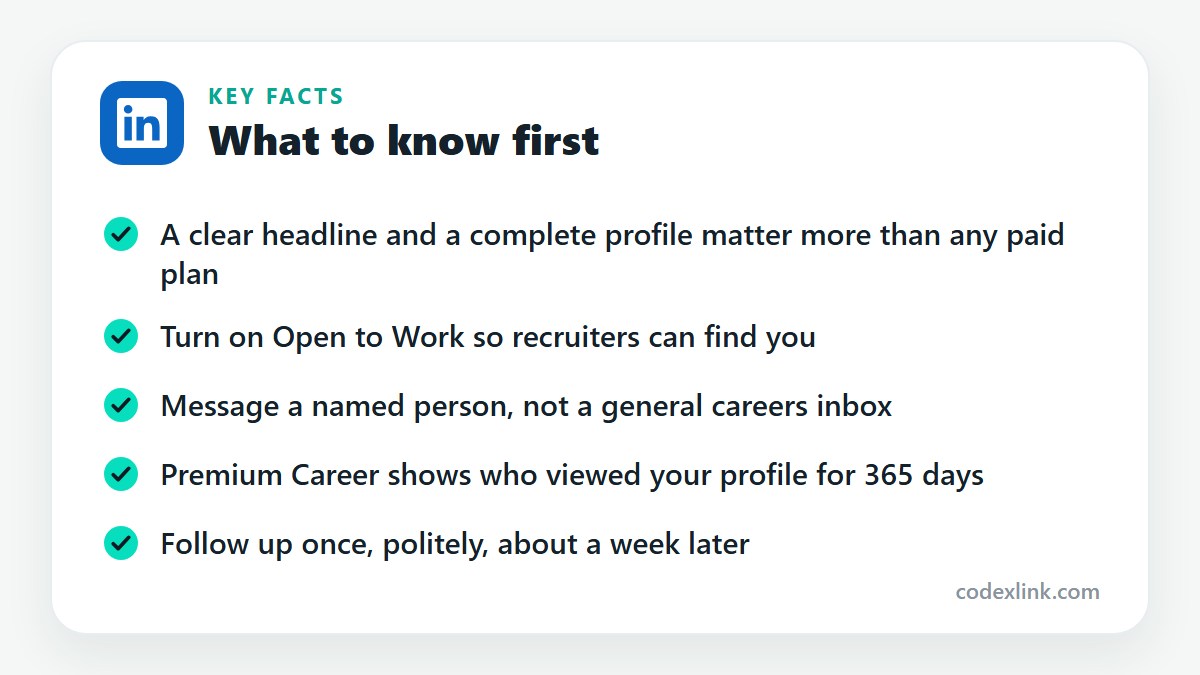
Put the job title you want in your headline and About section, list relevant skills, and fill every section. Recruiters search by keywords, so use the same terms that appear in job descriptions for your target role. Then switch on Open to Work.
How to write a professional LinkedIn headline?
State your role and what you are good at in one line, for example Front-End Developer, React and TypeScript, Building Fast E-commerce Sites. Avoid vague phrases such as seeking opportunities. The headline appears in every search result, so make it specific.
How to write an effective LinkedIn About section?
Start with who you help and how, give two or three concrete achievements, and finish with what you are looking for and how to contact you. Keep paragraphs short. Write the way you would speak to a colleague, not in the third person.
How to get more profile views on LinkedIn?
Post or comment regularly, add relevant keywords to your headline and skills, and connect with people in your field. Activity is the main driver. Every thoughtful comment on a popular post puts your name and headline in front of that post's audience.
How to stand out from other job applicants?
Tailor your application to the role, then contact someone at the company with a short, specific message. Mention a real detail about their work. Share proof of your skills, such as a project or case study. Most applicants never follow up, so doing it once sets you apart.
How to improve my chances of getting hired?
Apply early, target roles that fit your experience, and get a referral where you can. A referred candidate is far more likely to be interviewed. Prepare examples for common interview questions, and ask for feedback after any rejection.
Reaching recruiters and hiring managers
How to get noticed by recruiters on LinkedIn?
Turn on Open to Work, use the right keywords, and stay active. Recruiters filter by job title, location and skills, then favour people who have been active recently. Responding quickly to messages also improves how often you appear in their searches.
How to message a recruiter on LinkedIn?
Keep it to three or four sentences: who you are, the role you are interested in, one reason you fit, and a clear question. Send a connection request with a note, or use InMail if you have Premium. Don't attach a CV in the first message unless asked.
How to contact hiring managers on LinkedIn?
Find the manager through the company's People tab by searching for the team name or a likely title. Send a brief connection note that mentions the role and one relevant result of yours. If you have InMail credits, use one here, since hiring managers decide who is interviewed.
How to message someone on LinkedIn without connecting?
You have three options. Send an InMail, which requires a Premium plan. Message them for free if they have an Open Profile. Or message them through a LinkedIn group you both belong to. Otherwise, add a short note to a connection request.
How to send InMail on LinkedIn?
Open the person's profile and select Message. If you are not connected and have InMail credits, a new message window opens with a subject line. Write a short, specific message and send. A credit is returned if they reply within 90 days.
How to find hiring managers at a company?
Go to the company page, open People, and search by department or title, such as Engineering Manager or Head of Marketing. The job posting sometimes names the poster. Mutual connections can also tell you who leads the team.
How to contact recruiters in the USA?
Search People for recruiter or talent acquisition, filter by United States and by your industry. Follow them, engage with their posts, then send a short note stating your role, work authorisation status and time zone. Being upfront about visa needs saves time for both sides.
How to find alumni working at my dream company?
Open your university's LinkedIn page and choose the Alumni tab, then filter by where they work. Alumni are more likely to reply than strangers. Ask one specific question about their team or how they were hired, not for a job outright.
How to build a professional network as a student?
Connect with classmates, lecturers, guest speakers and alumni. Join groups in your field and comment on posts from people doing the work you want to do. Aim for a few genuine conversations each week instead of collecting hundreds of silent connections.
Profile viewers
How to see who viewed my LinkedIn profile?
Open your profile and select the profile views figure in the analytics section. Free accounts see a small number of recent viewers. Premium shows the full list for the last 365 days, except people browsing in private mode.
How to know if a recruiter viewed my profile?
In the list of profile viewers, each visitor's name, headline and company is shown, so recruiters are easy to spot. With Premium you see the complete list. A recruiter who viewed your profile is a good person to message while your name is fresh.
Does Premium help?
Is LinkedIn Premium useful for fresh graduates?
It can be, mainly for the profile viewer list, InMail to hiring managers and LinkedIn Learning courses. Finish your profile and use the free trial first. If budget is tight, buy a short period during your active search instead of an ongoing subscription.
Does LinkedIn Premium help you get a job?
It helps you act on better information. You can see who is interested in you, message decision-makers directly, and compare yourself with other applicants. It doesn't move your application ahead of others, and it can't replace a strong profile.
Is LinkedIn Premium Career worth it?
It is worth it during an active job search of one to three months, when you will use InMail and profile viewers every week. Our LinkedIn Premium Career guide covers the features, limits and who should skip it.
How to use LinkedIn Premium for job hunting?
Check profile viewers twice a week and contact relevant ones. Spend InMails on hiring managers, not general HR inboxes. Use applicant insights to choose roles where you are competitive, and complete one LinkedIn Learning course that matches your target job.
How to get international clients through LinkedIn?
Set your headline to the service you offer and the type of client you serve, post examples of your work, and search for decision-makers in your target countries. Send short, relevant messages. Our guide to finding clients on LinkedIn covers the full method.
LinkedIn plans and prices on CodeX Link
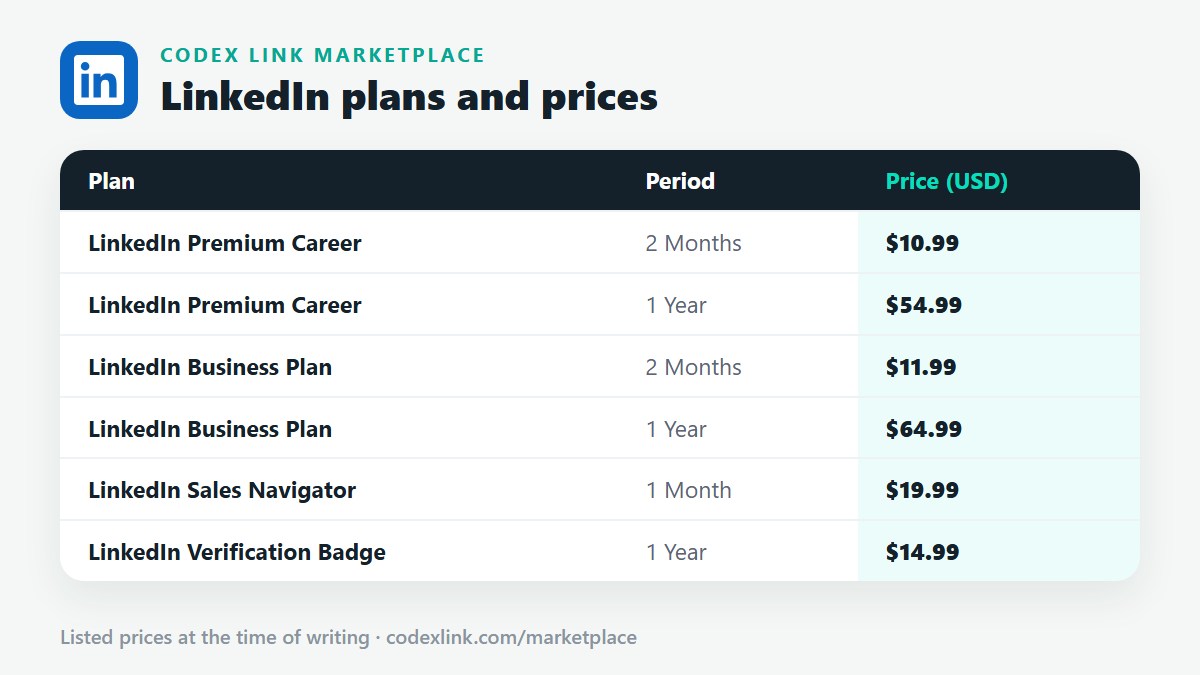
These are the LinkedIn plans listed on the CodeX Link marketplace at the time of writing. Message the team on WhatsApp to confirm the price and how activation works before you order.
| Plan | Period | CodeX Link price |
|---|---|---|
| LinkedIn Premium Career | 2 Months | $10.99 |
| LinkedIn Premium Career | 1 Year | $54.99 |
| LinkedIn Business Plan | 2 Months | $11.99 |
| LinkedIn Business Plan | 1 Year | $64.99 |
| LinkedIn Sales Navigator | 1 Month | $19.99 |
| LinkedIn Verification Badge | 1 Year | $14.99 |
Need a LinkedIn plan?
Chat with the CodeX Link team for the current price and activation details, or browse every tool in the marketplace.
LinkedIn is a trademark of its owner. Features, limits and prices change over time and differ by country, so confirm the current terms on LinkedIn before you buy.