

Canadian B2B teams, from Toronto SaaS startups to Calgary energy-services firms and Vancouver agencies, use Sales Navigator to build target lists, follow buying signals and reach decision-makers. This guide covers the plans and prices in Canadian dollars, what each feature does, and a practical playbook for the Canadian market.
Sales Navigator price in Canada at a glance
| Plan | Official (USD) | Approx CAD* | Best for |
|---|---|---|---|
| Sales Navigator Core | about $99.99 / month | about C$138 / month | Individual sellers, founders, consultants |
| Sales Navigator Advanced | about $149.99 / month | about C$207 / month | Teams that share lists and need TeamLink |
| Sales Navigator Advanced Plus | Custom pricing | Contract | Larger teams needing CRM sync |
| Sales Navigator from CodeX Link | Ask price | Genuine, instant activation | |
*Example rate of 1.38 CAD per USD; rates move daily. GST or HST applies depending on your province, and annual billing lowers the monthly cost. LinkedIn shows the final price in Canadian dollars at checkout.
| Plan | Price |
|---|---|
| LinkedIn Premium Career | Ask price |
| LinkedIn Business Premium | Ask price |
| LinkedIn Sales Navigator | Ask price |
| LinkedIn Verification Badge | Ask price |
What Sales Navigator gives you
Advanced lead filters
Filter people by job title, function, seniority, company headcount, industry, geography, years in role and signals such as "changed jobs recently". These turn LinkedIn into precise lists of Canadian buyers.
Account search and filters
Find companies by industry, headcount, headcount growth, province and more, and build target account lists for account-based selling.
Saved searches and alerts
Save a search and get alerts when new people match, for example a new VP joining a target firm in Ontario or Alberta.
Lead and account lists
Organise prospects by campaign, territory or stage and track activity in one place.
InMail
Sales Navigator includes a larger monthly InMail allowance than Premium plans, for reaching people outside your network.
Buyer intent and activity signals
See when leads view your profile, engage with your company or change roles, and prioritise those showing interest.
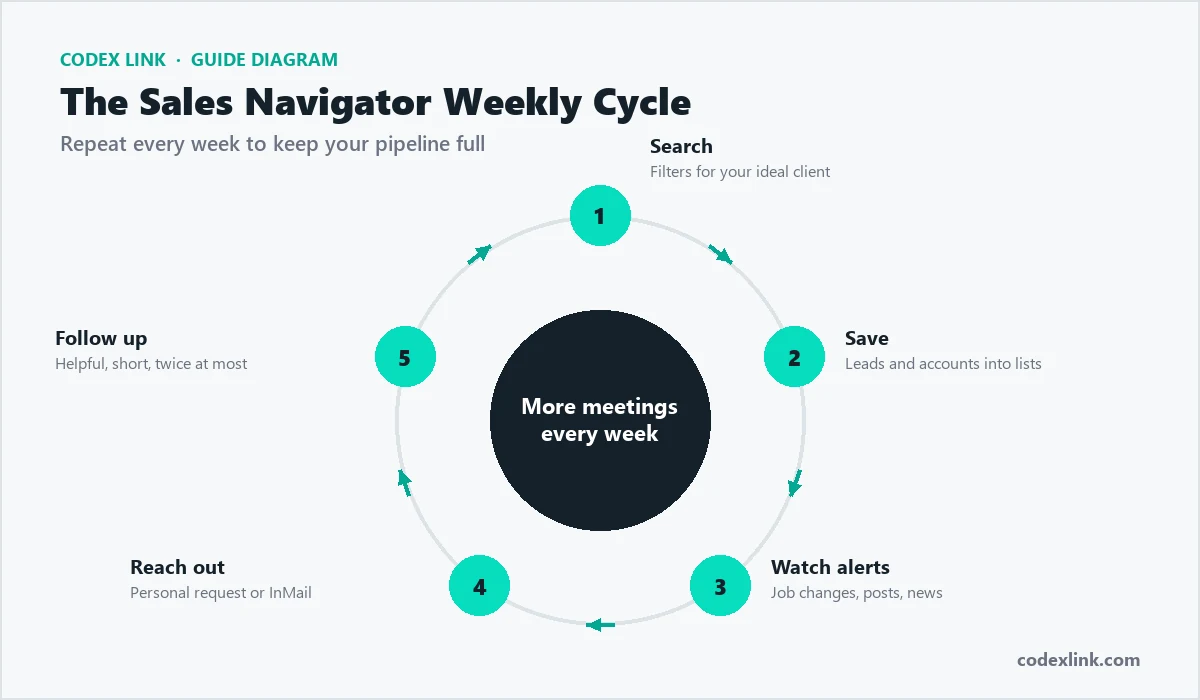
Core vs Advanced vs Advanced Plus
| Feature | Core | Advanced | Advanced Plus |
|---|---|---|---|
| Advanced lead and account search | Yes | Yes | Yes |
| Lead and account lists, alerts | Yes | Yes | Yes |
| InMail | Yes | Yes | Yes |
| TeamLink (warm paths via colleagues) | No | Yes | Yes |
| Smart Links and team sharing | No | Yes | Yes |
| CRM sync (Salesforce, HubSpot, Dynamics) | No | No | Yes |
Most individual Canadian sellers, founders and small agencies only need Core. Teams that want shared lists choose Advanced, and Advanced Plus suits larger teams needing CRM sync.
Sales Navigator vs Business Premium
Business Premium gives unlimited browsing and some InMail, enough for light prospecting. Sales Navigator is built for daily selling, with dozens of lead filters, saved searches, alerts and lists. If you prospect more than an hour a day, Sales Navigator pays for itself in time saved. For comparison, read our Business Premium guide and the Sales Navigator price in the USA.
Who uses Sales Navigator in Canada?
- SaaS and tech sellers in Toronto, Waterloo, Montreal and Vancouver.
- Agencies selling marketing, development and design to mid-market firms.
- Founders doing founder-led sales before hiring a team.
- Professional and financial services, within compliance rules.
- Energy, logistics and manufacturing suppliers across the provinces.
A Canadian prospecting playbook
1. Define your ideal customer profile
Write down industry, company size, province, and the job titles of the buyer and influencers, for example "Ontario manufacturers with 50 to 500 staff, buyer is VP Operations".
2. Build an account list
Use account filters to find 100 to 300 companies that fit, adding headcount growth to prioritise firms that are expanding.
3. Map the buying committee
Save two to four leads per account: the decision-maker, a champion and an influencer.
4. Set alerts
Save searches for new leaders in your target roles and watch alerts for job changes and posts.
5. Engage before you pitch
Comment on prospects' posts and view their profiles. Many will look back at yours.
6. Personalised outreach
Send a connection request or InMail that references a trigger such as a new role or funding, and offer a useful insight, not a demo.
A Canadian saved search:
Geography:         Canada (Ontario, Alberta)
Industry:          Manufacturing
Company headcount: 51-500
Function:          Operations
Seniority:         Director, VP
Changed jobs:      In the past 90 days
Result:            A weekly list of new operations leaders
at growing Canadian manufacturersMetrics to track
- Connection acceptance rate: how relevant your targeting and profile are.
- Reply and positive reply rate: message quality and timing.
- Meetings booked: the number that matters for pipeline.
- Social Selling Index: LinkedIn's score for your activity.
Compliance in Canada
- Follow CASL (Canada's Anti-Spam Legislation) when you move prospects to email; get the right consent and include an unsubscribe.
- Handle personal data under PIPEDA and your company's privacy policy.
- LinkedIn prohibits scraping and most automation; such tools risk account restrictions.
- Regulated sectors such as financial services should follow firm policies on social selling.
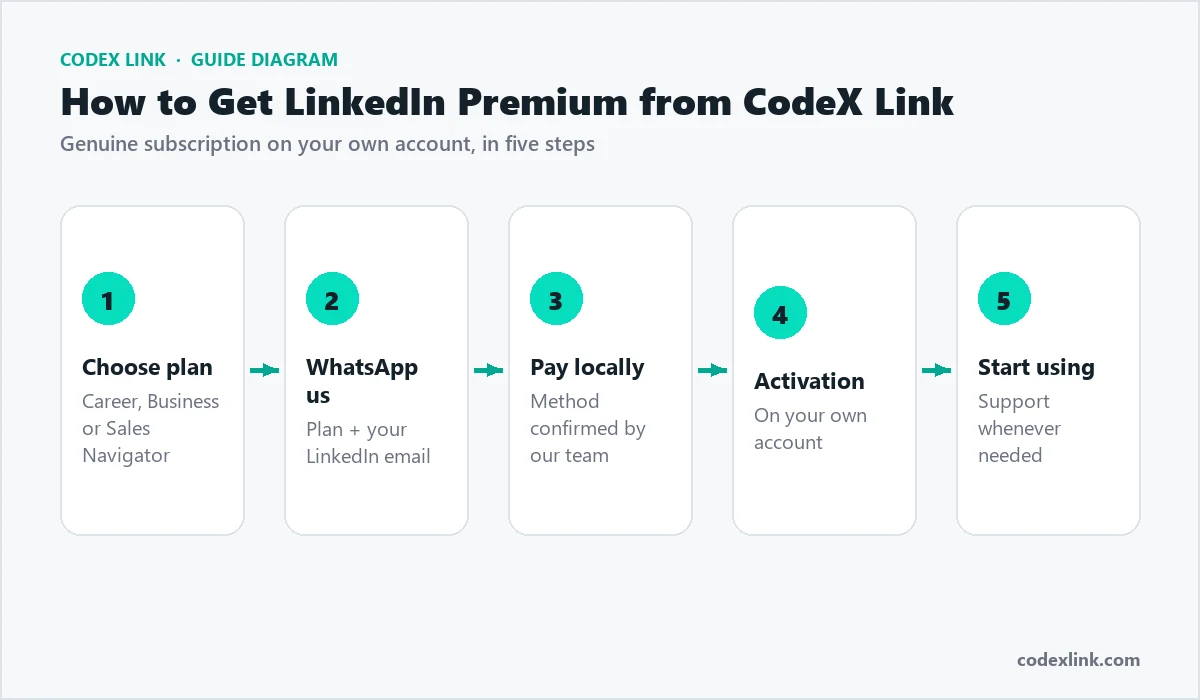
How to buy Sales Navigator through CodeX Link
- Open the Sales Navigator page or the marketplace.
- Choose the one-month plan at a special price. Ask price
- Complete payment and share your LinkedIn profile link to activate.
- Sales Navigator is activated on your own account, usually within minutes.
Sales Navigator and your CRM
Core and Advanced do not sync automatically with your CRM, but you can still keep clean records by adding notes in Sales Navigator and moving qualified leads into your CRM by hand. Advanced Plus offers CRM sync with Salesforce, HubSpot and Microsoft Dynamics for larger teams. Whatever your setup, record every meaningful conversation so follow-ups are timely and two people never contact the same Canadian prospect twice.
Sales Navigator vs data tools
Some Canadian teams also use contact-data tools for emails and phone numbers. Sales Navigator is different: its data comes from members' own profiles, so titles and companies are usually current, and you can see recent activity. Many teams identify and research prospects in Sales Navigator, reach them on LinkedIn first, then move to email in line with CASL. Wherever you source data, follow privacy law and LinkedIn's rules, and never scrape LinkedIn.
Grow your Social Selling Index
LinkedIn scores your selling activity with the Social Selling Index, a number out of 100 across four areas: your professional brand, finding the right people, engaging with insights and building relationships. Sales Navigator directly supports finding people and engaging, while a complete profile and steady posting lift the rest. Checking your SSI every few weeks shows whether your habits are improving, and a higher score generally brings more views, acceptances and replies.
Does Sales Navigator replace cold calling?
Not entirely, but it makes every channel work better. Sales Navigator helps you find the right Canadian prospects, understand them and warm them up on LinkedIn before you ever pick up the phone. Many teams use it to research and engage first, then follow up by phone or email with full context, which makes those calls far more welcome. Think of it as the layer that turns cold outreach into warm, informed conversations rather than a replacement for talking to people.
Timing outreach across Canada
Canada spans six time zones, so timing is part of the craft. A message to a Toronto prospect lands hours apart from one to a Vancouver prospect, and scheduling each for local mid-morning on a weekday improves your odds of being read. Use Sales Navigator alerts to reach people at natural moments, such as the first weeks in a new role or just after a company announces growth. For prospects in Quebec, a short, correct French opener signals respect and often lifts reply rates. The habit that works is simple: let the alerts, not the calendar, decide who you contact each day, and send at the prospect's local business hours rather than your own.
Sales Navigator for founder-led sales in Canada
Many Canadian startups sell through the founder before hiring a sales team, and Sales Navigator fits this stage perfectly. A founder can build a list of 100 ideal accounts, save the economic buyer and a champion at each, and work through them steadily. Founder messages often earn better replies because they are personal and show real product knowledge. Keep a simple CRM or spreadsheet, review which segments respond, and focus on the ones that convert. Those first reference customers make later sales hires far easier.
Sales Navigator for Canadian agencies
Agencies in Toronto, Montreal and Vancouver selling marketing, development, design or video can use Sales Navigator signals to time outreach: a new marketing leader, a rebrand, a funding round or rapid hiring. Pairing a trigger with a relevant Canadian case study turns a cold pitch into useful timing. Agencies that specialise in a vertical usually outperform generalists, because their message and portfolio speak directly to the prospect's industry.
Account-based selling
For larger Canadian deals, focus on a short list of high-value accounts. Save every stakeholder, follow company news, and engage each person with a message tailored to their role, since a CFO, an operations lead and an end user each care about different things. Sales Navigator's account pages, alerts and lists keep this in one place so your approach to each account stays coordinated.
Your first week with Sales Navigator
- Day 1: set sales preferences: provinces, industries, functions and company sizes.
- Day 2: build your first account list of 100 Canadian companies that fit.
- Day 3: save two to four leads per account and create lead lists by persona.
- Day 4: save searches with alerts for job changes and new hires.
- Day 5: start engaging and send your first ten personalised messages.
Common mistakes to avoid
- Searching too broadly and messaging everyone instead of a focused list.
- Pitching a demo in the first message rather than offering an insight.
- Ignoring alerts, which are often the best triggers for outreach.
- Letting your own profile go stale, so prospects bounce when they check you.
- Buying Advanced when you work alone and only need Core.
Sales Navigator by Canadian region
Geography filters let you target metros such as Toronto, Montreal, Vancouver, Calgary, Edmonton, Ottawa and Winnipeg, or entire provinces. Regional campaigns allow local references, such as nearby clients or industry events, and help you schedule messages across Canada's time zones. Smaller markets often have less competition for attention, so do not overlook cities beyond the biggest hubs. For bilingual outreach in Quebec, a short, correct French message can lift reply rates noticeably.
One month or longer?
A one-month subscription is ideal for a focused sprint: build your lists, launch a campaign and measure results. If it works, renew month by month or move to annual billing for a lower monthly cost. Many small Canadian teams run Sales Navigator continuously because saved searches and alerts keep producing fresh, timely prospects.
Is Sales Navigator worth it in Canada?
For anyone selling to Canadian businesses, Sales Navigator is usually worth it: one extra deal a quarter covers many months of the subscription. At a special price through CodeX Link, it is an easy decision for founders, consultants and small teams. The key is consistent use every week. Ask price
How CodeX Link can help
Get genuine LinkedIn Sales Navigator at a special price from the CodeX Link marketplace. Email support@codexlink.com or WhatsApp +92 343 5673902. Also see the LinkedIn lead generation guide and how to get clients on LinkedIn.