

If you sell to other businesses in the United States, Sales Navigator is the tool that turns LinkedIn into a prospecting engine. But "how do I actually buy it, and is there a cheaper way?" is the real question. This guide walks through every way to get Sales Navigator in the USA, what each costs, and how to activate it, so you pick the route that fits your budget and your sales process.
Sales Navigator price in the USA at a glance
| Plan | Official monthly billing | Annual billing | Best for |
|---|---|---|---|
| Sales Navigator Core | about $99.99 / month | Lower per month; shown at checkout | Individual sellers, founders, consultants |
| Sales Navigator Advanced | about $149.99 / month | Lower per month; shown at checkout | Teams that share lists and need TeamLink |
| Sales Navigator Advanced Plus | Custom pricing | Contract | Larger teams needing CRM sync |
| Sales Navigator from CodeX Link | Ask price | - | Genuine, instant activation |
Official prices vary with billing period and promotions, and sales tax depends on your state. LinkedIn shows the final price at checkout.
| Plan | Price |
|---|---|
| LinkedIn Premium Career | Ask price |
| LinkedIn Business Premium | Ask price |
| LinkedIn Sales Navigator | Ask price |
| LinkedIn Verification Badge | Ask price |
For a full breakdown of plans and features, see our Sales Navigator price in the USA guide. Below, we focus on how to actually buy it.
Option 1: Start the free trial
If you have never used Sales Navigator, start here. LinkedIn usually offers a one-month free trial to eligible members. It gives you full access so you can build lists, test searches and send InMail before paying anything.
- Sign in to LinkedIn and open the Sales Navigator page.
- Choose the free trial and confirm your plan (usually Core).
- Enter a payment card. You are not charged until the trial ends.
- Set a reminder to cancel before the renewal date if you do not want to continue.
Option 2: Buy directly from LinkedIn
Buying from LinkedIn is the standard route and takes a few minutes:
- Open the Sales Navigator page while signed in.
- Choose Core or Advanced, and monthly or annual billing. Annual lowers the monthly cost.
- Enter your payment card and billing details. LinkedIn adds any applicable sales tax at checkout.
- Sales Navigator activates immediately on your account at sales.linkedin.com.
Monthly billing suits a short campaign; annual billing is cheaper per month if you will use it all year.
Option 3: Team plans and seats
If several people will prospect, Sales Navigator Advanced adds team features: TeamLink for warm introductions through colleagues, shared lists, Smart Links and admin controls. You buy multiple seats and manage them from the admin area. For larger sales organisations, Advanced Plus adds CRM sync with Salesforce, HubSpot and Microsoft Dynamics and is quoted per contract. Most individuals and small agencies, though, only need Core.
Option 4: Buy through CodeX Link at a special price
If you want Sales Navigator for a focused month without paying the full US sticker price, CodeX Link offers a genuine one-month subscription at a special price, activated on your own LinkedIn account.
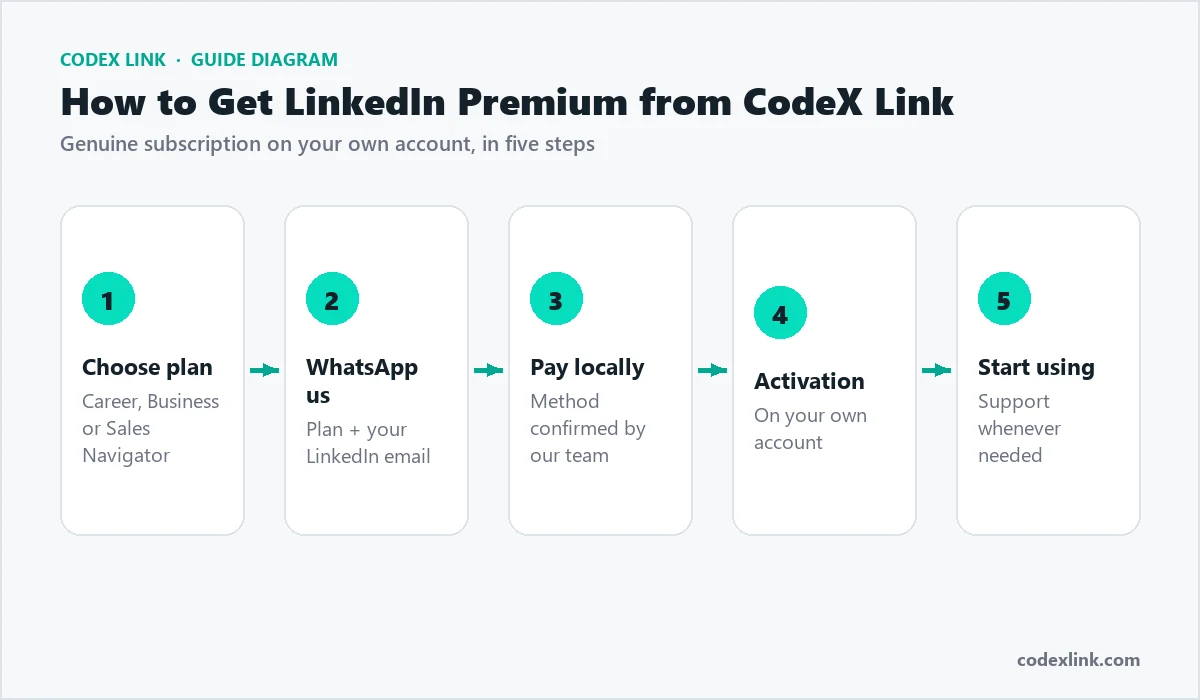
- Open the Sales Navigator page or the marketplace.
- Choose the one-month plan at a special price. Ask price
- Complete payment and share only your LinkedIn profile link to activate.
- Sales Navigator is activated on your own account, usually within minutes.
- Open sales.linkedin.com and set up your preferences, lists and saved searches.
Which plan should you buy?
| You are... | Buy this |
|---|---|
| A founder or solo seller | Core, monthly or through CodeX Link for a sprint |
| A consultant or freelancer | Core |
| A small sales team sharing lists | Advanced |
| A sales org needing CRM sync | Advanced Plus |
Buying Advanced when you work alone wastes money, because TeamLink and shared lists only matter with colleagues. Start with Core and upgrade if you hire.
Payment, billing and cancellation
LinkedIn accepts major US credit and debit cards and bills in US dollars, adding sales tax based on your state. You can switch between monthly and annual billing, update your card and download invoices from your account settings. A monthly plan cancels at the end of the current period; an annual plan runs to its renewal date. If you buy a one-month plan through CodeX Link, it simply ends on its expiry date with nothing to cancel, which many buyers prefer for a short campaign.
Activating and your first week
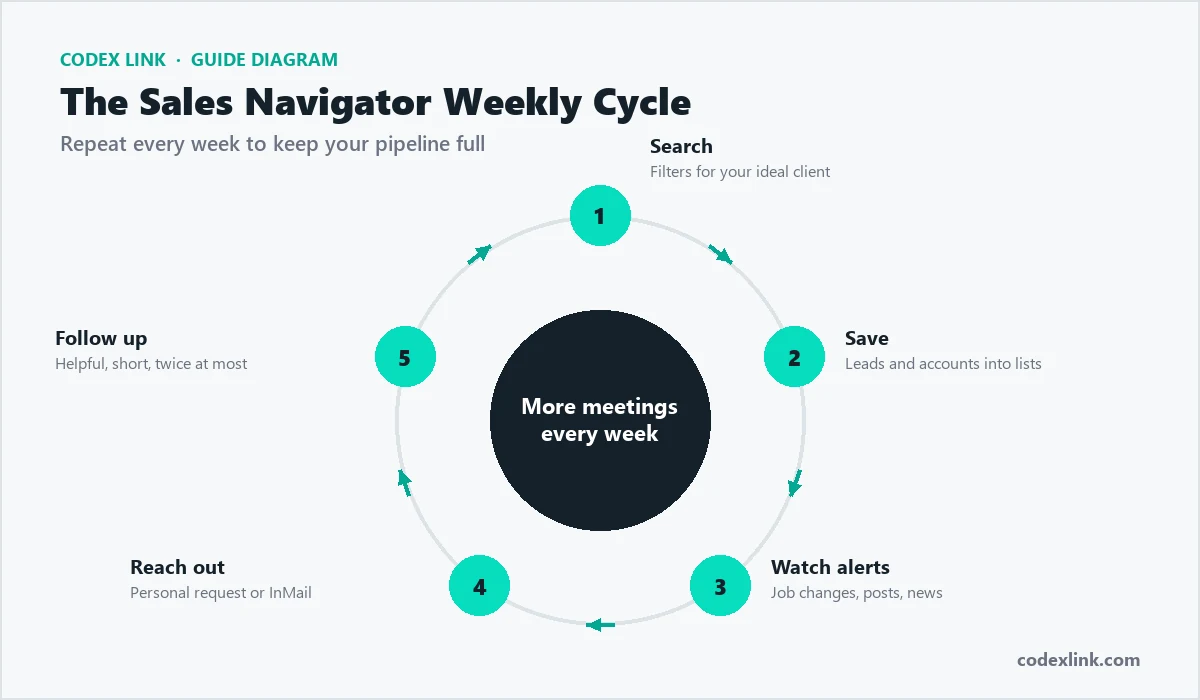
- Day 1: set sales preferences: geographies, industries, functions and company sizes.
- Day 2: build your first account list of 100 US companies that fit your ideal customer profile.
- Day 3: save two to four leads per account and create lead lists by persona.
- Day 4: save searches with alerts for job changes and new hires.
- Day 5: start engaging and send your first ten personalised messages.
Sales Navigator vs data tools
Some US teams also use contact-data tools for emails and phone numbers. Sales Navigator is different: its data comes from members' own LinkedIn profiles, so job titles and companies are usually current, and you can see recent activity and shared connections. Many teams use Sales Navigator to identify and understand prospects, then reach them on LinkedIn first and move to email later. Wherever you source data, follow privacy laws and LinkedIn's rules, and never scrape LinkedIn, because automation and scraping both risk account restrictions.
Grow your Social Selling Index
LinkedIn scores your selling activity with the Social Selling Index, a number out of 100 across four areas: establishing your professional brand, finding the right people, engaging with insights, and building relationships. Sales Navigator directly supports the middle two, and a complete profile plus consistent posting lifts the others. Checking your SSI every few weeks is a simple way to see whether your habits are improving, and sellers with a higher SSI generally see more profile views, acceptances and replies.
Monthly or annual billing: which to choose
The billing choice is really a commitment question. Monthly billing costs a little more per month but lets you stop any time, which suits a short prospecting sprint or a test of a new market. Annual billing lowers the monthly cost and is the better value if you will prospect all year, but it commits you for twelve months. A common pattern is to start monthly, or with a one-month plan through CodeX Link, to prove the tool works for your sales motion, then switch to annual once you know you will keep using it. Whatever you choose, note the renewal date so a switch or cancellation is never a surprise.
Sales Navigator for founder-led sales
Many US startups sell through the founder before hiring a sales team, and Sales Navigator is ideal for this stage. A founder can build a list of 100 ideal accounts, save the economic buyer and a champion at each, and work through them steadily. Messages from founders often get better replies because they are personal and show deep product knowledge. Keep a simple spreadsheet or CRM to track conversations, review which segments respond best, and double down on the ones that convert. This disciplined, founder-led approach frequently produces the first reference customers that make later hires easier.
Sales Navigator for US agencies
Agencies selling marketing, web development, design or video can use Sales Navigator signals to time outreach: a new CMO, a rebrand, a funding round, rapid marketing hiring or a website relaunch. Pair each trigger with a relevant case study from the same industry, and your message stops feeling like a cold pitch and starts feeling like useful timing. Agencies that specialise in a vertical, such as dental practices, SaaS or construction, usually see far better results than generalists, because their outreach and portfolio speak directly to the prospect's world.
Account-based selling in the USA
For larger deals, focus on a short list of high-value accounts rather than a wide net. Save every relevant stakeholder, follow company news, and engage several people with messages tailored to their role. A CFO cares about cost and risk; an operations leader cares about efficiency; an end user cares about ease of use. Sales Navigator's account pages, alerts and lead lists keep this information in one place so your whole approach to an account stays coordinated.
A buying committee map for a mid-market deal:
Account:         Brightline Manufacturing (450 staff, Ohio)
Economic buyer:  CFO - cost per unit and payback
Champion:        Plant Operations Manager - daily pain
Technical:       IT Director - security and integration
Trigger:         New plant opening announced last month
Sales Navigator and your CRM
Core and Advanced do not sync automatically with your CRM, but you can still keep clean records by adding notes and moving qualified leads into your CRM by hand. Advanced Plus offers CRM sync with Salesforce, HubSpot and Microsoft Dynamics for larger teams. Whatever your setup, record every meaningful conversation so follow-ups are timely and two people on your team never contact the same prospect twice.
Common mistakes when buying Sales Navigator
- Buying Advanced when you work alone. TeamLink and shared lists only help with colleagues; solo sellers need Core.
- Skipping the free trial. It lets you prove value before paying a cent.
- Choosing annual before you have used it. Start flexible, then commit once it works.
- Sharing a password with a reseller. Genuine activation never needs your login.
- Buying the tool but not using it weekly. Sales Navigator rewards consistent use, not a one-off burst.
Timing your US outreach
When you message matters almost as much as what you say. In the US market, mid-morning on Tuesday to Thursday tends to work well, when prospects have cleared their inbox but are not yet buried in meetings. Use Sales Navigator alerts to reach people at natural moments, such as the first weeks in a new role, just after a funding announcement, or when a company is clearly hiring in the department you serve. A relevant message sent at the right moment consistently beats a perfect message sent at random, so build your week around the alerts rather than blasting everyone at once.
How to avoid Sales Navigator scams
- Never share your password. Genuine activation never requires your login.
- Avoid prices that look impossible. A legitimate subscription has a real cost; offers far below that often end in a lost account.
- Confirm it activates on your own profile. That is how a real subscription works.
- Ask what happens if there is a problem. A real seller gives you support and a clear contact.
Is it worth buying?
For anyone doing B2B sales in the USA, Sales Navigator usually pays for itself: at about $99.99 a month, a single extra deal a quarter covers the cost many times over. The free trial lets you prove that for yourself at no risk, and CodeX Link makes a focused month affordable. The deciding factor is consistent use: build lists, follow buying signals and send personalised messages every week. Ask price
How CodeX Link can help
Get genuine LinkedIn Sales Navigator at a special price from the CodeX Link marketplace, activated on your own account. Email support@codexlink.com or WhatsApp +92 343 5673902. Also read the Sales Navigator price in the USA guide, the LinkedIn lead generation guide and how to get clients on LinkedIn.