


Four AI assistants dominate everyday work: ChatGPT from OpenAI, Gemini from Google, Claude from Anthropic and Copilot from Microsoft. They can all write, summarise, answer questions and help with code. The differences are in how well they do each job, how they fit into the software you already use, and how they treat your data.
This comparison focuses on practical business use: what each assistant is genuinely best at, where it is weaker, and how to choose for yourself or your team.
The quick verdict
- Best all-rounder: ChatGPT.
- Best for Google Workspace users: Gemini.
- Best for long documents and writing quality: Claude.
- Best for Microsoft 365 users: Copilot.
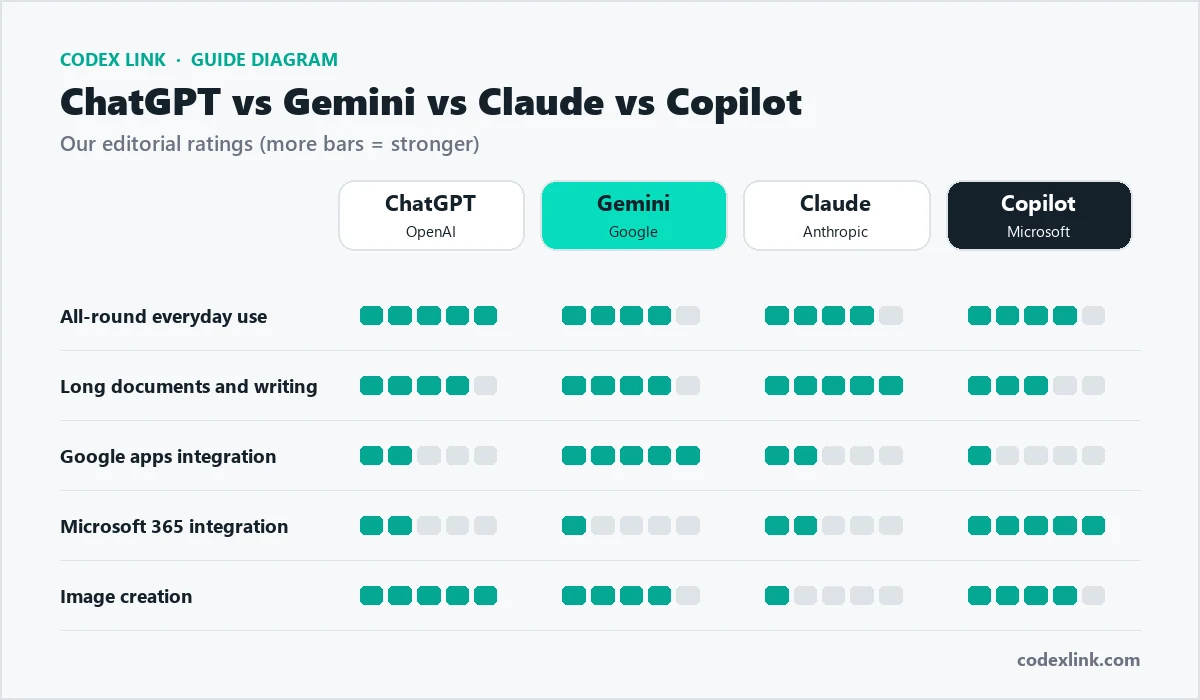
What each assistant is
ChatGPT (OpenAI)
The assistant that started the current wave of AI tools and still the most widely used. It combines strong writing and reasoning with file analysis, image creation, voice conversations, web search and custom GPTs. It runs in the browser and on desktop and mobile apps. Read our ChatGPT Plus guide for what the paid plan adds.
Gemini (Google)
Google's assistant, available as a standalone chat app and built into Google Workspace. Its strength is connection to your Google world: Gmail, Docs, Sheets, Slides, Drive and Google search.
Claude (Anthropic)
Known for careful, natural writing, strong coding ability and handling very long documents. It is popular with writers, analysts and developers.
Copilot (Microsoft)
Microsoft's assistant appears in Windows, the Edge browser and, most importantly for businesses, inside Word, Excel, PowerPoint, Outlook and Teams through Microsoft 365.
Side-by-side comparison
| ChatGPT | Gemini | Claude | Copilot | |
|---|---|---|---|---|
| Everyday writing | Excellent | Very good | Excellent | Very good |
| Long documents | Very good | Very good | Excellent | Good |
| Coding help | Excellent | Very good | Excellent | Good |
| Image creation | Built in | Built in | Not its focus | Built in |
| Office integration | Connectors and apps | Google Workspace | Connectors and integrations | Microsoft 365 |
| Web search | Yes | Yes, Google search | Yes | Yes, Bing |
These ratings reflect our experience with typical business tasks. All four improve quickly, so it is worth re-testing every few months.
Writing quality
All four write well. ChatGPT is flexible and good at following detailed formatting instructions. Claude tends to produce the most natural, human-sounding prose and is excellent at editing your own drafts without changing your voice. Gemini and Copilot are strongest when writing inside their own apps, for example drafting an email reply in Gmail or a document in Word using files you already have.
Tip: whichever you use, give examples of your preferred style and ask for a short first draft you can refine.
Same prompt, four assistants
The best way to see the differences is to give every assistant the same task. Here is a test we recommend.
A realistic business writing test:
Write a 120-word email to a customer whose order is delayed by three days.
Apologise, explain the delay was caused by a supplier,
offer free delivery on their next order, and keep the tone warm.
In our experience, all four produce a usable email. Differences show up in tone (how natural it sounds), how closely the word limit and instructions are followed, and how much editing is needed. Run this test with your own real task and compare.
Research and accuracy
Every AI assistant can produce confident but wrong answers, sometimes called hallucinations. For research:
- Use the web search mode so the assistant shows sources.
- Click through and check important facts, figures and quotes.
- Ask the assistant what it is unsure about.
Gemini benefits from Google search, and Copilot from Bing. ChatGPT and Claude can also search the web. For deep research tasks, several assistants now offer research modes that read many sources and write a cited report.
Working with files and data
All four can read uploaded documents. ChatGPT is particularly strong at analysing spreadsheets and producing charts. Claude handles very long documents comfortably. Gemini can work directly with files in your Drive, and Copilot with files in OneDrive and SharePoint, which saves uploading.
Coding
ChatGPT and Claude are both excellent coding assistants, able to write, explain and debug code across many languages. Gemini is also strong. For developers working inside a code editor, a dedicated tool such as GitHub Copilot is often the most convenient choice.
Images
ChatGPT, Gemini and Copilot can all create images from text. ChatGPT is particularly good at following detailed instructions and placing readable text in images. Claude focuses on text and code rather than image generation. For the highest artistic quality, many designers still prefer Midjourney; see our AI image generator comparison.
Voice, mobile apps and languages
Much everyday AI use now happens on a phone. All four assistants offer mobile apps, and most support voice conversations, which are handy for brainstorming while travelling or practising a presentation.
- Voice: ChatGPT and Gemini offer natural voice conversations in their apps; Copilot also supports voice.
- Camera and photos: you can photograph a document, product or whiteboard and ask the assistant to read, explain or summarise it.
- Languages: all four work in many languages, including Urdu and Arabic, and can translate between them. Quality is generally strongest in widely used languages, so have a native speaker check important customer-facing text.
For teams in Pakistan, the Gulf and other multilingual markets, this makes AI assistants useful for drafting customer messages in the language each customer prefers, then having a team member review them.
Speed and reliability
At busy times any assistant can slow down or hit usage limits, especially on free plans. Paid plans usually get priority access and higher limits. For critical work, keep a second assistant available as a backup, and save important outputs rather than relying on chat history.
Integrations with your work apps
This is often the deciding factor for businesses.
- Google Workspace companies get the most from Gemini, which can read and draft in Gmail, Docs and Sheets.
- Microsoft 365 companies get the most from Copilot, which works in Word, Excel, Outlook and Teams.
- ChatGPT and Claude connect to many apps through connectors and integrations, and work well as a central assistant alongside either suite.
Long conversations and memory
Assistants differ in how much text they can consider at once (often called the context window) and in whether they remember things between conversations.
- Context: Claude and Gemini are especially comfortable with very long inputs such as full reports or large sets of documents. ChatGPT also handles long files well.
- Memory: ChatGPT can remember preferences across chats if you allow it. Projects or similar features in several assistants keep files and instructions together for repeat work.
- Custom assistants: ChatGPT offers custom GPTs and Gemini offers Gems, which save instructions for a specific job, such as "proposal writer" or "support reply drafter".
Privacy and business plans
For business use, check how each provider handles your data. Business and enterprise plans from all four providers generally offer stronger privacy commitments, admin controls and settings that keep your data out of model training. As a rule:
- Prefer team or business plans for company work.
- Review data and training settings on personal plans.
- Never paste passwords, card numbers or sensitive personal data.
Free vs paid plans
Each assistant has a free tier that is good for trying it out. Paid plans add more capable models, higher usage limits, longer conversations and advanced features. If you use an assistant every day, the paid plan usually pays for itself quickly in saved time. Check current prices on each provider's site, or see the subscriptions available in our marketplace.
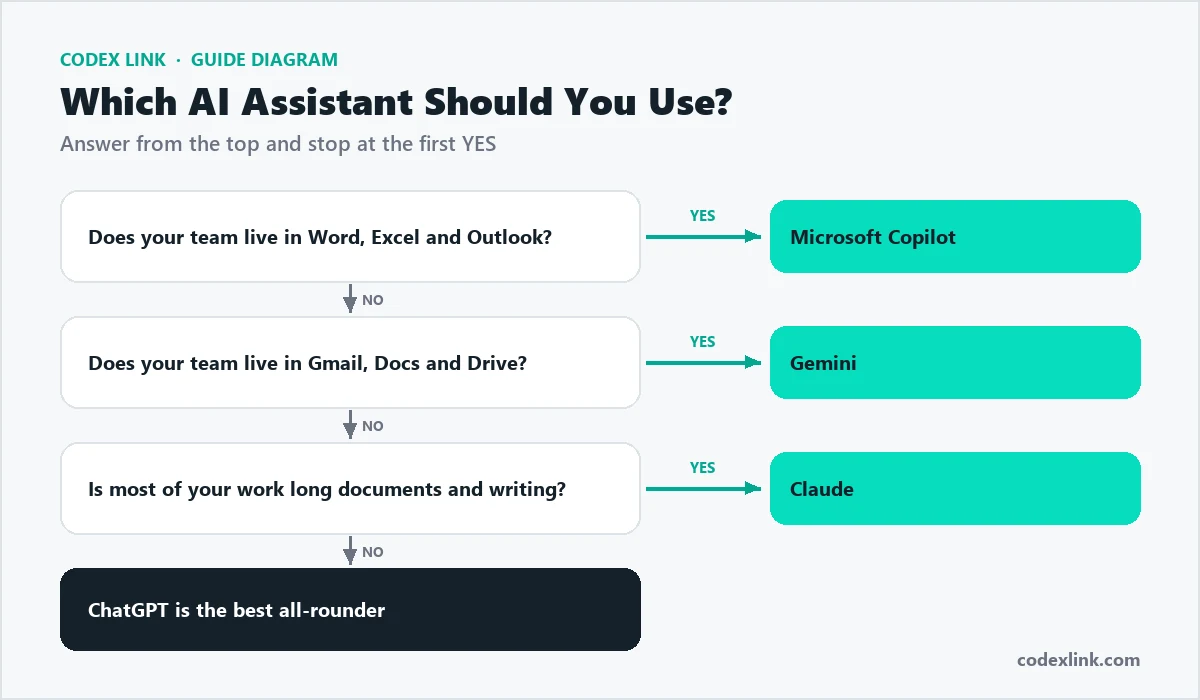
Which assistant for which role?
| Role | Good first choice | Why |
|---|---|---|
| Business owner | ChatGPT | Covers the widest range of tasks |
| Marketer or writer | Claude or ChatGPT | Natural writing and editing |
| Office team on Google | Gemini | Works in Gmail and Docs |
| Office team on Microsoft | Copilot | Works in Word, Excel and Outlook |
| Developer | Claude, ChatGPT or GitHub Copilot | Strong coding help |
| Researcher or analyst | ChatGPT or Gemini with search | Sources and data analysis |
Real-world scenarios
A small online store
The owner writes product descriptions, answers customer emails and plans social posts. ChatGPT covers all three well and can create product images, making it the best single choice.
An accounting firm on Microsoft 365
The team works in Excel and Outlook all day, with sensitive client data. Microsoft 365 Copilot on a business plan fits their apps and admin controls.
A marketing agency on Google Workspace
Proposals live in Google Docs and communication in Gmail. Gemini works inside those apps, with ChatGPT or Claude as a second assistant for creative writing.
A law or consulting practice
Staff review long documents and write detailed reports. Claude is strong for long documents and careful writing, with every output checked by a professional.
A software development team
Developers write and review code daily. GitHub Copilot in the editor plus ChatGPT or Claude for design questions and debugging is a common setup.
Example prompts to try in any assistant
Summarise a long document:
Summarise this document in 5 bullet points for a busy manager.
Then list any deadlines, amounts or risks it mentions.
[paste or upload the document]
Research with sources:
Search the web and list the 5 most important trends in [your industry] this year.
For each trend give one sentence of explanation and the source link.
Improve your own writing:
Edit the text below to be clearer and more persuasive.
Keep my voice, keep it under 200 words, and explain your 3 biggest changes.
[paste your text]
Cost and plans: what to expect
All four providers follow a similar structure: a free tier with limits, an individual paid plan for daily users, and team or business plans with admin controls and stronger privacy terms. Higher tiers add more powerful models, bigger usage limits and advanced features such as deep research or longer conversations.
- Individuals: start free, upgrade when you hit limits every day.
- Small teams: a team plan simplifies billing, sharing and privacy.
- Office-suite users: check whether AI is already included in your Microsoft 365 or Google Workspace plan before buying another tool.
How to choose in one afternoon
- Pick three real tasks from your week: an email, a document summary and a piece of research.
- Give exactly the same instructions to two assistants.
- Compare accuracy, tone and how much editing each answer needs.
- Check which one fits your existing apps and privacy needs.
- Choose one main assistant and stick with it long enough to build good prompts.
Prompting tips that work in every assistant
- Set the role: "You are an experienced accountant..."
- Give context: who the reader is and what they already know.
- Specify the format: length, headings, bullet points or a table.
- Show an example of the style you want.
- Iterate: ask for changes rather than starting again.
Common mistakes
- Trusting statistics or legal points without checking the source.
- Paying for every assistant instead of mastering one.
- Using personal accounts for sensitive company work.
- Judging an assistant on a single vague prompt.
The bottom line
There is no single winner for everyone. ChatGPT is the safest choice for most people. If your company lives in Google or Microsoft apps, the built-in assistant may give you more value. Claude is the specialist for long-form work. Many teams use one main assistant plus the one inside their office suite.
How CodeX Link can help
Get genuine ChatGPT Plus and other AI subscriptions with instant activation from our marketplace, and talk to our team about connecting AI assistants to your business systems with AI automation.