


Your productivity software is where your team spends most of the working day: writing documents, answering email, building spreadsheets and meeting online. Switching later is painful, so it pays to choose carefully. This guide compares the two main office suites and explains where Notion fits.
The quick answer
- Choose Microsoft 365 if you exchange Word and Excel files with clients, need advanced Excel or prefer desktop apps.
- Choose Google Workspace if your team works in the browser, collaborates constantly and wants the simplest setup.
- Add Notion if you want a single place for processes, documentation, meeting notes and project boards.
What is Microsoft 365?
Microsoft 365 gives you the familiar Office apps on Windows, Mac, web and mobile, plus cloud storage in OneDrive, team chat and meetings in Teams, and, on business plans, professional email in Outlook with Exchange. Our Microsoft 365 guide explains the plans and apps.
Microsoft 365 strengths
- Full desktop apps with the deepest features, especially Excel.
- Office formats are the standard in many industries and with many clients.
- Teams combines chat, meetings and file sharing.
- Strong security and admin options on business plans.
Microsoft 365 limitations
- More settings and apps to learn and manage.
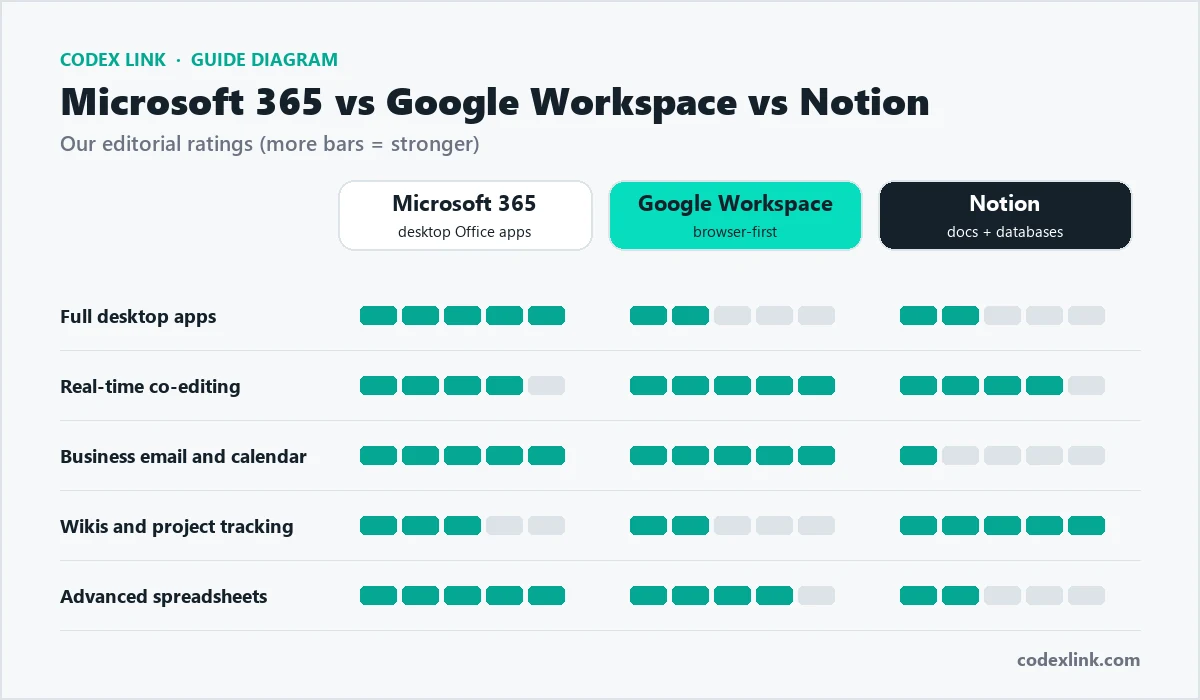
- Co-editing works well but can feel less seamless than Google Docs.
What is Google Workspace?
Google Workspace runs mostly in the browser. Documents save automatically, sharing is simple, and several people can edit the same file at once with live cursors. Business plans add custom email addresses on your domain, shared drives, admin controls and larger storage.
Google Workspace strengths
- The simplest real-time collaboration of any suite.
- Excellent Gmail search and spam filtering.
- Works on any computer with a browser, with little to install.
- Easy for new staff to learn.
Google Workspace limitations
- Sheets is powerful but less advanced than Excel for complex models.
- Complex Word files can lose formatting when opened in Docs.
- Offline use is possible but needs setting up.
What is Notion?
Notion combines pages, wikis and databases. A database in Notion can be shown as a table, board, calendar or timeline, which makes it ideal for tracking projects, content calendars, client lists or hiring pipelines. Notion AI can summarise pages, draft text and answer questions about your workspace. Read our Notion Plus guide.
Notion strengths
- One place for company knowledge, processes and onboarding.
- Flexible databases for almost any workflow.
- Thousands of templates for teams.
Notion limitations
- No business email, and spreadsheets are far simpler than Excel or Sheets.
- Needs some structure and discipline, or it becomes cluttered.
Side-by-side comparison
| Microsoft 365 | Google Workspace | Notion | |
|---|---|---|---|
| Documents | Word | Docs | Pages |
| Spreadsheets | Excel (most advanced) | Sheets | Simple databases |
| Presentations | PowerPoint | Slides | Basic |
| Business email | Outlook with Exchange | Gmail | Not included |
| Video meetings | Teams | Meet | Not included |
| Cloud storage | OneDrive, SharePoint | Drive, shared drives | File uploads in pages |
| Real-time co-editing | Good | Excellent | Good |
| Desktop apps | Full apps | Mainly browser | Desktop and mobile apps |
| AI assistant | Copilot | Gemini | Notion AI |
Email and calendar
Both suites give you professional email on your own domain, such as name@yourcompany.com. Outlook is the familiar choice in corporate environments and handles complex calendars, shared mailboxes and rules well. Gmail is fast, simple and has excellent search and spam filtering. Either way, set up SPF, DKIM and DMARC records so your mail reaches inboxes; our guide to professional business email explains how.
Collaboration
Google Workspace pioneered browser-based co-editing, and it still feels the smoothest: share a link, and everyone edits together. Microsoft 365 now supports real-time co-authoring in Word, Excel and PowerPoint, especially when files are stored in OneDrive or SharePoint, and adds Teams for chat and meetings. Notion is excellent for collaborative pages and wikis where many people contribute over time.
Spreadsheets: Excel vs Sheets
For financial models, large datasets, pivot tables, Power Query and complex formulas, Excel remains the leader. Google Sheets handles most everyday business spreadsheets well and is better for many people editing at once.
A formula that works in both Excel and Google Sheets, totalling sales for one region:
=SUMIF(B2:B500, "Lahore", D2:D500)
AI features
Each option now has its own AI assistant. Copilot works inside Word, Excel, Outlook and Teams. Gemini works inside Gmail, Docs, Sheets and Meet. Notion AI works across your Notion pages. If AI is important to you, test the assistant inside the suite you are considering; see our comparison of ChatGPT, Gemini, Claude and Copilot.
Security and administration
Both Microsoft 365 and Google Workspace offer strong security on business plans: two-factor authentication, admin consoles, device management, data loss prevention on higher tiers, and compliance features. Microsoft is often preferred by organisations with strict IT policies; Google is often preferred for its simplicity. Notion offers workspace permissions, and higher plans add advanced security controls.
- Turn on two-factor authentication for every account.
- Use admin controls to remove access immediately when staff leave.
- Review sharing settings so sensitive files are not public.
Storage
Both suites include generous cloud storage per user on business plans, with more on higher tiers. Microsoft 365 consumer plans include 1 TB of OneDrive storage per person. Notion stores files inside pages, with upload limits depending on the plan. Check each provider's current plan details for exact figures.
Cost: how to compare
Microsoft 365 and Google Workspace both charge per user per month, with entry, standard and premium business tiers. Notion has a free plan and paid plans per member. When comparing, count:
- Which apps and features each tier includes, not just the headline price.
- Whether desktop apps are included (some Microsoft business plans are web-only).
- Storage per user and email features.
- The cost of AI add-ons if you need them.
Genuine Microsoft 365 and Notion subscriptions are available in the CodeX Link marketplace.
Step by step: set up your business suite
- Choose your plan and the number of users.
- Verify your domain by adding a record at your domain or hosting provider.
- Create user accounts and role addresses such as info@ and sales@.
- Update MX records so email arrives in the new system, and add SPF, DKIM and DMARC.
- Set up shared folders or shared drives for each team.
- Turn on two-factor authentication for every account.
- Install the apps on computers and phones and connect calendars.
- Train the team on where files live and how to share them.
Mobile apps
Both suites have strong mobile apps. Microsoft 365 offers Outlook, Teams, Word, Excel, PowerPoint and OneDrive apps; Google offers Gmail, Meet, Docs, Sheets, Slides and Drive. Notion's mobile app is good for reading and quick edits, and for capturing notes on the go. If your team works mainly from phones, test the mobile apps for your most common tasks before deciding.
Integrations with other business tools
Most business software connects to both suites: CRMs, accounting tools, project management apps and e-signature services. Microsoft 365 integrates deeply with other Microsoft products such as Power BI and Dynamics. Google Workspace connects smoothly with many web apps through its marketplace. Notion connects with tools such as Slack and Google Drive and can embed files from either suite.
Switching between suites
Moving from one suite to another is possible but takes planning. Email, calendars and files can be migrated with official tools, but some formatting, sharing settings and integrations need manual work. Plan a weekend cut-over, train staff beforehand, and keep the old system read-only for a few weeks.

Recommended setups by business type
| Business | Recommended setup |
|---|---|
| Accounting, legal or finance firm | Microsoft 365 |
| Startup or digital agency | Google Workspace plus Notion |
| Retail or restaurant with a small office | Google Workspace |
| Company working with corporate clients | Microsoft 365, optionally plus Notion |
| Software team | Google Workspace or Microsoft 365, plus Notion for documentation |
Real-world scenarios
A ten-person accounting firm
Clients send Excel workbooks and Word letters daily, and the firm needs strict access controls. Microsoft 365 business plans with Teams for internal chat fit naturally.
A five-person digital agency
The team writes proposals together, works remotely and uses many web apps. Google Workspace for email and documents, plus Notion for client wikis and the content calendar, keeps everything simple.
An online store with a small office
The owner needs professional email, shared spreadsheets for stock and a place for supplier documents. Google Workspace is simple to manage; Microsoft 365 suits stores whose accountants work in Excel.
A growing startup
Founders want fast collaboration and a place to document processes as the team grows. Google Workspace plus Notion is a common choice, with Microsoft 365 added later if enterprise clients require Office files.
Migration checklist
A simple checklist for moving to a new suite:
[ ] List all users, shared mailboxes and email aliases
[ ] Export or migrate email, contacts and calendars
[ ] Move shared files into team folders, not personal drives
[ ] Recreate sharing permissions for sensitive folders
[ ] Update MX, SPF, DKIM and DMARC records
[ ] Reconnect apps such as CRM, accounting and e-signature
[ ] Train staff and share a one-page "where things live" guide
[ ] Keep the old system read-only for 30 days
Common mistakes
- Using free personal accounts for business email and files.
- Mixing both suites without rules, so files end up in two places.
- Choosing Notion as a replacement for email and spreadsheets.
- Skipping two-factor authentication.
Video meetings: Teams vs Meet
Both suites include video meetings. Microsoft Teams combines meetings with persistent team chat channels, file sharing and app integrations, which suits organisations that want one hub for internal communication. Google Meet is simpler: guests can join from a browser with one click, which suits client calls and smaller teams. Both offer screen sharing, recording on suitable plans, live captions and AI meeting summaries on plans that include Copilot or Gemini.
Onboarding a new employee
Your suite makes onboarding faster when it is set up well. A good routine:
- Create the account and add the person to the right groups, so they get the correct shared folders and calendars automatically.
- Share a Notion or Docs welcome page with links to policies, processes and key contacts.
- Set up two-factor authentication on their first day.
- Book a short walkthrough of where files live and how to share them.
A tidy setup also makes audits, client security questionnaires and handovers far easier, because everyone knows where documents are kept and who can see them.
When someone leaves, reverse the process: transfer their files to a manager, convert their mailbox to a shared mailbox if needed, and remove access the same day.
Our recommendation
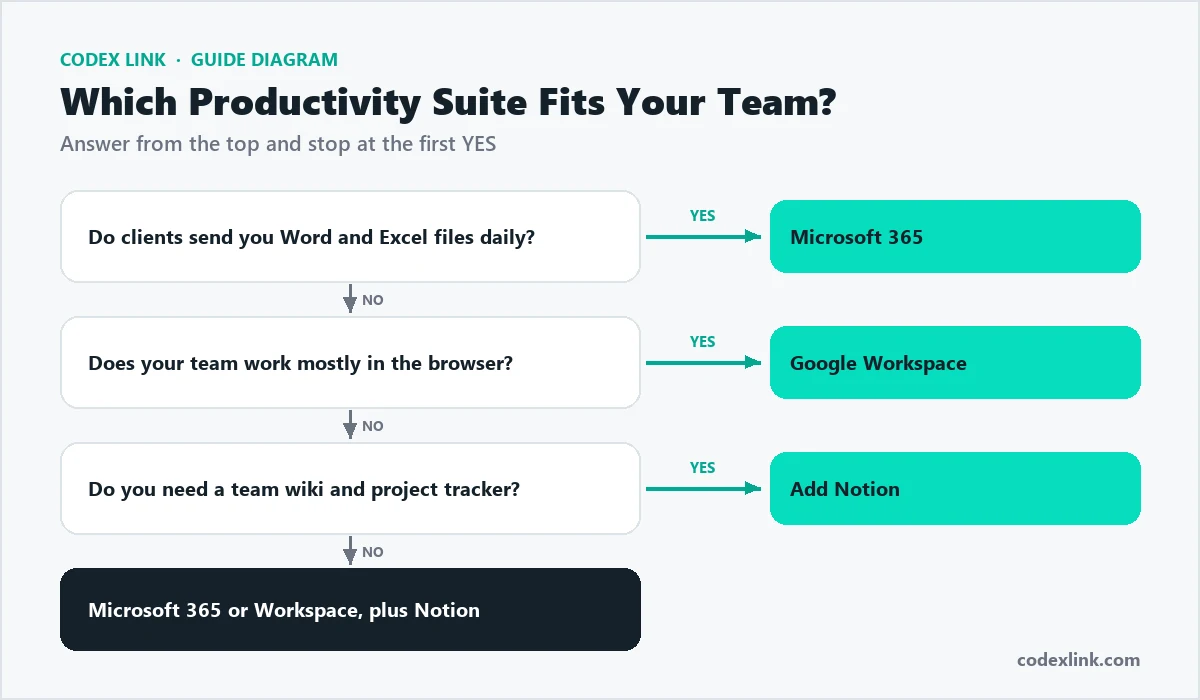
If your clients send you Office files and you rely on Excel, choose Microsoft 365. If your team values speed, simplicity and constant collaboration, choose Google Workspace. In either case, consider Notion as your team's knowledge base and project tracker.
How CodeX Link can help
Get genuine Microsoft 365 and Notion Plus subscriptions from our marketplace, and let our team set up your business email with spam protection and correct SPF, DKIM and DMARC records.