The right LinkedIn plan depends on what you want from it. Paying for Sales Navigator to look for a job wastes money, and trying to run a sales pipeline on Premium Career is just as mismatched.
This page matches plans to goals, then answers the everyday questions that usually sit behind the search: how to find work, clients and leads.
Best plan by goal
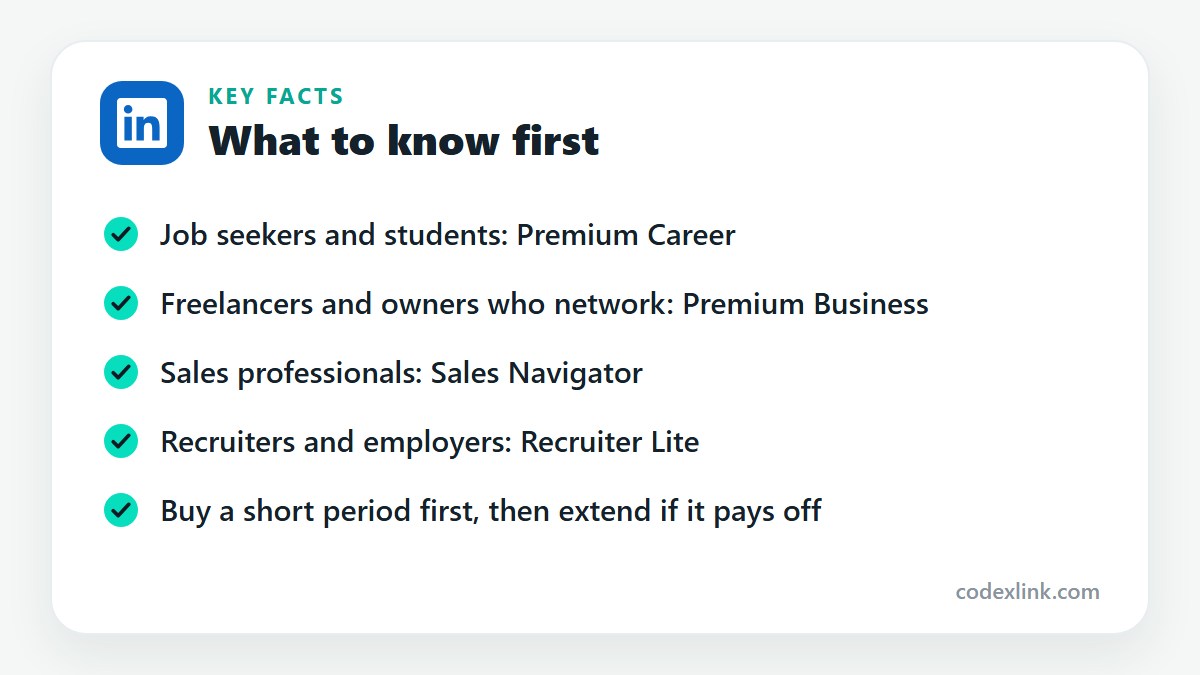
Best LinkedIn subscription for job seekers
Premium Career is the best fit. It adds InMail to reach hiring managers, the full list of profile viewers, applicant insights and LinkedIn Learning. A short period during an active search is usually enough.
Best LinkedIn subscription for freelancers
Freelancers who prospect regularly should use Sales Navigator for its filters and lead lists. Those who rely on referrals and occasional outreach are well served by Premium Business.
Best LinkedIn subscription for sales professionals
Sales Navigator is designed for this. It offers advanced lead and account search, saved lists, alerts on job changes and 50 InMails a month. Core suits individuals, and higher tiers add team and CRM features.
Best LinkedIn subscription for students
Most students should start with a complete free profile and their university's LinkedIn Learning access. Near graduation, a short period of Premium Career helps with InMail and seeing which recruiters are viewing the profile.
Best LinkedIn subscription for recruiters
Recruiter Lite is the best choice for individual recruiters and small employers. It includes recruiting filters, candidate projects and 30 InMails a month. Large teams use the full Recruiter product.
Price and value
Cheapest way to get LinkedIn Premium
Use the free trial, then annual billing if you plan to stay. For short-term needs, buy a fixed period. CodeX Link lists Premium Career at $10.99 for 2 months and Premium Business at $11.99 for 2 months.
LinkedIn Premium monthly vs. yearly
Monthly is flexible and suits a temporary need such as a job search. Yearly costs less per month and suits continuous business use. If you are unsure, start monthly or with a short period.
Is LinkedIn Premium worth it in 2026?
It is worth it when you will use its tools every week for a clear goal. LinkedIn has added more AI assistance to Premium, but the core value is unchanged: reaching people outside your network and seeing who is interested in you.
Sales Navigator for beginners
Begin with one saved search for your ideal customer. Save 20 to 30 leads to a list, check alerts each morning, and send a few personal messages a day. Our Sales Navigator guide walks through the features.
Finding work and clients
How to find a job faster
Apply to recent listings, tailor each application, and message someone at the company the same day. Ask your network for referrals, which shorten the process considerably. Our LinkedIn job search guide has the full method.
How to get more clients this month
Contact past clients and warm leads first, since they convert fastest. Then send a set number of personal messages each day to well-chosen prospects, and follow up with everyone who replied. Short-term results come from direct outreach.
How to find international clients online
Decide which countries and industries to target, make your profile clear to an overseas reader, and contact decision-makers directly with a relevant message. See how to get clients on LinkedIn for a step-by-step approach.
How to find companies looking for freelancers
Search posts and jobs for freelance, contract or part-time with your skill. Small agencies and growing startups are the most frequent buyers. Check LinkedIn's Services marketplace, where businesses request proposals.
How to find potential customers in the USA
Filter by United States, then by industry, company size and job title. Sales Navigator narrows results by state, city or postcode radius. Write in US English and quote in dollars.
How to find new business opportunities online
Watch for triggers: funding news, new hires, expansion and job posts. Follow target companies, join industry groups and respond quickly when someone describes a problem you solve.
Getting noticed and building a network
How to get noticed on LinkedIn
Post useful content regularly, comment on other people's posts, and keep a specific headline. Being active is the single biggest factor in who sees your profile.
How to improve LinkedIn profile views
Add relevant keywords to your headline and skills, post or comment several times a week, and connect with people in your field. Each interaction brings visitors to your profile.
How to contact decision-makers
Identify the person with authority, find a relevant reason to write, and send a brief message through a connection request, an InMail or a shared contact. One clear question gets more replies than a long pitch.
How to build a professional network
Connect with colleagues, classmates, clients and people you meet, always with a short note. Stay in touch by commenting and sharing useful things. A smaller network of people who know you is worth more than a large silent one.
How to grow a professional network online
Join groups in your field, take part in discussions, attend online events and follow up with the people you speak to. Offer help before you ask for anything.
Leads and tools
How to find leads without paying for ads
Use LinkedIn search, industry groups and referrals, and publish content that answers buyers' questions. Direct outreach costs time instead of money and often produces better leads than adverts.
Best tools for B2B lead generation
LinkedIn Sales Navigator is the main tool for finding people. A CRM such as HubSpot keeps track of them, and an email finder or outreach tool supports follow-up. Start with the fewest tools you can manage well.
Best LinkedIn tools for small businesses
A complete company page, the owner's personal profile and Premium Business cover most small business needs. Add Sales Navigator when outbound selling becomes a regular activity, and Recruiter Lite while hiring.
How to save time finding business leads
Save your searches so new matches come to you, work from lists instead of searching again, and use alerts to decide who to contact first. Templates for the routine parts of a message help, as long as the first line stays personal.
Best LinkedIn tools for sales prospecting
Sales Navigator is the core tool, with saved searches, lead lists, alerts and InMail. Its buyer intent signals and relationship mapping help with larger accounts. Pair it with a CRM to track conversations.
LinkedIn plans and prices on CodeX Link
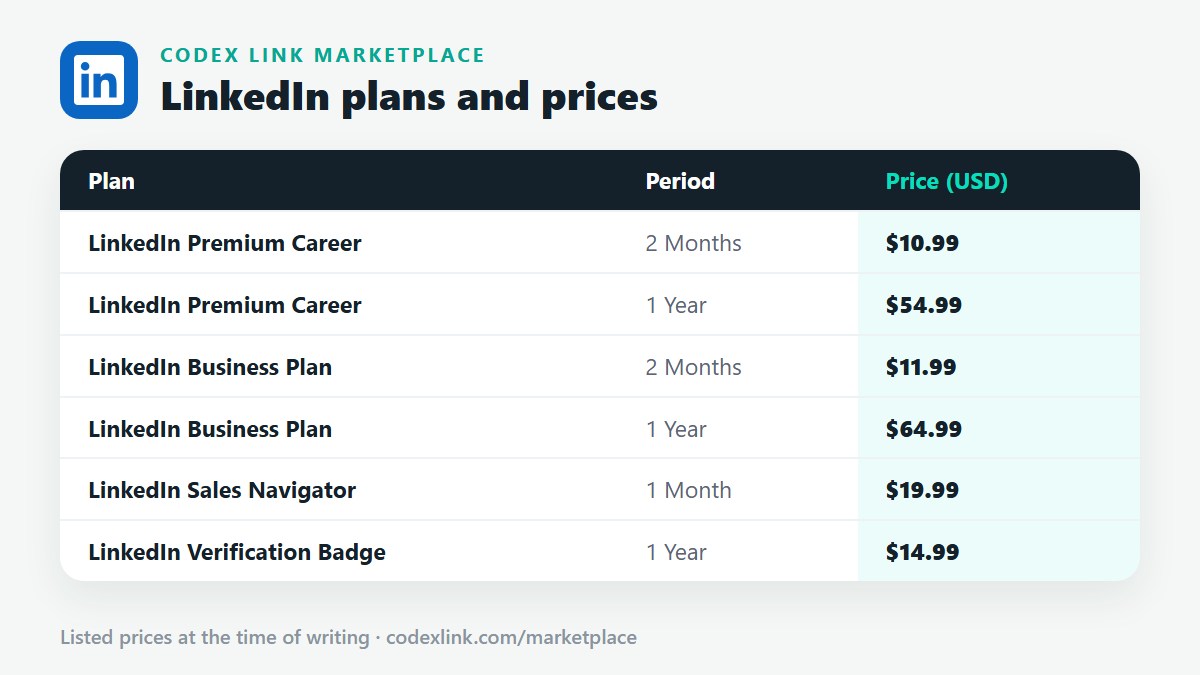
These are the LinkedIn plans listed on the CodeX Link marketplace at the time of writing. Message the team on WhatsApp to confirm the price and how activation works before you order.
| Plan | Period | CodeX Link price |
|---|---|---|
| LinkedIn Premium Career | 2 Months | $10.99 |
| LinkedIn Premium Career | 1 Year | $54.99 |
| LinkedIn Business Plan | 2 Months | $11.99 |
| LinkedIn Business Plan | 1 Year | $64.99 |
| LinkedIn Sales Navigator | 1 Month | $19.99 |
| LinkedIn Verification Badge | 1 Year | $14.99 |
Need a LinkedIn plan?
Chat with the CodeX Link team for the current price and activation details, or browse every tool in the marketplace.
LinkedIn is a trademark of its owner. Features, limits and prices change over time and differ by country, so confirm the current terms on LinkedIn before you buy.