

Sales Navigator is the most powerful prospecting tool on LinkedIn, but at around $100 a month it is a big expense for freelancers, small agencies, founders and salespeople in countries where dollar prices hurt. This guide compares every genuine way to get Sales Navigator cheaper, explains why Sales Navigator coupon codes do not really exist, covers the free trial and student questions, and shows how to buy Sales Navigator cheaply and safely.
Sales Navigator price comparison
| Option | Price | Per month | Notes |
|---|---|---|---|
| Sales Navigator Core, official, monthly | about $99.99 / month | about $99.99 | Plus any tax; auto-renews |
| Sales Navigator Advanced, official, monthly | about $149.99 / month | about $149.99 | Team features |
| Official annual billing | Shown at checkout | Lower than monthly | Paid yearly |
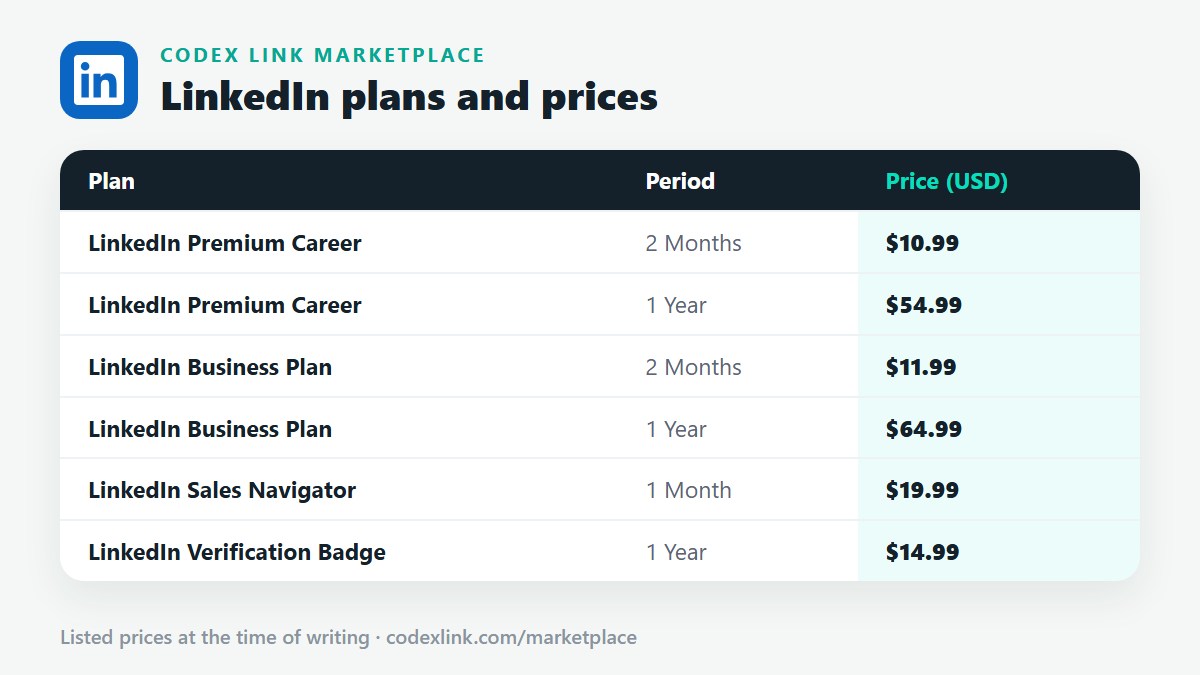
| Sales Navigator from CodeX Link | $19.99 / 1 month | $19.99 | Genuine, no auto-renewal |
Official prices are commonly listed US prices and vary by country, billing period, taxes and promotions. LinkedIn shows the final price at checkout.
What you get with Sales Navigator
- Advanced lead filters: job title, seniority, function, company size, industry, geography, years in role, recent job changes and recent posts.
- Account search: find companies by industry, headcount, growth and location.
- Lead and account lists: organise prospects by campaign or territory.
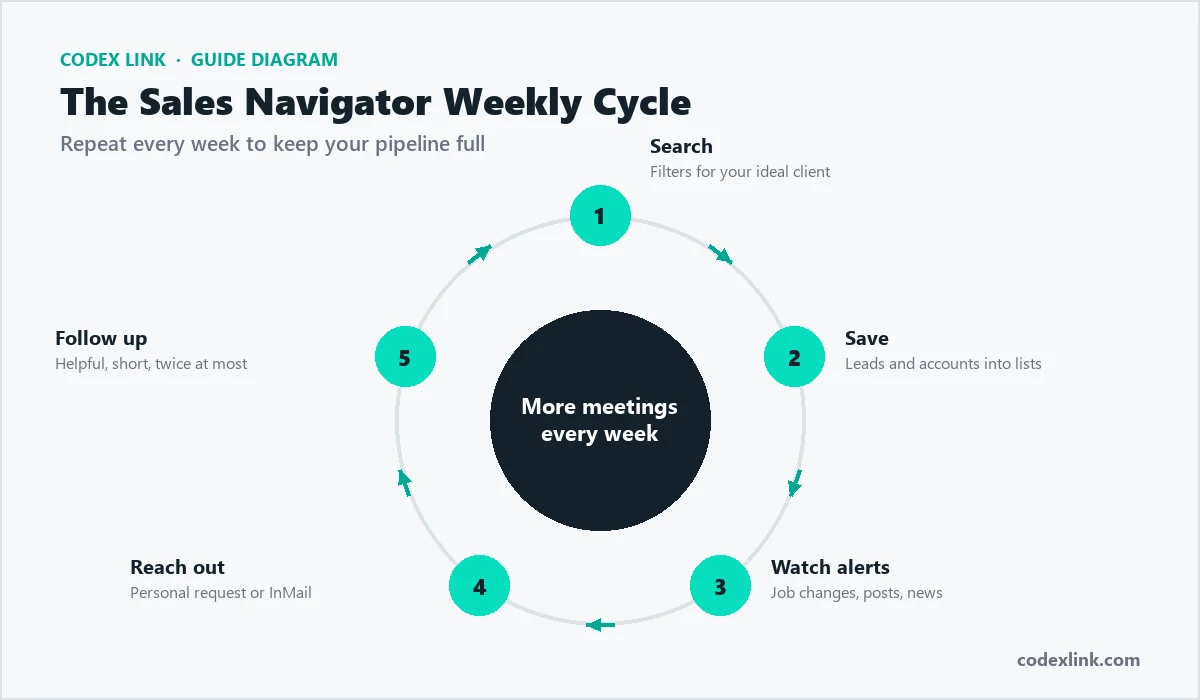
- Saved searches and alerts: get notified when new prospects match or leads change jobs.
- InMail: a larger monthly allowance than Premium plans.
- Unlimited people browsing without the commercial use limit.
The $19.99 CodeX Link subscription is the genuine Sales Navigator on your own account, with the same features LinkedIn provides for the plan. See the Sales Navigator page.
Every genuine way to get Sales Navigator cheaper
1. CodeX Link: $19.99 a month
The lowest regular price for individuals and small teams. One month at a time, no automatic renewal, activated on your own account, with support on WhatsApp and email. You can renew month by month while it brings results.
2. LinkedIn's free trial
LinkedIn offers eligible users a free trial of Sales Navigator, often one month on Core. It needs a payment card and renews at the full price unless cancelled. See below.
3. Annual billing
Paying LinkedIn annually lowers the monthly cost, but you pay a large amount up front and commit for a year.
4. Team pricing
Companies buying several Advanced or Advanced Plus seats can negotiate with LinkedIn's sales team.
5. Using Business Premium instead
If you prospect occasionally, Business Premium may be enough: unlimited browsing, more InMail and company insights for $15 for 2 months through CodeX Link. See cheap Business Premium.
Sales Navigator coupon code and promo code
LinkedIn does not publish public coupon or promo codes for Sales Navigator. Websites listing "Sales Navigator coupon codes" usually show expired, invented or trial links. Genuine discounts come from LinkedIn's in-account offers, team negotiations or fixed-term resellers. Read our LinkedIn coupon code guide.
Sales Navigator free trial
To start a free trial, open the Sales Navigator page while signed in or choose Sales Navigator from LinkedIn's Premium options. If you are eligible, you will see a free trial offer. Enter a payment card and set a reminder to cancel before it ends if you do not want to pay the full price. If you are not eligible or your card fails, CodeX Link's $19.99 month is the cheapest alternative. Read our free trial guide.
Is there a Sales Navigator student discount?
LinkedIn does not offer a public Sales Navigator student discount. Sales Navigator is a professional sales tool; students preparing for sales careers can learn it through LinkedIn Learning courses, and those starting a business can use the CodeX Link plan at $19.99. See the student discount guide for Premium options.
Cheap Sales Navigator: what to avoid
- Shared Sales Navigator logins: you would be prospecting from someone else's profile, which breaks LinkedIn's rules and risks restrictions.
- "Lifetime" or "1 year for $10" offers: not genuine.
- Sellers asking for your password.
- Automation and scraping bundles: often sold with "cheap Sales Navigator", and they can get your account restricted.
How to buy Sales Navigator cheap
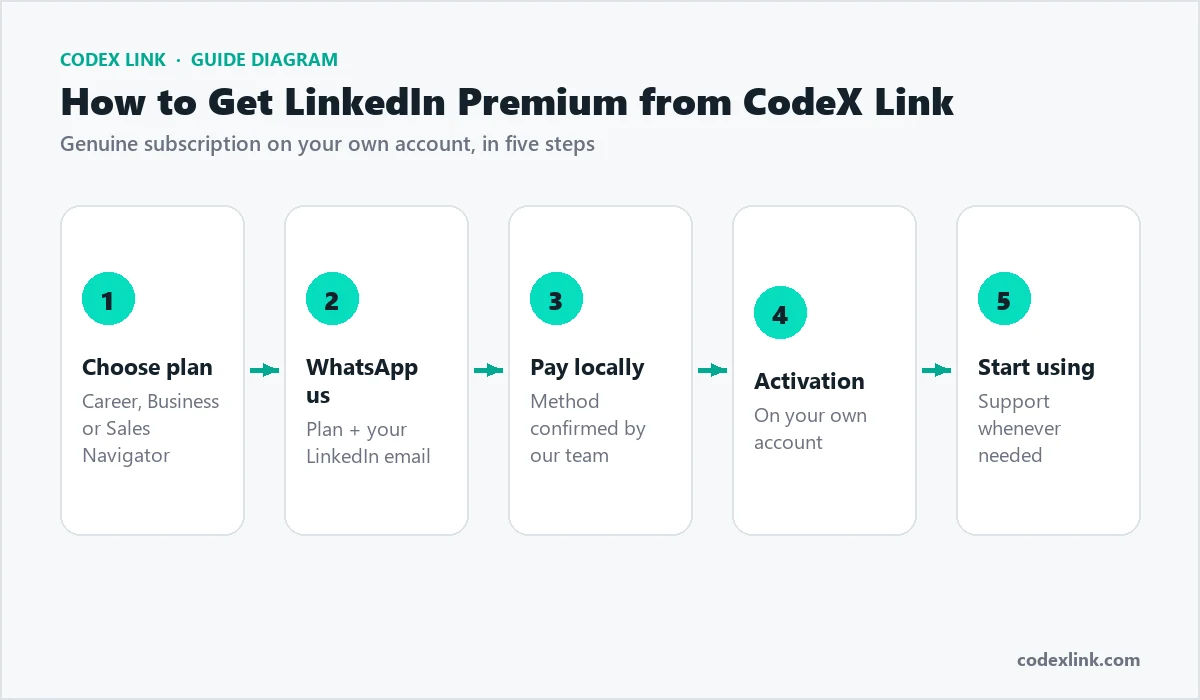
- Open the Sales Navigator page or the CodeX Link marketplace.
- Choose the one-month plan for $19.99.
- Pay with a card or a local method confirmed by our team.
- Share your LinkedIn profile link for activation.
- Open sales.linkedin.com, set your preferences and start building lists.
Getting the most from one cheap month
Week 1: Set up
- Define your ideal customer: industry, size, region and buyer titles.
- Build an account list of 100 to 200 companies.
- Save two to four leads per account and create saved searches with alerts.
Weeks 2 and 3: Engage
- Engage with prospects' posts and view their profiles.
- Send 10 to 20 personalised connection requests or InMails a day.
- Reference a trigger: a new role, funding, hiring or a recent post.
Week 4: Follow up and review
- Follow up once with something useful.
- Book calls with interested prospects.
- Review acceptance, reply and meeting rates; decide whether to renew.
A trigger-based message:
Hi Priya, congrats on joining Brightwave as Head of Marketing.
New marketing leaders often review their website conversion in
the first quarter. We helped a similar SaaS company lift demo
requests by 35% with a landing page rebuild. Would a 3-point
review of your current pages be useful?
Best deal by type of seller
| You are | Best deal |
|---|---|
| Freelancer or solo consultant | CodeX Link Sales Navigator, $19.99 a month, renewed while it works |
| Small agency (2 to 5 sellers) | CodeX Link plan for each seller |
| Larger sales team needing shared lists and CRM sync | Negotiate Advanced or Advanced Plus with LinkedIn |
| Occasional prospecting | Business Premium, $15 for 2 months |
| First-time user wanting to test | LinkedIn free trial if eligible, otherwise one CodeX Link month |
Cheap Sales Navigator by country
Local price guides: Pakistan, India, UAE, Saudi Arabia, USA and UK.
Is cheap Sales Navigator worth it?
At $19.99 a month, almost certainly, if you sell to other businesses. One new client usually pays for years of Sales Navigator at this price. The key is consistent use: build lists, follow alerts and send personalised messages every week.
Core vs Advanced: do you need the expensive plan?
| Feature | Core | Advanced | Advanced Plus |
|---|---|---|---|
| Advanced lead and account search | Yes | Yes | Yes |
| Lists, saved searches and alerts | Yes | Yes | Yes |
| InMail | Yes | Yes | Yes |
| TeamLink and shared lists | No | Yes | Yes |
| Smart Links | No | Yes | Yes |
| CRM sync | No | No | Yes |
| Official monthly price | about $99.99 | about $149.99 | Custom |
Most freelancers, founders and small agencies only need the Core features. Team features matter when several sellers work the same accounts. Buying a more expensive plan than you need is the most common way people overpay for Sales Navigator.
The real cost of a lead
A good way to judge whether Sales Navigator is cheap is the cost per conversation. If you send 300 personalised messages in a month and 30 prospects reply, the official Core price of about $99.99 means roughly $3.33 per conversation. At $19.99 through CodeX Link, it is about $0.67 per conversation. If even one conversation becomes a client, the return is enormous.
Monthly numbers for a small web agency:
Messages sent:            300
Replies:                  30   (10%)
Calls booked:             8
Projects won:             2    (average $1,500 each)
Revenue:                  $3,000
Sales Navigator cost:     $19.99 (CodeX Link)
Return on the tool:       about 150 times the cost
Sales Navigator for freelancers and small agencies
Freelancers and small agencies get the most from cheap Sales Navigator because their deals are relatively large compared with the tool's cost. Pick one niche, such as dental clinics in the UK or SaaS start-ups in the US, and build a list of 200 decision-makers. Use alerts for job changes and recent posts, engage before messaging and lead with a specific, useful idea. A one-month subscription is enough to build lists and start conversations; renew while the pipeline grows.
Sales Navigator for software houses and exporters
Software houses in Pakistan, India, Egypt and Eastern Europe, and exporters of products from textiles to engineering goods, use Sales Navigator to reach buyers abroad. Geography and industry filters, combined with account lists, let them target the right companies in the US, UK, Europe and the Gulf. At $19.99 a month, every business development person in a small company can have their own seat.
Paying for Sales Navigator without an international card
LinkedIn's official checkout needs a card that works for international recurring payments. In many countries, that is the main barrier. Through CodeX Link, you can pay with local methods confirmed by our team in supported countries. Ask on WhatsApp which methods are available.
Does cheap Sales Navigator include InMail?
Yes. A genuine Sales Navigator subscription includes the InMail allowance LinkedIn provides for the plan. Use InMail for high-value prospects you cannot reach with a connection request, and keep messages short and specific.
Is cheap Sales Navigator safe for my account?
Yes, when it is a genuine subscription on your own account and you use it within LinkedIn's rules. The risks come from shared logins, automation tools and spammy behaviour, not from the price you paid. Keep your outreach personal, send a sensible number of connection requests each day, and avoid browser extensions that automate messages or scrape data.
Sales Navigator for recruiters and staffing firms
Recruitment agencies selling their services use Sales Navigator to reach hiring managers and HR leaders at growing companies. Account filters for headcount growth and department growth highlight companies that are hiring, and alerts show when new talent leaders join. For sourcing candidates at scale, LinkedIn Recruiter is the dedicated tool, but many small agencies start with Sales Navigator for business development.
Renewing month by month
CodeX Link Sales Navigator is sold one month at a time. Renew as long as it produces conversations, pause in quiet months, and pick up again later: your lists and saved searches are kept in your Sales Navigator account. This flexibility is often cheaper than an annual commitment for small businesses with seasonal sales.
Common mistakes
- Buying Advanced when Core is enough.
- Searching too broadly and messaging everyone.
- Pitching in the first message.
- Ignoring alerts, which are the best triggers.
- Using automation tools that risk restrictions.
Compliance basics
Cheap or not, prospecting has rules. LinkedIn prohibits scraping and most automation. If you move prospects to email, follow local laws, such as CAN-SPAM in the US, UK GDPR and PECR in the UK, GDPR and national rules in the EU, and POPIA in South Africa. Keep messages relevant and respect opt-outs.
What happens when the month ends?
Your account returns to its previous plan. Lead lists, account lists and saved searches stay in your Sales Navigator account for when you renew, and your normal LinkedIn connections and messages are unaffected.
Prices on this page were checked at the time of writing; the marketplace always shows the current price.
How CodeX Link can help
Buy genuine LinkedIn Sales Navigator for $19.99 a month from the CodeX Link marketplace. Email support@codexlink.com or WhatsApp +92 343 5673902. Read the LinkedIn lead generation guide to get results quickly.