


Online learning is one of the fastest ways to change careers, earn a promotion or add a skill your business needs. The three biggest platforms work in very different ways, and choosing the right one saves both money and time. This guide compares them honestly for different goals.
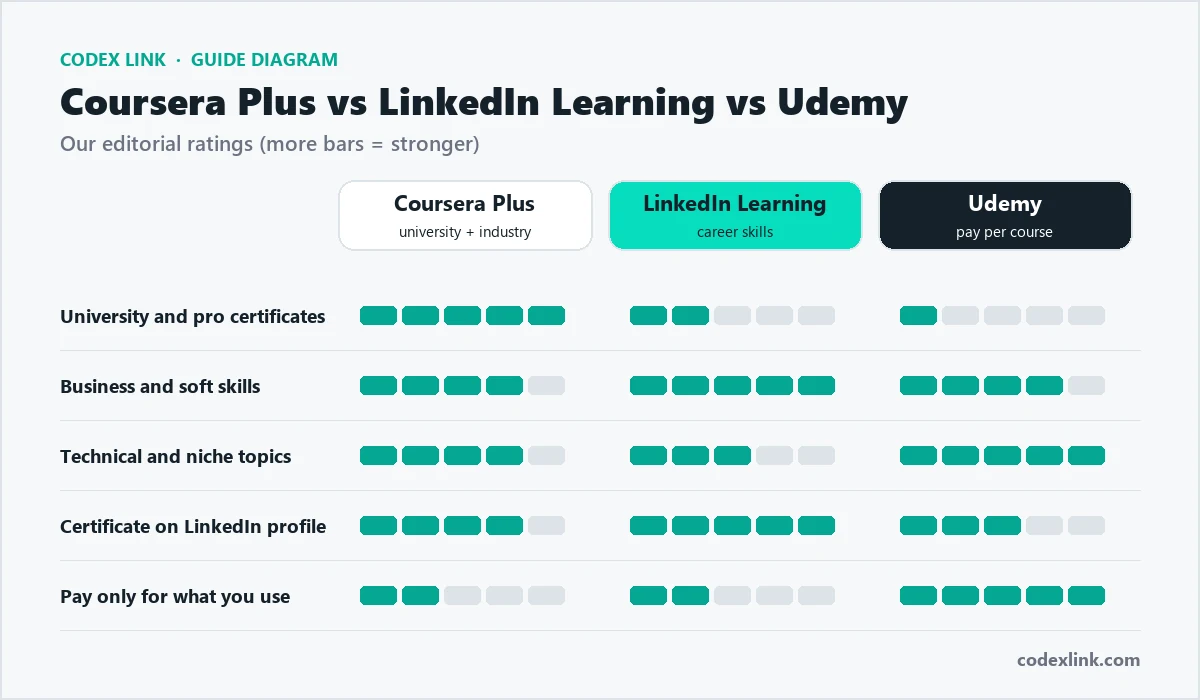
The quick answer
- Choose Coursera Plus if you want recognised certificates and structured programmes from universities and well-known companies.
- Choose LinkedIn Learning if you want short, practical courses on business and career skills, especially if you already have LinkedIn Premium.
- Choose Udemy if you want one specific course, such as a particular programming framework or software tool.
Coursera and Coursera Plus
Coursera partners with universities and companies to offer courses that often include graded assignments, peer reviews and projects. Professional Certificates from companies such as Google, IBM and Meta are designed to prepare learners for entry-level roles in areas like data analytics, IT support, project management, UX design and digital marketing.
Coursera Plus gives access to most of the catalogue for a subscription fee, including many Professional Certificates and Specializations. Degrees and some premium programmes are not included. Our Coursera Plus guide explains exactly what is and is not included.
Coursera strengths
- University and big-company certificates that many employers recognise.
- Structured programmes with deadlines, assignments and projects.
- Strong in data, technology, business and career-change programmes.
Coursera limitations
- Programmes take weeks or months, so they need commitment.
- Not every course or degree is included in Coursera Plus.
LinkedIn Learning
LinkedIn Learning offers a very large library of expert-led video courses on business, technology and creative skills, from Excel and project management to leadership, marketing and design software. Courses are usually short and practical, with exercise files. Certificates of completion can be added to your LinkedIn profile with one click.
LinkedIn Learning is included with LinkedIn Premium plans, which makes it excellent value if you already use Premium for job searching or networking. Read our LinkedIn Learning guide and LinkedIn Premium Career guide.
LinkedIn Learning strengths
- Short, high-quality courses you can finish in an evening.
- Certificates show directly on your LinkedIn profile.
- Included with LinkedIn Premium.
- Strong for business software, soft skills and leadership.
LinkedIn Learning limitations
- Certificates are completion certificates, not university credentials.
- Fewer deep, project-based programmes than Coursera.
Udemy
Udemy is a marketplace with a huge number of courses created by independent instructors. You usually buy individual courses and keep lifetime access, and frequent sales make many courses inexpensive. Udemy also offers a Personal Plan subscription for access to a large collection of courses, and Udemy Business for companies.
Udemy strengths
- Courses on almost every topic, including very specific tools and niches.
- Pay once per course, with lifetime access.
- Great for hands-on technical and software skills.
Udemy limitations
- Quality varies by instructor, so check reviews and previews.
- Certificates carry less weight with employers.
Side-by-side comparison
| Coursera Plus | LinkedIn Learning | Udemy | |
|---|---|---|---|
| Payment model | Subscription | Subscription or with LinkedIn Premium | Per course or Personal Plan |
| Course creators | Universities and companies | Vetted industry experts | Independent instructors |
| Certificates | University and Professional Certificates | Completion certificates on LinkedIn | Completion certificates |
| Course length | Weeks to months | Mostly short | Varies widely |
| Assignments and projects | Yes, graded | Exercises and quizzes | Depends on instructor |
| Best for | Career change and credentials | Career and business skills | Specific technical skills |
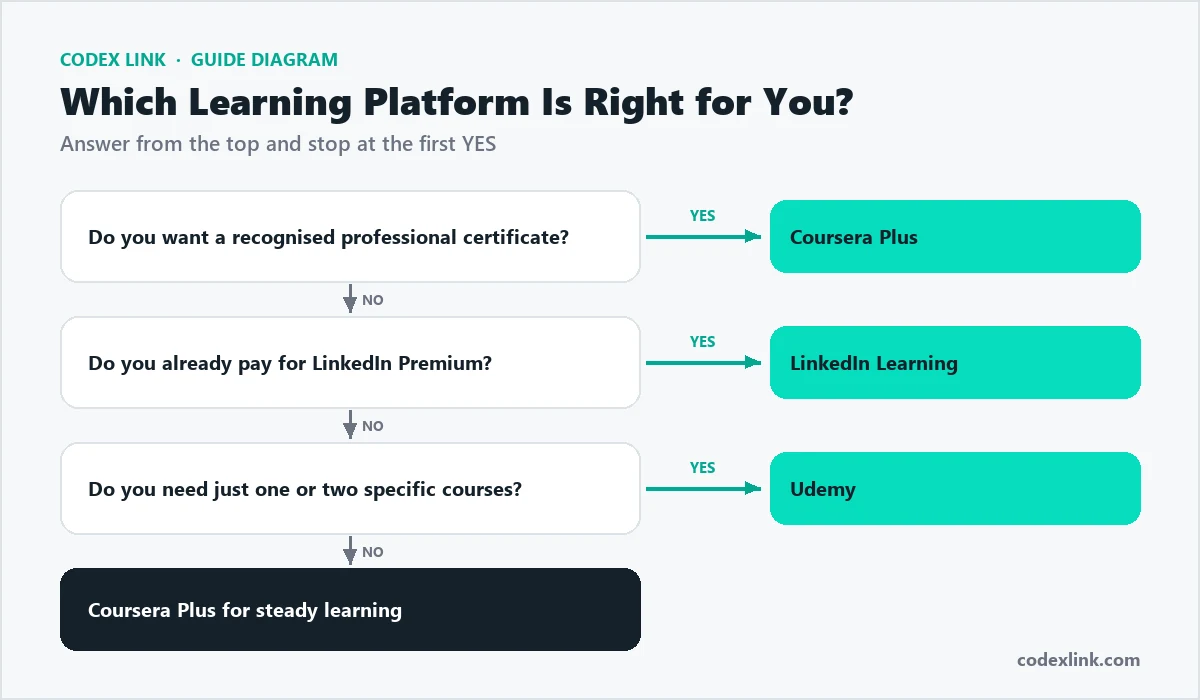
Which platform for which goal?
| Your goal | Best choice |
|---|---|
| Change career into data, IT or UX | Coursera Plus Professional Certificates |
| Get better at Excel, PowerPoint or project management | LinkedIn Learning |
| Learn one programming framework quickly | Udemy |
| Improve leadership and communication | LinkedIn Learning |
| Study a university-level subject | Coursera |
| Train a whole team | LinkedIn Learning, Coursera for Business or Udemy Business |
Popular Professional Certificates on Coursera
These company-backed programmes are among the most popular for people changing careers or adding job-ready skills. Most are designed for beginners and include hands-on projects.
| Certificate | Provider | Leads towards |
|---|---|---|
| Data Analytics | Junior data analyst roles | |
| IT Support | Help desk and IT support roles | |
| Project Management | Project coordinator roles | |
| UX Design | Junior UX designer roles | |
| Digital Marketing and E-commerce | Marketing and e-commerce roles | |
| Cybersecurity | Entry-level security analyst roles | |
| Data Science and AI programmes | IBM | Data science and AI roles |
| Social Media Marketing | Meta | Social media roles |
How long do courses take?
Time is often the real cost of learning. As a rough guide:
- LinkedIn Learning courses: often one to three hours, ideal for a single evening.
- Udemy courses: anything from one hour to more than 50 hours of video.
- Coursera Professional Certificates: typically several months at a few hours per week, though you can go faster.
With a subscription, finishing faster saves money, so plan your weekly study time before you subscribe.
Are online certificates worth it?
Certificates help in three ways: they show employers you take learning seriously, they can help your CV and LinkedIn profile get noticed in searches, and well-known programmes give structure that keeps you motivated. But employers care most about what you can actually do.
How to add certificates to LinkedIn
Adding a certificate to your LinkedIn profile:
1. Open your profile and click "Add profile section"
2. Choose "Licenses & certifications"
3. Enter the certificate name and issuing organisation
4. Add the issue date and the credential URL from the platform
5. Save, then share a short post about what you learned
LinkedIn Learning certificates can be added automatically when you finish a course. Coursera certificates include a shareable link you can add as the credential URL.
An 8-week study plan
A simple plan for completing a programme while working full time:
Week 1:  Choose one programme, set 3 study slots per week in your calendar
Week 2-3: Complete the first modules, take notes, join the forum
Week 4:  Start a small project using what you have learned
Week 5-6: Continue modules, apply one skill at work each week
Week 7:  Finish the course project and write a short case study
Week 8:  Add the certificate to LinkedIn and share your project
Free ways to learn first
Before paying, you can test a subject with free resources:
- Coursera: many individual courses can be previewed or audited for free, without a certificate.
- LinkedIn Learning: LinkedIn Premium free trials, when available, include learning access.
- Udemy: some instructors publish free introductory courses.
- Other free options: official documentation, YouTube channels, Google's free training on Search and Analytics, and freeCodeCamp for coding.
Free resources are great for exploring; a paid, structured programme helps when you need motivation, projects and a recognised certificate.
Learning on mobile
All three platforms have mobile apps, and most allow you to download videos for offline viewing, which is useful when commuting or with an unreliable connection. Subtitles and transcripts are available on most courses, and many popular courses offer subtitles in several languages. For hands-on subjects such as coding or design, plan to practise on a computer.
Getting the most from any platform
- Set a weekly schedule: for example three sessions of 45 minutes.
- Pick one programme at a time and finish it before starting another.
- Take notes and build something with each new skill.
- Join the community forums or study groups to stay motivated.
- Apply it at work within a week, so the skill sticks.
Cost and value
If you plan to study steadily for several months, a subscription such as Coursera Plus or LinkedIn Learning usually offers the best value. If you only need one or two courses, buying them on Udemy during a sale can cost less. If you already pay for LinkedIn Premium, LinkedIn Learning is effectively included. Check current prices on each platform, or see genuine Coursera Plus and LinkedIn Premium subscriptions in the CodeX Link marketplace.

Learning paths we recommend
For a career in digital marketing
Start with a digital marketing Professional Certificate on Coursera, add short LinkedIn Learning courses on Google Ads and analytics, and practise by running a small campaign for a real business. Our Google Ads vs SEO guide is a good primer.
For a business owner
Use LinkedIn Learning for Excel, finance basics, leadership and marketing, in short sessions that fit a busy week.
For a developer
Combine a structured Coursera programme for fundamentals with focused Udemy courses on the specific frameworks you use at work, and use an AI assistant to practise; see our AI assistant comparison.
For a designer
Use LinkedIn Learning and Udemy for software skills in Figma, Adobe and Canva, and Coursera for UX research and design thinking. Our design tools comparison explains which software to learn.
Learning for teams
All three platforms offer business plans with admin dashboards, progress tracking and curated learning paths. When choosing for a team, consider:
- Which skills you need most in the next year.
- Whether staff need recognised certificates or practical skills.
- How you will make time for learning during the working week.
- How you will measure results, such as projects completed or tasks automated.
How to choose a good course
On any platform, a few checks separate excellent courses from disappointing ones.
- Read the syllabus: make sure it covers the exact skills you need, at your level.
- Check the date: technology and marketing courses should be recently updated.
- Read recent reviews: look for comments about clarity, depth and support, not just star ratings.
- Watch a preview: if you cannot follow the instructor's style in five minutes, choose another course.
- Look for projects: courses with practical projects build skills you can show employers or clients.
- Check the instructor: real industry experience matters more than follower counts.
Learning with AI assistants
AI assistants make online courses more effective. Ask ChatGPT, Claude or Gemini to explain a difficult concept in simpler words, create practice questions, review your project or quiz you before an exam. Use them as a study partner, not as a way to skip assignments: the skills you build by doing the work yourself are what employers pay for.
Common mistakes
- Starting many courses and finishing none.
- Collecting certificates without building projects.
- Choosing a course by price alone without checking reviews and the syllabus.
- Watching videos passively instead of practising alongside them.
Learning in Pakistan and the Gulf
For learners in Pakistan and the Gulf, online platforms open access to the same programmes used by professionals worldwide. Coursera offers financial aid on many individual courses, frequent Udemy sales keep course prices low, and LinkedIn Learning certificates are visible to international recruiters on your profile. Combine a recognised certificate with a portfolio, and you can compete for remote roles with companies anywhere.
Our recommendation
For recognised credentials and career change, choose Coursera Plus. For practical business and career skills, especially with LinkedIn Premium, choose LinkedIn Learning. For one specific skill on a budget, choose a well-reviewed Udemy course. Whatever you choose, pair learning with real projects.
How CodeX Link can help
Get genuine Coursera Plus and LinkedIn Premium subscriptions, which include LinkedIn Learning, with instant activation from the CodeX Link marketplace.