
Every online booking system claims to do everything. The reality is that a cheap script and a professional platform can look similar on a sales page and behave completely differently once real customers start booking. The difference is in the features that are easy to overlook until they fail. This guide lists the ones that genuinely matter, so you can choose with your eyes open.
Why the right features matter
A booking system is where money changes hands, so the weak points are expensive. A missing availability check means double bookings and angry customers. A clumsy checkout means abandoned sales. A system you cannot export data from means hours of manual work every month. Choosing well at the start saves you from migrating to a better platform a year later, which is the costliest fix of all.
1. Real-time availability
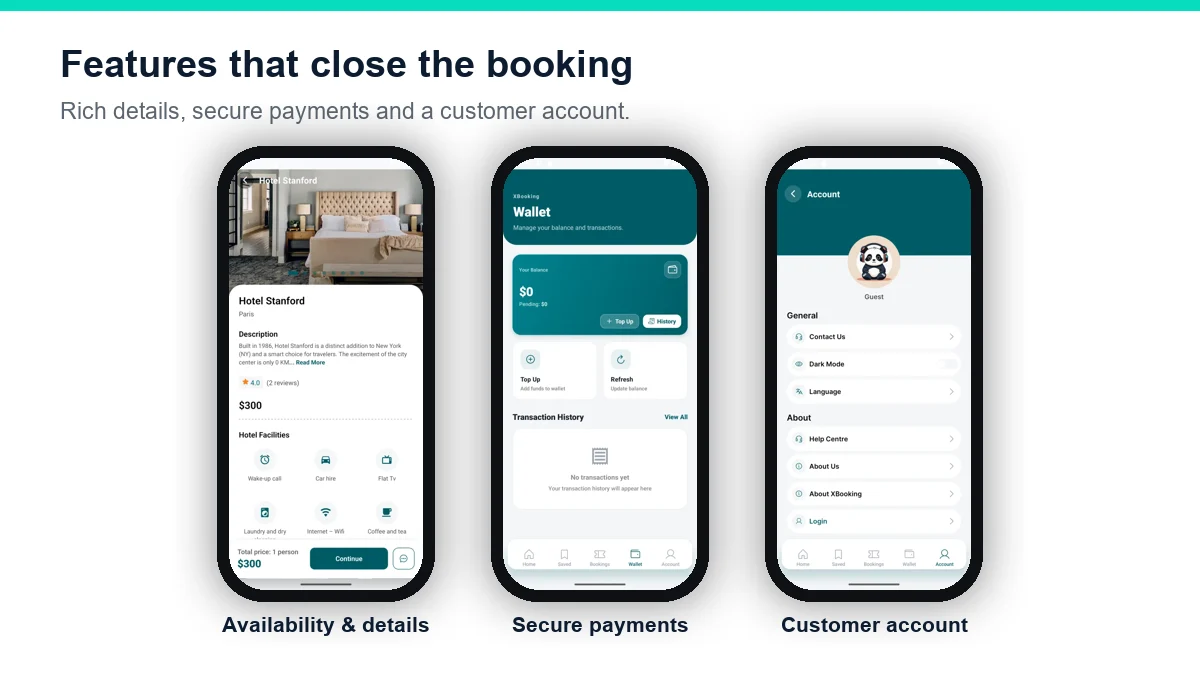
This is the feature a booking system lives or dies by. Live availability calendars make sure a room, seat or car can only be sold once, and update the moment a booking is made or cancelled. Without it, two customers can book the same slot, and you spend your days apologising. Look for availability that works across every booking type and, for marketplaces, across every vendor at once.
2. Secure payments with multiple gateways
Customers only pay when they trust the checkout. A strong system offers several gateways, such as Stripe and PayPal plus local options, processes payments securely, and generates invoices automatically. It should also handle refunds and partial payments cleanly, because cancellations are part of travel and a messy refund damages your reputation.
3. Multi-currency support
If you serve travellers from more than one country, they should see prices and pay in their own currency. Automatic exchange-rate conversion removes confusion at checkout and reduces abandoned bookings. This single feature can be the difference between winning and losing international customers.
4. Multi-language support
People book with more confidence in their own language. A platform that supports multiple front-end and back-end languages, and lets you add new ones, opens your business to markets a single-language site simply cannot reach. For international travel, this is not a luxury; it is a growth lever.
5. Automated emails and notifications
Good software does the repetitive work for you. Automatic booking confirmations, payment receipts, check-in reminders, review requests and cancellation notices keep customers informed without you touching the keyboard. This saves hours of admin and, just as importantly, makes a small business feel organised and professional.
6. Reporting and exports
You cannot improve what you cannot measure. Look for detailed reports on revenue, bookings, payouts and customer behaviour, with exports to PDF and Excel for your accountant. The best systems turn raw bookings into clear insight: which listings sell, which seasons are strong, and where customers drop off.
7. Mobile-ready design
Most travel bookings now happen on a phone. If the booking flow is awkward on mobile, you lose the majority of your customers before they pay. A professional platform is fast and simple on any screen, with a checkout that works as smoothly on a phone as on a desktop.
8. Multi-vendor support
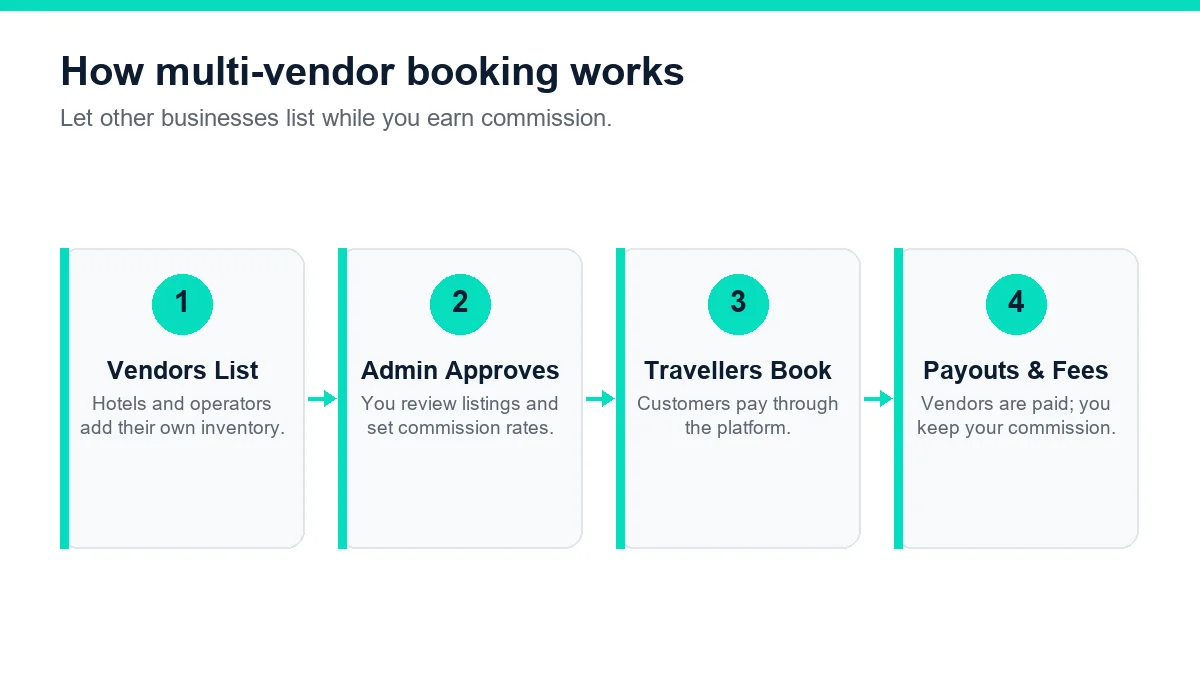
Even if you start with your own inventory, multi-vendor support is worth having for the future. It lets other businesses list on your platform while you earn a commission, turning your site into a marketplace. Each vendor manages their own listings and bookings, and you control approvals, commission rates and payouts.
9. Full ownership of data and source code
This feature is invisible until you need it. A hosted, rented system holds your customer data and limits what you can change. Owning the software and its source code means your data is yours, you can customise design and workflows freely, and you are never locked into one provider's prices or roadmap. For a serious business, ownership is a feature in its own right.
A quick buyer's checklist
Use this table to score any booking system you are considering. A professional platform should tick every row.
| Feature | What good looks like |
|---|---|
| Availability | Real-time calendars across all types and vendors |
| Payments | Multiple gateways, invoices, refunds handled |
| Currencies | Automatic multi-currency conversion |
| Languages | Multiple languages, easy to add more |
| Automation | Confirmations, reminders and reviews sent automatically |
| Reporting | Revenue and booking reports with PDF and Excel export |
| Mobile | Fast, simple checkout on any device |
| Multi-vendor | Vendor dashboards, commission and approvals |
| Ownership | Full source code and control of your data |
Hosted vs self-owned booking systems
One choice shapes all the others: do you rent a hosted booking system, or own the software outright? A hosted service is quick to start but charges monthly forever, holds your customer data, limits your branding, and can change its prices or rules whenever it likes. An owned platform is a one-time purchase that you install on your own hosting, with the full source code, so your data stays yours and you can customise freely. For a hobby or a short experiment, hosted can be fine. For a real business that intends to grow, ownership almost always wins on cost and control over any reasonable time frame.
| Consideration | Hosted (rented) | Self-owned |
|---|---|---|
| Cost over time | Monthly fees forever | One-time purchase |
| Your data | Held by the provider | Yours to keep and export |
| Customisation | Limited to their options | Full source code |
| Commission | Sometimes per booking | None to anyone |
| Lock-in | Hard to leave | You are in control |
Features that sound good but rarely matter
Sales pages love long feature lists, but some headline items make little difference in practice, while the basics quietly decide your success. Be wary of paying extra for a flood of niche add-ons you will never switch on, dozens of theme variations when one clean design would do, or "AI" labels attached to features that are really just filters. A platform that does the nine essentials reliably and quickly will out-earn a bloated one every time. Judge software by how smoothly a real customer can complete a booking, not by how many bullet points the brochure has.
How features affect your conversion rate
Every feature on this list touches the number that matters most: the share of visitors who actually complete a booking. Real-time availability stops the frustration of a slot that turns out to be taken. Local payment methods and multi-currency remove the final hesitation at checkout. A fast, mobile-ready flow keeps people moving instead of giving up. Automated confirmations reassure customers that their money was well spent. In other words, these are not technical boxes to tick; each one directly protects a sale you would otherwise lose. When you compare systems, picture your customer at each step and ask where they might stop.
Questions to ask a booking software vendor
Before you buy, put these questions to any vendor. The answers reveal a great deal:
- Do I receive the full source code and own my data? Ownership protects your business long term.
- Which booking types and payment gateways are supported? Make sure today's needs and tomorrow's are covered.
- Does availability update in real time across vendors? This prevents double bookings as you scale.
- How are updates and support handled? Know what is included and for how long.
- Can I see a live demo and make a test booking? Experience the flow before you commit.
How X-Booking measures up
We built X-Booking around exactly this checklist. It offers real-time availability across hotels, tours, cars, flights, events, boats, buses, visas and space rental; secure payments through Stripe, PayPal and regional gateways; multi-currency and multi-language support; automated emails; detailed reports with PDF and Excel export; a mobile-ready design; full multi-vendor operation; and the complete Laravel source code, so the platform and its data are genuinely yours.
| Package | Price (one-time) | Best for |
|---|---|---|
| Basic | $299 | A single-vendor launch with an installation guide. |
| Professional | $599 | Growing sites, with installation and server setup included. |
| Enterprise | $1000 | Full multi-vendor marketplaces with complete setup. |
Every plan includes six months of support. Our guides on what travel booking software is and how to build a travel booking website cover the rest of the journey.
Matching features to your business size
Not every business needs every feature on day one, and a good platform lets you grow into its capabilities rather than paying for complexity you cannot yet use. A single hotel or guesthouse mainly needs rock-solid real-time availability, secure payments and automated confirmations; multi-vendor support can wait until later. A tour operator adds scheduling and group limits to that list. An agency or marketplace, by contrast, leans heavily on multi-vendor dashboards, commission handling and multi-currency from the start, because its whole model depends on them. The important thing is that the platform contains all of these, so you switch on what fits your stage and enable the rest as you expand. Buying a system that only suits your current size forces a painful migration the moment you grow, whereas a complete platform such as X-Booking scales with you. When you assess the nine essential features, weigh them against where your business is heading in a year or two, not only where it stands today, and you will choose software you will not have to replace.
Security and trust features that protect every booking
Because a booking system handles money and personal details, security is itself a feature, and a weak one costs you customers and reputation. Look for a platform that uses secure, encrypted connections throughout, processes card payments through trusted gateways rather than storing card numbers itself, and offers role-based access so staff only see what they need. Clear cancellation and refund handling matters too, since customers judge a business by how fairly it treats them when plans change. Automatic invoices and a complete record of every transaction protect you as well, giving you an audit trail for disputes and accounts. Trust is quietly built from these details, and travellers notice when they are missing.
Support, updates and the long term
Software is not a one-time event; it needs care over time. When you compare platforms, look past the feature list to how the product is supported. Ask what is included after purchase, how long support lasts and what renewal costs, and how updates are delivered. A platform you own, with the full source code, gives you the freedom to maintain and extend it yourself or through any developer, rather than being tied to one provider's timeline and prices. X-Booking includes six months of technical support with every plan, renewable afterwards, and ships with the complete Laravel source code, so your business is never dependent on anyone else to keep moving.
The bottom line on features
If you remember only one thing from this guide, make it this: reliability beats quantity. A booking system that handles availability, payments and automation flawlessly will earn more than one with a dazzling feature list that stumbles at checkout. The nine essentials exist because each one protects a real part of the customer's journey or your ability to run the business, from the moment someone searches to the moment you reconcile your accounts. Everything beyond them is a bonus, useful when it fits your plans and a distraction when it does not. Hold any option up against those essentials, insist on a demo, and let a real test booking settle the decision. Choose on substance, and the software will serve your business for years rather than months.
Choose with confidence
The best booking system is not the one with the longest feature list; it is the one that does the essentials reliably and gives you room to grow. Score your options against the nine features above, ask for a demo, and make a test booking before you commit. If you would like to see X-Booking tick every box for your business, message our team for a walkthrough.