The small shield with a tick next to a name on LinkedIn means that person has confirmed something about themselves: their identity, their employer or their school. It is free, and LinkedIn never sells it.
Getting it should take minutes. In practice many people get stuck, because the options depend on where you live and which documents you hold. This guide explains the whole process. If something has already gone wrong, see LinkedIn verification not working, and for local rules see LinkedIn verification by country.
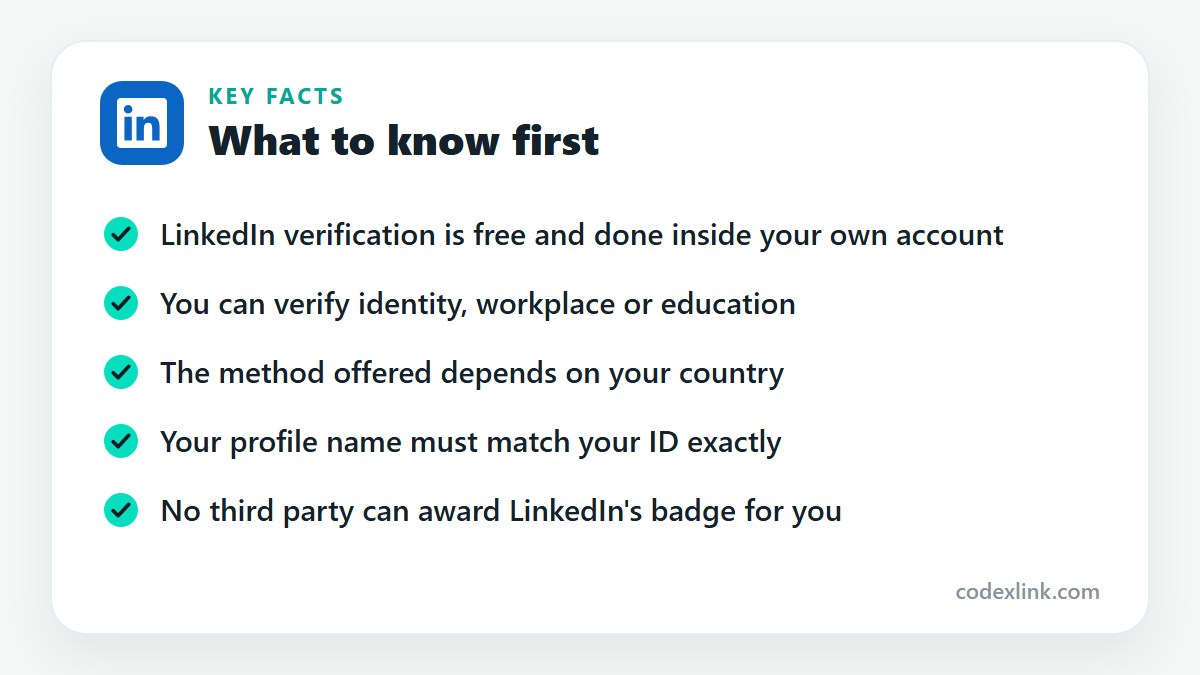
One point before anything else. Only LinkedIn and its verification partners can add the badge, and only for the real owner of the account. Any tool or service, including ours, can guide you through the process. It cannot issue the badge.
LinkedIn verification basics
What is the LinkedIn verified badge?
The LinkedIn verified badge is a shield icon with a tick that appears beside your name on your profile, in search results and next to your comments. It tells other members that LinkedIn, or a partner acting for LinkedIn, has confirmed at least one fact about you. Selecting the badge opens a panel listing exactly what was confirmed, for example your government ID or your current workplace, and when. It is different from the gold Premium badge, which only shows that someone pays for a subscription.
What is LinkedIn account verification?
LinkedIn account verification is the general name for the checks that prove a real person stands behind a profile. It covers three things: identity verification with a government document, workplace verification with a company email or employer system, and education verification with a school. It should not be confused with confirming your email address or phone number when you sign up, or with the security check LinkedIn asks for when it suspects an account has been taken over. Those protect your login. Verification adds the public badge.
What is LinkedIn identity verification?
LinkedIn identity verification confirms that the name on your profile belongs to a real person holding a valid government document. LinkedIn does not examine the document itself. It sends you to a specialist partner, which scans the document, compares it with a live selfie and reports back whether the check passed. LinkedIn receives the result and basic details such as your name, and says it does not store the document image. Of the three verification types, this is the one that carries the most weight with recruiters and clients.
What is LinkedIn profile verification?
LinkedIn profile verification means having at least one confirmed fact displayed on your profile. Once any check succeeds, the shield appears next to your name and a Verifications section is added to the About this profile panel. People sometimes use the phrase for a manual review by LinkedIn staff, but no such review exists for ordinary members. The process is automated, runs inside your own account and can be repeated if you change your name or employer.
What is the LinkedIn verification process?
The process has four steps. First, open your profile and select the Verify now prompt or the More button, then About this profile. Second, pick one of the methods LinkedIn offers for your country and situation. Third, complete that method, which means scanning a document and taking a selfie, or entering a code sent to your work email. Fourth, wait for the result, which normally arrives within minutes. If the check passes, the badge is added automatically and you do not need to do anything else.
What are the LinkedIn verification requirements?
For identity verification you need a document your country's partner accepts, a smartphone with a working camera, the current LinkedIn app and a profile name that matches the document. Where a passport is used, it must contain an NFC chip and your phone must be able to read it. For workplace verification you need a current position on your profile and an email address on your employer's own domain. In every case the account must be yours and in good standing.
Who is eligible for LinkedIn verification?
Any member with an account in good standing can be verified if a method is available to them. Eligibility depends on three things: whether LinkedIn has switched on identity verification in your country, whether you hold a document its partner accepts there, and, for workplace verification, whether your employer's email domain is supported. Age matters too, since the document partners generally require adults. If no option appears on your profile, you are not yet eligible for that method where you live.
How to get verified on LinkedIn
How do I verify my LinkedIn account?
Sign in on the LinkedIn mobile app and open your own profile. Under your name you will see a Verify now prompt if you are not yet verified. If it is not there, select More and then About this profile. LinkedIn lists the methods available to you. Choose identity verification if you have an accepted document, or workplace verification if you have a company email. Follow the on-screen steps to the end. The whole thing usually takes less than ten minutes.
How do I get verified on LinkedIn?
Getting verified means completing one of LinkedIn's own checks from inside your account. Update the app, open your profile, start the verification flow and pick a method. For an identity check you scan your document, hold your phone against the passport chip if asked, and take a selfie. For a workplace check you enter a code sent to your work email. There is nothing to apply for and nobody to pay. The badge is added by the system as soon as the check passes.
How do I verify my LinkedIn profile?
Before you start, make your profile ready, because most failures come from mismatched details. Set your first and last name exactly as they appear on your document, with no titles, emojis or nicknames. Add your current job and link it to the correct Company Page if you plan to verify your workplace. Then open About this profile from your profile's More menu and run the method you have chosen. When it completes, check that the Verifications section shows the new entry.
How do I get a verified badge on LinkedIn?
The badge is not requested separately. It is the visible result of passing any one verification. Complete an identity, workplace or education check and the shield appears beside your name automatically, usually straight away. It stays there as long as the underlying fact remains true. If you change your name, the identity badge is removed until you verify again. If you leave the employer you verified, the workplace verification is removed when you update your position.
How does LinkedIn identity verification work?
LinkedIn relies on outside partners that specialise in checking documents. In the United States, Canada and Mexico it has used CLEAR, which checks a government ID together with a phone number from that country. In India it has used DigiLocker, which confirms your details through Aadhaar. In many other countries it uses Persona, which reads the encrypted chip inside an electronic passport and compares its photo with your selfie. The partner tells LinkedIn whether you passed, and LinkedIn then displays the badge.
Is LinkedIn verification free?
Yes. LinkedIn does not charge for any form of verification, and you do not need a Premium subscription. The partner services it uses are free for members as well. If a website or message asks you to pay for the badge itself, treat it as a warning sign, since nobody outside LinkedIn can grant it. Some people choose to pay for guidance through the steps, which is a separate matter. The verification itself always costs nothing.
What are the benefits of LinkedIn verification?
A verified profile is harder to fake, so people trust it more quickly. Recruiters are more willing to reply, clients are more comfortable starting a conversation with a freelancer, and connection requests to strangers are accepted more often. LinkedIn has reported that verified members receive more profile views, messages and comments on average. It also protects you. If someone copies your photo and name to run a scam, the absence of the badge on their copy helps others spot it.
What documents are required for LinkedIn verification?
The answer depends on the partner serving your country. Through CLEAR, accepted documents have included a passport, a driving licence or a state ID, together with a local phone number. Through DigiLocker, the check uses your Aadhaar number and the mobile number linked to it. Through Persona, you generally need a valid passport that contains an NFC chip. LinkedIn shows the exact list for your account before you begin, so read that screen before you fetch any document.
Can I verify LinkedIn with my national ID?
Sometimes. It depends entirely on what the partner for your country accepts. Where CLEAR is used, a state ID or driving licence is usually fine. Where Persona is used, national ID cards are frequently not accepted and a chip passport is required, because the check depends on reading an encrypted chip. In India the Aadhaar route works through DigiLocker. The document list on your own verification screen is the only reliable answer for your account.
Can I verify LinkedIn with my passport?
Yes. A passport is the most widely accepted document for LinkedIn verification. Where Persona runs the check, the passport must be electronic, which you can confirm by the small rectangular chip symbol printed on the front cover. Your phone must support NFC and have it switched on. You scan the photo page with the camera, then rest the phone on the passport until the chip has been read, then take a selfie. Expired passports are rejected.
Can I verify LinkedIn without a passport?
In some countries you can, using another accepted document such as a driving licence or, in India, Aadhaar. Where a passport is the only identity document accepted, you still have a route that needs no document at all: workplace verification. If your employer's email domain is supported, you can earn the badge by confirming a code sent to your work email. Students may also be able to use education verification through their school.
Can I verify LinkedIn without a government ID?
Yes, through workplace or education verification. Neither asks for an identity document. Workplace verification confirms that you control an email address at the company on your profile, and education verification confirms your link to a school that supports it. Be aware of what the badge will say. It will show that your workplace or school was confirmed, not your legal identity. For most professional purposes that is still a strong signal.
How long does LinkedIn verification take?
The steps themselves take between five and ten minutes. For most people the result is returned almost instantly, and the badge appears as soon as they return to their profile. Occasionally a check is held for a manual review by the partner and stays pending for a few hours. If nothing has changed after a day or two, the attempt has probably stalled. Start again from your profile, or contact LinkedIn support if the second attempt also hangs.
Is LinkedIn verification available in every country?
No. LinkedIn has been rolling identity verification out country by country since 2023, and coverage is wide but incomplete. The documents accepted also differ from place to place. Workplace verification has no country restriction as such, but depends on the employer being supported. If you open About this profile and see no identity option, the feature is not yet enabled for your location. Our country guide covers the main markets.
How can I check my LinkedIn verification status?
Open your profile and look beside your name. A shield with a tick means you are verified. Select it, or choose More and then About this profile, to see the Verifications section. It lists each check you have passed, the partner that performed it and the month it was completed. If an attempt is still being processed, it shows as pending. LinkedIn does not offer a separate status page, and no outside website can look this up for you.
Can I verify LinkedIn from my mobile phone?
Yes, and for identity verification a phone is normally required. The check uses the camera to capture your document and selfie, and uses the NFC reader for passports. Use the LinkedIn app, not the mobile browser, and update it first. Android phones need NFC switched on in settings. On an iPhone it is always available on recent models. Close other apps that might be using the camera before you begin.
Can I verify LinkedIn from a computer?
You can begin on a computer. For an identity check, LinkedIn shows a QR code that you scan with your phone to continue there, because a laptop cannot read a passport chip. Workplace verification is different. It only involves receiving a code by email and typing it in, so it can be done from start to finish in a desktop browser. If the QR code will not scan, start directly in the mobile app instead.
Can international professionals verify LinkedIn?
Yes. What matters is holding a document the partner accepts, and a chip passport from most countries qualifies where Persona is used. Expatriates should use the passport of their nationality. Residence cards issued by the country they live in are usually not accepted. Where the local method needs a phone number from that country, as CLEAR does, newcomers without one may need to use workplace verification until they have it.
Can freelancers get verified on LinkedIn?
Yes, through identity verification. Workplace verification is rarely possible for freelancers, since it requires an email address on an employer's supported domain, and a personal address or a one-person business domain will not qualify. For someone whose income depends on strangers trusting them, the identity badge is worth the ten minutes. It answers the first question a new client has, which is whether the person behind the profile is real.
Can students get verified on LinkedIn?
Yes. A student with an accepted document can complete identity verification like anyone else. Some universities and colleges also support education verification, either through a school email address or through a partner system, which adds a verified entry for that school. Students who are under the minimum age set by the document partner may have to wait. For those about to apply for internships or first jobs, a verified profile is a small but useful advantage.
Does LinkedIn verification improve profile credibility?
Yes. People make a quick judgement about whether to accept a request or answer a message, and they look for signals that a profile is genuine. The shield is one of the clearest, because it cannot be bought or added by hand. It works alongside the other signs of a real profile: a clear photo, a complete work history, recommendations and regular activity. A badge on an otherwise empty profile will not do much by itself.
Does LinkedIn verification help with job applications?
It helps indirectly. A recruiter reviewing applicants can see at a glance that your identity or current employer has been confirmed, which removes one possible doubt. Some hiring teams filter out profiles that look fake, and the badge keeps you clear of that. It does not move your application up LinkedIn's list or replace relevant experience. Think of it as removing a reason to say no, not as adding a reason to say yes.
Workplace, work email and company verification
What is LinkedIn workplace verification?
Workplace verification confirms that you currently work at the company shown on your profile. LinkedIn does this in one of two ways. The common one sends a code to an email address on your employer's domain. The other uses a digital employee credential issued through a system such as Microsoft Entra Verified ID, for companies that have set it up. When it succeeds, the Verifications section states that your workplace was confirmed and names the company.
How do I verify my workplace on LinkedIn?
Add your current position to your profile and make sure it is linked to the company's official LinkedIn Page, not typed as plain text. Open About this profile from the More menu and select workplace verification. If your company is supported, LinkedIn asks for your work email address and sends a six-digit code. Enter the code before it expires. If the option is not shown, your employer's domain is not supported, and identity verification is the alternative.
What is LinkedIn work email verification?
Work email verification is the code-by-email method of confirming your workplace. It proves that you can receive mail at an address on your employer's domain, which is good evidence that you work there. LinkedIn uses the address only for the check. It is not added to your profile or shown to anyone. Because the method depends on the domain, addresses from general providers such as Gmail, Outlook.com or Yahoo are never accepted.
How do I verify my work email on LinkedIn?
Start workplace verification from About this profile and type your company email address when asked. Open your work inbox, find the message from LinkedIn and enter the code on the verification screen. Codes last only a short time, so do it straight away. If nothing arrives, look in spam or quarantine folders, since corporate filters often hold automated mail. You can request a new code, and you may need your IT team to allow messages from LinkedIn.
What is LinkedIn company verification?
Company verification has two meanings. For an employee, it means confirming that they work at a company, which is workplace verification. For the business itself, it means a verified badge on the Company Page, which shows that LinkedIn has confirmed the page represents the real organisation. Page verification is handled separately from member verification and is offered to eligible pages through their admin tools.
How do I verify my company on LinkedIn?
You need to be a super admin of the Company Page. Open the page's admin view and look in its settings for a verification option. If your page is eligible, LinkedIn guides you through confirming the organisation's details. The feature has been introduced gradually, so many pages will not see it yet. Keeping the page complete, with a matching website domain and accurate company information, puts you in the best position when it becomes available.
Help, support and guides
Where can I get LinkedIn verification help?
Start with LinkedIn's own Help Centre, which has step-by-step articles for each method and each partner. Open it from your profile menu and search for verification. For a specific failure, our troubleshooting page explains the common errors and their fixes. If you have followed the steps and still cannot complete the check, raise a support case with LinkedIn, since only LinkedIn and its partners can see what happened to your attempt.
Is there LinkedIn verification support?
Yes. LinkedIn support handles verification questions through the Help Centre. Choose the contact option, describe which step failed and attach a screenshot of the error. Problems that occur inside the partner's part of the process, such as a document that will not scan, may be passed to that partner, and both CLEAR and Persona have their own help pages. Response times vary, so check the simple causes first.
Can someone give me LinkedIn verification assistance?
Yes. Assistance means someone explaining the steps, checking that your profile and document are ready, and helping you work out why an attempt failed. A colleague who has done it can help, and so can a paid service. What nobody else can do is complete the check for you. You must scan your own document and take your own selfie, on your own account. Never hand over your password or let anyone use their identity on your profile.
Is there a complete LinkedIn verification guide?
This page is intended as one. It covers what verification is, the requirements, each method, and who can use it. Two companion pages go further: LinkedIn verification not working covers thirty specific errors and their solutions, and LinkedIn verification by country explains the method, documents and common problems in more than fifty countries.
Verification tools and services
Is there a LinkedIn verification tool?
The only tool that can verify a LinkedIn profile is the verification flow built into LinkedIn itself, together with the partners it connects to. Searches for a LinkedIn verification tool, a profile verification tool or an identity verification tool often lead to third-party websites. None of them can add the badge, because LinkedIn does not allow outside systems to write to a member's verification status. Use them, if at all, only as sources of guidance.
Is there a LinkedIn verification checker or status tool?
No outside checker exists. A LinkedIn verification checker, status checker or profile verification checker would need access to data that LinkedIn does not share. The real status check is simple: open the profile and look for the shield, then open About this profile for the details. You can check anyone's profile this way, which is exactly how recruiters and clients do it.
Is there a LinkedIn verification eligibility checker?
The eligibility check is also inside LinkedIn. Open About this profile on your own account and see which methods are listed. If identity verification appears, you are eligible where you live, subject to holding an accepted document. If workplace verification appears, your employer is supported. If neither is shown, no external tool can change that. Updating the app and checking again every few weeks is the practical approach.
Can I buy a LinkedIn verification tool online, and what does it cost?
You cannot buy LinkedIn verification, a verification tool or the badge, online or anywhere else. Verification is free. What is sold under names such as LinkedIn verification tool or verification service online is, at best, help with the process. Before paying anyone, ask precisely what you will receive and what happens if the check does not pass. Avoid any seller who promises a badge without your own documents.
What is a LinkedIn verification service?
A legitimate LinkedIn verification service, sometimes called a verification support service or account verification assistance, is a guidance service. It prepares your profile so the name matches your document, tells you which method and document will work in your country, walks you through the steps and helps you resolve errors. It is useful for people who have failed several times and are unsure why. It cannot bypass LinkedIn's checks or use someone else's identity.
Is there a LinkedIn verification troubleshooting tool?
There is no automated troubleshooting tool that can read your failed attempt. Troubleshooting is a matter of working through the likely causes in order: the document type, the passport chip, the phone's NFC, the name on the profile, the selfie and the app version. Our troubleshooting guide sets these out error by error, which is the nearest thing to a diagnostic tool that can honestly be offered.
Is there a verification solution for freelancers, recruiters, agencies and businesses?
Each group uses the same LinkedIn process, with different emphasis. Freelancers and international users rely on identity verification with a passport. Recruiters benefit from both identity and workplace verification, since candidates are wary of fake recruiters. Agencies and businesses should have staff verify their workplace by company email and should look at Page verification for the company itself. No separate professional profile verification tool exists for any of these groups.
What does the CodeX Link LinkedIn Verification Badge service offer?
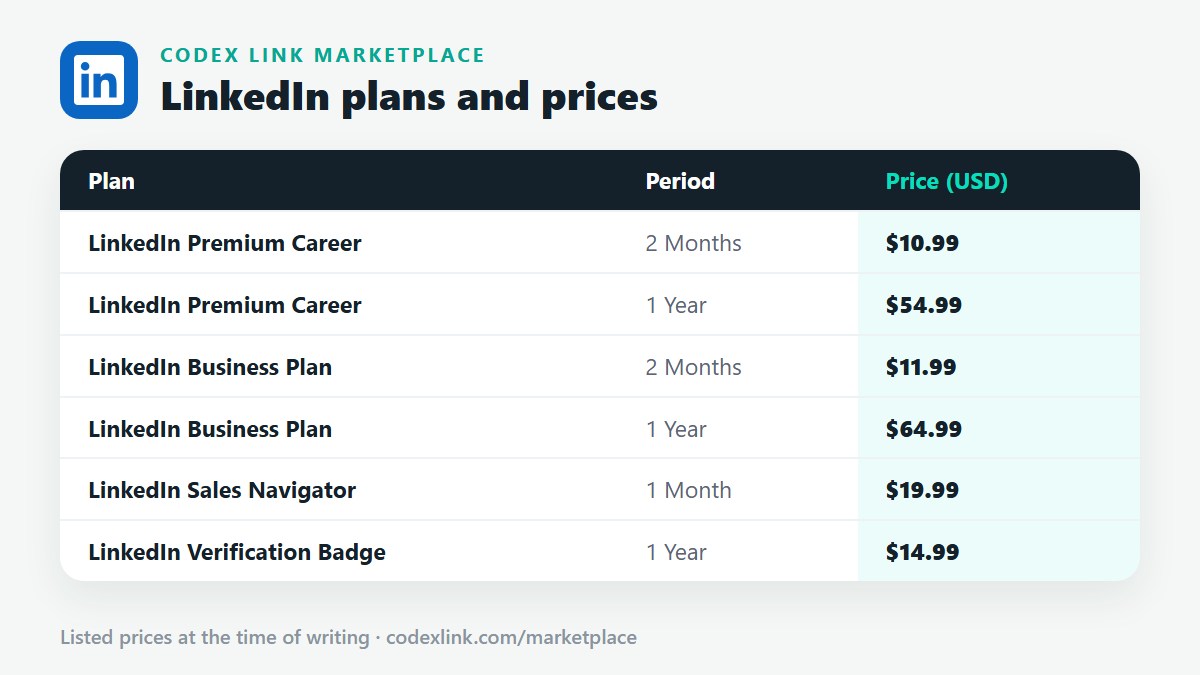
It is listed on the CodeX Link marketplace for people who want help getting through the process on their own account. It is listed at $14.99 for 1 year at the time of writing. Message the team on WhatsApp before ordering and ask exactly what is included and which documents you will need. As explained above, the check itself is completed by you, with your own documents, through LinkedIn. No service can issue the badge on LinkedIn's behalf.
Is it safe to pay someone to verify my LinkedIn account?
Paying for guidance is your decision, and it can save time. Protect yourself with three rules. Never share your LinkedIn password or login codes. Never send a copy of your passport or ID to someone you do not know and trust. Never allow another person to verify your account using their own identity, because that breaks LinkedIn's rules, misleads everyone who sees the badge and can lead to the account being restricted.
LinkedIn plans and prices on CodeX Link
These are the LinkedIn plans listed on the CodeX Link marketplace at the time of writing. Message the team on WhatsApp to confirm the price and how activation works before you order.
| Plan | Period | CodeX Link price |
|---|---|---|
| LinkedIn Premium Career | 2 Months | $10.99 |
| LinkedIn Premium Career | 1 Year | $54.99 |
| LinkedIn Business Plan | 2 Months | $11.99 |
| LinkedIn Business Plan | 1 Year | $64.99 |
| LinkedIn Sales Navigator | 1 Month | $19.99 |
| LinkedIn Verification Badge | 1 Year | $14.99 |
Need a LinkedIn plan?
Chat with the CodeX Link team for the current price and activation details, or browse every tool in the marketplace.
LinkedIn is a trademark of its owner. Features, limits and prices change over time and differ by country, so confirm the current terms on LinkedIn before you buy.