LinkedIn's plan pages list features without explaining what they do in practice. This page explains each one and sets the plans side by side.
It also answers the questions people ask about what Premium can and cannot reveal, such as who searched for you.
What you get
What are the benefits of LinkedIn Premium?
The main benefits are InMail messages to people outside your network, a full list of who viewed your profile, insights on jobs or companies, access to LinkedIn Learning, and, on higher plans, unlimited searching and advanced filters.
What is included in LinkedIn Premium Career?
Premium Career includes 5 InMail credits a month, the full profile viewer list for 365 days, applicant insights, a view of jobs where you rank as a top applicant, LinkedIn Learning and an optional Premium badge. Details are in our Premium Career guide.
What is included in LinkedIn Premium Business?
Premium Business includes 15 InMail credits a month, unlimited profile browsing, company growth and hiring insights, the full profile viewer list and LinkedIn Learning. Our Premium Business guide explains who it suits.
What is included in Sales Navigator?
Sales Navigator Core includes advanced lead and account search filters, saved lead and account lists, alerts on job changes and company news, buyer intent signals and 50 InMail credits a month. See the Sales Navigator guide.
Comparing the plans
What is the difference between LinkedIn Free and Premium?
A free account lets you build a profile, connect, post and apply for jobs, with limits on searching and on who you can message. Premium adds InMail, the full viewer list, insights, LinkedIn Learning and, from Business upwards, unlimited browsing.
LinkedIn Premium Career vs. Premium Business
Career is for job seekers, with 5 InMails and applicant insights. Business is for professionals and owners, with 15 InMails, unlimited browsing and company insights. Choose Career for a job search and Business for networking and client work.
LinkedIn Premium Business vs. Sales Navigator Core
Business works inside ordinary LinkedIn with fewer limits. Sales Navigator Core is a separate prospecting workspace with far more filters, saved lists, alerts and 50 InMails. Business is enough for light outreach. Sales Navigator is for regular selling.
LinkedIn Premium vs. Recruiter Lite
Premium is general purpose. Recruiter Lite is built for hiring, with recruiting filters, candidate projects, tracking and 30 InMails a month. If you are filling roles, Recruiter Lite is the appropriate tool.
Which LinkedIn Premium plan should I choose?
Choose by goal. Looking for a job: Career. Networking and researching companies: Business. Finding customers: Sales Navigator. Hiring staff: Recruiter Lite. If you are unsure, start with the lower plan and upgrade when you reach its limits.
InMail
What are LinkedIn InMail credits?
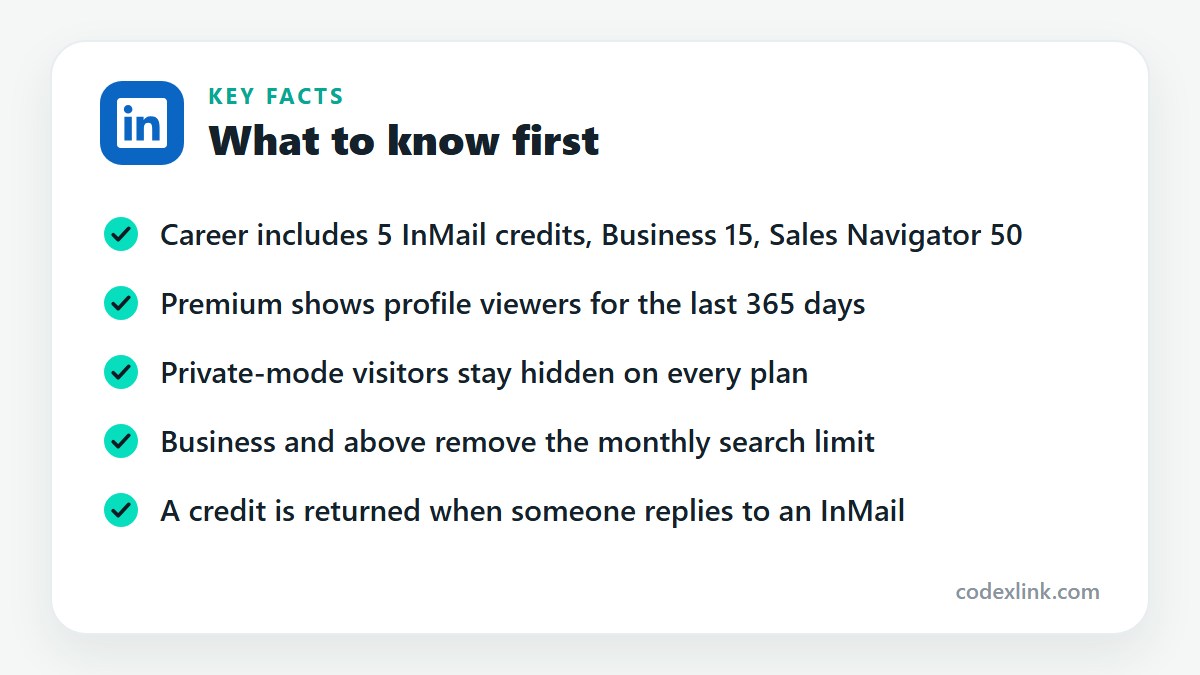
InMail credits let you send a direct message to someone you are not connected to. Each message uses one credit. Credits are added monthly, roll over for a limited time, and are returned when the recipient replies within 90 days.
How many InMail credits do I get?
Premium Career includes 5 a month, Premium Business 15, Recruiter Lite 30 and Sales Navigator Core 50. Unused credits accumulate for up to three months, after which the oldest ones expire.
Can LinkedIn Premium help me contact recruiters?
Yes. InMail lets you message recruiters and hiring managers you aren't connected to, and the viewer list shows which recruiters have looked at your profile. A short, specific message works best.
Search and visibility
How does LinkedIn advanced search work?
Standard search filters people by location, company, industry, school and connection level. Sales Navigator and Recruiter products add many more, such as seniority, function, years in role, company headcount and recent job changes, and let you save searches.
Can I search for people outside my network?
Yes. Search covers LinkedIn members generally, though free accounts see limited detail for people beyond third-degree connections and face a monthly commercial use limit. Premium Business and higher plans remove that limit.
Does LinkedIn Premium show all profile viewers?
It shows everyone who viewed your profile in the last 365 days, except visitors using private mode. Their visits appear as anonymous, and no plan reveals who they are.
Can I see who searched for me on LinkedIn?
No. LinkedIn shows how many searches you appeared in and, in aggregate, the companies and job titles of the people searching. It never lists the individuals. Profile viewers are shown, but searchers are not.
Does LinkedIn Premium increase profile visibility?
Not directly. Premium doesn't raise your ranking in search results. It offers an Open Profile setting so anyone can message you, and a badge. Visibility comes mostly from a complete profile, relevant keywords and regular activity.
Does it help?
Does LinkedIn Premium improve job applications?
It gives you applicant insights and shows where you compare well, which helps you choose roles wisely. Some job posts also let Premium members highlight their application. It does not guarantee your application is seen first.
Can LinkedIn Premium help me find clients?
Yes, mainly through InMail and unlimited browsing on Premium Business. For serious client prospecting, Sales Navigator is the better tool because of its filters and lead lists.
Can LinkedIn Premium help grow my network?
It helps you reach people beyond your current connections through InMail and Open Profile, and the viewer list shows who is already interested in you. Network growth still depends on relevant messages and regular activity.
LinkedIn plans and prices on CodeX Link
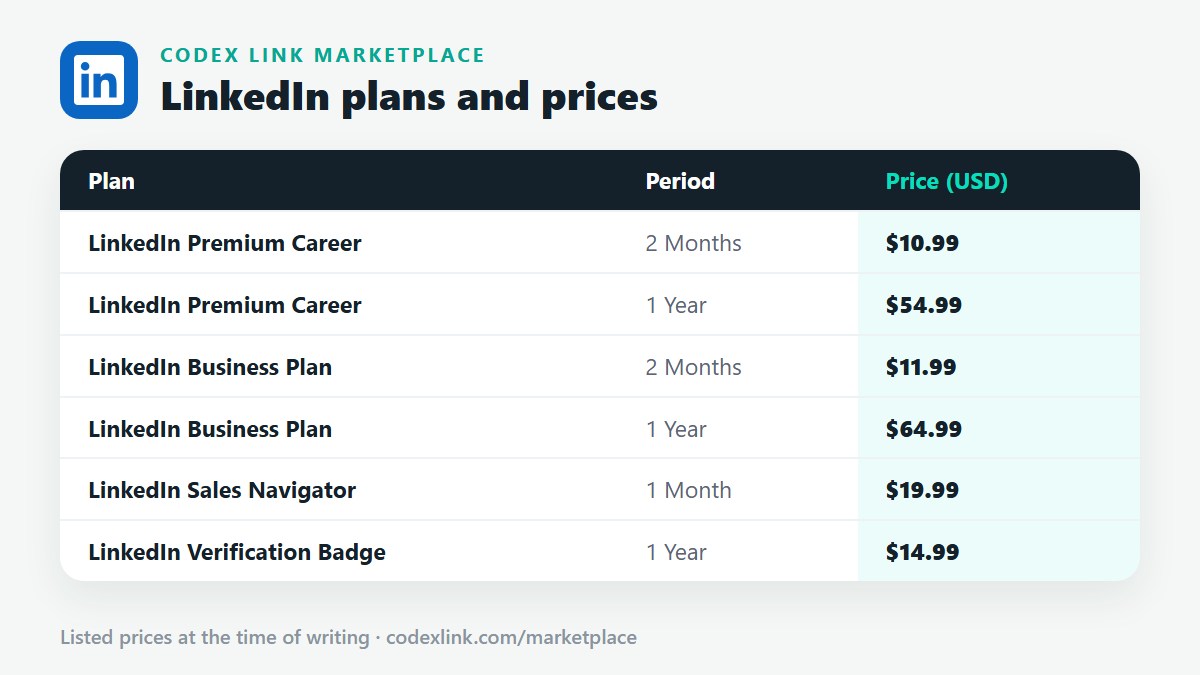
These are the LinkedIn plans listed on the CodeX Link marketplace at the time of writing. Message the team on WhatsApp to confirm the price and how activation works before you order.
| Plan | Period | CodeX Link price |
|---|---|---|
| LinkedIn Premium Career | 2 Months | $10.99 |
| LinkedIn Premium Career | 1 Year | $54.99 |
| LinkedIn Business Plan | 2 Months | $11.99 |
| LinkedIn Business Plan | 1 Year | $64.99 |
| LinkedIn Sales Navigator | 1 Month | $19.99 |
| LinkedIn Verification Badge | 1 Year | $14.99 |
Need a LinkedIn plan?
Chat with the CodeX Link team for the current price and activation details, or browse every tool in the marketplace.
LinkedIn is a trademark of its owner. Features, limits and prices change over time and differ by country, so confirm the current terms on LinkedIn before you buy.