
Choosing a hosting type is like choosing where your business lives: a shared office, a private suite or a whole building. Each suits a different stage of growth. Here is how they compare.
Shared hosting
Your website shares a server, and its resources, with other websites. The host manages everything for you.
- Best for: business websites, portfolios, blogs and new projects.
- Pros: lowest cost, easy control panel, no server management.
- Cons: limited resources and less control over the server.
VPS (Virtual Private Server)
A physical server is divided into isolated virtual servers. You get a guaranteed share of CPU, RAM and storage, with full root access.
- Best for: growing online stores, web apps, agencies hosting several sites, developers.
- Pros: dedicated resources, full control, easy to scale up.
- Cons: costs more than shared hosting and needs some technical knowledge or a managed plan.
Dedicated server
You rent an entire physical machine. Every CPU core, all the memory and all the disk speed belong to you.
- Best for: high-traffic sites, large stores, databases, game servers and strict data isolation.
- Pros: maximum performance and control, no neighbours.
- Cons: highest cost, and you are responsible for configuring the server.
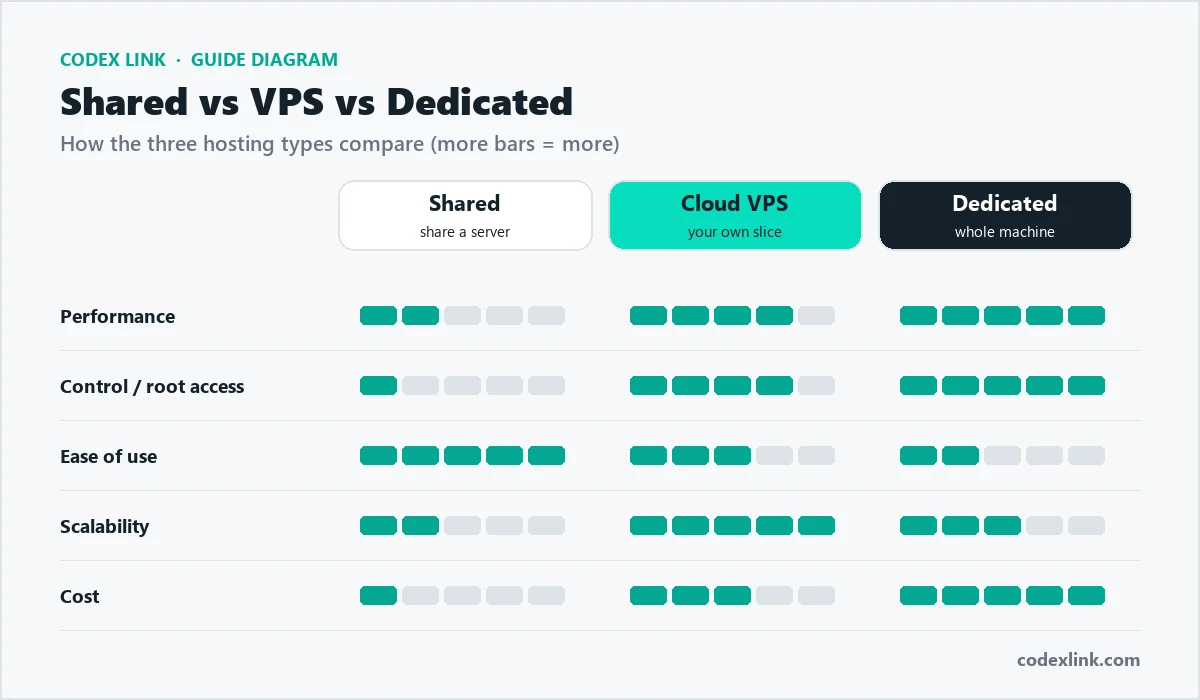
Comparison at a glance
| Shared | VPS | Dedicated | |
|---|---|---|---|
| Performance | Good | High | Highest |
| Resources | Shared | Guaranteed share | Entire server |
| Root access | No | Yes | Yes |
| Scaling | Limited | Easy | Hardware upgrade |
| Technical skill | None | Some | More |
| Cost | Low | Medium | High |
Signs it is time to upgrade
- Your pages slow down at busy times of day.
- Your host warns you about high resource usage.
- You need software or settings that shared hosting does not allow.
- Your store or app now earns enough that downtime is expensive.
What about security?
All three types can be secure when they are managed well. On shared hosting, the provider handles server security for you. On a VPS or dedicated server you have more control, which also means more responsibility: keep software updated, use a firewall, disable unused services and keep regular off-server backups.
Managed or unmanaged?
An unmanaged server gives you the machine and leaves the setup to you, which suits experienced developers. A managed server includes help with setup, updates and monitoring, which suits businesses that want the performance of a VPS or dedicated server without hiring a system administrator.
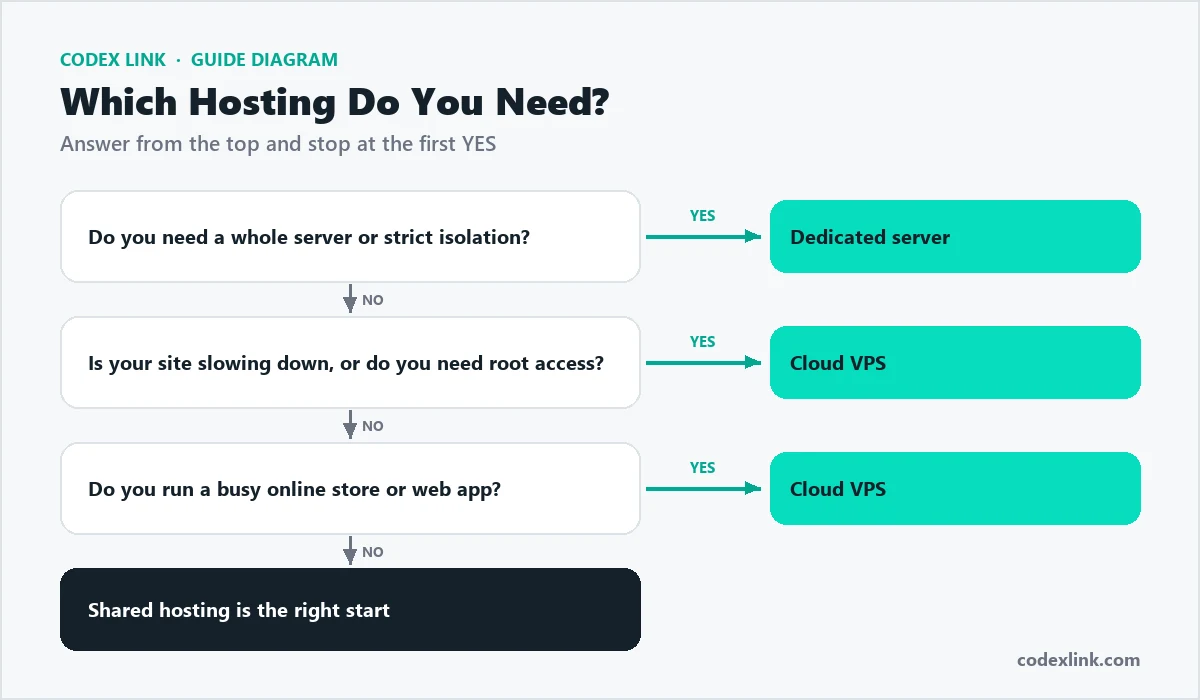
Quick decision guide
- Choose shared hosting if you have one or a few business websites and want the simplest option.
- Choose a VPS if your site is growing, you run an online store, or you need custom software.
- Choose a dedicated server if performance and isolation matter more than cost.
How each option handles traffic spikes
Traffic is rarely steady. A sale, a viral post or a news mention can multiply visitors in minutes. Each hosting type responds differently:
- Shared hosting: resources are limited per account, so a sudden spike can slow the site or trigger temporary limits.
- VPS: guaranteed resources handle spikes better, and plans can often be upgraded quickly.
- Dedicated server: the full power of the machine is yours, suitable for consistently high traffic.
Whatever you choose, caching and a content delivery network (CDN) reduce load dramatically, because repeat visitors and images are served without rebuilding every page.
Performance basics on any plan
- Use caching for pages and database queries.
- Optimise images by resizing and using modern formats such as WebP.
- Keep software updated: modern PHP versions and an opcode cache make sites noticeably faster.
- Limit heavy plugins and remove ones you do not use.
- Block abusive bots with rate limits or a firewall, so they cannot exhaust server resources.
Real-world examples
Local bakery website        -> shared hosting
Growing WooCommerce store   -> start shared, move to VPS at
                               a few thousand orders a month
Booking platform / SaaS     -> cloud VPS with backups and monitoring
Large marketplace or ERP    -> dedicated server or several VPSs
Security responsibilities
| Task | Shared hosting | Unmanaged VPS | Managed VPS / dedicated |
|---|---|---|---|
| Server updates and patches | Host | You | Host |
| Firewall and malware scanning | Host (basic) | You | Host |
| Website and plugin updates | You | You | Usually you, sometimes host |
| Backups | Host, plus your own copy | You | Host, plus your own copy |
Running several websites
Agencies and businesses with several brands often host many sites together. On shared hosting, one busy or hacked site can affect the others in the same account. On a VPS, each site can be isolated with its own user, PHP settings and resource limits, so a problem on one site does not slow down the rest. If you run important websites alongside experimental projects, separate them.
Migration path as you grow
- Launch on quality shared hosting with SSL, backups and caching.
- Monitor speed and resource usage monthly.
- Move to a VPS when you regularly hit limits or need custom software.
- Add a CDN and separate database or caching servers as traffic grows.
- Consider dedicated servers or multiple servers for large, business-critical platforms.
Cost comparison over a year
Prices vary by provider and specification, but the pattern is consistent: shared hosting is the cheapest, a VPS costs more and gives guaranteed resources, and dedicated servers cost the most. Managed services, where the provider handles updates and security, add to the price but save time and risk. When comparing, count the full yearly cost including renewal prices, backups, control panel licences and any paid support.
| Cost item | Shared | VPS | Dedicated |
|---|---|---|---|
| Base price | Low | Medium | High |
| Control panel licence | Usually included | Sometimes extra | Often extra |
| Management | Included | Extra if managed | Extra if managed |
| Backups | Often included | Sometimes extra | Sometimes extra |
| Your time | Minimal | Moderate if unmanaged | High if unmanaged |
Key specifications explained
- CPU cores: how much processing power you have; important for busy stores and apps.
- RAM: memory for running software and caching; databases and WordPress benefit from more.
- Storage type: NVMe SSD is much faster than older hard drives.
- Bandwidth: how much data can be transferred each month.
- Data centre location: closer to your visitors means faster loading.
Cloud hosting and scalability
Cloud VPS plans can often be resized as you grow, adding CPU, RAM or storage without moving to a new server. This makes a cloud VPS a flexible middle step between shared hosting and dedicated servers. For applications with very variable traffic, several smaller servers behind a load balancer can be more resilient than one large server.
Monitoring and uptime
Whatever you choose, monitor your website. Free uptime monitors check your site every few minutes and alert you if it goes down. On a VPS or dedicated server, also monitor CPU, memory, disk space and traffic, so you can spot problems, such as a bot crawling thousands of pages, before they slow down every site on the server.
Which is better for SEO?
Google does not rank sites higher because of the hosting type itself, but speed and uptime matter. A well-configured shared plan can outperform a poorly configured VPS. Choose the option that keeps your pages fast and online, and fix performance basics such as caching and image optimisation first.
Questions to ask before buying a VPS or dedicated server
- Is it managed or unmanaged, and what exactly does management include?
- Are backups included, how often, and where are they stored?
- Is a control panel included or extra?
- How quickly can I upgrade resources?
- What support response times are guaranteed?
Hosting questions answered in detail
Can I switch from shared hosting to a VPS later?
Yes. Most providers can migrate your website, email and databases. Plan the move during a quiet time, test the site on the new server and then point your domain to it.
Is a VPS harder to use than shared hosting?
An unmanaged VPS requires server knowledge for updates, security and troubleshooting. A managed VPS with a control panel feels similar to shared hosting, with more power.
How much RAM does a WordPress store need?
Small stores often run well on modest resources with caching. Busy stores with many products, plugins and simultaneous shoppers benefit from more RAM and CPU on a VPS.
What is a noisy neighbour?
On shared hosting, another website on the same server using too many resources can slow yours. Good hosts limit this with resource controls; a VPS reduces the problem further.
Do I need a dedicated server for security?
Not usually. Good security comes from updates, firewalls, strong passwords, backups and monitoring. A dedicated server helps when regulations or contracts require physical isolation.
What uptime should I expect?
Reputable providers aim for 99.9% or better. Check how downtime is communicated and what support you get during incidents, not only the headline number.
Can bots slow down my server?
Yes. Aggressive crawlers and scrapers can send thousands of requests a minute and exhaust server resources. Rate limiting, a firewall or a service such as Cloudflare blocks them before they reach your website.
Summary table: which one should you choose?
| If you... | Choose |
|---|---|
| Are launching a business website or blog | Shared hosting |
| Run a growing store or several busy sites | Cloud VPS |
| Need custom software or root access | Cloud VPS |
| Handle very high traffic or large databases | Dedicated server |
| Have strict compliance requirements | Dedicated server |
| Have no technical staff | Shared or managed VPS |
Start with what you need today, choose a provider that makes upgrading easy, and review your hosting every six months as your traffic and business grow. Moving up a level at the right time is far cheaper than paying for power you do not use, or losing customers to a slow website.
Key takeaways
- Shared hosting is the right start for most business websites and blogs.
- A cloud VPS suits growing stores, several busy sites and custom software.
- Dedicated servers are for very high traffic, large databases or strict compliance.
- Managed plans save time and reduce risk if you have no server expertise.
- Caching, image optimisation and bot protection often fix slowness before an upgrade is needed.
- Keep independent backups and monitor uptime on every plan.
The best hosting is the plan that keeps your website fast, secure and online today, with a clear path to grow tomorrow.
Glossary of hosting terms
- Root access: full administrator control of a server.
- Managed hosting: the provider handles server updates, security and monitoring.
- CDN: a network of servers that delivers files from locations close to visitors.
- Uptime: the percentage of time a server is online and reachable.
- NVMe: a fast type of SSD storage that speeds up websites and databases.
- Caching: saving prepared pages or data so they can be served faster next time.
Further reading
- How to choose the best web hosting: a checklist for comparing providers.
- How to start an online store: hosting needs for e-commerce.
- CodeX Link web hosting: NVMe SSD hosting with free SSL and daily backups.
- Cloud VPS: full root access and dedicated resources.
- Dedicated servers: a whole server for demanding workloads.
If you are still unsure which option fits, describe your website, current traffic and plans for the next year to a hosting provider and ask for a recommendation in writing. A good provider will suggest the smallest plan that meets your needs, explain when you should upgrade, and help you move when the time comes, rather than selling you more than you need today.
Review your choice every six months as your business grows.
Find your fit at CodeX Link
Start with web hosting, move to a Cloud VPS with full root access and NVMe storage as you grow, or choose a dedicated server in one of our datacenters worldwide. Our team will help you migrate when it is time to move up.