

"Can I get LinkedIn Premium for free?" is one of the most common LinkedIn questions. The honest answer: yes, for a limited time, through LinkedIn's official free trial, if your account is eligible. There is no permanent free Premium, and "free Premium accounts" shared online are risky. This guide explains how the free trial works, how to get one month free, when longer trials appear, how Sales Navigator and Business trials work, how to cancel without being charged, and what to do if you are not eligible.
How the LinkedIn Premium free trial works
- Length: usually one month. Occasionally LinkedIn shows longer or different offers to some accounts.
- Eligibility: usually members who have not had Premium or a trial recently. LinkedIn decides who sees the offer.
- Payment card: required at sign-up, even though you are not charged during the trial.
- Renewal: at the end of the trial, the plan converts to a paid subscription at the full price unless you cancel.
- Features: the trial gives you the full features of the plan you choose.
How to get LinkedIn Premium 1 month free
- Sign in to LinkedIn on a computer or the app.
- Click Try Premium (or "Try Premium for free") near the top of your feed or profile.
- Answer LinkedIn's questions about your goal; it will recommend Career, Business or Sales Navigator.
- Choose the plan and confirm the free trial.
- Enter a payment card and start the trial.
- Set a reminder a few days before the end date if you do not want to continue.
LinkedIn Premium 2 months free
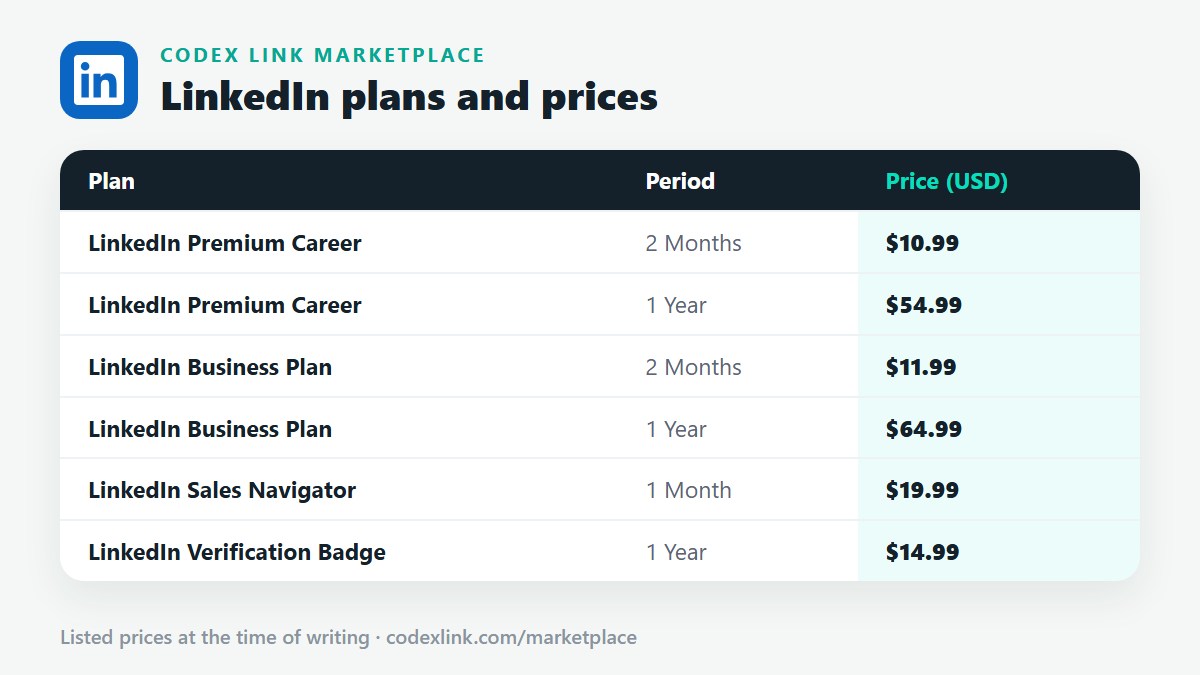
LinkedIn sometimes shows longer trials or special offers to some members, but two months free is not standard and not guaranteed. "2 months free" links on coupon sites usually lead to the normal trial page. If you want two months of Premium at the lowest cost, CodeX Link offers Premium Career for $10.99 for 2 months and Business Premium for $15 for 2 months.
Free trial for each plan
| Plan | Free trial | Price after trial (official, monthly) | CodeX Link alternative |
|---|---|---|---|
| Premium Career | Often 1 month for eligible members | about $29.99 / month | $10.99 / 2 months |
| Premium Business | Often 1 month for eligible members | about $59.99 / month | $15 / 2 months (voucher) |
| Sales Navigator Core | Free trial for eligible users | about $99.99 / month | $19.99 / 1 month |
Trials, lengths and prices vary by country and account. LinkedIn shows the details before you confirm.
Sales Navigator free trial
LinkedIn offers a free trial of Sales Navigator to eligible users, often for one month on the Core plan. Start it from the Sales Navigator page or from LinkedIn's Premium options. Like Premium trials, it needs a payment card and renews at the full price unless cancelled. Use the trial intensively: set your sales preferences, build lead and account lists and save searches with alerts in the first week. If you are not eligible, CodeX Link offers genuine Sales Navigator for $19.99 a month. See cheap Sales Navigator.
LinkedIn Business free trial
Premium Business is often available as a free trial for eligible members. It includes unlimited people browsing, more InMail and company insights. After the trial, it renews at the full monthly price. If your Business trial is used, the CodeX Link Business Premium voucher costs $15 for 2 months, with no login details required. See cheap LinkedIn Business Premium.
How to cancel the free trial without being charged
- Open Settings & Privacy, then Subscriptions and payments (or Account preferences, depending on the app version).
- Select your Premium subscription.
- Choose Cancel subscription and follow the steps.
- Cancel at least a day or two before the trial ends.
After cancelling, you usually keep Premium until the end of the trial period. If you subscribed through the Apple App Store or Google Play, cancel in that store's subscription settings. Read activate, cancel and renew Premium.
Is there a free LinkedIn Premium account?
No genuine permanent free Premium accounts exist. Offers of "free Premium accounts" on social media, forums or Telegram are usually shared logins or stolen accounts. They break LinkedIn's rules, do not improve your own profile, can be locked at any time and may expose your data. Free LinkedIn access is the standard free plan, plus a free trial if you are eligible.
Free access to Premium features
- LinkedIn Learning: many universities, libraries and employers provide free access.
- Open Profile messages: some members allow free messages from anyone.
- Free plan tools: job search, Easy Apply, job alerts, connections and posting are all free.
- Employer programmes: some companies provide Premium or Sales Navigator to staff.
Why your free trial might not appear
- You had Premium or a trial in the past, often within the last year.
- Your account is new or has limited activity.
- The offer is not available in your country right now.
- You are using an app version that shows different offers; try the website.
Why the trial card step fails
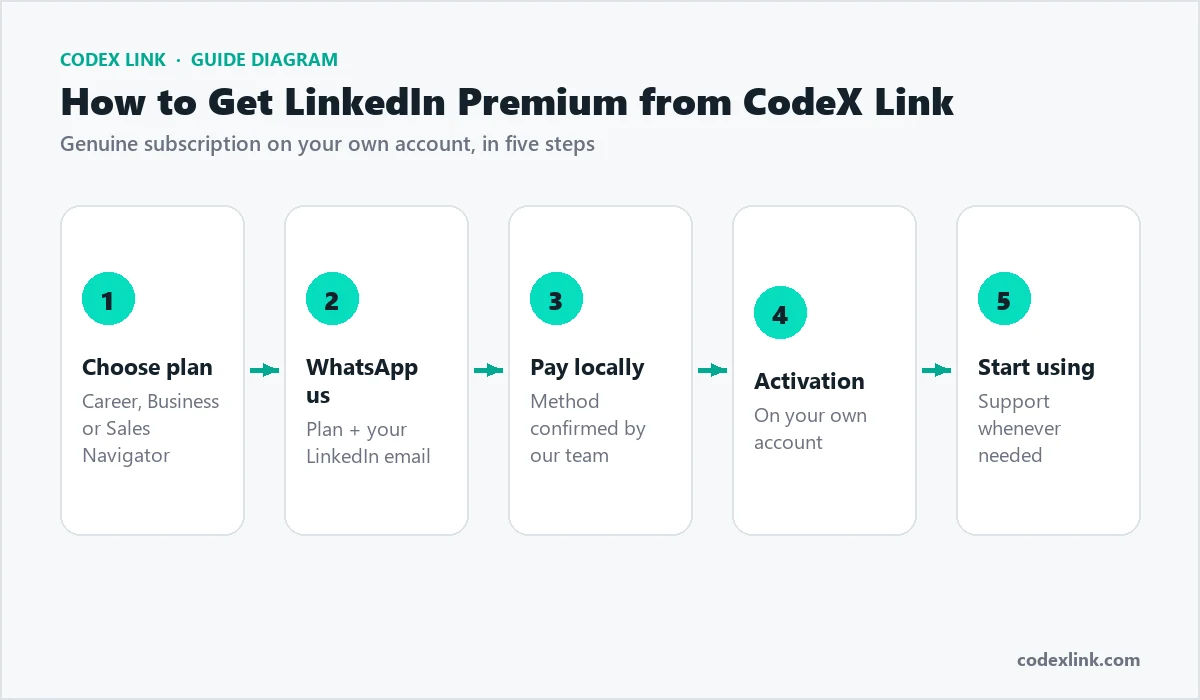
In many countries, local debit cards do not work for international subscriptions, or banks block the small verification charge. Common fixes are enabling international online payments in your bank app or using a different card. If it still fails, a CodeX Link plan avoids the problem: you can pay with a local method confirmed by our team.
Free trial vs CodeX Link
| LinkedIn free trial | CodeX Link plan | |
|---|---|---|
| Cost | Free for the trial period | From $10.99 for 2 months |
| Length | Usually 1 month | 2 months, 12 months or 1 month (Sales Navigator) |
| Card needed | Yes | No, local methods available |
| Auto-renewal | Yes, at the full price | No |
| Eligibility | Limited | Anyone |
Getting the most from a free month
- Prepare your profile before starting the trial.
- Use every InMail credit for your best opportunities.
- Check who viewed your profile and follow up.
- Apply early to Top Applicant jobs.
- Finish one LinkedIn Learning course.
Common mistakes
- Starting a trial before your profile is ready.
- Forgetting to cancel and being charged the full price.
- Using "free Premium account" logins from social media.
- Believing coupon sites offering "2 months free" codes.
What you get during the free trial
During the trial, you get the full features of the plan you choose:
- Premium Career: InMail credits, who viewed your profile, applicant insights, Top Applicant jobs and LinkedIn Learning.
- Premium Business: all of the above plus unlimited people browsing, more InMail and company insights.
- Sales Navigator: advanced lead and account search, lists, saved searches with alerts and InMail.
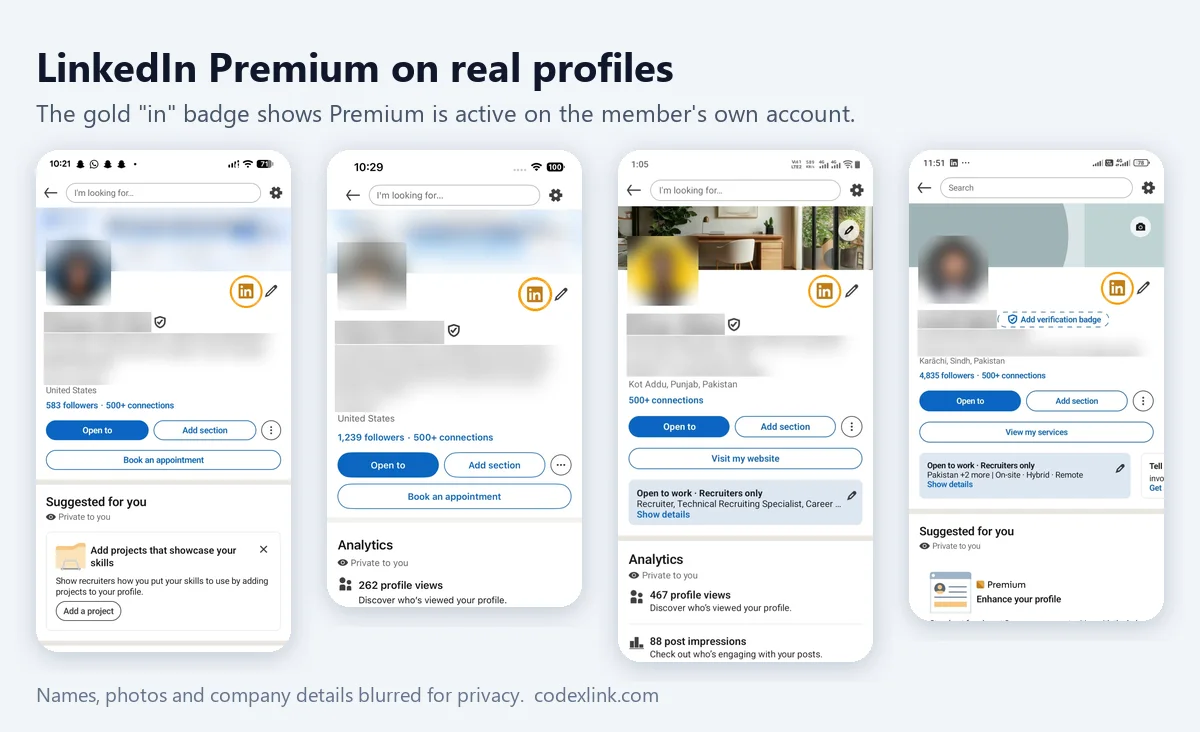
The gold Premium badge also appears on your profile during the trial.
A 30-day plan for your free month
Days 1 to 3
- Update your headline, About section, experience and skills.
- Set Open to Work or your sales preferences.
- Set the cancellation reminder.
Days 4 to 21
- Apply to Top Applicant roles or build your first lead lists.
- Send InMails to your highest-value contacts.
- Check who viewed your profile every few days and follow up.
- Complete one LinkedIn Learning course.
Days 22 to 30
- Follow up on all conversations.
- Decide whether Premium is worth paying for.
- Cancel or continue before the trial ends.
After the trial: your options
| Option | Cost | Best if |
|---|---|---|
| Do nothing (trial converts) | Full monthly price | You want to keep paying LinkedIn monthly |
| Cancel and use the free plan | Free | Premium did not help enough |
| Switch to annual billing | Lower monthly cost, paid yearly | You will use Premium all year |
| Cancel and buy a CodeX Link plan | From $10.99 for 2 months | You want Premium for less, with no auto-renewal |
Free trial by country
Trial availability and prices after the trial differ by country, and so do payment problems. These guides cover local prices: Pakistan, India, UAE, Nigeria, Egypt, Kenya, USA, UK and Europe.
Can I get another free trial?
Usually not immediately. LinkedIn typically limits trials to members who have not had Premium recently. Creating a second account to get another trial breaks LinkedIn's rules, which allow one account per person, and can lead to restrictions. If you need Premium again, a low-cost paid plan is safer.
Free trial in the LinkedIn app
You can start a trial in the LinkedIn mobile app, but if you pay through the Apple App Store or Google Play, the subscription is managed by that store. To cancel, open your App Store or Google Play subscriptions rather than LinkedIn settings. Prices through app stores can also be different. Starting the trial on the LinkedIn website keeps billing in your LinkedIn account and is usually simpler to manage.
Free trial for teams and companies
Companies interested in Sales Navigator Advanced, LinkedIn Recruiter or LinkedIn Learning for staff can contact LinkedIn's sales team, which may offer a trial or demo for the team. Individual employees can still use their own Premium trials if eligible.
Is the free trial worth it?
Yes, if you are eligible and have a working card: it is the best way to see whether Premium helps you. Prepare first, use it every day and set a reminder to cancel. If you are not eligible or cannot pay by card, a short CodeX Link plan gives you the same Premium experience at low cost, without the risk of an unexpected renewal charge.
Free trial vs free plan
The free trial gives you temporary Premium. The free plan is LinkedIn's permanent basic membership, and it is still powerful: you can build a full profile, apply to jobs, set job alerts, follow companies, post content, join groups, message connections and use the Open to Work feature. Many people get jobs and clients with the free plan alone. Premium adds tools that make the process faster, especially InMail, the profile viewer list and applicant insights.
Trials for LinkedIn Learning
LinkedIn Learning, which is included in Premium Career and Premium Business, has also been offered as a standalone trial in some cases. Many universities, public libraries and employers provide it free. Check with yours before paying.
Does cancelling the trial delete anything?
No. Cancelling only stops the paid renewal. Your profile, connections, messages and any LinkedIn Learning certificates stay on your account, and Sales Navigator lists are kept for when you return. People can still reply to InMails you sent during the trial.
Free trial refunds
If the trial converted to a paid plan before you cancelled, contact LinkedIn Help quickly. Refunds are not guaranteed and depend on LinkedIn's policy and local consumer law, so cancelling on time is far easier than asking for a refund afterwards.
Keep the trial confirmation email from LinkedIn; it shows the start date, plan and the date your first payment would be taken.
How CodeX Link can help
Used your trial, or your card will not work? Buy genuine Premium Career for $10.99 for 2 months, Business Premium for $15 or Sales Navigator for $19.99 from the CodeX Link marketplace. Email support@codexlink.com or WhatsApp +92 343 5673902.