
Search engine optimisation is not a trick; it is a set of habits that help Google understand your website and trust it. Work through this checklist in order. The early steps fix problems that would hold back everything else.
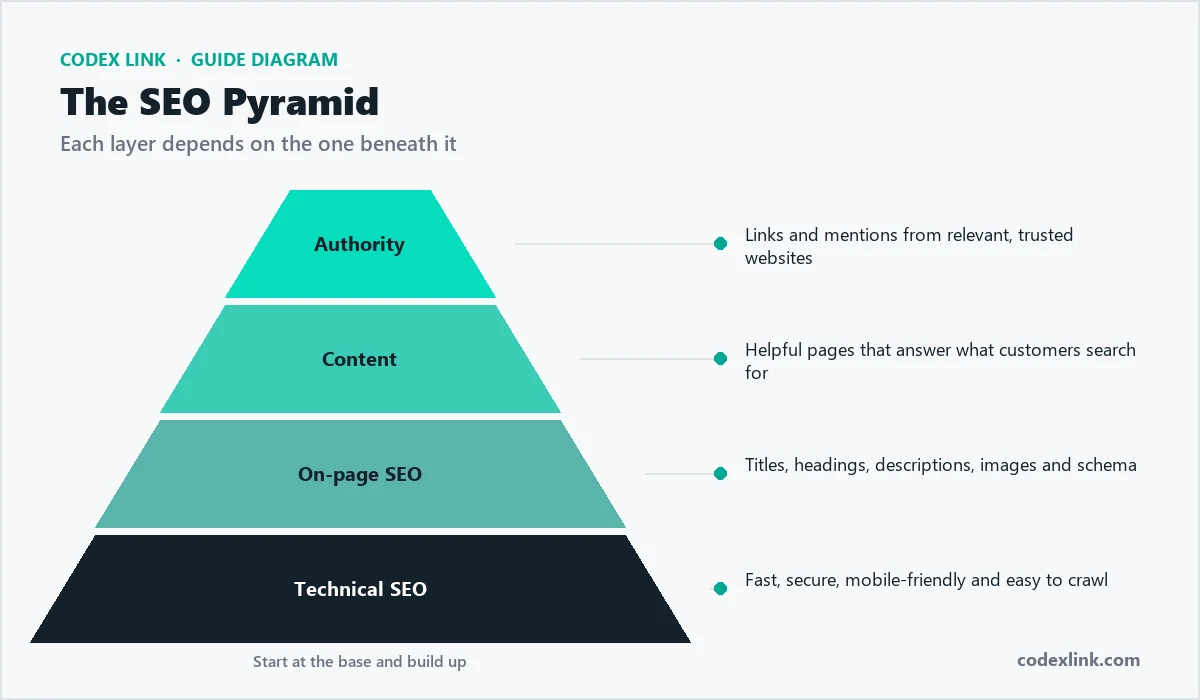
Technical foundations
- Use HTTPS everywhere. Install an SSL certificate and redirect every page to the secure version.
- Make every page mobile-friendly. Google ranks the mobile version of your site.
- Speed up your pages. Compress images (WebP is ideal), use caching and choose fast hosting.
- Submit an XML sitemap in Google Search Console so Google finds all your pages.
- Fix broken links and 404 errors, and redirect old URLs to their new pages.
- Keep one URL per page. Set a canonical URL so duplicate versions do not compete.
Keywords and on-page SEO
- Research what customers search for. Target specific phrases such as "web design company in Lahore" rather than single words.
- Give each page one main topic and one primary keyword.
- Write a unique title tag under 60 characters with the keyword near the start.
- Write a meta description of 120 to 160 characters that makes people want to click.
- Use one H1 heading per page, and organise the rest with H2 and H3 headings.
- Add descriptive alt text to images so they can appear in Google Images.
- Add structured data (schema) for your business, services, FAQs and articles.

Local SEO
- Claim and complete your Google Business Profile with photos, hours and services.
- Keep your name, address and phone number identical on your website and every directory.
- Ask happy customers for Google reviews, and reply to every review.
Content and authority
- Publish helpful articles regularly that answer your customers' real questions.
- Link related pages together so visitors and Google can follow a clear path.
- Earn links from relevant websites: partners, suppliers, industry directories and local press.
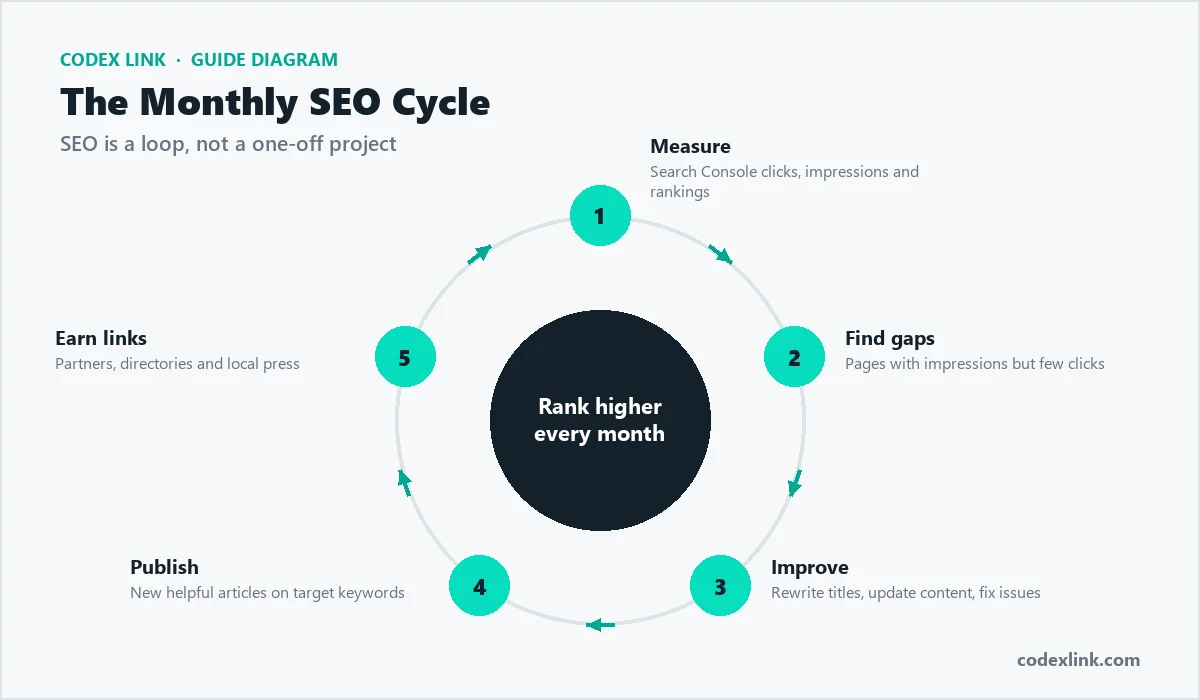
- Measure and improve. Check Search Console monthly for pages that get impressions but few clicks, and improve their titles and content.
Free tools that make SEO easier
- Google Search Console shows which searches bring visitors, indexing problems and page-experience issues.
- Google Analytics shows what visitors do on your site and which pages turn them into customers.
- Google Business Profile controls how your business appears on Google Maps and in local results.
- PageSpeed Insights tests the speed of any page on mobile and desktop.
Common SEO mistakes
- Targeting only broad keywords like "hosting" instead of the specific phrases customers actually use.
- Copying text from other websites or using the same description on many pages.
- Keyword stuffing. Write naturally for people; Google understands synonyms and context.
- Buying cheap links. Low-quality link schemes can harm your rankings instead of helping.
- Forgetting old pages. Update outdated content instead of letting it slip down the results.
How long does SEO take?
Technical fixes can help within weeks, but competitive rankings usually build over several months of consistent work. SEO compounds: pages that rank keep bringing visitors without paying for every click, which is why it is one of the best long-term investments for a small business.
Step-by-step SEO plan for your first 90 days
Days 1 to 30: foundations
- Set up Google Search Console and Google Analytics, and submit your sitemap.
- Fix technical problems: broken links, missing titles, slow pages and mobile issues.
- Write a unique title and meta description for every important page.
- Create or claim your Google Business Profile and complete every field.
Days 31 to 60: content and local presence
- Improve your main service pages with clear headings, FAQs and proof such as reviews.
- Publish two helpful articles answering questions customers ask you.
- List your business in trusted directories with the same name, address and phone number.
- Ask happy customers for Google reviews.
Days 61 to 90: authority and measurement
- Earn links from local partners, suppliers, associations and press mentions.
- Review Search Console to find keywords where you rank on page two, and improve those pages.
- Add internal links from articles to service pages.
- Report on calls, forms and bookings from organic search, not just rankings.
How to find the right keywords
Good keywords match what customers actually type. Start with your services and location, then expand:
- List every service you offer, in the words customers use, not internal jargon.
- Add locations: "plumber in Lahore", "dentist near DHA", "web design Dubai".
- Use Google's autocomplete and "People also ask" to find real questions.
- Check Search Console for queries that already bring impressions.
- Group keywords by page: one main topic per page avoids pages competing with each other.
Writing a page that ranks
- Answer the question early: put the main answer or offer in the first paragraph.
- Use clear headings (H2 and H3) that include related terms naturally.
- Show expertise: real examples, photos of your work, prices or price ranges, and named team members.
- Add FAQs that answer common customer questions in two or three sentences each.
- Make contact easy: phone, WhatsApp and a short form on every service page.
Getting recommended by AI assistants
More people now ask ChatGPT, Gemini, Copilot and Perplexity for recommendations. These tools rely on clear, consistent, trustworthy information. To be included:
- Keep your business name, address, phone and services identical everywhere online.
- Publish clear service pages and FAQs that state who you serve, where and what it costs.
- Earn reviews and mentions on reputable sites.
- Allow search and AI crawlers in robots.txt and keep your sitemap up to date.
Measuring SEO the right way
| Metric | Where to find it | Why it matters |
|---|---|---|
| Impressions and clicks | Google Search Console | Shows visibility and interest |
| Average position by page | Search Console | Shows which pages to improve |
| Organic leads | Analytics and form tracking | The number that pays the bills |
| Google Business Profile actions | Business Profile performance | Calls, directions and website clicks |
| Page speed | PageSpeed Insights | Affects rankings and conversions |
SEO for different types of business
- Local services: Google Business Profile, reviews and location pages matter most.
- Online stores: product descriptions, category pages, structured data and fast loading.
- B2B companies: detailed service pages, case studies and industry articles.
- Professionals: author pages, credentials and helpful guides that show expertise.
Technical SEO checklist in detail
- HTTPS everywhere: every page loads securely, and HTTP redirects to HTTPS.
- One version of each page: choose www or non-www and use canonical tags to avoid duplicates.
- XML sitemap: lists your important pages and is submitted in Search Console.
- Robots.txt: blocks admin and checkout areas but not your public pages.
- Mobile-friendly design: text readable without zooming, buttons easy to tap.
- Fast loading: compressed images, caching and minimal heavy scripts.
- Structured data: LocalBusiness, Product, FAQ and Article markup where relevant.
- Clean URLs: short, readable addresses such as /services/ac-repair.
- No broken links: check regularly and fix or redirect.
Local SEO in more depth
For businesses that serve a city or area, local SEO often brings the fastest results.
- Google Business Profile: correct category, services, hours, photos and weekly posts.
- Reviews: ask every satisfied customer, reply to every review, positive or negative.
- NAP consistency: identical name, address and phone on your site and directories.
- Location pages: one helpful page per area you serve, with real local details, not copied text.
- Local links: chambers of commerce, local news, sponsorships and partner businesses.
Content ideas that attract customers
- Answers to the questions customers ask before buying.
- Price guides that explain what affects cost.
- Comparisons, such as "repair or replace" or "option A vs option B".
- Step-by-step guides and checklists.
- Case studies showing a real problem, solution and result.
Our guides section is an example: each guide answers a specific question in depth.
Link building without risk
Links from other websites remain a strong ranking signal, but quality matters far more than quantity. Avoid buying links in bulk or joining link networks; they can lead to penalties. Instead, earn links by being useful: publish data or guides others cite, get listed by suppliers and partners, contribute expert quotes to journalists and sponsor local events. A few relevant links from trusted local or industry sites outperform hundreds of low-quality ones.
SEO tools for small businesses
You can do a lot with free tools: Google Search Console, Google Analytics, Google Business Profile and PageSpeed Insights. Paid tools add keyword research and competitor analysis. See our guide to the best SEO tools for small business.
SEO questions answered in detail
Do I need to blog for SEO?
Not every business needs a blog, but helpful content that answers customer questions is one of the most reliable ways to rank. Two well-researched articles a month usually beat ten short, thin posts.
Should I target keywords in other cities?
Only if you genuinely serve those cities. Create a useful page for each area with real local details. Pages that only swap the city name are low quality and rarely rank.
How important are reviews for SEO?
For local searches, very important. The number, recency and quality of Google reviews influence Maps rankings and whether people click. Reply to every review professionally.
Does social media help SEO?
Social posts are not a direct ranking factor, but they help people discover your content, which can lead to links, brand searches and visits that support SEO.
Can I do SEO myself?
Yes, the basics in this checklist are achievable for most owners. As competition grows, a specialist can save time and avoid mistakes, especially with technical issues and link building.
Why did my rankings drop?
Common causes include technical problems after a website change, competitors improving their pages, Google algorithm updates, lost links or a slow website. Check Search Console for errors first, then compare your pages with the sites now ranking above you.
Monthly SEO routine (two hours a month)
- 15 minutes: check Search Console for errors, coverage problems and new queries.
- 15 minutes: post an update and new photos on your Google Business Profile.
- 15 minutes: reply to all new reviews and request reviews from recent customers.
- 45 minutes: improve one existing page: better title, clearer answer, new FAQs or internal links.
- 30 minutes: plan or outline next month's helpful article.
Consistency beats intensity. A small monthly routine, repeated for a year, builds rankings that are hard for competitors to catch.
Printable one-page SEO checklist
- Search Console and Analytics set up; sitemap submitted.
- Every page has a unique title and description.
- Site is secure (HTTPS), fast and mobile-friendly.
- Google Business Profile complete with photos and weekly posts.
- Same name, address and phone on every listing.
- Each service has its own detailed page with FAQs.
- Two helpful articles published each month.
- Reviews requested and answered every week.
- Quality links earned from local and industry sites.
- Monthly report on organic leads, not just rankings.
When to bring in an SEO specialist
Consider professional help if your website has technical errors you cannot fix, if rankings have dropped suddenly, if you compete in a crowded market, or if you simply do not have time to follow a monthly routine. A good specialist explains what they will do, reports on leads and never promises guaranteed first positions.
Further reading
- Google Ads vs SEO: decide how to balance paid and organic traffic.
- Best SEO tools for small business: free and paid tools to track progress.
- How much does a website cost?: budget for a site built with SEO in mind.
Want this done for you?
CodeX Link SEO services cover technical audits, keyword research, on-page optimisation and link building, with monthly reports in plain language. Pair it with our content writing team to publish articles that rank and convert.