
Both Google Ads and SEO put your business in front of people who are already searching for what you sell. The difference is how you pay and how long the results last. Here is how to decide where your marketing budget should go.
How each one works
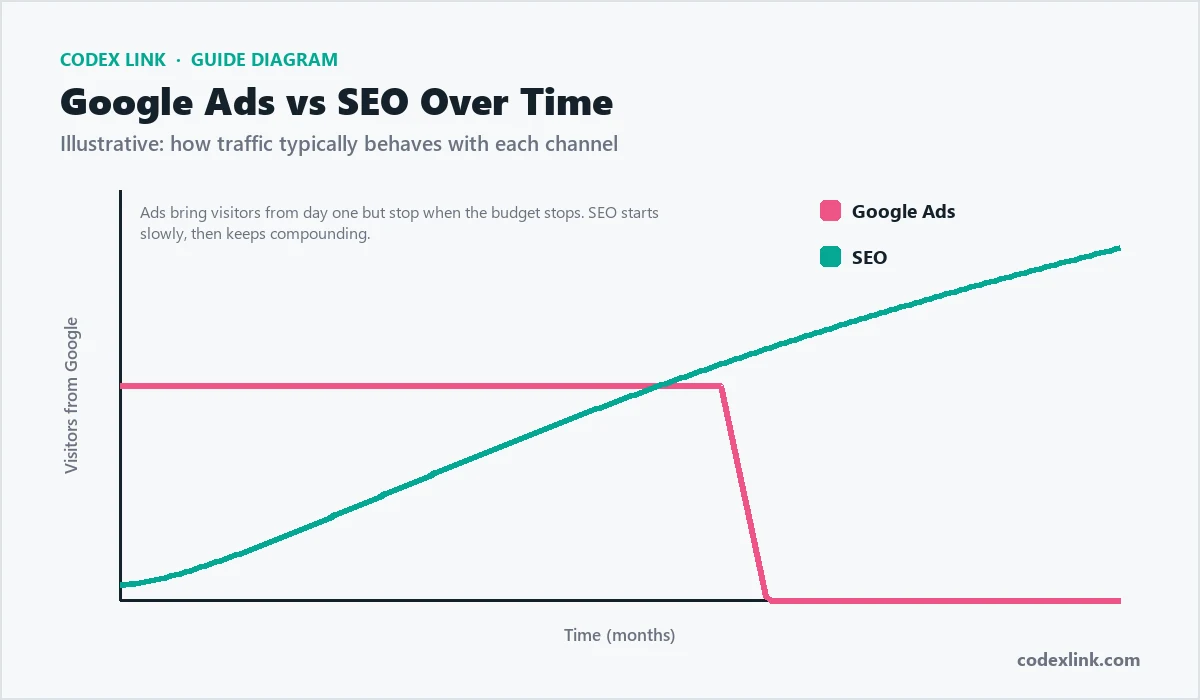
Google Ads lets you pay to appear at the top of search results for chosen keywords. You pay each time someone clicks your ad, and your visibility stops when you stop paying.
SEO (search engine optimisation) improves your website so it ranks in the free, organic results. It takes longer to build, but the traffic keeps coming without paying per click.
Side-by-side comparison
| Google Ads | SEO | |
|---|---|---|
| Speed | Traffic from day one | Builds over months |
| Cost model | Pay for every click | Invest in content and optimisation |
| When you stop | Traffic stops | Rankings and traffic continue |
| Targeting | Precise: location, device, schedule, audience | Broad: anyone searching the topic |
| Trust | Labelled as sponsored | Many users trust organic results more |
| Best for | Launches, offers, testing keywords | Long-term, compounding growth |
When Google Ads makes more sense
- You are launching a new business or product and need customers now.
- You run time-limited offers or seasonal promotions.
- You want to test which keywords actually convert before investing in SEO content.
When SEO makes more sense
- You want a steady flow of leads without paying for every visit.
- Your customers research before buying and read guides and comparisons.
- Clicks in your industry are expensive, so organic traffic saves a lot over time.
The best answer for most businesses: both
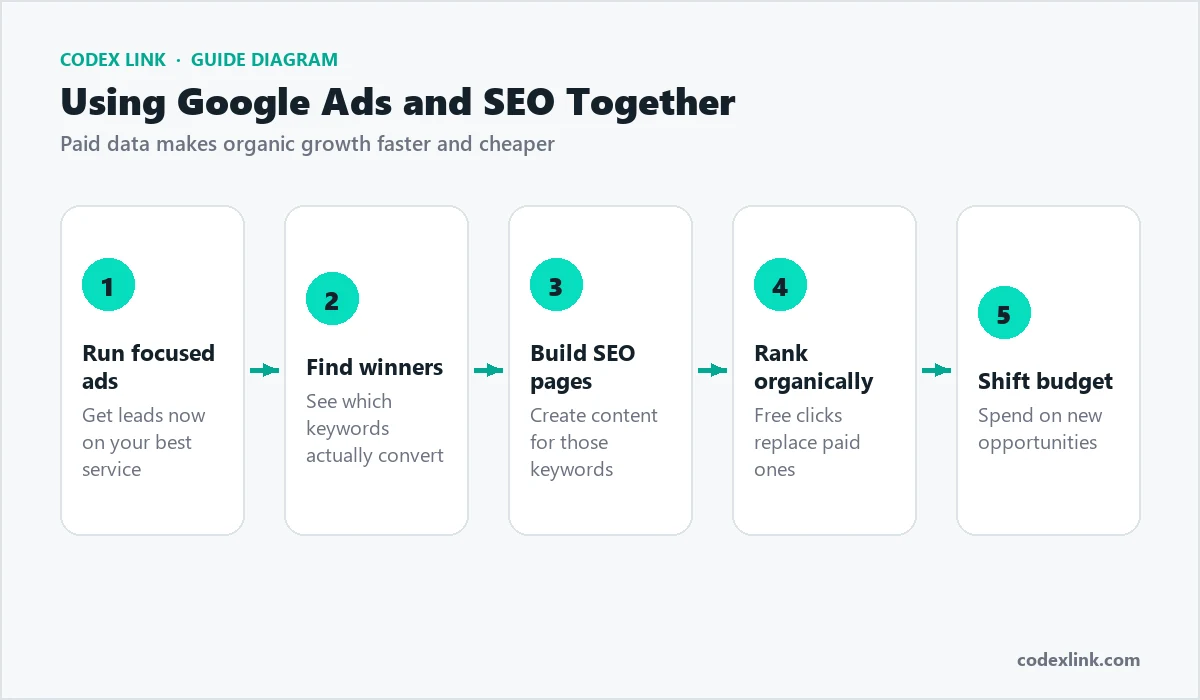
The strongest strategy combines them. Use Google Ads for immediate leads and to learn which keywords convert. Feed those winning keywords into your SEO plan. As organic rankings grow, you can reduce ad spend on terms you now rank for, and put the budget into new opportunities.
Mistakes to avoid
- Running ads without conversion tracking, so you cannot tell which clicks became customers.
- Sending ad traffic to your home page instead of a focused landing page.
- Expecting SEO results in two weeks and giving up too early.
How to measure success
Whichever channel you choose, judge it on business results rather than clicks alone:
- Cost per lead or sale: total spend divided by the enquiries or orders it produced.
- Conversion rate: the share of visitors who call, message, fill in a form or buy.
- Return on ad spend: revenue from ads divided by what the ads cost.
- Organic growth: clicks and impressions in Google Search Console, month by month.
A simple plan for the first three months
- Month 1: set up conversion tracking, launch a focused Google Ads campaign on your best service, and fix technical SEO issues.
- Month 2: pause keywords that do not convert, improve landing pages, and publish helpful articles on the keywords that do.
- Month 3: scale the profitable ad groups, build links to your key pages, and compare cost per lead across both channels.
Understanding Google Ads costs
Google Ads works like an auction. You choose keywords and a maximum bid, and Google decides which ads appear based on your bid and the quality of your ad and landing page. You pay when someone clicks. The cost per click depends heavily on the industry and location: legal, insurance and finance keywords are usually expensive, while local services in smaller cities are often affordable.
- Quality Score: relevant ads and fast, relevant landing pages lower your cost per click.
- Match types: phrase and exact match keep ads focused; broad match can waste budget without careful monitoring.
- Negative keywords: exclude searches such as "free", "jobs" or "DIY" that will not become customers.
- Location and schedule: show ads only where and when you can serve customers.
How SEO builds value over time
SEO is slower but compounds. A page that ranks well can bring visitors for years without paying for each click. The investment goes into content, technical quality and reputation rather than clicks.
- Months 1 to 3: technical fixes, service pages and Google Business Profile improvements.
- Months 3 to 6: helpful articles and local signals start bringing steady visits.
- Months 6 to 12: rankings strengthen as content and links grow, and cost per lead falls.
Our SEO checklist for small business shows the steps in detail.
Google Ads vs SEO by industry
| Business | Start with | Why |
|---|---|---|
| Emergency services (plumbing, locksmiths) | Google Ads + Business Profile | Customers need help now and call the first result |
| New online store | Google Shopping ads, then SEO | Sales from day one while product pages gain rankings |
| Clinics and professional services | SEO + local, with some Ads | Trust and reviews matter; searches are steady |
| B2B and software | SEO content + targeted Ads | Long research cycles reward helpful content |
| Seasonal offers and events | Google Ads | Short windows need instant visibility |
Landing pages: where both succeed or fail
Whether visitors come from ads or organic search, the page they land on decides whether they become customers. A strong landing page has:
- A headline that matches what the visitor searched for.
- A clear offer and price or price range.
- Proof: reviews, photos of real work, certifications or client logos.
- An obvious next step: call, WhatsApp, booking or a short form.
- Fast loading on mobile, ideally under three seconds.
Budget planning example
Business:          dental clinic in one city
Google Ads:        small daily budget on "dentist near me" and
                   "teeth whitening [city]" for immediate patients
SEO:               service pages, Google Business Profile, reviews,
                   two articles a month
Month 1-3:         most new patients from Ads
Month 6+:          organic search and Maps bring a growing share,
                   Ads budget focused on high-value treatments
Tracking: the part most businesses skip
Without tracking, you cannot know which channel works. Set up conversion tracking in Google Ads for calls, forms and WhatsApp clicks, link Google Ads with Analytics, and use Search Console for SEO. Review cost per lead from each channel monthly, and move budget towards the cheapest source of good customers.
Google Ads campaign types explained
- Search: text ads on Google results for chosen keywords. Best for high-intent searches.
- Performance Max: automated campaigns across Search, YouTube, Display, Gmail and Maps. Powerful but needs good tracking.
- Shopping: product ads with images and prices for online stores.
- Local and Maps: ads that promote your location and calls.
- Display and YouTube: awareness and remarketing to past visitors.
SEO strategies that complement your ads
- Use Google Ads search term reports to discover keywords that convert, then create SEO pages for them.
- Turn high-performing ad copy into page headings and meta titles.
- Use organic rankings for expensive keywords so you can reduce ad spend over time.
- Remarket to organic visitors with display or YouTube ads.
Common budget questions
How much should a small business spend on Google Ads?
Start with a test budget you can afford to lose for a month, focused on one service and one area. Calculate how much a customer is worth to you; if the cost per customer from ads is lower, scale gradually.
How much does SEO cost?
SEO is usually a monthly investment in content, technical work and local optimisation. The right amount depends on competition. See our SEO service for packages.
Can I stop ads once SEO works?
Many businesses reduce ads as SEO grows but keep a smaller budget for competitive or seasonal keywords and remarketing.
Mistakes that waste money
- Sending ad traffic to the homepage instead of a matching landing page.
- No conversion tracking, so you cannot see which keywords produce customers.
- Targeting the whole country when you serve one city.
- Expecting SEO results in two weeks and giving up too early.
- Copying competitor keywords without checking whether they bring the right customers.
Reporting you should expect from an agency
| Channel | Monthly report should show |
|---|---|
| Google Ads | Spend, clicks, cost per click, conversions, cost per lead, search terms |
| SEO | Rankings for target keywords, organic traffic, organic leads, work completed |
| Both | Leads and sales by channel and next month's plan |
Google Ads vs SEO: questions answered
Do Google Ads help my SEO rankings?
No. Paying for ads does not improve organic rankings directly. Ads can, however, show you which keywords convert, which helps you plan SEO content.
Which is faster, Google Ads or SEO?
Google Ads can bring visitors on the day campaigns go live. SEO usually takes several months to show meaningful results, but the traffic continues without paying per click.
Which brings better quality leads?
It depends on targeting. High-intent searches in both channels bring good leads. Many businesses find organic visitors trust them slightly more, while ads give precise control over which searches you appear for.
Should I bid on my own brand name?
Often yes, if competitors bid on it or you want to control the message. Brand clicks are usually cheap. If nobody else competes for your name, organic results may be enough.
What about Google Maps?
Map results come from your Google Business Profile, which is free and part of local SEO. You can also run local ads, but a complete profile with good reviews is the foundation.
Can small businesses compete with big brands?
Yes, especially locally. Specific services, local pages, reviews and quick responses help small businesses win searches that national brands do not target closely.
How do I choose an agency?
Ask for examples in your industry, clear reporting, who owns the ad account, and how results are measured. Avoid anyone who guarantees first position on Google.
Decision checklist
Use these questions to decide where to put your budget first:
- Do you need customers this month? Start with Google Ads.
- Is your website new, with no rankings yet? Use Ads while SEO builds.
- Are clicks in your industry very expensive? Invest more in SEO.
- Do customers research for weeks before buying? Create helpful SEO content.
- Do you serve a local area? Prioritise your Google Business Profile and local SEO.
- Do you have a limited budget? Focus on one service and one area in either channel.
Review the decision every three months using real lead data, and move budget to the channel with the lowest cost per good customer.
Key takeaways
- Google Ads buys immediate visibility; SEO earns lasting visibility.
- Most businesses grow fastest by using Ads for quick leads while SEO builds.
- Strong landing pages and conversion tracking decide whether either channel is profitable.
- Local businesses should treat their Google Business Profile as a top priority.
- Judge both channels by cost per customer, not clicks or rankings alone.
Revisit your mix every quarter. As organic rankings grow, you can usually reduce ad spend on the same keywords and reinvest it in new services or areas.
Glossary
- CPC: cost per click, what you pay each time someone clicks your ad.
- CTR: click-through rate, the share of people who click after seeing your ad or listing.
- Conversion: a valuable action, such as a call, form, booking or sale.
- Organic: unpaid search results earned through SEO.
- SERP: the search engine results page.
Further reading
- SEO checklist for small business: the step-by-step basics of ranking.
- How much does a website cost?: budget for landing pages that convert.
- Google Ads management: campaigns set up and optimised by CodeX Link.
- SEO services: ongoing SEO with monthly reporting.
Whichever channel you start with, the businesses that win are the ones that measure honestly, keep improving their landing pages and stay consistent for months rather than weeks. Small, steady improvements in both channels compound into a reliable flow of customers.
Let CodeX Link run both
Our Google Ads management team builds campaigns with proper conversion tracking, and our SEO team grows the organic rankings that lower your cost per lead over time. Ask us for a free review of your current marketing.