LinkedIn is the one network where a freelancer in Lahore can reach a marketing director in London without paying for an advert. The people who hire are there, with their job titles on display.
Getting work from it takes a method. These answers cover finding the right people, writing messages they answer, and choosing the plan that fits how much outreach you do.
Finding clients for your service
How to get clients on LinkedIn?
Make your profile about the client's problem, not your CV. Search for the job titles that hire your service, connect with a short note, and start a conversation before you pitch. Post examples of your work each week so people who check your profile see proof.
How to find web development clients on LinkedIn?
Look for founders, marketing managers and operations heads at small and mid-sized companies, especially ones with outdated sites or new funding. Search job posts for web developer roles too, since a company hiring one may accept a contractor. Mention a specific improvement you noticed on their site.
How to find WordPress clients on LinkedIn?
Target marketing agencies, bloggers, small e-commerce brands and consultants, who commonly run WordPress. Search posts for phrases such as WordPress developer needed. Offer a clear, small first job, such as a speed fix or a plugin issue, to start the relationship.
How to get digital marketing clients?
Choose a niche, such as dentists, software firms or online stores, and show results for that niche in your posts and featured section. Reach out to owners and marketing heads with one observation about their current marketing. A short audit is a strong opening offer.
How to find high-paying clients online?
High-paying clients are businesses with budgets and a costly problem. Target companies by size and industry, speak to senior decision-makers, and price by outcome instead of hours. Case studies with numbers matter more than a low rate.
How to get clients without paid advertising?
Combine three free activities: direct outreach to chosen prospects, regular posts that show your expertise, and asking past clients for referrals. Comment on posts by people in your target market, since this puts your name in front of them before you message.
How to find potential customers for my business?
Describe your best customer by industry, company size, location and job title, then run that search on LinkedIn. Look at who engages with competitors' posts. Save the profiles in a list and work through them steadily.
How to identify companies that need web development?
Signs include a slow or dated website, a recent funding round, a rebrand, a new product launch, or job adverts for developers and marketers. Sales Navigator's filters for headcount growth and hiring activity make these companies easier to find.
How to find marketing agencies on LinkedIn?
Search Companies for marketing agency or digital agency and filter by location and size. Agencies often need overflow help with development, design or content. Contact the founder or operations lead and offer white-label work.
Finding clients in other countries
How to get international clients from Pakistan?
Set your profile in clear English, list your time zone and working hours, and show work for overseas clients if you have any. Search by country and job title, send relevant messages, and offer a call at a time that suits them. Reliable communication wins repeat work.
How to find clients in the USA on LinkedIn?
Filter People or Companies by United States, then by industry and title. Small and mid-sized firms are more open to remote contractors than large corporations. Mention your overlap with their working hours and quote in US dollars.
How to find clients in the UK on LinkedIn?
Filter by United Kingdom and your target industry. UK businesses respond well to short, polite, direct messages. Refer to something specific about their company and suggest a brief call. Quote in pounds where you can.
How to find clients in Canada on LinkedIn?
Filter by Canada, and narrow by city, such as Toronto or Vancouver, to keep lists manageable. Many Canadian small businesses outsource digital work. As with any market, a relevant first line matters more than a long introduction.
Finding decision-makers
How to find decision-makers on LinkedIn?
Search by titles that carry budget authority, such as founder, director, head of or vice president, and filter by company size. In small firms the owner decides. In larger ones, find the head of the relevant department.
How to find decision-makers by job title?
Use the title field in People search with terms such as marketing director or head of engineering. Sales Navigator lets you combine title with seniority level and function, which removes junior staff with similar titles from the results.
How to find business owners on LinkedIn?
Search People for owner, founder, co-founder or managing director, then filter by location and industry. Company size filters help you separate one-person businesses from established firms.
How to find CEOs and founders on LinkedIn?
Search for CEO or founder with your target industry and region. Sales Navigator's seniority filter for owner and C-level roles is more precise. Senior people get many messages, so yours needs a clear reason to reply.
How to find startup founders on LinkedIn?
Search founder with terms such as startup, seed or early stage, and filter by small company size. Follow funding announcements, because a newly funded startup is usually about to spend on hiring, development and marketing.
How to search LinkedIn by industry and location?
After a People or Companies search, open All filters and choose Industry and Locations. You can add several of each. Free accounts have basic filters. Sales Navigator adds postcode radius, company headcount and many more.
Leads and outreach
How to generate B2B leads on LinkedIn?
Define your target buyer, search for them, save them to a list, and contact a few each day with a personal message. Support the outreach with posts that address their problems. Consistency over weeks produces leads. One large blast does not.
How to find leads on LinkedIn?
Use People search with title, industry and location filters, look at who comments on relevant posts, and check the People also viewed panel on a good prospect's profile. Each of these produces more names like the ones that already fit.
How to build a lead list on LinkedIn?
On a free account, keep a spreadsheet with name, company, profile link and notes. In Sales Navigator, save leads into named lists and add notes inside the tool. Add 20 to 30 leads a week so you can contact each one properly.
How to send cold messages on LinkedIn?
Send a connection request with a short note, or an InMail if you have credits. Refer to something specific, state why you are writing in one sentence, and ask one easy question. Don't paste a sales pitch into the first message.
How to write a LinkedIn cold outreach message?
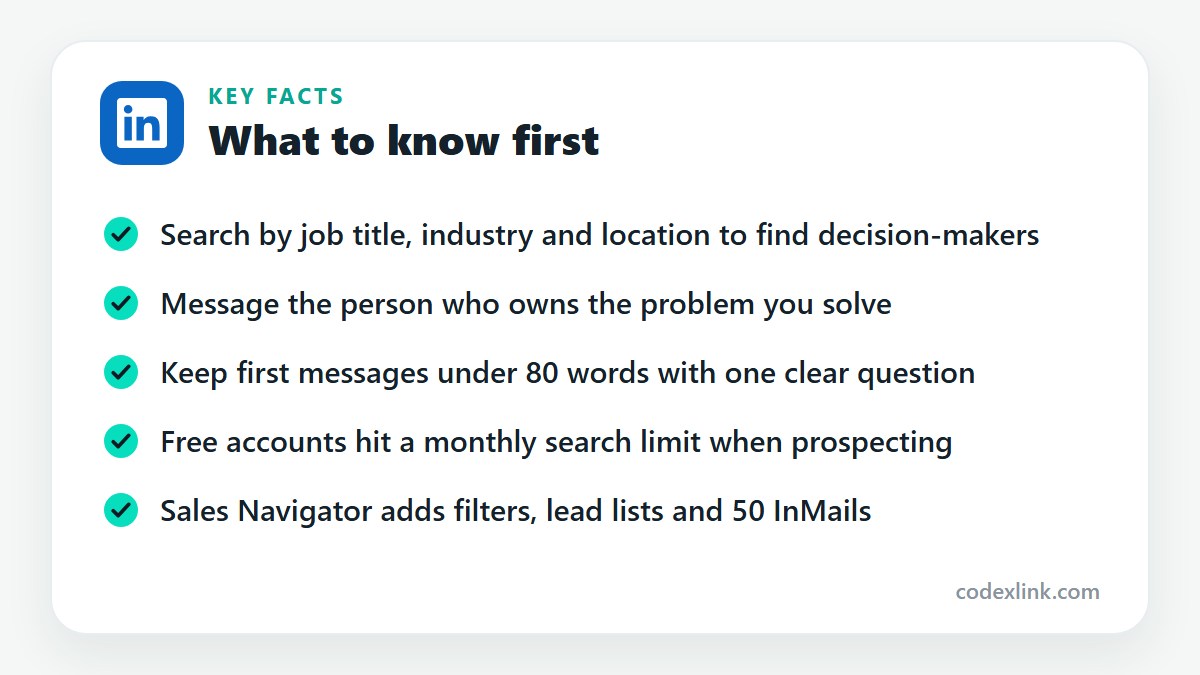
Use four parts: a relevant observation about them, one line on who you help, a small proof point, and a low-pressure question. Keep it under 80 words. For example, mention a detail from their site and ask whether improving it is a priority this quarter.
How to get replies to LinkedIn messages?
Make the message about them, keep it short, and ask a question that takes ten seconds to answer. Send it on a weekday morning in their time zone. Follow up once after about a week with something useful, such as a relevant tip.
How to book meetings through LinkedIn?
Once someone replies with interest, suggest two specific times or share a scheduling link. Keep the request small, such as a 15-minute call. Confirm by email with an agenda so the meeting feels worth attending.
How to get B2B leads without expensive tools?
A free LinkedIn account, a spreadsheet and steady manual outreach are enough to start. Use Google with site:linkedin.com searches to extend your results. When the free search limit starts blocking you, a short Sales Navigator period is the next step.
Which plan to use
Is LinkedIn Sales Navigator worth it for freelancers?
It is worth it if prospecting is a weekly activity and you keep hitting the free search limit. The advanced filters and saved lists save hours. If you contact only a few people a month, start with a free account or Premium Business.
LinkedIn Premium vs. Sales Navigator for freelancers
Premium Business gives you 15 InMails and unlimited browsing inside normal LinkedIn. Sales Navigator gives you 50 InMails, far more search filters, lead lists and alerts. Choose Business for light outreach and Sales Navigator for systematic prospecting.
What is the best LinkedIn plan for freelancers?
For most freelancers who actively look for clients, Sales Navigator offers the most value. Those who rely mainly on referrals and occasional outreach are well served by Premium Business.
LinkedIn plans and prices on CodeX Link
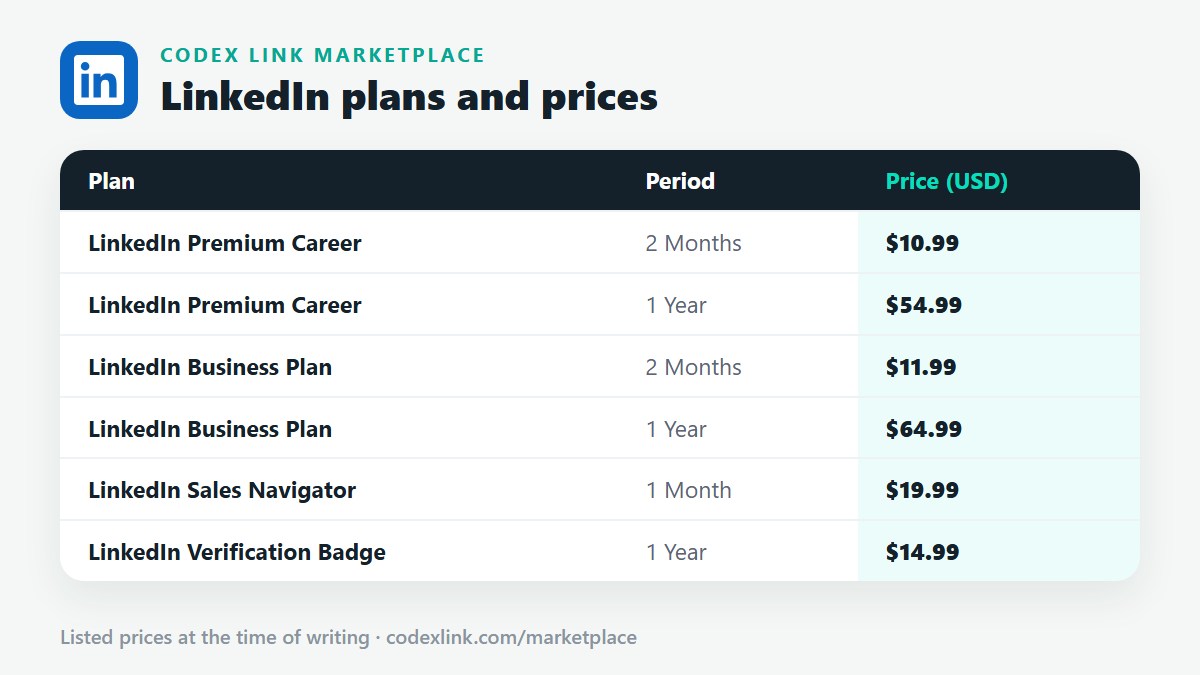
These are the LinkedIn plans listed on the CodeX Link marketplace at the time of writing. Message the team on WhatsApp to confirm the price and how activation works before you order.
| Plan | Period | CodeX Link price |
|---|---|---|
| LinkedIn Premium Career | 2 Months | $10.99 |
| LinkedIn Premium Career | 1 Year | $54.99 |
| LinkedIn Business Premium | 2 Months | $15 |
| LinkedIn Business Premium | 1 Year | $80 |
| LinkedIn Sales Navigator | 1 Month | $19.99 |
| LinkedIn Verification Badge | 1 Year | $14.99 |
Need a LinkedIn plan?
Chat with the CodeX Link team for the current price and activation details, or browse every tool in the marketplace.
LinkedIn is a trademark of its owner. Features, limits and prices change over time and differ by country, so confirm the current terms on LinkedIn before you buy.