

The United States is LinkedIn's largest market, with more members than any other country and the most competitive job and B2B markets in the world. Whether you are searching for a job in New York, selling software from Austin, recruiting in Chicago or freelancing from anywhere, a paid LinkedIn plan can save you time. This guide explains exactly what each plan costs in the US, what you get, how taxes and billing work, and how to decide whether Premium is worth it for you.
LinkedIn Premium price in the USA at a glance
| Plan | Official, monthly billing* | CodeX Link price | Best for |
|---|---|---|---|
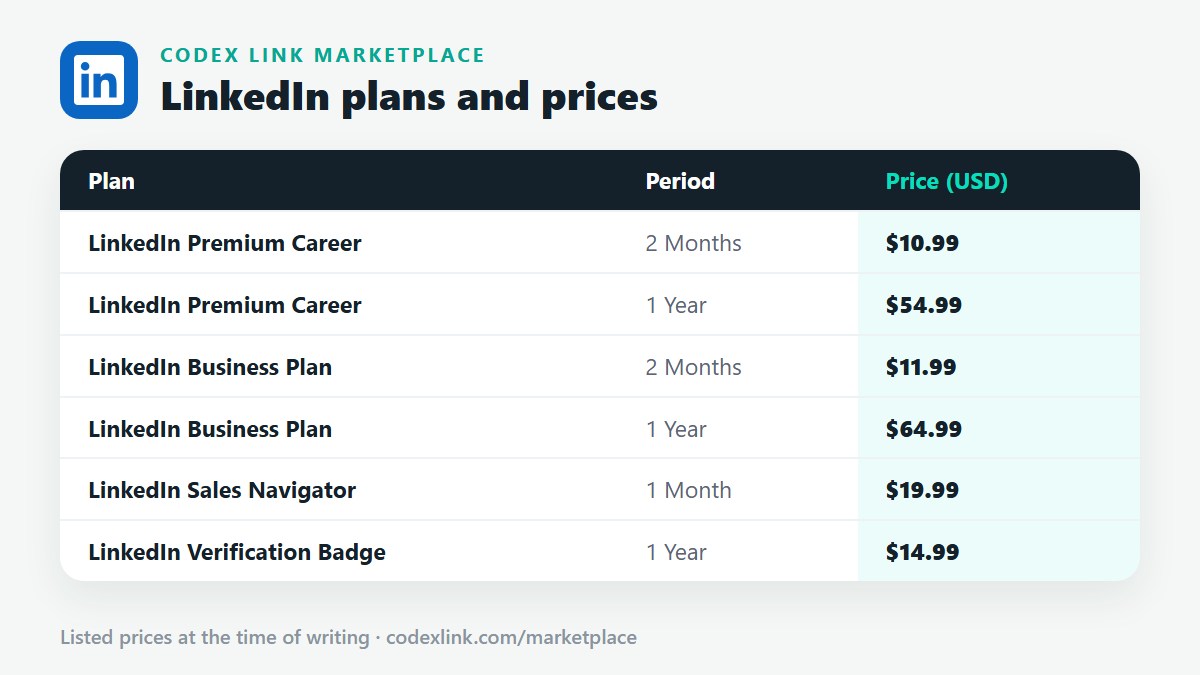
| Premium Career | about $29.99 / month | $10.99 / 2 months $54.99 / 1 year | Job seekers |
| Premium Business | about $59.99 / month | $11.99 / 2 months $64.99 / 1 year | Professionals, owners, freelancers |
| Sales Navigator Core | about $99.99 / month | $19.99 / 1 month | Sales reps, founders, agencies |
| Sales Navigator Advanced | about $149.99 / month | Ask our team | Sales teams |
| Recruiter Lite | about $170 / month | Ask our team | Recruiters and hiring managers |
*Commonly listed US prices on monthly billing at the time of writing. LinkedIn changes prices from time to time, annual billing usually lowers the monthly cost, and sales tax may apply depending on your state. LinkedIn shows the exact total at checkout.
Monthly vs annual billing
LinkedIn offers monthly and annual billing on most plans. Annual billing reduces the effective monthly price, often by a meaningful percentage, but you pay for the full year upfront and commit for twelve months. Monthly billing costs more per month but lets you cancel whenever your goal is reached, for example once you have accepted a job offer.
- Choose monthly if you need Premium for a short, focused job search.
- Choose annual if you use LinkedIn every week for sales, recruiting or business development.
- Choose a fixed-period CodeX Link plan if you want a lower price without automatic renewal.
Sales tax on LinkedIn Premium in the US
Sales tax on digital subscriptions in the United States depends on your state and sometimes your city. Some states tax digital services and software subscriptions, while others do not. LinkedIn calculates any applicable tax from your billing address and shows it at checkout. Businesses should keep invoices for their accounting records.
What each plan includes
Premium Career
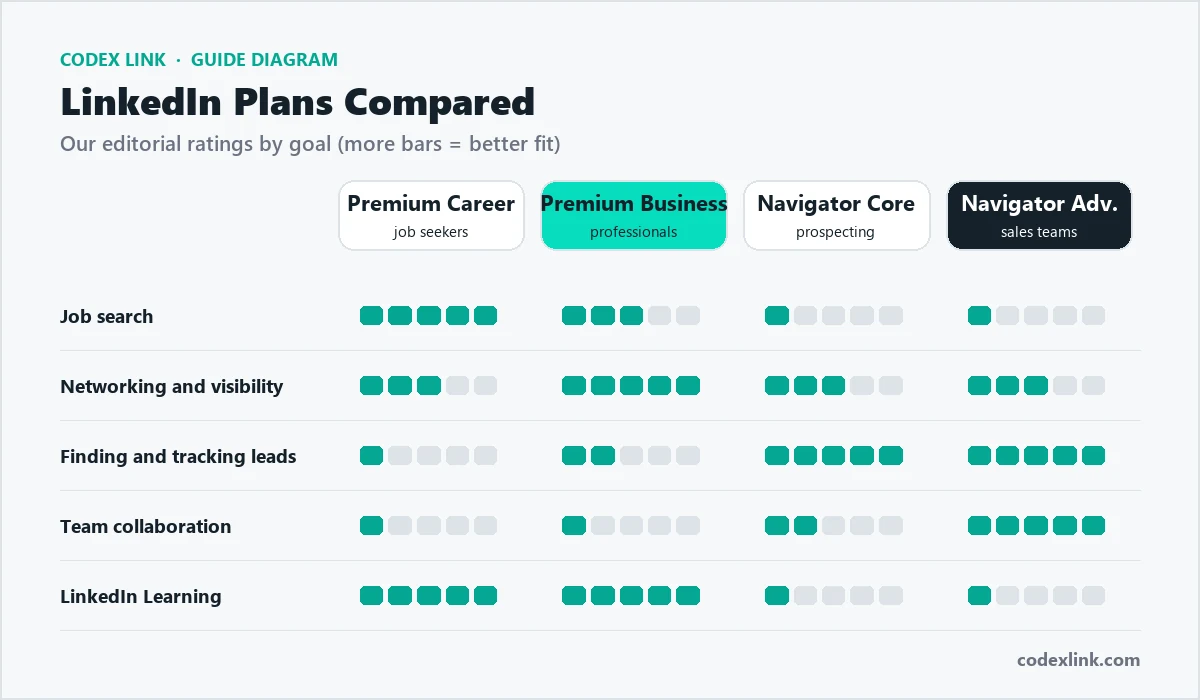
Built for job seekers: InMail credits to contact recruiters and hiring managers, a fuller history of who viewed your profile, applicant insights, Top Applicant jobs, LinkedIn Learning and AI-assisted writing tools on many accounts. See our Premium Career guide.
Premium Business
For professionals and business owners: more InMail, unlimited people browsing, company insights such as headcount growth and hiring trends, and LinkedIn Learning. See our Premium Business guide.
Sales Navigator
For B2B sales: advanced lead and account search, saved lists, alerts, more InMail and CRM integrations on higher tiers. See our Sales Navigator guide.
Recruiter Lite
For hiring: advanced candidate search, recruiting InMail, candidate tracking and hiring projects. Larger organisations use LinkedIn Recruiter, which is sold through LinkedIn's sales team.
Which plan should you choose in the US?
| You are... | Choose |
|---|---|
| Actively job hunting or changing careers | Premium Career |
| A consultant, freelancer or founder building a network | Premium Business |
| An SDR, AE, founder or agency doing outbound sales | Sales Navigator Core |
| A sales team sharing accounts | Sales Navigator Advanced |
| A hiring manager or small-company recruiter | Recruiter Lite |
For a deeper comparison, read which LinkedIn subscription is best.
Job searching in the US with Premium Career
US job postings often receive hundreds of applications within days, and many roles are filled through referrals and recruiter outreach. Premium Career helps you act faster and more directly.
- Apply in the first 24 to 72 hours after a role is posted; early applicants are reviewed first.
- Message the hiring manager or recruiter with InMail after applying.
- Use applicant insights to focus on roles where your skills match strongly.
- Check who viewed your profile and follow up with relevant recruiters.
- Ask for referrals from connections at target companies; referred candidates are much more likely to be interviewed.
A concise InMail to a US hiring manager:
Hi Jordan, I just applied for the Product Marketing Manager role.
At my current company I led three B2B SaaS launches that grew
pipeline 40% year over year. I would welcome the chance to share
how I would approach your upcoming launch. Thanks for your time.
Remote jobs and US time zones
Many US companies hire remotely across states, and some hire internationally. When you search, filter by "Remote" and check whether a role requires you to live in specific states for tax and employment reasons. US time zones span from Eastern to Pacific (and Alaska and Hawaii), so mention your time zone and working hours in your profile if you want remote roles.
B2B selling in the US with Sales Navigator
The US is the world's largest B2B market, and Sales Navigator is a standard tool for SDRs, account executives and founders.
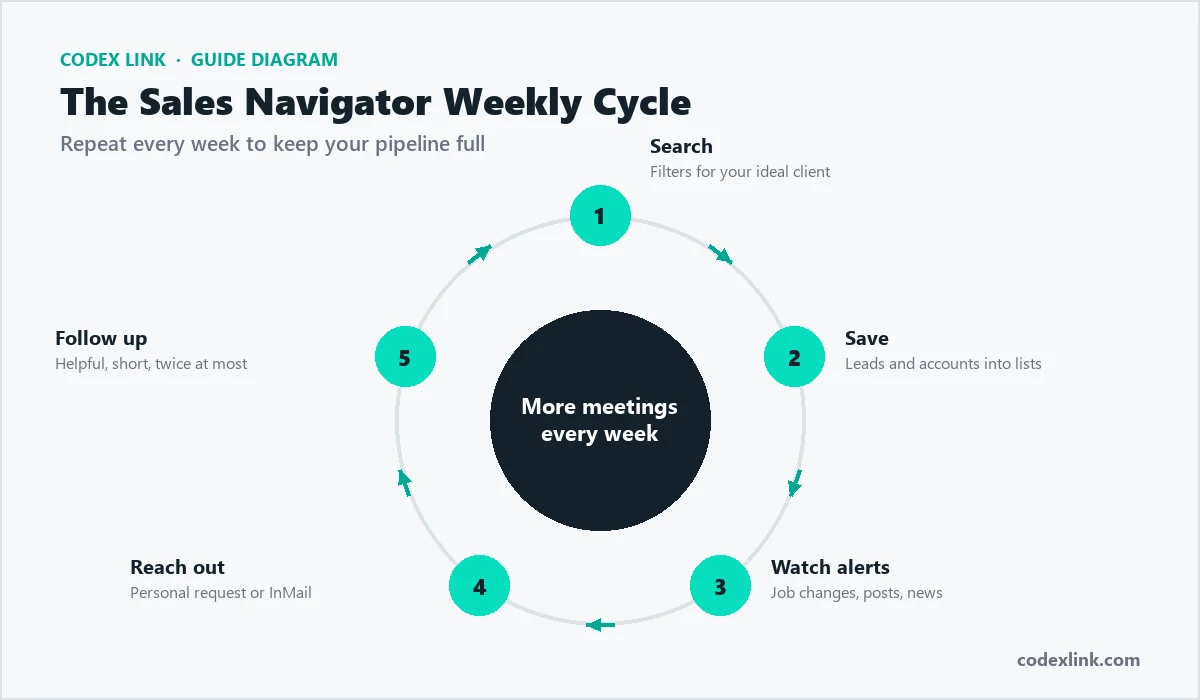
A lead search for a cybersecurity startup:
Geography:     United States
Function:      Information Technology
Seniority:     Director, VP, CXO
Company size:  201-500, 501-1,000
Industry:      Hospitals and Health Care, Financial Services
Spotlight:     Changed jobs in past 90 days
Combine Sales Navigator with email and phone outreach in a multi-touch sequence, and always personalise the first line with something specific to the prospect.
Recruiting in the US
For small companies hiring a few roles a year, Recruiter Lite offers advanced candidate filters, projects to track candidates and recruiting InMail. Search by skills, years of experience, location and current company, and write short, personal messages that explain why the role fits that person. See our guide on finding candidates on LinkedIn.
Students and new graduates in the US
College students and recent graduates can get strong results from LinkedIn without paying, but a short Premium Career plan during peak recruiting season can help. Add internships, projects, campus leadership and relevant coursework; connect with alumni through your university's LinkedIn page; and message alumni at target companies for advice and referrals. Many employers recruit interns and graduates months in advance, so start early in the academic year.
Freelancing and contract work
Independent consultants, freelancers and contractors in the US use LinkedIn's Services page, Premium Business and Sales Navigator to win clients directly. Post short case studies, ask satisfied clients for recommendations, and use Sales Navigator to build lists of companies in your niche. For contract roles, filter LinkedIn Jobs by "Contract" and set alerts for your skills.
Salary research before you negotiate
Several US states and cities require salary ranges in job postings, which gives you useful data. Combine posted ranges, conversations with people in similar roles and company insights on LinkedIn (such as team growth and recent hires) to understand your market value. Enter negotiations with a researched range rather than a single number.
Free trial and how cancellation works
Eligible members can often try Premium free for one month. You need a payment card, and the subscription renews automatically at the full price unless you cancel before the trial ends. To cancel, open Settings, then Subscriptions and payments, and choose to cancel. You keep Premium features until the end of the current billing period. Our guide to activating, cancelling and renewing Premium covers each step.
Is LinkedIn Premium a tax-deductible business expense?
For many US business owners and self-employed professionals, subscriptions used for business, such as Sales Navigator or Premium Business used for prospecting, may be deductible as ordinary business expenses. Job-search expenses for employees are treated differently under current federal rules. Tax rules are specific to your situation, so confirm with a tax professional.
How to get LinkedIn Premium cheaper in the US
- Use the free trial if you have not used it before.
- Choose annual billing for long-term use.
- Check employer and university access: some employers and schools provide LinkedIn Learning or Premium benefits.
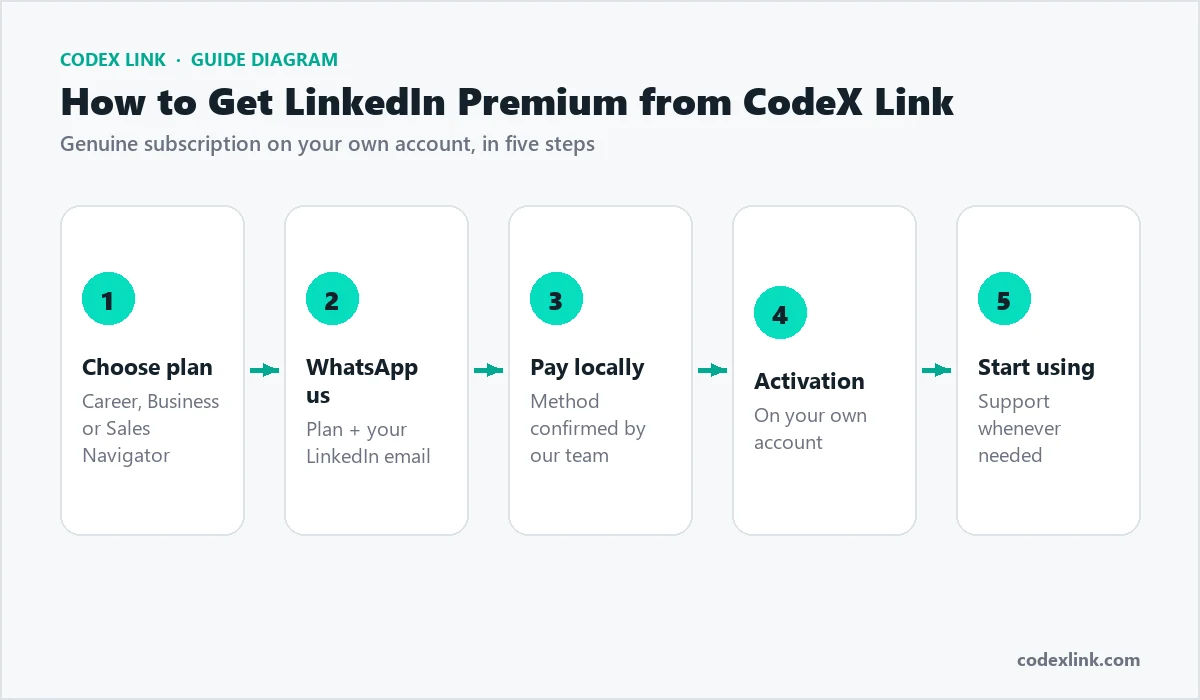
- Buy a genuine fixed-period plan from CodeX Link at a lower price, activated on your own account.
See our guide to Premium discounts, coupons and free trials.
Verification in the USA
In the US, LinkedIn identity verification has been handled by CLEAR. You confirm your phone number, scan a US passport, driving licence or state ID, and take a selfie; if you already have a CLEAR account, some steps are faster. Workplace verification through a company email is also available for many employers. Verified profiles build trust with recruiters and buyers. See our verification guide.

Getting the most from Premium
- Complete your profile before upgrading, including a keyword-rich headline and About section.
- Use every InMail credit each month on carefully chosen people.
- Review profile viewers weekly and follow up.
- Finish at least one LinkedIn Learning course and add the certificate.
- Post once or twice a week to stay visible to recruiters and buyers.
- Track results: applications, replies, interviews, meetings and deals.
Premium features glossary
- InMail: messages to people outside your network, using monthly credits.
- Who viewed your profile: a fuller history of profile visitors.
- Applicant insights: how you compare with other applicants.
- Top Applicant jobs: roles where you are a strong match.
- Open Profile: lets any member message you for free.
- LinkedIn Learning: the video course library included with Premium.
US industries most active on LinkedIn
Technology, financial services, healthcare, consulting, marketing and professional services are among the most active US industries on LinkedIn, both for hiring and B2B buying. Decision-makers in these sectors post regularly, comment on industry news and announce changes publicly, which gives job seekers and sellers timely reasons to start conversations. Follow leaders in your target industry and engage with their posts before you reach out.
Common mistakes
- Forgetting to cancel a free trial and paying for a month you did not need.
- Choosing Premium Business for job search, or Premium Career for prospecting.
- Sending long, generic InMails that get ignored.
- Upgrading with an incomplete profile.
- Buying shared accounts from unofficial sellers, which can get your profile restricted.
Is LinkedIn Premium worth it in the USA?
For active job seekers, Premium Career often pays for itself if it shortens your search by even a few weeks. For B2B sellers, one new deal usually covers a year of Sales Navigator. For professionals who log in only occasionally, the free plan with a strong profile is enough. The key is to subscribe with a clear goal, use the features every week and cancel once the goal is reached.
Whichever plan you pick, set a clear goal for the subscription period, such as a number of interviews, meetings or hires, and review your progress every two weeks. That simple habit turns Premium from a monthly expense into an investment you can measure.
How CodeX Link can help
Get genuine Premium Career from $10.99, Premium Business from $11.99 and Sales Navigator for $19.99, activated on your own account, from the CodeX Link marketplace. New to LinkedIn? Start with our LinkedIn roadmap.