


AI tools have moved from novelty to everyday business software. A small team can now draft proposals in minutes, design social posts without a designer, answer customer questions at night and summarise long documents instantly. The challenge is no longer whether AI is useful; it is choosing the right tools without paying for ten subscriptions nobody uses.
This guide explains the AI tools that genuinely help small businesses in 2026, what each one is best at, how much of your work it can take on, and how to introduce them safely. It is written from the experience of setting up these tools for clients and using them in our own work at CodeX Link.
How we chose these tools
There are thousands of AI products, and most are built on the same few underlying models. We focused on tools that meet four tests:
- Proven usefulness: they save real time on common business tasks, not just in demos.
- Reliability: they come from established companies with clear business plans and privacy terms.
- Ease of use: a non-technical team member can get value in the first week.
- Fit: they work with the software small businesses already use.
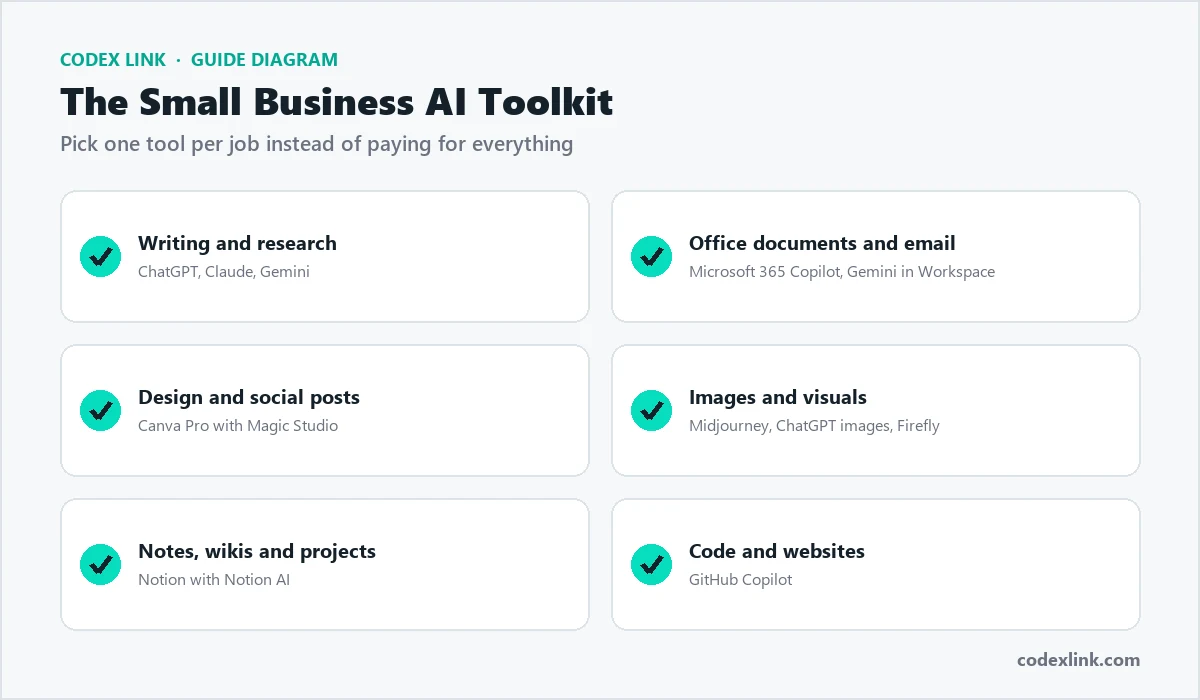
The best AI tools at a glance
| Tool | Best for | Who should use it |
|---|---|---|
| ChatGPT | All-round writing, research, analysis and images | Almost every business |
| Claude | Long documents, careful writing and coding | Teams that write and review a lot |
| Gemini | AI inside Gmail, Docs, Sheets and Drive | Google Workspace users |
| Microsoft 365 Copilot | AI inside Word, Excel, Outlook and Teams | Microsoft 365 users |
| Canva Pro (Magic Studio) | Social posts, presentations and marketing design | Owners and marketers without a designer |
| Midjourney | High-quality, artistic images | Brands that need striking visuals |
| Notion AI | Notes, wikis, meeting summaries and projects | Teams that organise work in Notion |
| GitHub Copilot | Writing and reviewing code | Developers and technical teams |
| Perplexity | Web research with cited sources | Anyone who researches markets or competitors |
1. ChatGPT: the best all-round AI assistant
ChatGPT from OpenAI is the tool most people start with, and for good reason. It handles a wide range of everyday work well: drafting emails and proposals, rewriting web copy, brainstorming campaign ideas, explaining unfamiliar topics, analysing spreadsheets and generating images.
What it does well for a business:
- Turns rough notes into polished emails, quotes, policies and social posts.
- Reads uploaded files such as PDFs and spreadsheets and summarises or analyses them.
- Creates images for posts and presentations directly in the chat.
- Lets you build custom GPTs: reusable assistants with your own instructions, for example a "proposal writer" that always uses your tone and service list.
Free or paid? The free plan is enough to try it. The paid plans add more capable models, much higher usage limits and advanced features, which matters once your team uses it daily. Our ChatGPT Plus guide explains exactly what the paid plan adds.
2. Claude: best for long documents and careful writing
Claude from Anthropic is known for clear, natural writing and for handling very long documents. You can give it a long contract, report or set of meeting transcripts and ask detailed questions about them. Many teams also use it for coding and for reviewing their own writing.
- Strong at summarising, comparing and extracting details from long files.
- Writes in a natural, less "robotic" tone, which helps for client-facing text.
- Projects let you keep reference documents and instructions together for repeat work.
If your business produces a lot of written material, such as proposals, reports or policies, Claude is worth testing alongside ChatGPT.
3. Gemini: best if you use Google Workspace
Gemini is Google's AI assistant. On its own it is a capable chat assistant, but its biggest advantage is integration with Gmail, Google Docs, Sheets, Slides and Drive. It can draft replies in Gmail, summarise long email threads, help write documents and find information across your Drive.
For businesses that already run on Google Workspace, Gemini often delivers more value than a separate tool, because it works where your team already spends its day.
4. Microsoft 365 Copilot: best if you use Word, Excel and Outlook
Microsoft's Copilot brings AI into the Office apps. In Word it drafts and rewrites documents; in Excel it helps analyse data and build formulas; in Outlook it summarises threads and drafts replies; in Teams it can summarise meetings. Our Microsoft 365 guide explains the plans and apps.
For companies whose clients send Word and Excel files every day, Copilot fits naturally into existing habits.
5. Canva Pro: best AI design tool for non-designers
Canva lets anyone create professional-looking designs, and its AI features (Magic Studio) make it faster still: generate a first design from a short description, remove image backgrounds in one click, resize a design for every social platform, and write captions. Canva Pro adds premium templates and stock content, the Brand Kit for your logo, colours and fonts, and more storage.
For most small businesses, Canva Pro replaces a large share of everyday design requests. See our Canva Pro guide for what the paid plan includes.
6. Midjourney: best for high-quality AI images
Midjourney is widely regarded as one of the best tools for artistic, high-quality images. Brands use it for campaign visuals, product concepts, mood boards and website imagery. It takes a little practice to write good prompts, but the results can be striking. Our Midjourney guide covers the plans and how to get good images, and our AI image generator comparison compares it with the alternatives.
7. Notion AI: best for organising team knowledge
Notion combines documents, wikis and databases in one workspace. Notion AI adds writing help, meeting note summaries and the ability to ask questions about your workspace, such as "What did we agree with this client last month?" It works best for teams that already keep their processes and projects in Notion. See our Notion Plus guide.
8. GitHub Copilot: best for developers
GitHub Copilot suggests code as developers type, explains unfamiliar code, writes tests and answers questions in a chat panel inside the code editor. For businesses that build their own website or software, it can noticeably speed up routine coding. Read our GitHub Copilot guide.
9. Perplexity: best for research with sources
Perplexity is an AI search engine that answers questions and shows the web sources it used. It is useful for market research, checking competitors and finding statistics, because you can click through and verify each source.
AI tools by department
Thinking by department helps you see where AI saves the most time.
Sales
- Draft personalised outreach and follow-up emails.
- Summarise discovery calls into proposals.
- Research a prospect's company before a meeting.
Marketing
- Plan a month of social posts and design them in Canva.
- Write first drafts of blog posts, then edit them with real expertise.
- Create campaign images and test different ad headlines.
Customer support
- Answer common questions with an AI chatbot trained on your policies.
- Draft polite replies to complaints for a person to approve.
- Turn repeated questions into help-centre articles.
Operations and finance
- Extract data from invoices and receipts.
- Summarise long contracts and highlight key dates.
- Build spreadsheet formulas and weekly reports.
How to roll out AI tools in your business
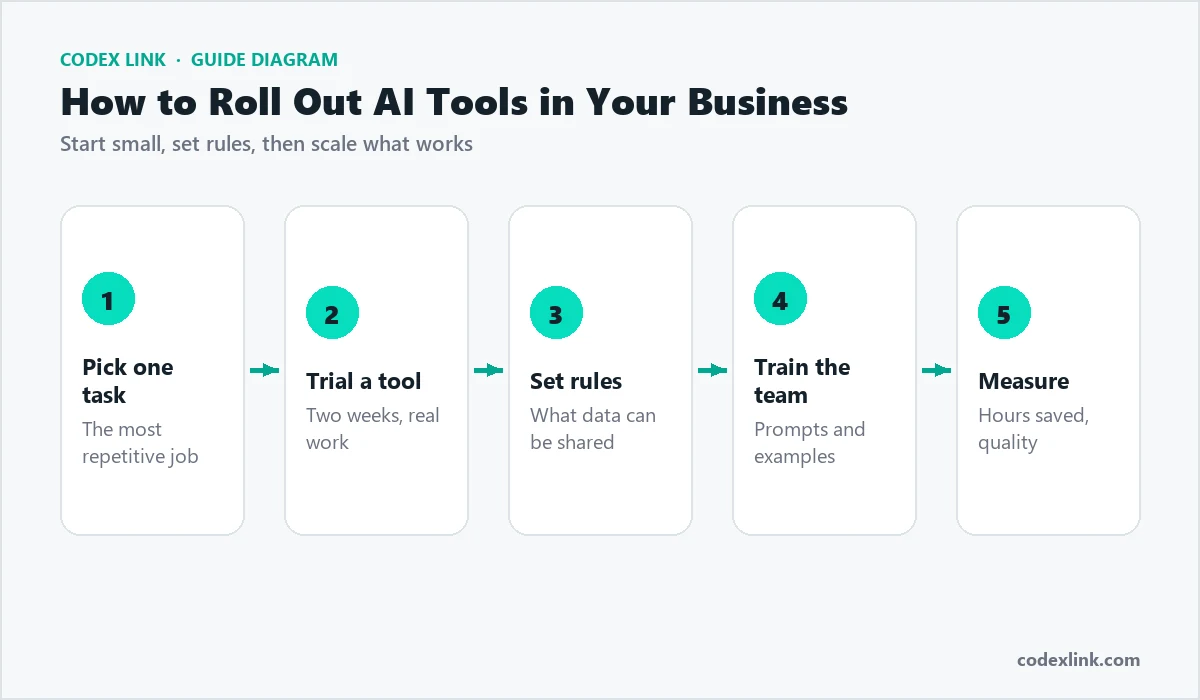
- Pick one task. Choose the most repetitive job in your week, such as writing quotes or answering the same customer questions.
- Trial a tool for two weeks on real work, not test examples.
- Set rules on what information staff may enter into AI tools. Avoid sharing passwords, card details and sensitive personal data, and prefer business plans that do not use your data for training.
- Train the team with shared prompts and good examples. A short prompt library saves everyone time.
- Measure the result: hours saved, response times and quality. Then move on to the next task.
AI tools by industry
The same tools are used very differently depending on the business. Here are practical examples.
Retail and e-commerce
Write unique product descriptions in bulk, create product lifestyle images, answer delivery questions with a chatbot and summarise customer reviews to spot recurring complaints.
Restaurants and cafes
Design menus and promotional posts in Canva, reply to reviews politely, write social captions for daily specials and translate menus for tourists.
Agencies and freelancers
Draft proposals from discovery notes, create first versions of campaign concepts, summarise client calls and prepare monthly reports faster.
Real estate
Write property listings from a few bullet points, create virtual staging concepts, answer common buyer questions and draft follow-up messages after viewings.
Education and training
Create lesson outlines, quizzes and worksheets, simplify difficult topics for different levels and generate practice questions with answers.
Professional services
Summarise long documents, draft client letters, organise research and prepare meeting agendas. Always review legal, medical or financial content with a qualified professional.
Writing better prompts: a simple formula
The quality of AI output depends heavily on the instructions. A reliable formula is: role + task + context + format. For example: "You are a sales manager for a web hosting company. Write a follow-up email to a client who asked about VPS hosting last week. They run an online store with about 2,000 visitors a day. Keep it under 120 words, friendly and with one clear next step."
- Give examples of the style you want.
- Ask for several options, then pick and refine the best.
- Ask the AI to list any assumptions it made.
A reusable prompt for writing a quote email. Replace the parts in brackets:
You are the sales manager at [company], which provides [service].
Write a friendly email to [client name] with a quote for [project].
Include: what is included, the timeline, the price of [amount],
and one clear next step. Keep it under 150 words.
A prompt for turning meeting notes into tasks:
Here are my meeting notes: [paste notes].
List every decision and every task.
For each task give: owner, deadline and the first step.
Format as a table.
Budgeting for AI tools
Most AI tools charge per user per month. To control costs:
- Give paid seats to the people who use the tool daily, and let others use free plans.
- Avoid paying for two tools that do the same job.
- Review usage every quarter and cancel unused seats.
- Compare prices: the CodeX Link marketplace offers genuine subscriptions to popular tools such as ChatGPT, Canva Pro, Microsoft 365, Notion, Figma, Midjourney and GitHub Copilot.
Risks and how to manage them
- Wrong answers: AI tools can state incorrect facts confidently. Always check figures, legal points and anything you publish.
- Privacy: use business plans where possible, and keep sensitive data out of prompts.
- Generic content: AI drafts need your expertise, examples and voice to be valuable to customers and to rank on Google.
- Over-automation: keep a person approving anything involving money, contracts or complaints.
What a typical week with AI looks like
To make the benefits concrete, here is how a small marketing agency might use AI tools across one week.
- Monday: ChatGPT turns last week's client calls into a summary and task list.
- Tuesday: Canva Pro creates a month of social posts from a brand kit in one afternoon.
- Wednesday: Claude reviews a long proposal for clarity and missing details.
- Thursday: Midjourney produces concept images for a new campaign pitch.
- Friday: Copilot in Excel helps build the monthly performance report.
None of these tasks is fully automated; each one is faster, and the team spends the saved time on strategy and clients.
Common mistakes to avoid
- Buying many tools at once and adopting none of them properly.
- Expecting perfect output from a one-line prompt.
- Publishing AI text without editing or fact-checking.
- Letting every employee choose their own tools with no data rules.
When off-the-shelf tools are not enough
Ready-made tools cover individual tasks. When you want AI to run a whole process, such as reading incoming enquiries, replying on WhatsApp, updating your CRM and booking appointments, you need a connected automation. That is where custom AI automation and AI agents come in, built around your systems with human checkpoints.
How CodeX Link can help
Get genuine subscriptions to leading AI and productivity tools with instant activation from the CodeX Link marketplace, and ask our team which tools fit your business. When you are ready to go further, we design AI automation and custom AI chatbots that connect these tools to your workflow.