


SEO tools turn guesswork into data. They show which searches bring visitors, which pages are slow, which competitors outrank you and which technical problems hold your site back. The good news for small businesses is that the most important tools are free. This guide explains each tool, what it is for and how to use it in a simple monthly routine.
The quick answer
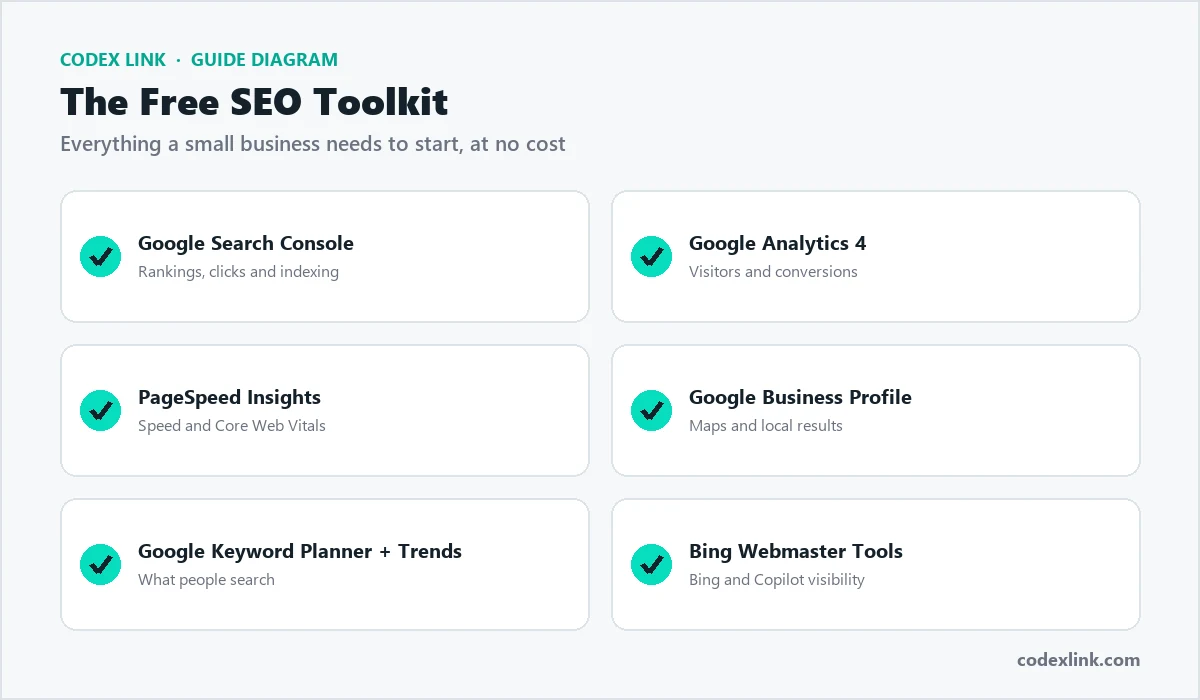
- Must-have free tools: Google Search Console, Google Analytics 4, PageSpeed Insights and Google Business Profile.
- Best free keyword tools: Google Keyword Planner, Google Trends and Search Console's own query data.
- Best paid all-in-one suites: Semrush and Ahrefs.
- Best technical crawler: Screaming Frog SEO Spider.
- Best WordPress plugins: Yoast SEO or Rank Math.
Free SEO tools
1. Google Search Console
Search Console is the most important SEO tool you can use, and it is free. It shows how Google sees your site: which searches you appear for, how many people click, your average position, which pages are indexed and any problems Google has found.
- Performance report: clicks, impressions, click-through rate and position by query and page.
- Pages report: which pages are indexed and why others are not.
- Sitemaps: submit your XML sitemap so Google finds every page.
- Core Web Vitals and page experience: speed and usability issues on real devices.
- Manual actions and security: alerts if Google finds spam or hacking.
2. Google Analytics 4
Google Analytics 4 (GA4) shows what visitors do after they arrive: how they found you, which pages they view and whether they contact you or buy. Set up conversions (Google calls them key events) for form submissions, calls, WhatsApp clicks and purchases, so you can see which pages and keywords bring real business, not just traffic.
3. PageSpeed Insights
PageSpeed Insights tests any page on mobile and desktop, reports Core Web Vitals and lists specific fixes such as oversized images or render-blocking scripts. Our guide on speeding up a slow website explains how to act on the results.
4. Google Business Profile
For any business that serves local customers, Google Business Profile controls how you appear on Google Maps and in local results. Its performance data shows searches, calls, direction requests and website clicks. Read our guide to ranking higher on Google Maps.
5. Google Keyword Planner and Google Trends
Keyword Planner, inside Google Ads, suggests keywords and shows approximate monthly search volumes. You need a Google Ads account but do not need to run ads to use it. Google Trends shows how interest in a topic changes over time and by region, which is useful for seasonal businesses.
6. Bing Webmaster Tools
Bing powers search for Microsoft products, including Copilot, and several other search services. Bing Webmaster Tools is free, offers similar reports to Search Console, and can import your site from Search Console in a few clicks.
Other useful free tools
- Google Rich Results Test: checks whether your structured data, such as FAQ or product schema, is valid.
- Schema Markup Validator: validates any schema.org markup.
- Google search itself: the "People also ask" box and related searches reveal real customer questions to answer.
Step by step: set up Search Console
Connecting your website to Google Search Console takes about ten minutes:
1. Go to Google Search Console and sign in with your Google account
2. Choose "Domain" property and enter yourcompany.com
3. Copy the TXT verification record Google gives you
4. Add it in your domain DNS settings (your host can help)
5. Click Verify (DNS changes can take a little time)
6. Open Sitemaps and submit https://yourcompany.com/sitemap.xml
7. Check the Pages report after a few days for indexing issues
Step by step: track leads in Google Analytics 4
Traffic only matters if it turns into customers. In GA4, mark the actions that matter as key events (conversions):
- Form submissions: track the thank-you page or the form submit event.
- Phone calls: track clicks on tel: links.
- WhatsApp clicks: track clicks on wa.me links.
- Purchases: connect your store so orders and revenue are recorded.
Then open the traffic acquisition report and filter for organic search to see exactly how many leads SEO brings each month.
Local SEO tools
For businesses that depend on local customers, a few specialist tools help manage listings and reviews:
- Citation and listing tools such as BrightLocal or Whitespark find and fix inconsistent business details across directories.
- Local rank trackers show where you appear on the map in different parts of your city, not just from one location.
- Review management tools help request reviews and alert you to new ones so you can reply quickly.
Most small businesses can start with Google Business Profile alone and add these tools when they manage several locations or very competitive markets.
Paid SEO tools
Semrush
Semrush is an all-in-one marketing suite covering keyword research, competitor analysis, site audits, rank tracking, backlink analysis and content tools, plus advertising and social media research. It is popular with agencies and marketing teams that want many tools in one place.
Ahrefs
Ahrefs is known for its large backlink index and excellent keyword and competitor research. Its Site Explorer shows which pages and keywords bring a competitor traffic, and which websites link to them. Ahrefs also offers free tools, including Ahrefs Webmaster Tools for auditing your own site.
Moz Pro
Moz offers keyword research, rank tracking, site audits and link research, and created the widely used Domain Authority metric. Many beginners find its interface approachable.
Screaming Frog SEO Spider
Screaming Frog crawls your website like a search engine and lists technical problems: broken links, redirect chains, missing or duplicate titles and descriptions, missing alt text and more. The free version crawls up to 500 URLs, which covers many small business sites.
Other popular tools
- Ubersuggest and Mangools: lower-cost keyword and rank tracking tools for smaller budgets.
- Surfer and similar content tools: suggest topics and terms to cover in an article based on top-ranking pages.
- SE Ranking: an affordable all-in-one option for rank tracking and audits.
Semrush vs Ahrefs
| Semrush | Ahrefs | |
|---|---|---|
| Best known for | All-in-one marketing suite | Backlink data and competitor research |
| Keyword research | Excellent | Excellent |
| Backlinks | Very good | Excellent |
| Site audit | Yes | Yes |
| Rank tracking | Yes | Yes |
| Extra marketing tools | Ads, social and content tools | Focused on SEO |
Both are excellent. Choose Semrush if you want one tool for SEO, ads and content research; choose Ahrefs if backlinks and competitor research are your priority. Most small businesses need only one.
WordPress SEO plugins
If your site runs on WordPress, an SEO plugin makes on-page SEO much easier.
- Yoast SEO: the long-standing favourite, with titles, descriptions, sitemaps, schema and readability checks.
- Rank Math: a feature-rich alternative with schema options, redirects and Search Console integration.
Use one SEO plugin only; two can conflict. Our WordPress team can set it up correctly.
Recommended toolkits by budget
| Budget | Toolkit |
|---|---|
| Free | Search Console, GA4, PageSpeed Insights, Business Profile, Keyword Planner, Trends, Screaming Frog free |
| Small | Free tools plus a low-cost keyword and rank tracker |
| Growing | Free tools plus Semrush or Ahrefs |
| Agency | Semrush or Ahrefs, Screaming Frog licence, a content tool and reporting dashboards |
A monthly SEO routine using these tools
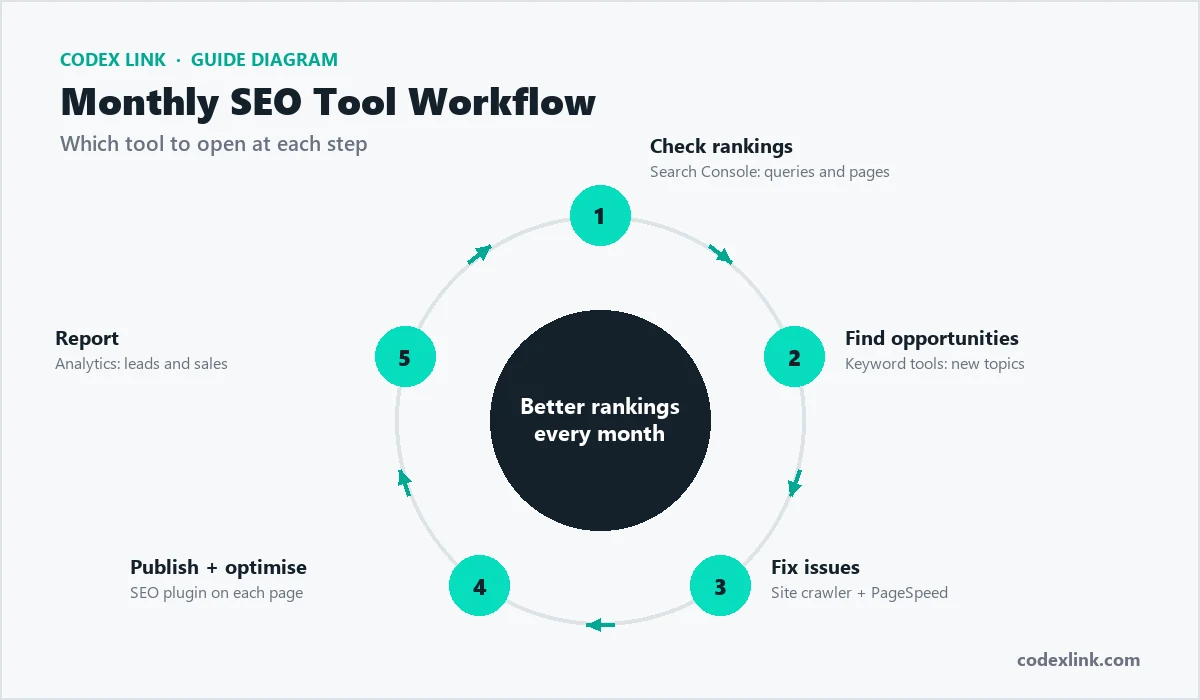
- Check rankings (Search Console): compare clicks and positions with last month, and note pages that dropped.
- Find opportunities (keyword tools): look for questions customers ask that you have not answered yet.
- Fix issues (crawler and PageSpeed): broken links, missing titles, slow pages and indexing errors.
- Publish and optimise (SEO plugin): new content and improved titles and descriptions on existing pages.
- Report (Analytics): leads, calls and sales from organic search, not just traffic.
Example: finding quick wins in Search Console
A simple process that often lifts clicks within weeks:
1. Open Search Console > Performance > Search results
2. Select the last 3 months, tick "Average position" and "CTR"
3. Click "Pages" and sort by Impressions (highest first)
4. Find pages with position 4-15 and CTR below 3%
5. Rewrite those page titles and meta descriptions
   to match the search queries and promise a clear benefit
6. Check again after 4 weeks
Example: a keyword research process
Turning one service into a list of target keywords:
Service: web hosting in Pakistan
Seed keywords: web hosting, cheap hosting, wordpress hosting
Add location: web hosting pakistan, hosting lahore
Add intent:   best web hosting for small business,
              how to choose web hosting
Check volume in Keyword Planner, competition in Semrush/Ahrefs
Group by intent: service page vs blog articleTracking AI search visibility
As more people ask ChatGPT, Gemini, Perplexity and Google AI Overviews for recommendations, it is worth tracking whether your brand is mentioned. Some SEO suites are adding AI visibility reports. A simple manual method works too: each month, ask several AI assistants the questions your customers ask and record who is named and which sources are cited. Our guide on getting recommended by ChatGPT explains how to improve your visibility.
Reporting: what to measure
- Organic clicks and impressions from Search Console.
- Rankings for your most important keywords.
- Conversions from organic search in GA4: forms, calls, WhatsApp clicks and sales.
- Technical health: indexed pages, errors and Core Web Vitals.
- Backlinks earned from relevant websites.
- Local actions from Google Business Profile: calls and direction requests.
How much time does this take?
For a small business website, a realistic routine is about two to four hours a month: thirty minutes a week checking Search Console and Business Profile for problems, and one longer session each month to review rankings, fix technical issues and plan new content. Agencies and growing stores spend more, but consistency matters far more than hours. A small amount of work every month beats a big audit once a year.
Common mistakes with SEO tools
- Chasing a tool's "SEO score" instead of real rankings and leads.
- Paying for several overlapping suites when one is enough.
- Treating estimated traffic figures as exact.
- Collecting reports without changing anything on the website.
- Ignoring Search Console warnings about indexing or manual actions.
Tools are not a strategy
SEO tools show you where to look; they do not do the work. Rankings come from a fast, technically sound site, helpful content that answers real searches, a strong Google Business Profile, and links and mentions from relevant websites. Our 20-step SEO checklist shows the full process.
Our recommendation
Start today with the free Google tools: connect Search Console and GA4, test your key pages in PageSpeed Insights and complete your Google Business Profile. When you are ready to grow, add one paid suite, Semrush or Ahrefs, and a crawler such as Screaming Frog. Review the data once a month and act on it.
How CodeX Link can help
Our SEO service uses these tools every week for our clients: technical audits, keyword tracking, competitor analysis, Search Console monitoring, backlink strategy, AI search visibility and clear weekly and monthly reports. Combine it with our content writing to publish articles that rank.