
Online grocery is one of the fastest-growing ways to sell food and household goods, because people happily reorder the same basket week after week once they trust a store to deliver. The good news is that you no longer need a national-app budget to compete. This guide walks through how to start an online grocery delivery business step by step, from your delivery area to your first order at the door.
Step 1: Decide what kind of grocery business you are building
Before any software, be clear on your model, because it shapes every later decision.
- Single store. You sell your own products online and deliver locally. The simplest and most common start.
- Chain or multi-branch. Several of your own branches serve different areas from one platform.
- Multi-vendor marketplace. You list many independent stores, approve them, and earn a commission on every order without holding stock yourself.
You can begin as a single store and grow into branches or a marketplace later, which is how many grocery platforms scaled.
Step 2: Choose your delivery area and range
Start with an area you can serve reliably rather than promising the whole city. Pick a delivery zone you can reach quickly, decide your opening hours and delivery slots, and choose a product range that fits your storage and demand, whether that is a full supermarket shop or a focused convenience range. A dependable small zone with fast, accurate delivery builds the reviews and repeat orders that let you expand with confidence.
Step 3: Pick a platform instead of coding from scratch
This decision most affects your budget and timeline. Building grocery delivery software from zero means months of development and a large bill before your first order. A ready platform gives you a catalog, inventory, delivery zones, rider tools and an admin dashboard on day one.
| Approach | Time to launch | Typical cost |
|---|---|---|
| Custom build from scratch | Months | Very high, plus ongoing dev |
| Ready platform (e.g. X-Grocery) | Days | One-time, far lower |
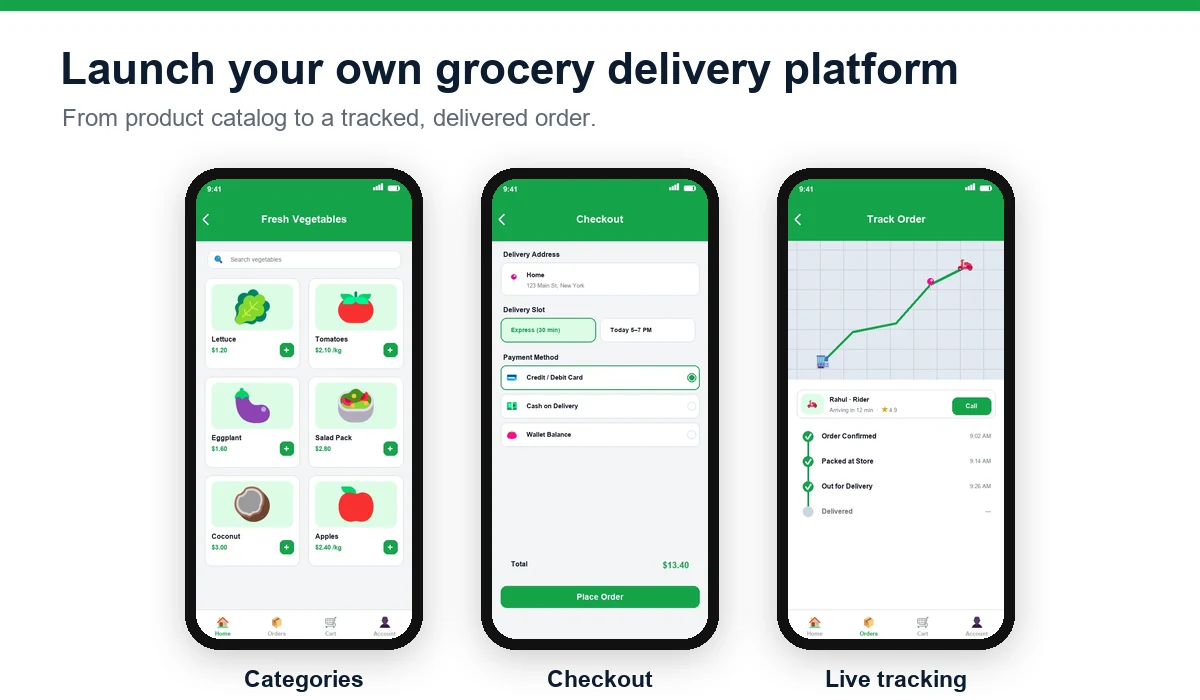
Our X-Grocery platform is a ready grocery and delivery system you own outright, with the full Laravel source code, so you launch quickly and still customise freely.
Step 4: Set up hosting and a domain
Your store needs a professional domain, such as your shop's name, and reliable web hosting that handles busy periods like weekends and holidays, when orders cluster. Add an SSL certificate so payments are secure and customers trust the site. A capable platform runs on standard hosting, so this step is affordable, and our team can set up hosting, the domain and SSL for you as part of installation.
Step 5: Install and brand the platform
Once hosting is ready, the platform is installed and made yours: your logo, colours, store name and contact details, so it feels like your brand from the first screen. With X-Grocery, the Professional and Enterprise packages include full installation and server setup, so you are not left with a technical project. This is also where you set your default currency, language, timezone and delivery-fee rules.
Step 6: Add your products and inventory
Now you fill the store with what you actually sell:
- Categories: organise products so customers find things fast, such as fruit, dairy, bakery and household.
- Products: add names, clear photos, units (kg, pack, litre), variants and prices.
- Inventory: set stock levels so items sell out correctly and staff know what to pick.
- Offers: create bundles, discounts and promo codes to lift basket size.
Good photos and accurate stock matter most here, because customers cannot pick up the item themselves and rely entirely on what the screen shows.
Step 7: Set delivery zones, slots and riders
Delivery is where grocery businesses win or lose. Configure:
- Delivery zones you can serve, with any fee or free-delivery threshold per zone.
- Delivery slots so customers choose a convenient time and you manage capacity.
- Riders, added to the system so you can assign orders and let customers track them live.
- Express and scheduled options if you offer both fast and planned delivery.
Reliable delivery is what turns a first order into a weekly habit, so set zones you can genuinely serve on time.
Step 8: Connect payments, including cash on delivery
A grocery business lives on smooth, flexible payments. Connect the gateways your customers use, such as Stripe, PayPal and local card processors, and switch on cash on delivery and wallet payments, which are essential in many markets. If you serve more than one community or country, enable multi-currency and multi-language. Test that invoices and refunds generate correctly, because substitutions and refunds are part of normal grocery operation.
Step 9: Test a real order end to end
Before telling anyone about the store, place a real order yourself. Browse, add items, choose a slot, pay by card and by cash on delivery, and confirm the order appears in the dashboard with the right items. Check that stock reduces, that you can assign a rider, and that the customer can track the order. Try a refund or substitution too. Completing a real order reveals problems no checklist will, and fixing them now is far better than a customer finding them at the door.
Step 10: Launch and market locally
With a working store, bring in orders. The most effective early marketing for grocery is local and repeat-focused:
- Google Business Profile and local search, so nearby customers find your delivery service.
- Local social media targeting your delivery zone with real product photos and offers.
- First-order discounts to win the trial, then loyalty rewards to earn the reorder.
- Flyers and QR codes in your store and neighbourhood that open your ordering app.
- SEO content for searches like "grocery delivery" plus your area, which brings steady free traffic.
Our guides on the SEO checklist for small business and best AI tools for small business help you market efficiently with a small team.
Step 11: Grow with branches, vendors and data
Once your first zone runs smoothly, you can grow in several directions. Add branches to cover new areas, invite independent stores to list as vendors and earn a commission on their orders, and widen your product range as demand appears. Use the reports to see your best-sellers, busiest slots and slowest products, then adjust ranges and run offers to lift margin. Because you own the customer data, you can email past buyers about offers and new products, which is far cheaper than paying a big app to reach them again.
How much does it cost to start?
Less than most people expect. The main costs are a one-time platform licence, hosting and a domain, optional installation help, and your riders and packing. With a ready platform such as X-Grocery, there is no large development bill and no monthly software rent, so the software cost is mostly a one-time licence plus hosting and payment-gateway fees. That is what makes online grocery realistic for an independent store, not only for national chains.
| Item | Typical cost |
|---|---|
| X-Grocery platform (one-time) | From $299 |
| Web hosting | Low monthly or yearly |
| Domain and SSL | Small yearly fee |
| Payment gateway | Per-transaction fee only |
Common mistakes to avoid
- Promising too wide a delivery area. A zone you cannot serve on time produces late orders and bad reviews; start tight and expand.
- Poor product photos and stock. Customers buy what they can see; blurry images and wrong stock lose orders.
- Skipping cash on delivery. In many markets this blocks most first orders.
- Only selling through big apps. Convenient at first, but they take a heavy commission and own your customers.
- Renting closed software. Owning the source code keeps you in control of pricing, branding and data.
Common questions
Do I need my own warehouse to start?
No. You can start from your existing store or a small space, picking and packing orders as they come in. A dedicated dark store is something you add as volume grows.
How fast can I be taking orders?
With a ready platform such as X-Grocery, a single-store launch in one delivery zone can be live in days, especially with a package that includes installation.
Can I run it with a small team?
Yes. The dashboard, automated notifications and rider tools are designed so a small team can manage packing and delivery efficiently.
Who this business suits
An online grocery delivery business is not only for large supermarket chains. It suits a wide range of people, which is part of why it has grown so fast. An existing grocery or convenience store is the most natural fit, simply adding a delivery channel to the stock it already holds. An entrepreneur with no shop can run a dark store built entirely around online fulfilment, or a marketplace that lists other stores and earns a commission without holding stock. A specialty shop, bakery or pharmacy can add delivery to reach customers beyond walking distance. Even a group of small local shops can share one platform to compete with the national apps. What they all share is a simple opportunity: people reorder groceries constantly, and software that makes reordering effortless turns a single sale into a weekly habit. If you have products to sell, or access to stores that do, the model can work at almost any scale, from a single neighbourhood to a whole city.
How to price products and delivery
Pricing is one of the first real decisions you will make, and on grocery's thin margins it needs care. Keep your product prices close to what customers would pay in store, because online shoppers compare easily and a fair price builds the trust that drives repeat orders. Rather than squeezing margin out of the products themselves, use delivery and basket rules to protect your economics. A small delivery fee below a certain order value, with free delivery above it, both covers your rider cost and nudges customers to add a few more items, which lifts the basket. Bundles and multi-buy offers move more stock at a healthy blended margin. A modest service fee, clearly shown, covers the convenience you provide. The goal is an honest shelf price that keeps customers loyal, with delivery and basket incentives doing the work of protecting profit, so you grow volume without a race to the bottom on every item.
Keeping deliveries fast and reliable
In grocery, the delivery is the product as much as the groceries are, because a late or wrong order loses a customer for good. A few habits keep deliveries reliable. Start with a delivery zone tight enough that you can reach every address quickly, and widen it only as you prove you can serve it on time. Use delivery slots to manage capacity so you never take more orders than your riders can fulfil in a window. Keep your inventory accurate so pickers are not hunting for items that are not there, and set a clear substitution policy for when something is genuinely out of stock. Assign riders efficiently and let customers track them, which both reduces anxious calls and cuts failed deliveries because people know when to be home. Reliability is not glamorous, but it is the single factor that most decides whether a first order becomes a weekly one.
Start your grocery delivery business with X-Grocery
X-Grocery gives you everything in this guide in one ready platform: product catalog, inventory, orders, delivery zones and slots, rider management and tracking, payments with cash on delivery, offers and reports, with multi-store, multi-vendor, multi-currency and multi-language support and the full source code included. Choose Basic at $299 to launch a single store, Professional at $599 for full installation and server setup, or Enterprise at $1000 for a large multi-vendor marketplace. Every plan includes six months of support. To begin, see the X-Grocery product page and message our team for a demo.
In short
Starting an online grocery delivery business comes down to choosing your store type and delivery area, owning a ready platform instead of building one, loading your products and stock, setting delivery zones and riders, enabling cash on delivery, testing a real order, then launching and marketing locally. Do that and a single store can earn from orders that would otherwise go to a commission-charging app. When you are ready, our team can set the whole system up and brand it for you.