

Students and fresh graduates are among the people who benefit most from LinkedIn Premium: they are applying for internships and first jobs, building skills and trying to get noticed by recruiters who have never heard of them. They are also the people with the smallest budgets. This guide explains what student discounts really exist, how to check for an offer on your own account, how to get LinkedIn Learning free through your university, and the cheapest genuine way to get Premium as a student.
Is LinkedIn Premium free for students?
Not as a general rule. LinkedIn does not have a separate free student version of Premium. However, students can often get some Premium value for free:
- Free trial: LinkedIn often offers eligible members a free trial of Premium, usually one month.
- University LinkedIn Learning: many universities and colleges license LinkedIn Learning for all students.
- Occasional student offers: LinkedIn has run student or early-career promotions in some countries.
- Free LinkedIn tools: the free plan already lets you build a profile, apply to jobs, follow companies and message connections.
LinkedIn Premium student price options
| Option | Cost to a student | What you get | Catch |
|---|---|---|---|
| LinkedIn free trial | Free for the trial | Full Premium Career | Needs a card; auto-renews at full price |
| University LinkedIn Learning | Free | Course library only | No InMail or job insights |
| LinkedIn student offer (if shown) | Discounted | Premium Career | Only in some countries, not always available |
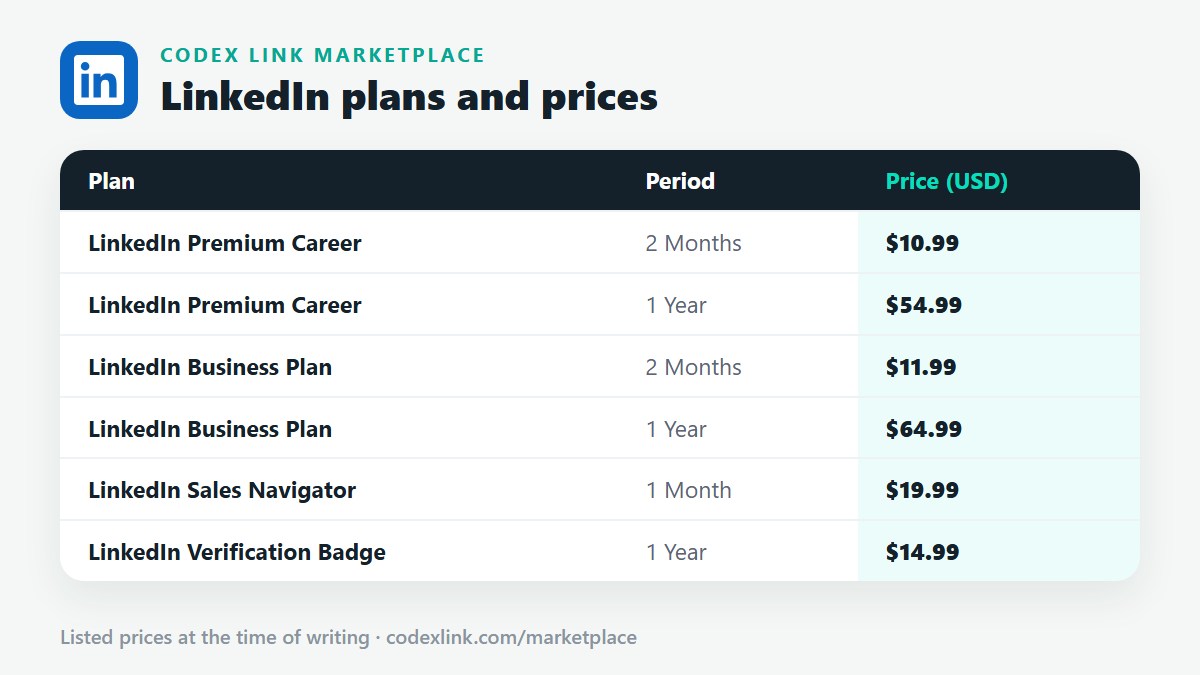
| CodeX Link Premium Career | $10.99 / 2 months | Full Premium Career | None: fixed price, no auto-renewal |
| LinkedIn monthly billing | About $29.99 / month | Full Premium Career | Expensive for students |
How to check for a LinkedIn student offer
- Sign in to LinkedIn on a computer.
- Make sure your profile shows you as a current student, with your university and expected graduation year.
- Click Try Premium or open the Premium page.
- Look for a free trial, a student offer or a discounted price. If none is shown, LinkedIn is not offering one to your account right now.
Free LinkedIn Learning through your university
LinkedIn Learning is the course library included with Premium. Many universities pay for it so all students can use it free. To check:
- Search your university website for "LinkedIn Learning".
- Check the library or IT services pages.
- Sign in with your university single sign-on, then connect your LinkedIn profile to add certificates.
If your university provides LinkedIn Learning, you may only need Premium for its job search tools. Read our LinkedIn Learning guide.
Is there a LinkedIn Career student plan?
There is no separate "student plan". Premium Career is the plan designed for job seekers, including students and graduates. It includes:
- InMail to message recruiters, hiring managers and alumni outside your network.
- Who viewed your profile, so you can follow up with interested recruiters.
- Applicant insights to see how you compare with other applicants.
- Top Applicant jobs where you are a strong match.
- LinkedIn Learning with certificates.
See the full Premium Career guide.
Cheap LinkedIn Premium for students
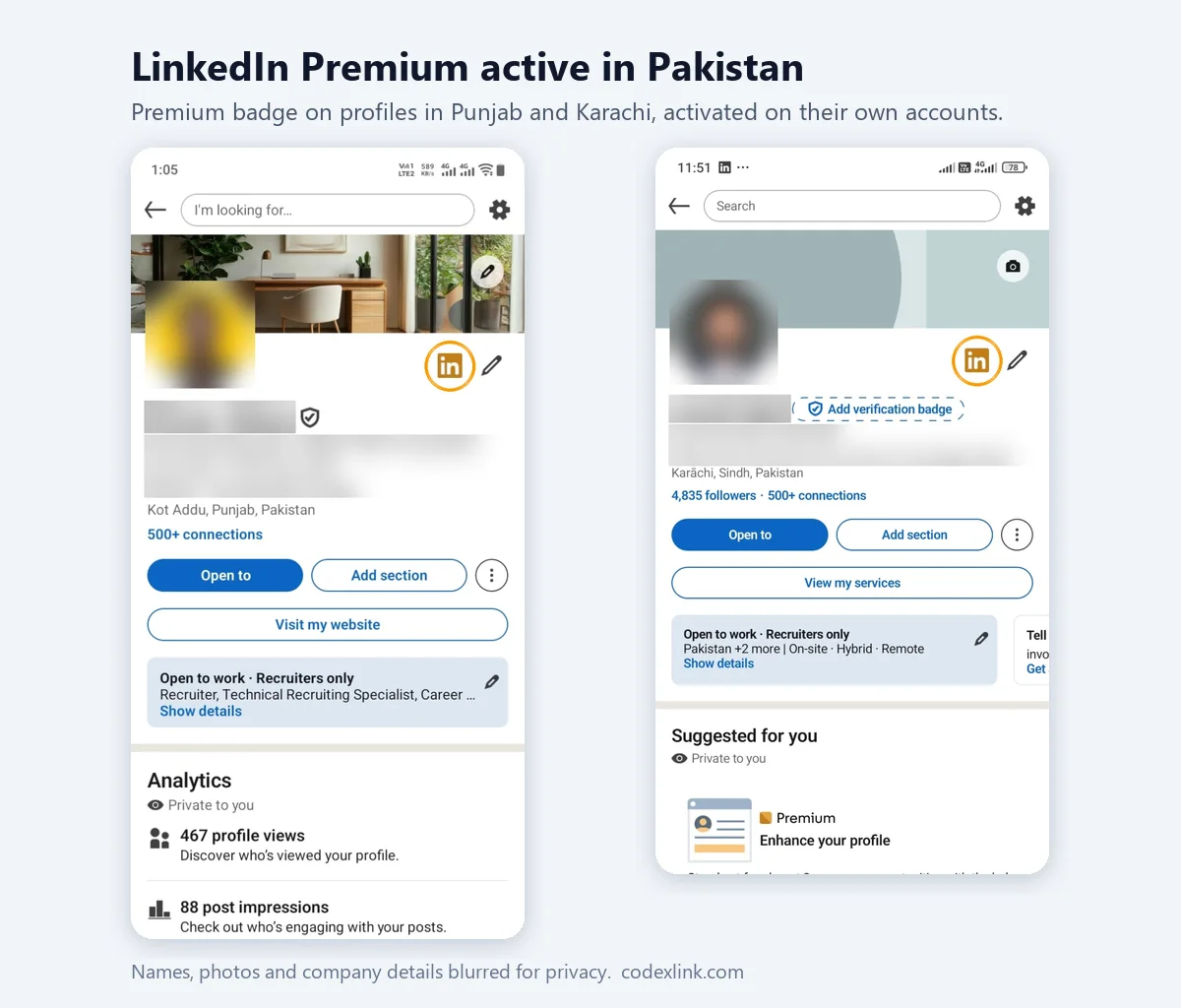
For most students, the best deal is Premium Career through CodeX Link: $10.99 for 2 months, about $5.50 a month. It is genuine, activated on your own account, does not renew automatically and does not require a credit card if you use a local payment method confirmed by our team. That last point matters: many students do not have a card that works for international subscriptions.
| LinkedIn monthly | CodeX Link | |
|---|---|---|
| 2 months of Premium Career | about $59.98 | $10.99 |
| 1 year of Premium Career | about $359.88 | $54.99 |
| Auto-renewal | Yes | No |
| Credit card needed | Yes | No |
When should a student buy Premium?
- Final year: the best time, when you are applying for graduate jobs and schemes.
- Internship season: when companies open internship applications.
- After graduation: during an active job search.
- Before a career fair: to research recruiters and follow up afterwards.
A 60-day Premium plan for students
Week 1: Build the profile
- Professional photo and a headline such as "Final-Year Computer Science Student | Python, SQL | Seeking Graduate Software Roles".
- About section: what you study, projects, skills and the roles you want.
- Projects, internships, part-time jobs, volunteering and societies with results.
- Skills that match job posts, and a custom profile URL.
Weeks 2 to 6: Apply and connect
- Apply to Top Applicant internships and graduate jobs early.
- Message alumni at target companies for advice, not jobs.
- Send InMails to recruiters for your best applications.
- Finish two short LinkedIn Learning courses and add the certificates.
Weeks 7 and 8: Follow up
- Follow up with recruiters who viewed your profile.
- Prepare for interviews and assessment centres.
- Decide whether to continue Premium.
A message from a student to an alumna:
Hi Ayesha, I'm a final-year BBA student at your old university
and I'm interested in marketing roles at Unilever. I'd really
value 15 minutes of your advice on how you got started and what
the graduate programme looks for. Thank you so much!
LinkedIn Learning courses for students
- Excel and data analysis: useful in almost every field.
- Programming: Python, JavaScript, SQL.
- Digital marketing and social media.
- Project management fundamentals.
- Communication, presentation and interview skills.
Student discounts by country
Student offers vary by country, and so do prices. These guides show local prices and payment tips: Pakistan, India, Bangladesh, Nigeria, Kenya, Egypt, UK, USA and Europe.
Common student mistakes
- Buying Premium before the profile is complete.
- Starting a free trial and forgetting it renews at full price.
- Using shared or "free" Premium accounts from social media.
- Sending generic messages asking for a job.
- Ignoring free LinkedIn Learning from the university.
Is LinkedIn Premium worth it for students?
For final-year students and graduates who are actively applying, yes, especially at $10.99 for two months. Premium helps you reach recruiters, follow up at the right moment and build skills. For first- and second-year students, the free plan, a strong profile and free university LinkedIn Learning are usually enough.
Which students benefit most from Premium?
Engineering and computer science students
Tech recruiters search LinkedIn heavily. Premium helps you see which companies viewed your profile, apply early to graduate roles and message engineering managers with project links. Add GitHub, portfolio projects and hackathons to your profile.
Business and finance students
Graduate programmes at banks, consultancies and multinationals are competitive. Premium helps you research recruiters, contact alumni and follow up after career fairs. Professional qualification progress, such as ACCA or CFA levels, strengthens your profile.
Marketing, media and design students
Portfolios matter more than grades. Use the Featured section for your best work, and InMail creative directors and marketing managers with a short note and a link.
International students
Students studying abroad often face visa time limits after graduation. Premium helps you find employers who sponsor visas and contact recruiters quickly. State your visa status and graduation date clearly.
Medical and health students
Many healthcare roles are recruited through official systems, but LinkedIn helps with research roles, health-tech companies and networking with professionals in your specialty.
Student offers vs CodeX Link: which is better?
If LinkedIn shows you a genuine student offer or free trial, try it first, especially if you have a card that works. If you see no offer, your trial is used, or you do not have an international card, CodeX Link's Premium Career plan is the cheapest genuine alternative at $10.99 for two months. Both give you the same Premium Career features on your own account.
Building a strong student profile for free
Before paying for anything, make sure your free profile is complete. Recruiters judge students mostly on their profile, not on the Premium badge.
- Photo and banner: a clear, friendly photo and a banner related to your field.
- Headline: your degree, key skills and the roles you want.
- About: three or four sentences on your interests, strengths and goals.
- Education: degree, expected graduation date, relevant modules and grades if strong.
- Projects: coursework, final-year projects and personal projects with results.
- Experience: internships, part-time jobs, volunteering and society roles.
- Skills and certificates: add LinkedIn Learning or other online course certificates.
- Recommendations: ask lecturers, supervisors and managers.
Career fairs and LinkedIn
Career fairs are a great time to use Premium. Before the fair, look up the recruiters attending and their companies. After the fair, connect with the people you met within 24 hours, mentioning your conversation. Premium's profile viewer list shows which recruiters looked you up afterwards, so you can follow up with them.
A follow-up after a career fair:
Hi Daniel, thank you for chatting with me at the campus career
fair yesterday about the analyst graduate programme. I enjoyed
hearing about the rotation in risk. I have now applied and
would be grateful for any tips on the assessment centre.
Free alternatives for students on a tight budget
- Free LinkedIn tools: job alerts, Easy Apply, company pages and posting are all free.
- Open Profiles: some professionals accept free messages from anyone; look for the "Open" label.
- Alumni tool: on your university's LinkedIn page, the Alumni tab lets you find graduates by company and job title for free.
- Connection notes: a personalised connection request can work almost as well as InMail for students.
- Posting: share projects and learning; it makes recruiters notice you for free.
Use these free tools first, then add a short Premium plan when you are applying intensively.
Paying for Premium as a student without a card
Many students do not have a credit card, and student debit cards are often blocked for international subscriptions. LinkedIn's free trial and monthly plans need a working card. Through CodeX Link, students can pay with local payment methods confirmed by our team, so the card problem disappears. Ask on WhatsApp which methods are available in your country.
Student discount myths
- "Every student gets Premium free." Not true; only trials and occasional offers exist.
- "A .edu email unlocks a discount." LinkedIn does not run a general email-based student discount for Premium.
- "Student codes on social media work." They are almost always fake or shared accounts.
- "Premium is required to get hired." It helps, but most students get hired with a strong free profile and good applications.
Graduates: does a student offer still apply?
Student offers, when shown, usually target current students. Recent graduates typically see the standard trial or prices. Premium Career at $10.99 for 2 months is the most affordable option during your first job search after graduation.
What happens when the plan ends?
Your account returns to the free plan, and everything you built stays: connections, messages, recommendations and LinkedIn Learning certificates. With CodeX Link there is no automatic renewal, so there is no risk of a surprise charge on a student budget.
Tip for student societies: ask your careers service whether it runs LinkedIn workshops, which are free and often cover profile reviews.
How CodeX Link can help
Students can buy genuine LinkedIn Premium Career for $10.99 for 2 months from the CodeX Link marketplace. Email support@codexlink.com or WhatsApp +92 343 5673902. New to LinkedIn? Start with our LinkedIn roadmap and how to find a job on LinkedIn.