
Every grocery delivery app claims to sell food online, but the difference between a basic cart and a platform you can run a real delivery business on is in the features. The right ones remove friction, prevent costly mistakes like selling out-of-stock items, and let you grow from one store to a full marketplace. This guide walks through the features that matter, why each earns its place, and what to check before you choose.
The core: catalog, inventory and cart
Three features form the foundation of any serious grocery app. If these are weak, nothing else saves it.
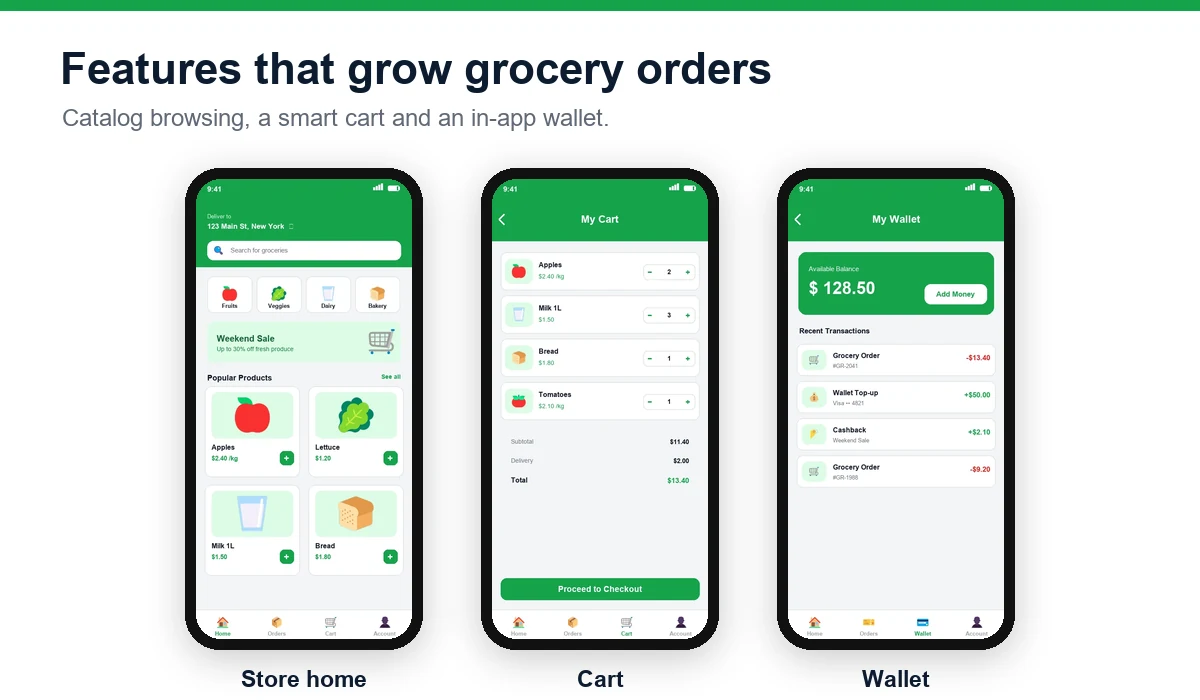
Searchable product catalog
Customers browse clear categories and search by name, seeing real photos, units and live prices. A good catalog is fast, well organised and shows only products that are genuinely in stock. This is the first thing a customer touches, so it must feel quick and trustworthy, because they are buying what they cannot physically pick up.
Live inventory
Stock updates the moment an order is placed, so you never sell an item you do not have. Live inventory also tells staff exactly what to pick and pack, and hides or flags out-of-stock items before a customer adds them to the cart. This single feature prevents the most common grocery complaint: paying for something that never arrives.
Smart cart and checkout
A smart cart lets customers adjust quantities, see the running total with any delivery fee, apply a coupon, and check out in a few taps. The smoother the cart and checkout, the fewer abandoned baskets, which directly protects your sales.
Delivery: zones, slots, riders and tracking
Delivery is what makes a grocery app different from a normal online shop, so these features are central.
| Feature | What it does |
|---|---|
| Delivery zones | Define where you deliver, with fees or free thresholds per area. |
| Delivery slots | Let customers pick a time while you manage capacity. |
| Rider assignment | Assign orders to riders and balance their workload. |
| Live order tracking | Customers follow the order from packed to out for delivery to arrival. |
| Express and scheduled | Offer fast delivery and planned slots side by side. |
Reliable, trackable delivery is what turns a first order into a weekly habit, so these features earn their place quickly.
Payments that fit every customer
An order is only as good as its checkout, and grocery customers expect flexibility.
- Multiple gateways: Stripe, PayPal and local card processors.
- Cash on delivery: essential in many markets, especially for first orders.
- In-app wallet: customers top up and reorder faster, which builds loyalty.
- Multi-currency: for stores serving more than one community or country.
- Automatic invoices and refunds: clean receipts and easy refunds for substitutions.
Offers, coupons and loyalty
Grocery margins are slim, so tools that lift basket size and repeat rate matter. Look for percentage and fixed discounts, product bundles, free-delivery thresholds, promo and coupon codes, and wallet-based loyalty rewards. Used well, these increase the average order value and turn one-time buyers into weekly regulars, which is where grocery profit really lives.
Multi-store and multi-vendor
If you run more than one branch, or plan a marketplace, you need multi-store tools:
- Multiple branches serving different zones from one platform.
- Independent vendors, each with their own dashboard for products, orders and payouts.
- Commission control, so a marketplace owner sets rates and approves stores.
- Per-store delivery and pricing, so each branch or vendor runs its own area.
This is what lets a single app grow from your own shop into a platform earning from many stores' orders.
Automation: notifications and alerts
Automation lets a small team run a busy service. A good app sends, without anyone lifting a finger:
- Order confirmations and receipts the moment an order is placed.
- Out-for-delivery alerts so customers know the rider is on the way.
- Delivery and substitution updates when something changes.
- Review requests after delivery to build trust for future customers.
Reports and insight
You cannot improve what you cannot see. Strong reporting turns raw orders into decisions: sales by day and category, best-selling and slow products, delivery performance, rider workload, and vendor payouts, all exportable to PDF and Excel. With this, you refine your range, staff the busy slots, and run offers where they lift margin most.
Reviews, ratings and trust
Customers hand over money and let a rider come to their home, so trust features matter. Look for product and store ratings, genuine reviews, secure encrypted payments, SSL across the app, and clear refund and substitution rules. For you as the owner, the right to the full source code and your own customer data is just as important, so you are never locked into a closed system.
Feature checklist before you choose
Use this as a quick scorecard when comparing grocery apps:
| Must-have | Nice-to-have |
|---|---|
| Searchable catalog with live inventory | In-app customer wallet |
| Smart cart and fast checkout | Loyalty and bundle offers |
| Delivery zones and slots | Multi-vendor marketplace |
| Rider assignment and live tracking | Multi-currency and multi-language |
| Cards and cash on delivery | Express plus scheduled delivery |
| Automated order notifications | Advanced analytics and exports |
| Reports and payouts | Full source-code ownership |
Common questions
Which feature matters most?
Live inventory. Everything else builds on the promise that what a customer orders is actually in stock; without it, you disappoint customers and erode trust from the first order.
Do I need multi-vendor features from the start?
Not necessarily. But choosing a platform that already includes them means you can grow from one store into a marketplace without changing systems later.
Is cash on delivery really necessary?
In many markets, yes. It is the most trusted option for a first order, and offering it noticeably increases completed orders.
Inventory: the feature that makes or breaks trust
Of all the features, live inventory is the one that quietly decides whether customers trust you, so it deserves a closer look. In a physical shop, a customer can see an empty shelf; online, they cannot, so the software has to be their eyes. Strong inventory keeps a real-time count of every product, reduces it the moment an order is placed, and hides or clearly flags items that are out of stock before they ever reach the cart. It should warn staff when stock is low so they can restock or adjust, and it should link to the physical store's stock where possible, so a sale on the shelf updates the online count. When inventory is accurate, customers get exactly what they ordered and learn they can rely on you. When it is not, they pay for items that never arrive, and that single bad experience sends them straight back to a big app. No feature does more to protect or destroy trust, which is why it belongs at the very centre of any grocery platform.
Substitutions and refunds: handling the inevitable gracefully
Even with good inventory, an item will occasionally be unavailable when a picker reaches it, so how the software handles substitutions and refunds matters more than owners expect. A good system lets you offer a sensible replacement, ask the customer to approve it, or refund the item cleanly if they would rather go without. The customer is kept informed at each step rather than discovering a missing item at the door. Refunds process automatically to the original payment method or the in-app wallet, with a clear record for both sides. Handled well, a substitution becomes a small moment of good service rather than a complaint, and the customer trusts you more for being transparent. Handled badly, it becomes the reason they never order again. Because this situation is inevitable in grocery, choosing a platform that manages it gracefully is not a nice-to-have but a core part of keeping customers.
Mobile app vs website for grocery
A common question is whether you need a mobile app, a website, or both. For grocery, a fast, mobile-friendly website is the essential foundation, because most customers will first find you through a search or a shared link and want to order without installing anything. A responsive website that works perfectly on a phone captures that traffic and ranks in local search. A dedicated mobile app then becomes valuable for your regulars, who do the same weekly shop: it keeps your brand on their home screen, enables push notifications for offers and order updates, and makes reordering a saved basket a two-tap affair. The best approach for most stores is to launch with a strong mobile website and add an app once you have loyal customers worth bringing back. A capable platform supports both from the same system, so your catalog, stock and orders stay in sync wherever the customer shops.
The admin dashboard: running the store
The customer-facing features get the attention, but the admin dashboard is where you actually run the store day to day, so its quality matters just as much. A good dashboard gives you a live order queue, from new to packed to out for delivery, so staff always know what to pick next. It lets you add and edit products, prices and stock without a developer, manage categories and offers, and handle refunds and substitutions in a few clicks. It shows delivery performance and rider workload so you can balance the load, displays payments as they arrive with automatic invoices, and calculates vendor payouts if you run a marketplace. Role-based access means packers, riders, vendors and managers each see only what they should. The better the dashboard, the less time you spend on admin and the more you spend improving your range and delighting customers.
Integrations that extend a grocery app
A grocery platform rarely works entirely alone, and connecting it to other tools quietly saves hours. Useful integrations include SMS and push gateways for order updates, email services for receipts and marketing, and multiple payment providers so you can offer local methods and cash on delivery alongside cards. Maps and routing help riders deliver efficiently. Accounting exports keep bookkeeping clean, barcode and POS links keep in-store and online stock aligned, and analytics tools show where your traffic and orders come from. Because a platform such as X-Grocery ships with the full source code, you are never blocked from adding an integration you need later, which protects your investment as your business and the tools around it grow.
How features work together on a real order
Features matter most not in isolation but in how they combine on a single order. A customer browses the catalog, live inventory shows only what is in stock, the smart cart tallies the basket with any delivery fee, and checkout takes payment by card or cash on delivery in a few taps. The order drops into the dashboard queue, stock reduces automatically, a picker packs it, a rider is assigned, and the customer follows it live from packed to out for delivery to arrival, with push and SMS alerts along the way. Afterwards a review request builds trust and the sale appears in your reports. Each feature is useful alone, but their value is in this seamless chain, which is why a platform where they are built to work together beats a patchwork of separate tools.
X-Grocery: every feature in one platform
X-Grocery ships with all of the features in this guide as built-in, configurable modules: searchable catalog, live inventory, smart cart, delivery zones and slots, rider assignment and live tracking, payments with cash on delivery, in-app wallet, offers and coupons, multi-store and multi-vendor support, automated notifications, reviews and reports, all on Laravel with the full source code included. Packages start at $299 one-time, with Professional at $599 including installation and Enterprise at $1000 for large marketplaces, each with six months of support. See it working and request a demo on the X-Grocery product page, and read our guide on how to start an online grocery delivery business to put it into practice.
In short
The features that define a good grocery delivery app are the ones that remove friction and prevent mistakes: a searchable catalog, live inventory, a smart cart, delivery zones and slots, rider tracking, flexible payments including cash on delivery, automation, reporting, and the ability to grow into wallets, offers and multiple vendors. Score any app against the checklist above, insist on owning the source code, and you will choose a platform you can build a lasting grocery business on.