Subscribing to LinkedIn Premium takes a minute. Changing, cancelling or fixing it is where people get stuck, because the settings are tucked away and differ depending on where you bought.
These answers explain each task. Menu names change slightly over time, so look for the nearest match in your settings if a label is different.
Starting and upgrading
How to activate LinkedIn Premium?
If you buy from LinkedIn, Premium is active as soon as payment is confirmed. If you bought through a reseller such as CodeX Link, follow the activation steps they send for your own account, then open your Premium features page to confirm it shows as active.
How to upgrade LinkedIn to Premium?
Select your profile picture, choose the Premium or Try Premium option, pick a plan and billing period, and enter a payment method. Eligible members see a free trial offer at this point.
How to upgrade from Premium Career to Premium Business?
Open your Premium subscription settings and choose the option to change or switch plan, then select Business. The new plan normally starts at your next billing date, or immediately with an adjusted charge, depending on your region.
How to switch LinkedIn Premium plans?
Go to Settings, open the subscriptions and payments section, select manage Premium account, and choose a different plan. If the option is missing, cancel the current plan and subscribe to the new one when the period ends.
How to change my LinkedIn Premium plan?
Use the plan change option in your Premium subscription settings. You can move up or down between Career, Business and other plans. Check the date the change takes effect before confirming.
Cancelling and renewing
How to cancel LinkedIn Premium?
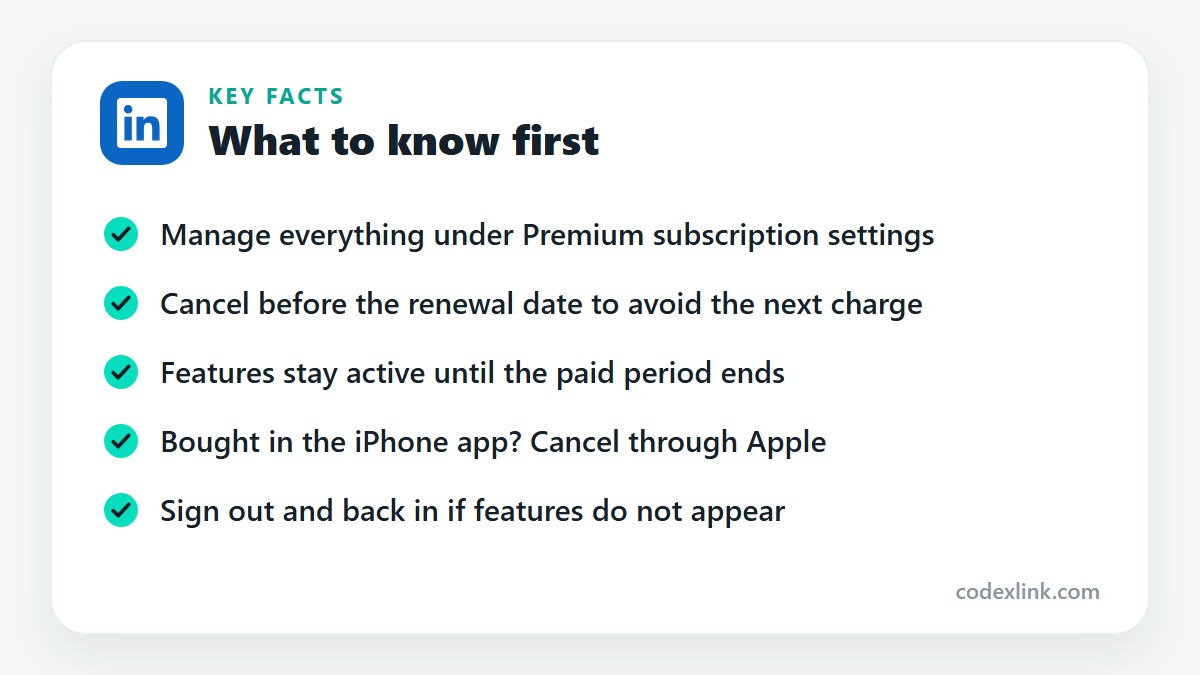
Select your profile picture, open Settings, find the subscriptions and payments section and choose manage Premium account, then cancel subscription. Your features continue until the end of the period already paid for.
How to cancel a LinkedIn Premium free trial?
Cancel through the same Premium subscription settings before the trial's end date. If you cancel in time, you are not charged. Set a reminder a few days before the trial ends.
How to stop LinkedIn Premium auto-renewal?
Cancelling the subscription is what stops automatic renewal. There is no separate switch. After cancelling, Premium stays active until the current period finishes and then ends without a further charge.
How to renew LinkedIn Premium?
Subscriptions bought from LinkedIn renew automatically. If yours has ended, subscribe again from the Premium page. Fixed-period plans bought from a reseller must be renewed with that seller before or after the expiry date.
How to restore my LinkedIn Premium subscription?
If you cancelled but the period hasn't ended, look for a reactivate option in your Premium settings. If it has already ended, subscribe again. Your profile, connections and messages are kept either way.
Billing and payments
How to check LinkedIn Premium subscription status?
Open Settings and the subscriptions and payments section, or the Premium features page from your profile menu. It shows your plan, billing period and next renewal or end date.
How to manage LinkedIn Premium billing?
All billing controls are in Settings under subscriptions and payments: view plan, update payment method, see purchase history and cancel. Purchases made through the iPhone app are managed in your Apple subscriptions instead.
How to change LinkedIn Premium payment method?
In your Premium subscription settings, choose manage payment methods, add the new card or account, and set it as the default. Remove the old one afterwards so a failed card doesn't interrupt the plan.
How to download a LinkedIn Premium invoice?
Go to Settings, open subscriptions and payments, and select view purchase history. Each transaction has a receipt you can open and download or print for your records.
How to get a refund for LinkedIn Premium?
LinkedIn generally doesn't refund subscription payments, apart from specific cases set out in its refund policy and where local law requires it. Contact LinkedIn support through the help centre with your receipt and explain the situation.
How to fix a failed LinkedIn Premium payment?
Check that the card is valid, has funds and allows international and online payments. Update the payment method in your settings and try again. If it still fails, ask your bank whether it blocked the charge.
Fixing problems
Why is my LinkedIn Premium not working?
Common causes are a failed payment, an expired period, or being signed in to a different account. Check your subscription status, sign out and back in, and update the app. If features are still missing, contact LinkedIn support.
Why is LinkedIn Premium not activated after payment?
Activation is usually instant, but a pending payment or a bank check can delay it. Wait a short while, then check your purchase history. If you paid a reseller, contact them with your order details so they can complete the activation.
Why can't I access LinkedIn Premium features?
Some features belong to particular plans, so check that yours includes the one you want. Clear the browser cache or reinstall the app, confirm the subscription is active, and make sure you are on the right account.
How to contact LinkedIn Premium support?
Open the LinkedIn Help Centre from your profile menu, search for your issue, and use the contact or create a support ticket option. Premium members can usually reach live chat. Keep your receipt and account email ready.
LinkedIn plans and prices on CodeX Link
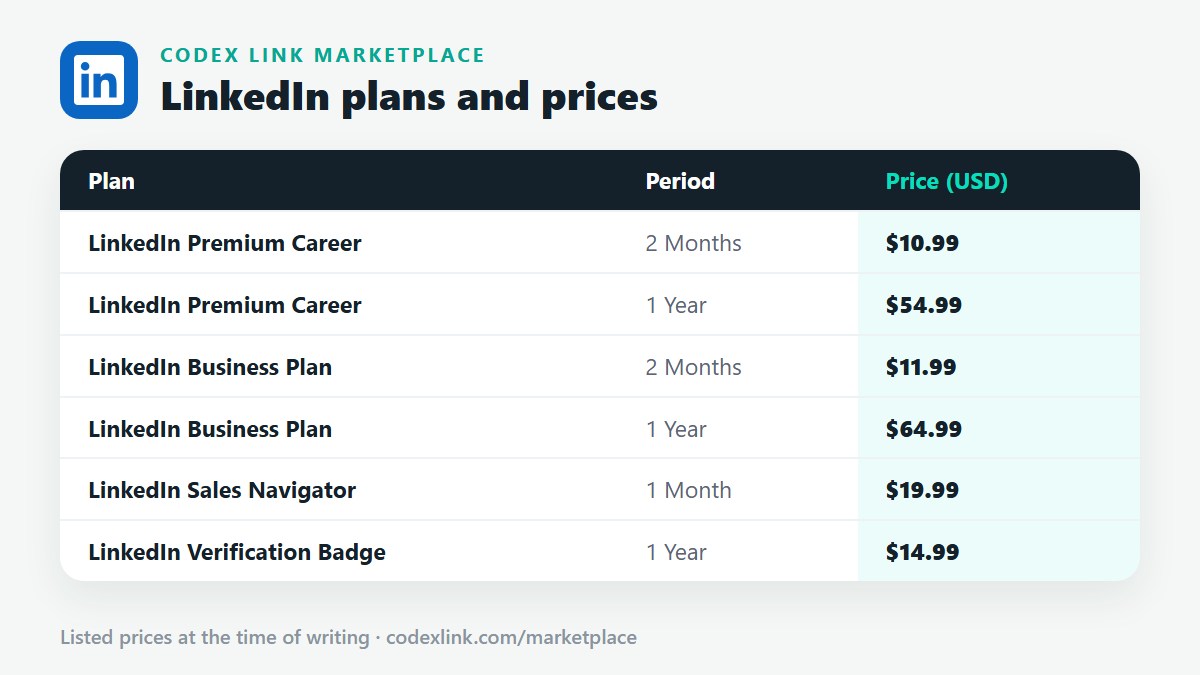
These are the LinkedIn plans listed on the CodeX Link marketplace at the time of writing. Message the team on WhatsApp to confirm the price and how activation works before you order.
| Plan | Period | CodeX Link price |
|---|---|---|
| LinkedIn Premium Career | 2 Months | $10.99 |
| LinkedIn Premium Career | 1 Year | $54.99 |
| LinkedIn Business Plan | 2 Months | $11.99 |
| LinkedIn Business Plan | 1 Year | $64.99 |
| LinkedIn Sales Navigator | 1 Month | $19.99 |
| LinkedIn Verification Badge | 1 Year | $14.99 |
Need a LinkedIn plan?
Chat with the CodeX Link team for the current price and activation details, or browse every tool in the marketplace.
LinkedIn is a trademark of its owner. Features, limits and prices change over time and differ by country, so confirm the current terms on LinkedIn before you buy.