
Table of Contents
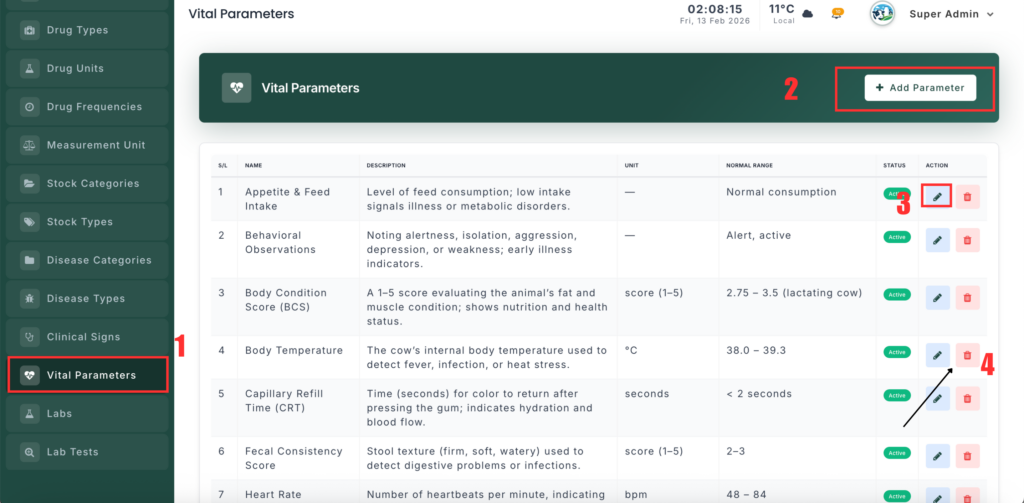
The Vital Parameter Management module lets administrators define and track quantitative health metrics (e.g., Body Temperature, Heart Rate, Respiration Rate) for standardized health monitoring.
📍 Page Link #
http://127.0.0.1:8000/vital-parameter
Key Functions #
1️⃣ View Vital Parameters #
- Displays all defined parameters in a table.
- Columns include Name, Unit, Normal Range (Min–Max), Input Type, and Status (Active/Inactive).
2️⃣ Add a New Vital Parameter #
- Click Add New Parameter.
- Enter Name and optional Unit (e.g., °C, bpm).
- Set Normal Range with Min and Max values.
- Choose Input Type:
Number– Numeric entry.Text– Free-text entry.Select– Predefined options.Select Score– Options with scores for scoring systems.
- If using Select or Select Score, define Options (comma-separated).
- Set Status (Active/Inactive).
- Click Save.
3️⃣ Edit Vital Parameters #
- Click Edit next to the parameter.
- Update any details: Name, Unit, Range, Input Type, Options, or Status.
- Click Update.
4️⃣ Delete Vital Parameters #
- Click Delete and confirm.
- Parameters linked to active cases may be protected to preserve historical data.


Leave a Reply
You must be logged in to post a comment.