
Table of Contents
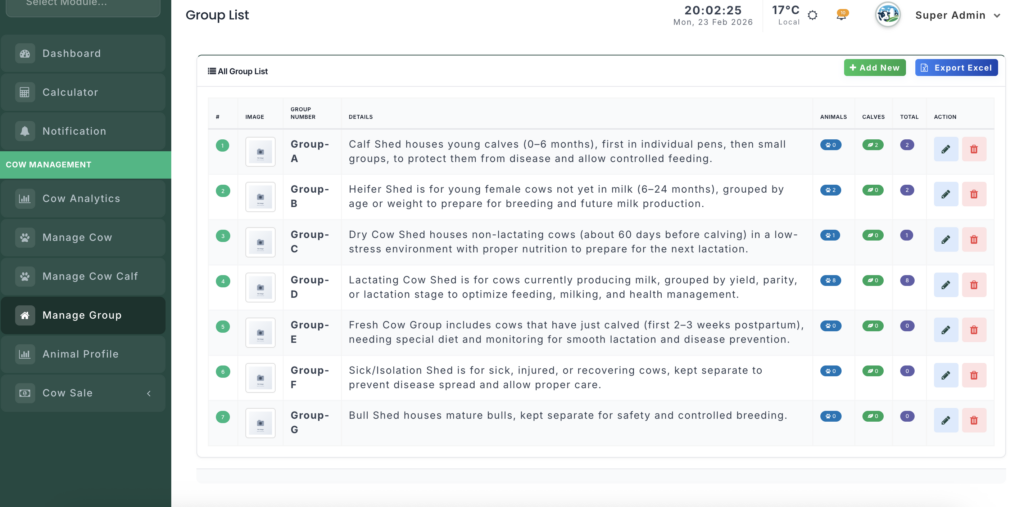
The Shed Management module helps organize and monitor the physical housing of your livestock. It ensures proper group separation, manages animal density, and tracks stall availability.
Module URL: http://127.0.0.1:8001/sheds
Key Features #
1. Stall Organization #
Every housing unit (Shed, Stall, or Pen) is listed with a unique identifier and current status, enabling:
- Category Separation — Keep milking cows, dry cows, and calves in their respective areas.
- Status Monitoring — Tracks whether a stall is Available or Booked based on current occupancy.
2. Real-Time Occupancy Tracking #
The dashboard provides instant insight into shed populations:
- Active Herd Count — Number of adult cows housed in the shed.
- Active Calf Count — Number of calves assigned to the shed.
- Capacity Alerts — Helps identify overcrowded or empty stalls for efficient space management.
3. Visual Identification #
- Each shed can include a photograph to make it easier for staff to locate housing units on larger farm sites.
Operations #
1. Managing Sheds #
- Add New Shed — Register a shed by assigning a number and optional location photo.
- Edit Shed Info — Update identifiers or replace images as the farm layout changes.
2. Density Monitoring #
- Assign animals to sheds using the Animal List and Calf Management modules.
- The Shed Management dashboard automatically updates counts to reflect changes.
3. Deleting Sheds #
- Remove shed records for decommissioned units.
- Important: Ensure the shed is empty of active animals before deletion to maintain accurate records.
Management Actions #
- Search — Quickly locate sheds by number.
- Image Preview — View or update the physical photo of a stall.
- Action Buttons — Edit details or remove redundant shed records.


Leave a Reply
You must be logged in to post a comment.