
Table of Contents
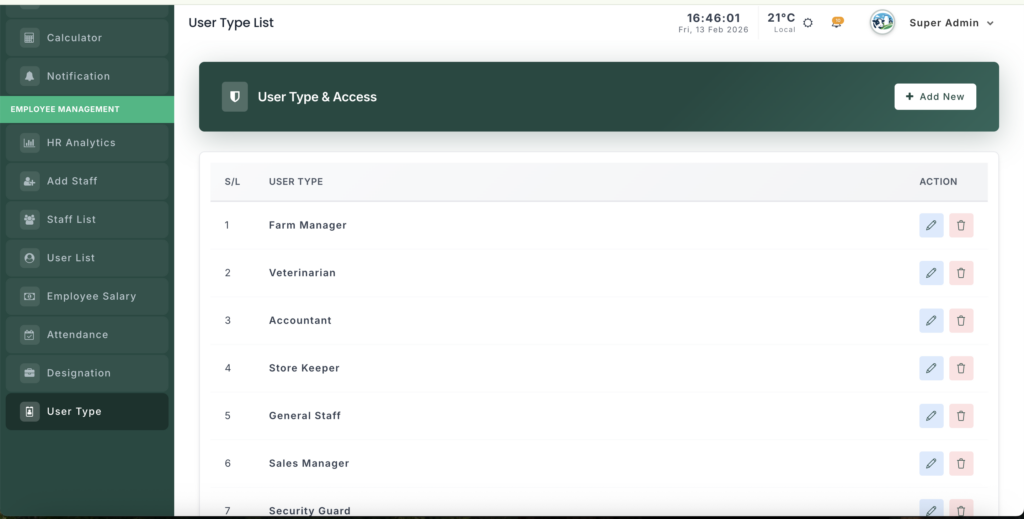
The User Type Management module helps you create and control different system user categories (such as Admin, Manager, Accountant, Staff). These user types decide what features a user can access in the system.
📍 Page Link #
http://127.0.0.1:8000/user-type
What You Can Do Here #
- Create new user categories.
- Edit existing user types.
- Delete unnecessary user types.
- Control system access levels for staff.
Step-by-Step Guide #
1️⃣ View User Types #
- Open the User Type page.
- You will see a list of all user categories.
- Each row shows:
- User Type Name
- Action buttons (Edit / Delete)
2️⃣ Add a New User Type #
- Click Add User Type button.
- Enter the User Type Name (example: Manager, Supervisor).
- Click Save.
- The new type will appear in the list.
✅ Use this when creating a new role in your organization.
3️⃣ Edit a User Type #
- Find the user type in the list.
- Click Edit.
- Update the name if needed.
- Click Update to save changes.
4️⃣ Delete a User Type #
- Click the Delete button next to the type.
- Confirm deletion.
- The user type will be removed.
⚠️ Note: Some important system roles cannot be deleted.
5️⃣ How User Types Are Used #
User Types are important because they:
Protect sensitive system areas
Control system permissions
Appear in Staff Registration forms
Help organize users by access level


Leave a Reply
You must be logged in to post a comment.