
Table of Contents
The Animal Statistics module enables deep performance analysis of individual animals. Follow these steps to effectively review and manage livestock data.
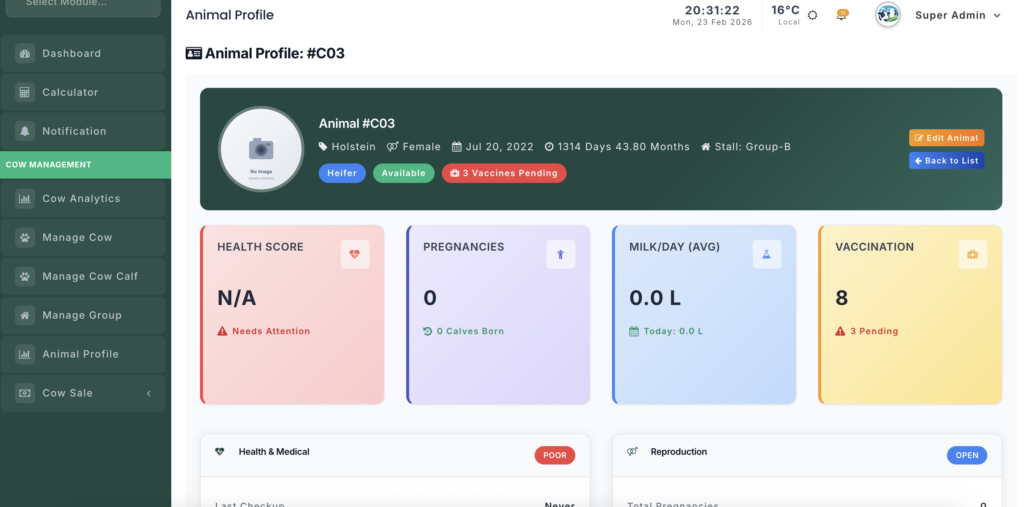
Module URL: http://127.0.0.1:8001/animal-statistics
Management Steps #
Step 1: Locate the Animal #
- Search by ID — Enter the Animal ID or Tag Number in the search field.
- Filter by Stall — Select a specific Shed/Stall to view animals in that location.
- Click the animal’s ID to open the live statistics dashboard.
Step 2: Evaluate Health & Growth Trends #
Once an animal is selected, review the key performance indicators:
- Weight & Height Charts — Ensure the animal is meeting expected growth targets.
- Health Score Trend — A declining score may indicate illness or stress requiring attention.
- Milk Yield Analysis — For milking cows, monitor for sudden drops in production.
Step 3: Review Historical Records #
Scroll to the consolidated data section to view:
- Pregnancy History — Past insemination and calving records.
- Offspring Records — List of calves produced by the cow.
- Vaccination Timeline — Completed vaccinations and upcoming boosters.
Step 4: Monitor Feeding Efficiency #
- Review the Feed Charts to analyze consumption patterns.
- Compare feed intake with milk production or weight gain to evaluate nutrition effectiveness.
Step 5: Take Management Action #
Based on insights from the statistics dashboard:
- Schedule Treatment — Use the Case Entry module if health scores are declining.
- Adjust Nutrition Plans — Modify feeding schedules if growth is slow.
- Make Breeding or Sale Decisions — Use long-term performance data for strategic herd management.
Technical Features #
- Live Data Loading — Dashboard updates instantly via AJAX without page refresh.
- Unified Data View — Consolidates information from Heat Detection, Feeding, and Vaccination modules into a single interface.


Leave a Reply
You must be logged in to post a comment.