
The Pregnancy Diagnosis (PD) module is used to confirm whether breeding activities (Artificial Insemination) were successful.
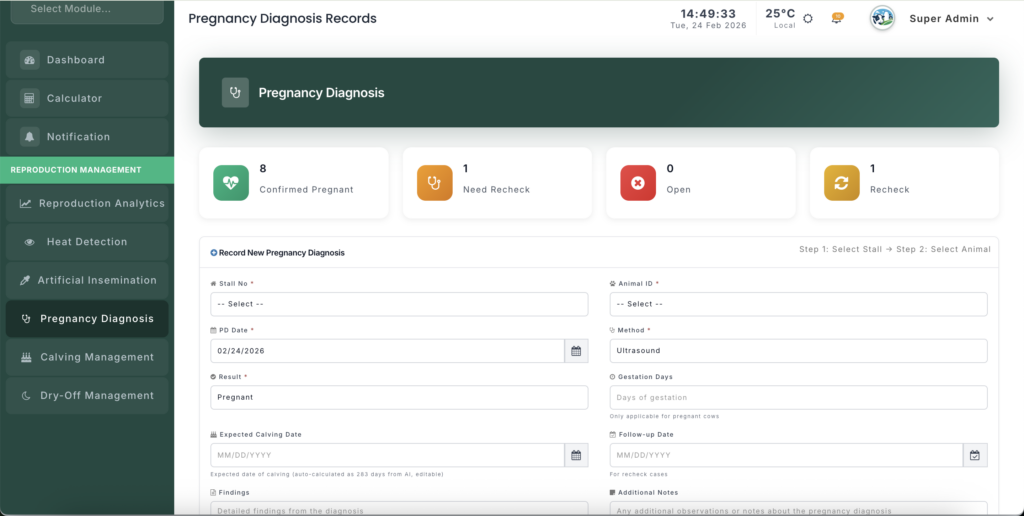
It enables herd managers to:
- Confirm pregnancies
- Identify “Open” animals early
- Schedule rechecks
- Monitor overall herd fertility
Early and accurate PD directly improves reproductive efficiency and reduces days open.
Module URL:http://127.0.0.1:8001/reproduction/pregnancy-diagnoses
Feature Overview #
The PD module centralizes diagnostic records and strengthens fertility management.
✅ Confirm Pregnancy #
- Record Pregnant results
- Automatically calculate Expected Calving Date
- Move animals into the calving pipeline
❌ Identify “Open” Animals #
- Flag animals that failed to conceive
- Return them to heat monitoring cycle
- Reduce wasted reproductive time
🔄 Manage Rechecks #
- Schedule follow-up examinations
- Track uncertain cases
- Prevent missed confirmations
🧪 Diagnostic Method Tracking #
Log the diagnosis method used:
- Ultrasound
- Rectal Palpation
- Blood Test
This improves veterinary performance analysis and accuracy tracking.
🚀 How to Manage PD Records #
You can record diagnoses in two ways:
1️⃣ Recording a New Diagnosis #
A. From the “Need PD” List (Recommended Method) #
Scroll to the Need PD section.
This automatically lists animals:
- That had AI
- Are within the optimal PD window
- Have not yet been diagnosed
Use the Quick Actions Dropdown:
✔ Quick Confirm Pregnant #
- Instantly marks the animal as pregnant
- Assumes default 30-day ultrasound confirmation
🔁 Quick Recheck #
- Flags the animal for follow-up
- Moves it to the Need Recheck list
❌ Quick Mark Open #
- Confirms non-pregnancy
- Returns animal to heat detection workflow
✔ This method is ideal during farm vet visits.
B. Manual Entry (Detailed Recording) #
Use manual entry when:
- Recording external veterinary reports
- Entering historical data
- Correcting previous entries
Step 1: Select Animal #
- Choose Stall/Shed
- Select Animal ID
Step 2: Enter PD Date #
Record the actual examination date.
Step 3: Choose Method & Result #
Select:
Method:
- Ultrasound
- Palpation
- Blood Test
Result:
- Pregnant
- Open
- Recheck
Step 4: Enter Gestation & Dates #
- Gestation Days: Current pregnancy stage
- Expected Calving Date: Auto-calculated from original AI date
- Follow-up Date: Required for “Recheck” cases
The system allows manual override if necessary.
📊 PD Dashboard Management #
The dashboard is divided into actionable areas:
🟡 Need PD #
Focus list of animals:
- 30–45 days post-AI
- Within optimal diagnostic window
- Awaiting first pregnancy confirmation
Animals may be tagged as Optimal Time.
🔁 Need Recheck #
Alert list of animals:
- Previously marked for recheck
- Awaiting second confirmation
⚠ Overdue items require immediate attention.
📈 Stats Overview #
Provides herd-level metrics:
- Total Pregnant
- Total Open
- Total Recheck
These statistics help evaluate:
- Conception rate
- AI success efficiency
- Reproductive bottlenecks
🔄 Workflow Integration #
The PD module integrates seamlessly with other reproduction modules:
🔥 Heat Records Integration #
Animals marked Open:
- Automatically reappear in heat detection workflow
- Become eligible for next breeding cycle
🐄 Calving Management Integration #
Animals confirmed Pregnant:
- Move into calving tracking
- Due dates monitored
- Appear in upcoming calving alerts
💡 Best Practices #
⏱ Perform PD at Optimal Timing #
First ultrasound recommended:
📅 30–45 days post-AI
Benefits:
- Reduces false negatives
- Detects early embryonic loss
- Improves herd planning
The system highlights animals in this window.
📝 Record Detailed Veterinary Findings #
Use the Findings Field to log:
- Ovarian cysts
- Uterine infections
- Twins suspected
- Weak heartbeat
- Embryonic loss risk
These notes are crucial for long-term fertility assessment.
🔁 Maintain Recheck Discipline #
Always set a Follow-up Date for:
- Early pregnancy checks
- Doubtful diagnoses
- Health-related uncertainty
The dashboard will automatically alert overdue rechecks.
🔍 Audit Open Animals #
If an animal is marked Open, review:
- AI timing
- Technician
- Semen type
- Heat score quality
Pattern analysis helps improve conception rates.
📈 Management Insight #
A disciplined PD system reduces:
- Days Open
- Repeat Breeding
- Breeding Costs
- Culling due to infertility
It improves:
- Conception Rate
- Pregnancy Rate
- Calving Interval
- Overall Farm Profitability
Early identification of Open animals is one of the most powerful tools in reproductive management.


Leave a Reply
You must be logged in to post a comment.