
Table of Contents
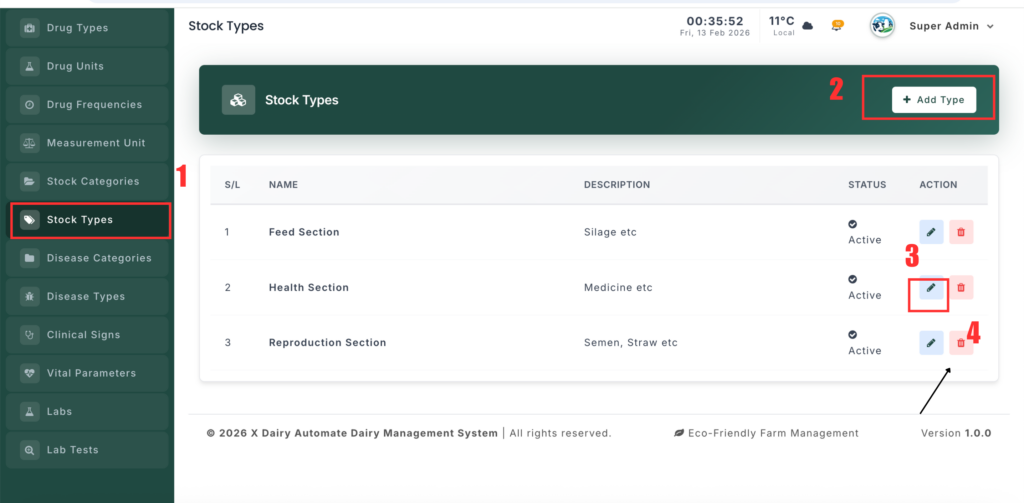
The Stock Type Management module is used to define the highest level of inventory classification such as Medicine, Feed, Equipment, Consumables, etc. These types act as parent groups for Stock Categories and help keep the inventory system well organized.
📍 Page Link #
http://127.0.0.1:8000/stock-type
Feature Overview #
This module allows administrators to:
- Create broad inventory classifications.
- Manage the top-level structure of all stock items.
- Organize inventory for better reporting and filtering.
- Control active and inactive stock types.
What You Can Do #
1️⃣ View Stock Types #
- Open the Stock Type page.
- A list of all stock types will be displayed.
- Each entry shows the name, description, and status.
2️⃣ Add a New Stock Type #
- Click “Add Stock Type”.
- Enter the Type Name (example: Medicine).
- Add an optional description.
- Set the status as Active or Inactive.
- Click Save to create the stock type.
3️⃣ Edit a Stock Type #
- Click the Edit button next to a type.
- Modify the name or description.
- Update the status if needed.
- Click Update to save changes.
4️⃣ Delete a Stock Type #
- Click Delete beside a stock type.
- Confirm the action.
- Deletion may be restricted if categories are linked to it.


Leave a Reply
You must be logged in to post a comment.