
Table of Contents
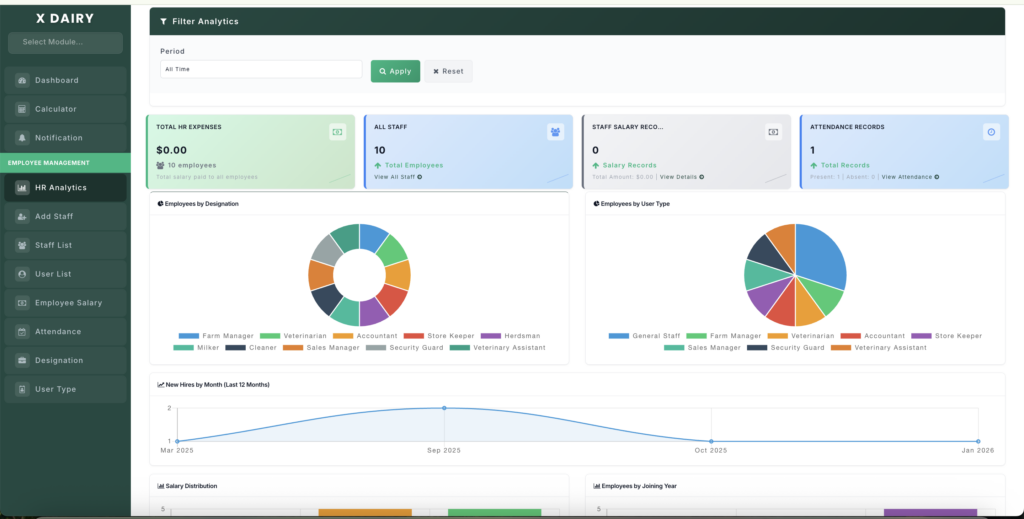
The HR Analytics dashboard shows important workforce data like staff count, salaries, hiring trends, and retention.
📍 Page Link #
http://127.0.0.1:8000/hr-analytics
Key Functions #
1️⃣ View HR Summary #
- See total employees.
- Check active vs inactive staff.
- View total salary and average tenure.
2️⃣ Check Employee Distribution #
- View staff by designation (Manager, Vet, Worker, etc.).
- See employees by user type.
3️⃣ Track Hiring Trends #
- View monthly hiring data.
- Monitor workforce growth over time.
4️⃣ Monitor Retention #
- See resignation counts.
- View average employee working duration.
5️⃣ Use Filters #
- Select time filter (Today, Monthly, Yearly, etc.).
- Or choose a custom date range.
- Data updates automatically.


Leave a Reply
You must be logged in to post a comment.