
Table of Contents
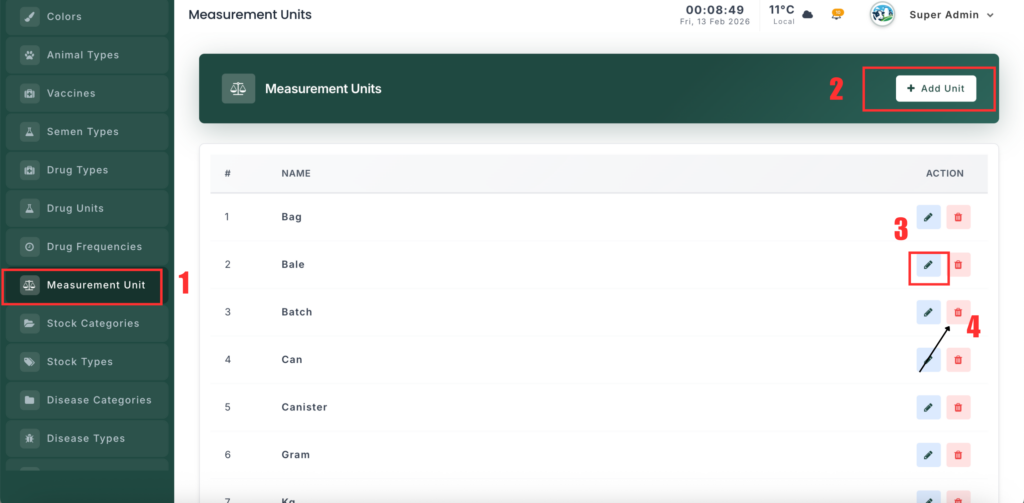
The Measurement Units Management section allows you to manage standard units used for feed, supplies, and inventory (such as Bag, Kg, Gram, Bale). These units help keep records consistent across the system.
📍 Page Link #
http://127.0.0.1:8000/measurement-units
Feature Overview #
This module helps you:
- Maintain a list of measurement units.
- Standardize unit names for accurate reporting.
- Use units across feed, stock, and supply records.
- Protect important system units from deletion.
What You Can Do #
1️⃣ View Measurement Units #
- Open the Measurement Units page.
- You will see a list of all units.
- Each record shows the unit name and related details.
2️⃣ Add a New Unit #
- Click “Add Unit”.
- Enter the unit name (example: Kilogram).
- (Optional) Add a symbol (example: Kg).
- Select a category if available.
- Click Save.
3️⃣ Edit a Unit #
- Click Edit next to a unit.
- Update the name or symbol.
- Click Update to save changes.
4️⃣ Delete a Unit #
- Click Delete next to a unit.
- Confirm the action.
- The unit will be removed (except protected system units).


Leave a Reply
You must be logged in to post a comment.