
Table of Contents
The Milk Analytics dashboard provides a high-level overview of your farm’s milk productivity and financial performance. Use this module to monitor efficiency, identify losses, and optimize milk production.
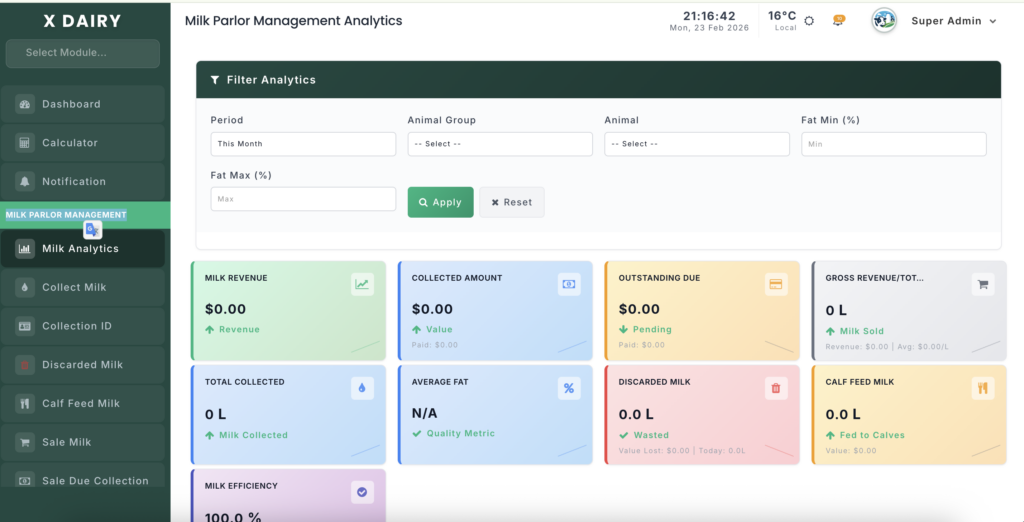
Module URL: http://127.0.0.1:8001/milk-analytics
Management Steps #
Step 1: Define Your Data Range #
- Quick Filters — Select Today, This Week, This Month, or This Year for instant analysis.
- Custom Range — Choose Custom and set specific start and end dates to review a defined period (e.g., breeding season).
- Click “Filter” to refresh the dashboard based on your selected timeframe.
Step 2: Analyze Core Productivity Metrics #
Review the summary cards at the top for key insights:
- Net Revenue — Total income from milk sales after discounts.
- Milk Efficiency — Percentage of collected milk successfully sold versus wasted or diverted. Higher percentages indicate better profitability.
- Average Fat Content — Indicates milk quality. Sudden drops may signal nutrition or health issues.
Step 3: Monitor Usage & Waste #
- Volume Breakdown — View total liters Collected, Sold, and Discarded.
- Discard Analysis — Check reasons for discarded milk (e.g., contamination or health issues).
- Calf Feeding — Track how much milk is allocated for feeding young livestock.
Step 4: Evaluate Collection & Sales Trends #
- Trend Charts — Switch between:
- Daily View for short-term analysis
- Monthly View for long-term trends
- Performance Gap Analysis — Compare collected vs. sold milk lines to detect wastage or reporting issues.
- Fat Trends Monitoring — Observe milk quality changes over time, especially during seasonal feed adjustments.
Step 5: Identify Top Performers #
- Collection Sources — Identify high-producing cows or sheds for breeding and performance rewards.
- Top Customers — Track major buyers and ensure timely recovery of outstanding dues.
Management Insights #
- Low Efficiency Warning — Often caused by high discard rates. Review discarded milk logs immediately.
- Increasing Dues — Check the Sale Due Collection module to recover pending payments.
- Data Exporting — Use export features (if available) to share reports with consultants, auditors, or veterinarians.


Leave a Reply
You must be logged in to post a comment.