
Table of Contents
The Stock Item Management module is the core inventory system for the farm. It ensures accurate stock control, consistent item naming, and advanced unit tracking.
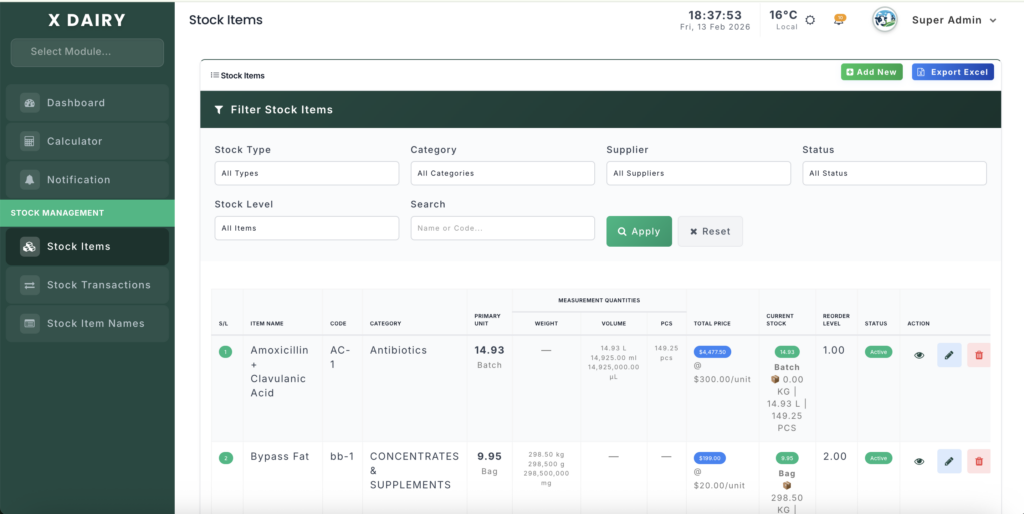
Module URLs #
| Feature | URL |
|---|---|
| Stock Item Names (Catalog) | http://127.0.0.1:8000/stock-item-name |
| Stock Items (Inventory) | http://127.0.0.1:8000/stock-item |
1. Stock Item Names (Catalog) #
This is the master list of all items used on the farm.
Purpose #
- Standardize item names to avoid duplicates (e.g., “Cattle Feed” vs “Cow Feed”).
- Categorize items into Feed, Medicine, Equipment, or Others.
- Set default units for easier stock tracking.
Key Fields #
| Field | Type | Description |
|---|---|---|
| name | string | The item name (required) |
| category | string | Category of the item (Feed, Medicine, Equipment) |
| default_unit | string | Suggested unit (Bag, Bottle, Piece, etc.) |
Workflow #
- Adding a New Item Name
- Go to Stock Item Names → Add New
- Fill in Name, Category, Default Unit
- Click Save
- Editing Item Names
- Click Edit next to an item
- Update details and save changes
- Deleting Item Names
- Click Delete to remove the item (cannot delete if linked to inventory)
Benefits #
- Maintains data consistency
- Makes inventory input faster via dropdowns
- Reduces human error when adding stock
2. Stock Items (Inventory) #
This is the active inventory tracker for all physical stock on the farm.
Purpose #
- Track quantity on hand, unit costs, and reorder levels
- Automatically calculate weights, volume, and piece equivalents
- Provide alerts for low stock
Key Fields #
| Field | Type | Description |
|---|---|---|
| item_name_id | foreign key | Links to Stock Item Name |
| category | string | Item category |
| unit_type | string | Main unit type (Bag, Bottle, Piece) |
| quantity | decimal | Current stock quantity |
| micro_kg_per_unit | decimal | Weight per unit in kg (optional) |
| micro_liter_per_unit | decimal | Volume per unit (optional) |
| micro_pcs_per_unit | integer | Pieces per unit (optional) |
| cost_price | decimal | Cost per unit |
| reorder_level | decimal | Minimum stock level for alerts |
| status | active/inactive | Operational availability |
Advanced Features #
1. Micro Unit Conversion #
- Tracks inner quantities for accurate usage.
- Example:
- 1 Bag = 50 kg
- Added 10 Bags → System tracks 500 kg automatically.
- Works for weight, volume, and pieces.
2. Low Stock Alerts #
- Items below
reorder_levelare highlighted in red. - Ensures timely procurement to avoid stockouts.
3. Inventory Calculations #
syncMeasurementQuantities()automatically converts:- Bags → kg
- Bottles → liters
- Packs → pieces
4. Category-Based Filtering #
- Filter inventory by:
- Feed, Medicine, Equipment
- Supplier (if tracked)
- Status (Active/Inactive)
Workflow #
- Adding Stock Items
- Go to Stock Items → Add New
- Select:
- Item Name (from catalog)
- Category
- Unit Type
- Enter:
- Quantity
- Cost Price
- Reorder Level
- Click Save
- Editing Stock Items
- Update quantity, unit conversion, or price
- System recalculates totals automatically
- Monitoring Stock
- Main stock table displays:
- Item Name
- Category
- Quantity
- Unit Conversion
- Reorder Status (Low/Normal)
- Quick links to view transaction history or edit.
- Main stock table displays:
- Low Stock Handling
- Highlighted in red
- Alerts notify the farm manager for procurement


Leave a Reply
You must be logged in to post a comment.