
Table of Contents
The Lab Confirmation module records and tracks laboratory test results for livestock. It ensures diagnoses are scientifically verified, allowing for accurate treatments and improved herd health management.
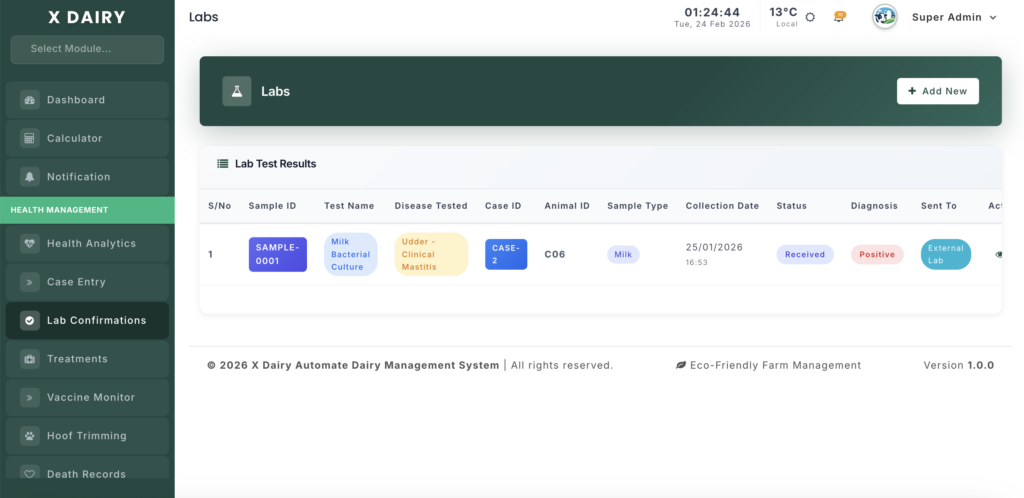
Module URL:http://127.0.0.1:8001/lab-confirmation
✅ Management Steps #
Step 1: Initiate a Lab Request #
- Click “Add New” to create a new lab confirmation record.
- Select Request Type:
- Case Based: Link to an existing Case Entry (recommended for illness tracking).
- Standalone: Use for routine screenings or preventive testing.
- Sample ID:
- The system automatically generates a unique ID (e.g.,
SAMPLE-0005). - Label your physical sample tubes with this ID.
- The system automatically generates a unique ID (e.g.,
Step 2: Record Sample Collection #
Enter sample details:
- Select Animal: Choose the cow or calf being tested.
- Sample Type: Select the material collected:
- Milk
- Blood
- Urine
- Fecal
- Collection Details: Record:
- Collection Date
- Collection Time
- Staff member who collected the sample
- Sample Condition: Indicate whether the sample is:
- Fresh
- Chilled
- Frozen
- Include preservatives used (if any)
Step 3: Manage Sample Dispatch #
Track the sample movement:
- Sent To: Choose:
- Farm Lab
- External Lab
- Select Lab: If external, select the facility from your directory.
- Tracking Dates:
- Dispatch Date
- Received Date
- Status Updates: Move the status through:
- Pending → Dispatched → Received
This helps monitor laboratory turnaround time.
Step 4: Record Results & Diagnosis #
When results are available:
- Final Diagnosis: Mark as:
- Positive (disease confirmed)
- Negative (disease ruled out)
- Inconclusive / Pending
- Disease Tested: Confirm the pathogen or condition (e.g., Mastitis, BVD).
- Diagnosis Notes: Enter key findings from the lab report.
Step 5: Complete the Record #
Finalize the entry:
- Technician Name: Record the professional who performed the test.
- Final Status: Set to Completed.
- Verification: Review the Lab Results table for full history and outcomes.
📊 Management Insights #
Treatment Justification #
Use positive lab results to:
- Support targeted treatment decisions
- Justify advanced medication costs
- Plan herd-wide vaccination strategies
Lab Performance Monitoring #
Compare:
- Dispatch Date
- Received Date
This helps identify labs with faster turnaround times.
Disease Trend Analysis #
Filter lab records by Positive Results to:
- Identify recurring pathogens
- Improve hygiene protocols
- Strengthen biosecurity measures


Leave a Reply
You must be logged in to post a comment.