
Milk Collection Accounts (also called Collection IDs) act as a grouping system for daily milk operations. They help synchronize collection, sales, and waste tracking for specific shifts, batches, or dates.
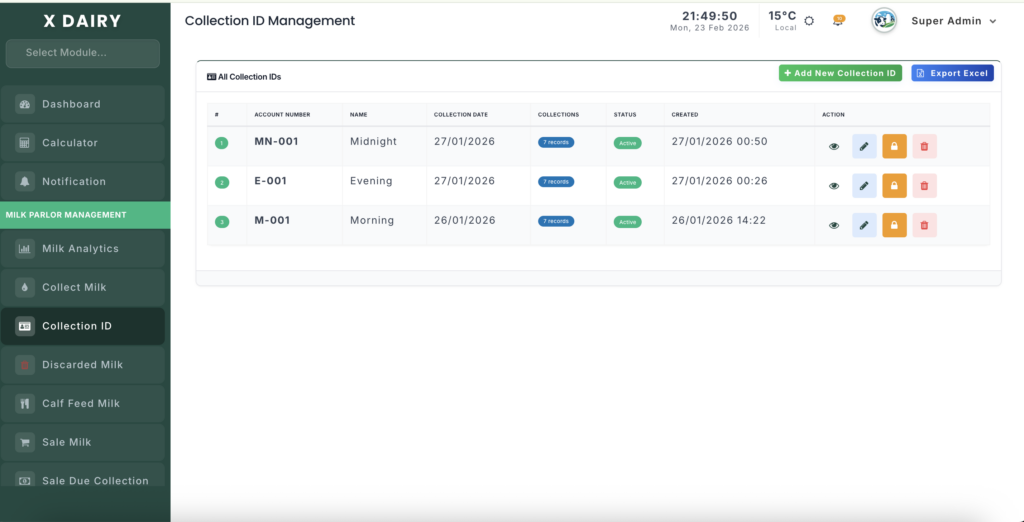
Module URL:http://127.0.0.1:8001/milk-collection-account
✅ Management Steps #
Step 1: Create a New Collection ID #
Follow these steps to register a new account:
- Click Add New to open the form.
- Account Number:
- Click Generate to auto-create a unique ID based on today’s date (
DDMMYYYYformat). - You may also enter a custom ID.
- Click Generate to auto-create a unique ID based on today’s date (
- Set Date: Choose the date this account will track.
- Click Submit to activate the account.
Step 2: Use the ID in Daily Operations #
Once created, the Collection ID becomes available across modules:
Milk Collection #
Select the account when recording milk from cows or groups.
Milk Sales #
Link sales transactions to track revenue for that specific batch.
Waste Management #
Assign discarded milk or calf feeding records to maintain accurate milk balance.
Step 3: Monitor Account Performance #
To view account insights:
- Click the View (Eye icon) on any account.
- Open the Collection Dashboard.
Dashboard Includes: #
- Total Liters Collected
- Milk Sold
- Fed to Calves
- Discarded Milk
- Net Balance Calculation
Animal Contribution Tracking #
Scroll down to see how much milk each cow contributed to that account.
Step 4: Manage Account Status #
Keep your records organized using status control:
Active Status #
Use while collections, sales, or waste records are ongoing.
Closed Status #
Set to Closed once the batch is finalized.
⚠️ Closed accounts:
- Cannot be selected for new entries
- Remain available for reporting and history
Step 5: Archive or Delete #
Edit Account #
You can update:
- Description
- Account Number
- Date
Delete Account #
Deletion is allowed only when:
- No linked records exist
If records are linked:
- Delete related entries first OR
- Simply mark the account as Closed
📊 Management Insights #
Why Use Collection Accounts? #
They allow you to track performance by milk batch, shift, or day.
Automatic Balancing #
The system instantly calculates Net Balance as you add:
- Sales
- Feeding records
- Waste entries
This helps detect leakage or losses quickly.
Historical Analysis #
Use dashboards to review:
- Date ranges
- Average sale price
- Profitability per batch


Leave a Reply
You must be logged in to post a comment.