
Table of Contents
The Lab Management module allows administrators to manage laboratories linked to the farm, including their contact details and operational status.
📍 Page Link #
http://127.0.0.1:8000/lab
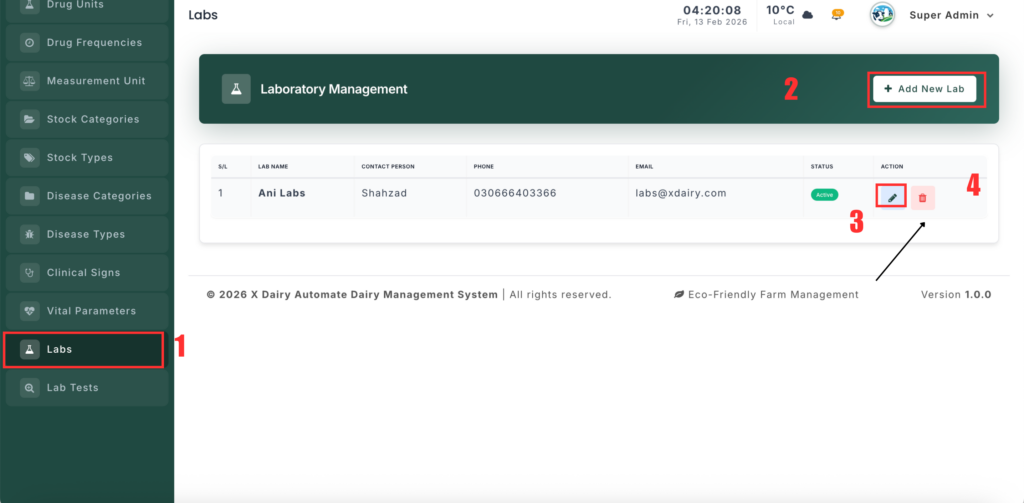
Key Functions #
1️⃣ View Lab List #
- Displays all registered labs in a table.
- Shows Lab Name, Contact Person, Phone, Email, and Status.
- Data is automatically filtered by the selected branch.
2️⃣ Add a New Lab #
- Click Add New Lab.
- Enter the Lab Name.
- (Optional) Add Description and Address.
- Enter Contact Details:
- Phone
- Contact Person
- Set Status (Active/Inactive).
- Click Save.
3️⃣ Edit Lab Details #
- Click Edit next to a lab.
- Update any information such as name, contact info, or status.
- Click Update.
4️⃣ Delete a Lab #
- Click Delete and confirm.
- This permanently removes the lab from the system.


Leave a Reply
You must be logged in to post a comment.