
Table of Contents
The Feed Analytics dashboard provides a complete financial and operational overview of your farm’s feeding program. It turns raw feeding logs into actionable insights for cost management, consumption trends, and herd efficiency.
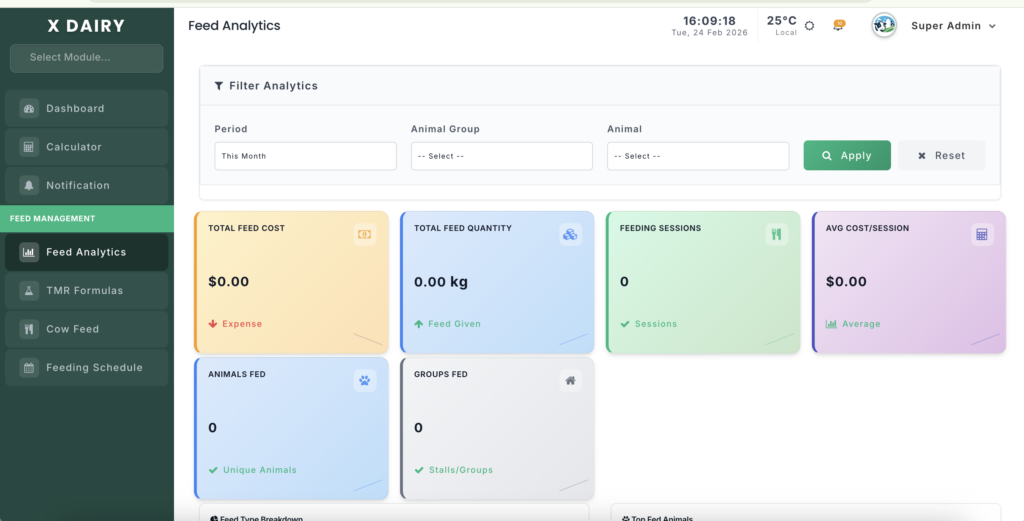
Module URL:http://127.0.0.1:8001/feed-analytics
📋 Feature Overview #
This module allows farm managers to:
- Monitor Expenses – Track total feed costs across selected periods.
- Analyze Consumption – Measure total feed quantity (kg) consumed by the herd.
- Identify Trends – Visualize correlations between feed volume and expenditure.
- Audit Performance – Break down feeding frequency per animal and per stall.
- Optimize Rations – Identify which feed types consume the largest portion of the budget.
🔍 Data Interpretation #
1️⃣ High-Level Metrics (Top Cards) #
- Total Feed Cost – Sum of all feed items distributed during the selected period.
- Total Feed Quantity – Aggregate weight (kg) of feed consumed.
- Feeding Sessions – Count of all recorded feeding events.
- Avg Cost/Session – Financial benchmark for each feeding session.
- Animals & Groups Fed – Unique count of animals and stalls reached.
2️⃣ Strategic Breakdowns #
- Feed Type Breakdown – Table showing feed types (e.g., Grass, Silage, Concentrates) with respective cost impact.
- Top Fed Animals/Groups – Identifies animals or stalls with highest feeding frequency. High frequency may indicate:
- High milk production
- Health-related adjustments
3️⃣ Visual Trends #
- Feed Cost Trend Chart – Dual-axis line chart:
- Blue Line – Feeding sessions
- Red Line – Feed expenses
- Insight: Rising costs without proportional session increase may indicate feed price changes or wastage.
🛠️ Using Filters & Tools #
Filtering the Data #
Use the top filter panel to focus analytics:
- Period – Today / This Week / This Month / Custom Range
- Animal Group / Shed – Filter by stall or barn
- Animal – Drill down into an individual cow’s feeding history
- Apply/Reset – Always click Apply after changing filters to update results
Exporting Reports #
- In Recent Daily Performance, click Export Excel to generate a
.csvwith:- Date
- Feeding session counts
- Total quantity fed
- Daily costs
Use for external auditing or accounting uploads.
💡 Management Tips #
- Cost Control – Regularly review Feed Type Breakdown to check if expensive feeds are used appropriately.
- Benchmarking – Track Avg Cost/Session to detect anomalies or price changes.
- Targeted Feeding – Use the Animal filter to ensure high-producing cows receive the correct supplement amounts.
This guide helps farm managers make informed decisions, optimize feed efficiency, and control costs effectively.


Leave a Reply
You must be logged in to post a comment.