
Table of Contents
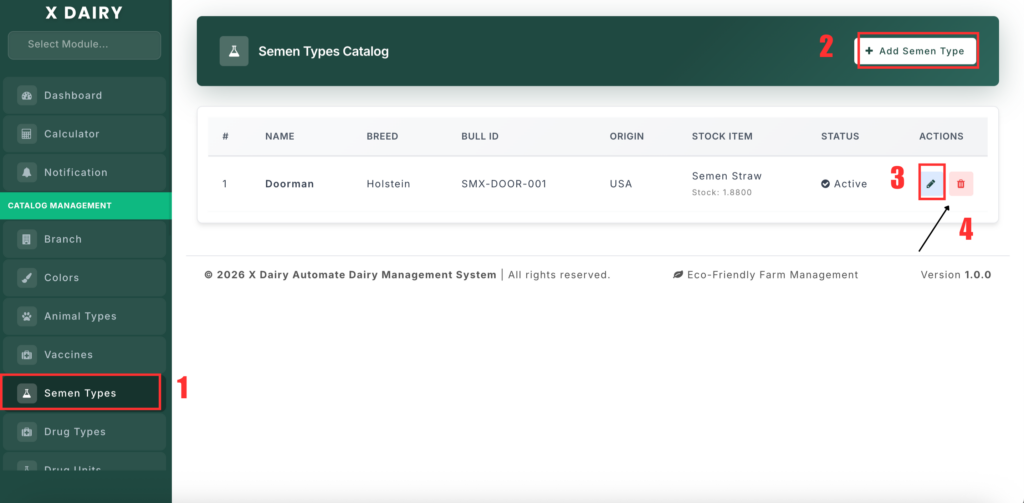
The Semen Type Management section allows you to manage bull semen records used for artificial insemination, including bull details, origin, dosage, and stock tracking.
📍 Page Link #
http://127.0.0.1:8000/semen-type
Feature Overview #
This module helps you:
- Maintain a list of semen types with bull information.
- Store breed, origin, and identification details.
- Define dosage per straw.
- Link semen types to stock items for inventory tracking.
- Enable or disable records using status control.
What You Can Do #
1️⃣ View Semen Types #
- Open the Semen Type page.
- You will see a list of all semen records.
- Each record shows bull name, breed, origin, dose info, and status.
2️⃣ Add a New Semen Type #
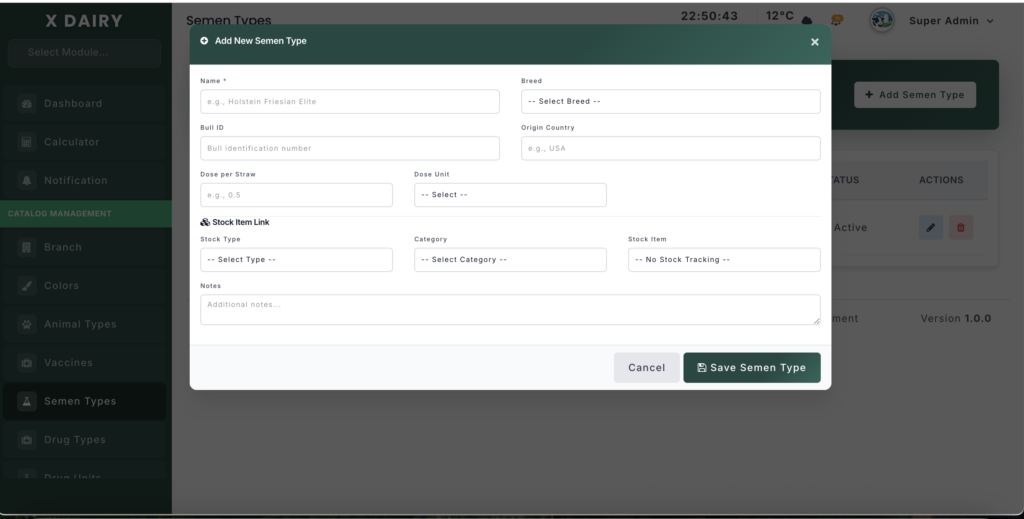
- Click “Add Semen Type”.
- Enter the semen name and bull ID.
- Select the breed and enter the origin country.
- Enter dose per straw and unit (example: ml).
- (Optional) Link a stock item for inventory tracking.
- Set the record status (Active/Inactive).
- Click Save.
3️⃣ Edit a Semen Type #
- Click Edit next to a record.
- Update any details such as bull info, dose, stock link, or status.
- Click Update to save changes.
4️⃣ Delete a Semen Type #
- Click Delete next to a record.
- Confirm the action.
- The semen type will be permanently removed.


Leave a Reply
You must be logged in to post a comment.