
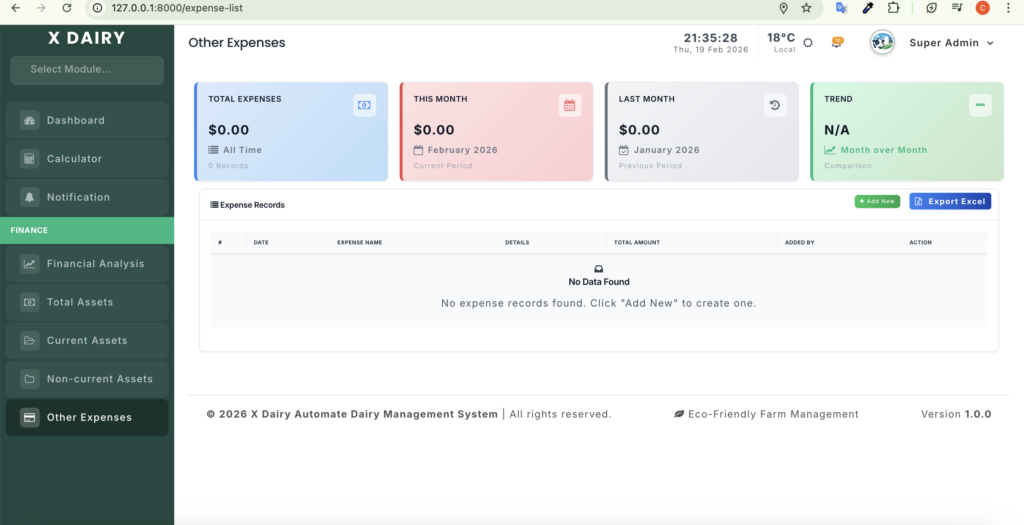
The Expense List module serves as a central ledger for tracking all farm-related expenditures. It provides instant financial insights through an integrated dashboard along with a detailed record of daily spending.
Module URL:
http://127.0.0.1:8000/expense-list
Key Features #
1. Financial Dashboard
Top summary cards display:
- Total Expenses: Overall cumulative spending since system start.
- Monthly Analysis: Real-time comparison of current month vs. previous month spending.
- Trend Indicator: Percentage-based visual showing whether expenses increased or decreased.
2. Detailed Expense Logging
Each expense record includes:
- Date
- Expense name
- Amount
- Optional notes/details
3. Automatic Audit Trail
- The system automatically records which staff member or admin added each expense.
Operations #
1. Monitor Spending #
- Use dashboard cards to quickly evaluate financial health.
- Check the Trend indicator to identify unusual spending spikes compared to the previous month.
2. Add an Expense #
- Click “Add New” to open the entry form.
- Required fields:
- Expense name
- Date
- Amount
- Optional: Add notes for additional context (e.g., vendor name, purchased items).
3. Manage Records #
- Edit: Click the blue pencil icon to update details.
- Delete: Click the red trash icon to remove incorrect entries.


Leave a Reply
You must be logged in to post a comment.