
Table of Contents
The Supplier module serves as the central directory for all external business contacts your farm interacts with — including feed vendors, equipment dealers, milk buyers, and livestock traders. It integrates supplier profiles with your farm’s financial and operational records.
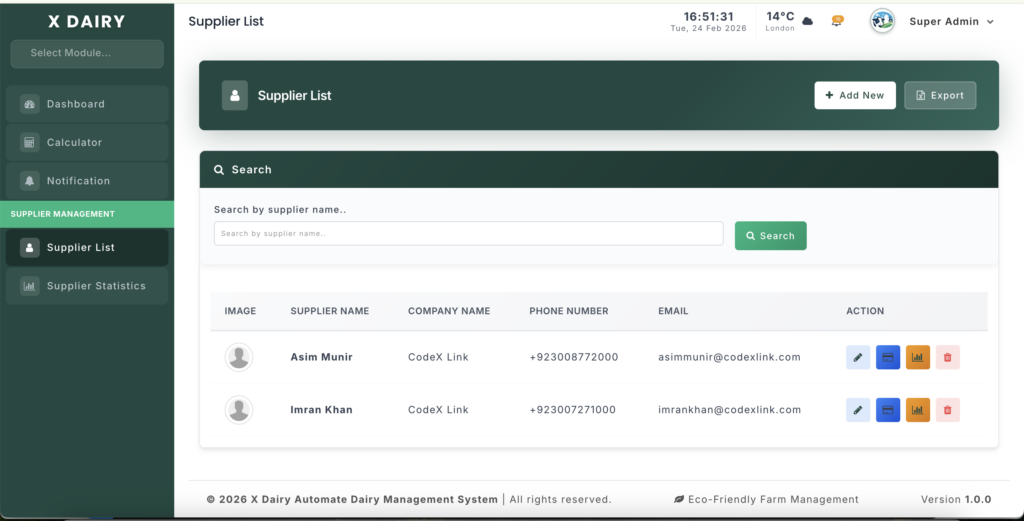
Module URL:http://127.0.0.1:8001/supplier
📋 Feature Overview #
This module provides a full Vendor Relationship Management (VRM) system:
- Contact Directory – Store names, company details, phone numbers, emails, and addresses.
- Payment Profiles – Record bank information for streamlined payments.
- Transaction Statistics – View purchases, sales, and milk/livestock transactions per supplier.
- Global Overview – Compare suppliers side-by-side to identify top-performing partners.
- Search & Export – Quickly locate suppliers and export the directory to Excel.
🚀 How to Manage Suppliers #
1️⃣ Adding a New Supplier #
- Click Add New from the supplier list.
- Fill in Basic Information (all required unless noted):
- Supplier Name – Contact person.
- Company Name – Business/trading name.
- Phone Number – Primary contact.
- Email – Business email.
- Company Address – Physical or mailing address.
- Fill Payment Details (optional but recommended):
- Payment Method – e.g., Bank Transfer.
- Bank Name, Account Holder Name, Account Number
- IFSC Code, Branch Name, SWIFT Code, Bank Address
- Payment Notes – e.g., “Payment net 30 days”.
- Upload a Profile Image (photo or logo) for visual identification.
- Click Save to create the profile.
2️⃣ Managing the Supplier List #
- Search – Filter by supplier name using the search bar.
- Edit – Click the pencil icon to update details.
- Payment Details – Click the credit card icon to view bank info quickly.
- Statistics – Click the bar chart icon for a full financial breakdown.
- Delete – Remove inactive suppliers (soft-delete for safety).
- Export – Download the directory as an Excel file.
📊 Supplier Statistics #
Per-Supplier View #
Accessed via the bar chart icon, this shows a supplier’s detailed financial activity:
| Section | Description |
|---|---|
| Stock Purchases | Feed, equipment, and inventory items bought; shows quantities, unit prices, totals |
| Animal Purchases | Livestock bought with per-head pricing |
| Milk Sales | Raw milk sold; litres, rate, total amount |
| Cow/Calf Sales | Animals sold; per-head pricing |
| Item Breakdown | Summary of total quantity, amount, and average price per category |
| Monthly Trends | Month-by-month volumes to spot seasonal patterns |
Global Statistics Overview #
- Grand Totals – Total purchases, sales, and transactions across all suppliers.
- Per-Supplier Summary – Purchase count, purchase amount, sales count, sales amount, unique items traded, last transaction date.
- Ranking – Sorted by combined transaction value, highlighting top partners.
💡 Best Practices #
- Complete Payment Profiles – Fill in bank details to save time and reduce payment errors.
- Regular Review – Use global statistics quarterly to evaluate supplier value and renegotiate terms if needed.
- Consistent Naming – Avoid duplicates by standardizing company names (e.g., “ABC Feed Co.”).
- Profile Images – Upload logos/photos to make scanning the directory faster, especially with many suppliers.


Leave a Reply
You must be logged in to post a comment.