
Table of Contents
The Feeding Schedules module automates and standardizes the daily feeding routine. By defining recurring feeding times and linking them to specific TMR formulas, it ensures consistent nutrition delivery while reducing manual data entry.
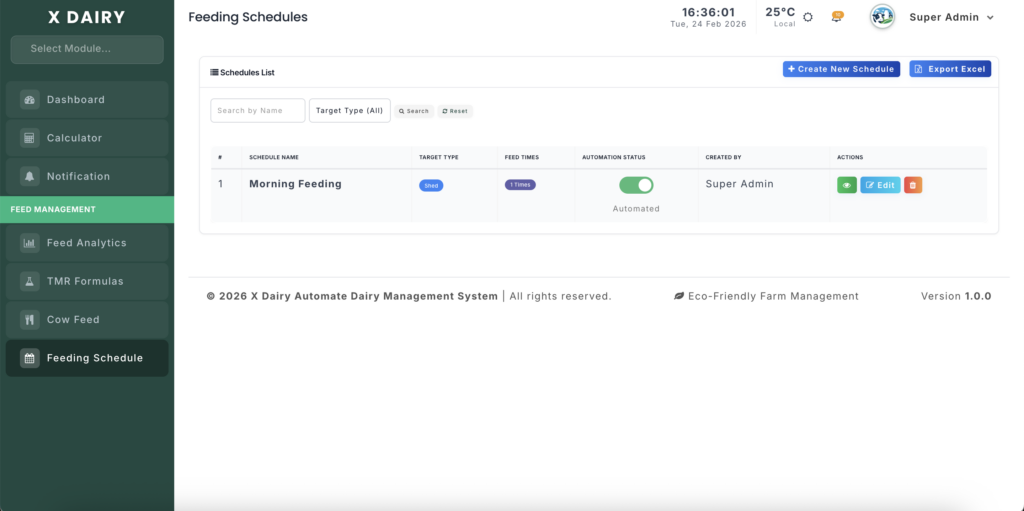
Module URL:http://127.0.0.1:8001/feeding-schedules
📋 Feature Overview #
This module acts as the SOP (Standard Operating Procedure) for herd nutrition:
- Recurring Times – Define exact feeding times (e.g., 6:00 AM, 2:00 PM, 9:00 PM).
- Automation Engine – Automatically generate feeding logs and deduct stock at scheduled times.
- Targeted Nutrition – Create separate schedules for different stalls or unique animals.
- TMR & Stock Linking – Assign pre-defined formulas or individual ingredients to each time slot.
- Audit Ready – Export schedules for posting or regulatory compliance.
🚀 How to Manage Feeding Schedules #
1️⃣ Creating a Schedule #
- Click Create New Schedule on the main list page.
- Schedule Name – Give a descriptive name (e.g., “East Barn Main Herd”).
- Target Type –
- Specific Stall: Apply to all animals in selected sheds.
- Specific Animal: Set a specialized timeline for unique animals.
- Add Feeding Times – Click Add Feeding Time:
- Time: Set the distribution time.
- Item Type: Choose TMR Formula or Stock Item.
- Item Select: Choose the specific recipe or ingredient.
2️⃣ Enabling Automation #
- On the Schedules List, toggle the Automation Status:
- Manual (Grey) – Schedule is a reference; staff must record feedings manually.
- Automated (Green) – System automatically logs feedings and deducts inventory at the specified times.
3️⃣ Reviewing Schedule Composition #
- Selecting a TMR Formula will display a Selected Formula Composition box.
- Verify all ingredients and proportions without leaving the schedule page.
🔍 Understanding Logs #
- Automated feeding logs appear in the Cow Feed module with an Automated badge.
- Each log shows the Feeding Schedule that triggered the record, ensuring a clear audit trail.
💡 Best Practices #
- Stagger Feeding Times – Match times to staff capacity and mixing equipment to avoid bottlenecks.
- Maintain Inventory Cushion – Keep stock topped up; low inventory may prevent automated logs from recording properly.
- Seasonal Updates – Adjust schedules for summer/winter routines to maintain herd performance.
- Export for Staff – Post a printed copy of the schedule in the mixing area to verify that automated logs match physical operations.


Leave a Reply
You must be logged in to post a comment.