
Table of Contents
The Cow Feed module is used to record the daily distribution of feed to your herd. It connects your nutrition strategy (TMR Formulas) with actual inventory usage, ensuring every feeding is tracked for animal health and financial auditing.
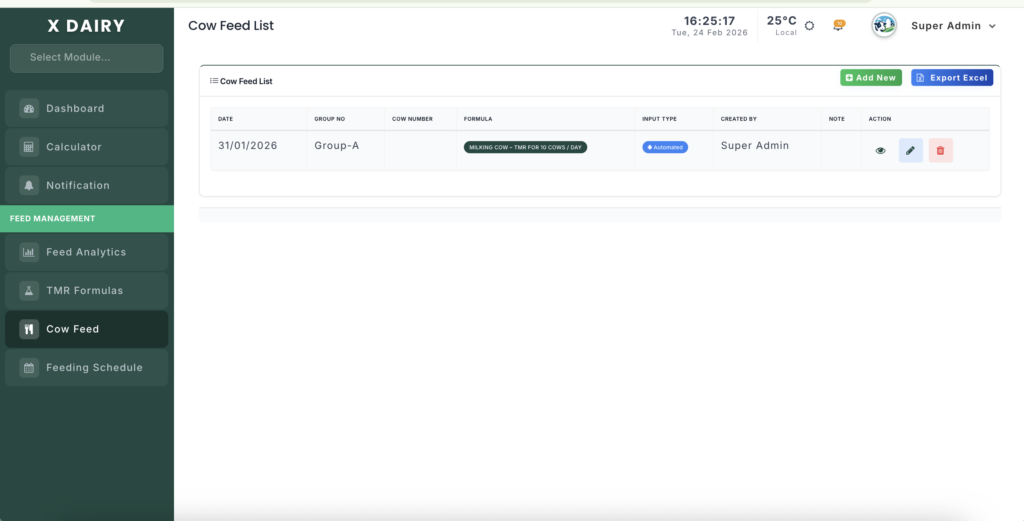
Module URL:http://127.0.0.1:8001/cow-feed
📋 Feature Overview #
This module is the daily “logbook” for feeding operations:
- Daily Logging – Record what was fed and when.
- TMR Integration – Load pre-defined TMR recipes for consistent rations.
- Stock Deduction – Automatically deducts consumed feed from inventory.
- Flexible Targeting – Feed an entire Stall or a single Animal (Cow or Calf).
- Manual Adjustments – Build custom rations by importing items from stock on the fly.
🚀 How to Record a Feeding Session #
1️⃣ Basic Information #
- Navigate to the Cow Feed list and click Add New.
- Stall/Shed – Select the location where the feeding is taking place.
- Animal ID –
- Choose a specific animal if feeding individually.
- Select General/All for communal feeding for the whole stall.
- Date – Enter the date the feed was distributed.
2️⃣ Loading a Ration (Ration Selection) #
You can populate the feeding list in two ways:
A. Load TMR Formula (Fastest) #
- Select the desired recipe in the Load TMR Formula dropdown.
- Click Load.
- The system auto-populates the table with all ingredients and weights (KG) from the formula.
B. Manual Stock Import #
- Click Import from Stock Items.
- Filter by Stock Type or Category to find feed items.
- Select items and click Import Selected.
- Manually enter the Quantity (KG) for each feed item distributed.
3️⃣ Verification & Saving #
- Stock Indicators – Displays available inventory in KG. Values exceeding stock are highlighted in Red.
- Submit – Click Save to finalize the feeding record and update inventory.
🔍 Understanding the Feed List #
The main feed list provides a clear audit trail:
- Formula Badge – Shows whether the feeding was based on a Manual entry or a specific TMR Formula.
- Input Type – Differentiates between manual entries and automated/scheduled feedings.
- Notes – Records staff observations during feeding (e.g., refusals or changes in appetite).
💡 Best Practices #
- Inventory Precision – Always verify Stock Available. Replenish low stock via the Inventory module before recording large feedings.
- Date Accuracy – Correct date entries are essential for the Feed Analytics dashboard and cost calculations.
- Weight Units – Standardized in KG. Bulk bag conversions (e.g., 1 Ton) are automatically handled.
- Post-Feeding Notes – Record observations such as leftover feed, animal behavior, or feed palatability.


Leave a Reply
You must be logged in to post a comment.