
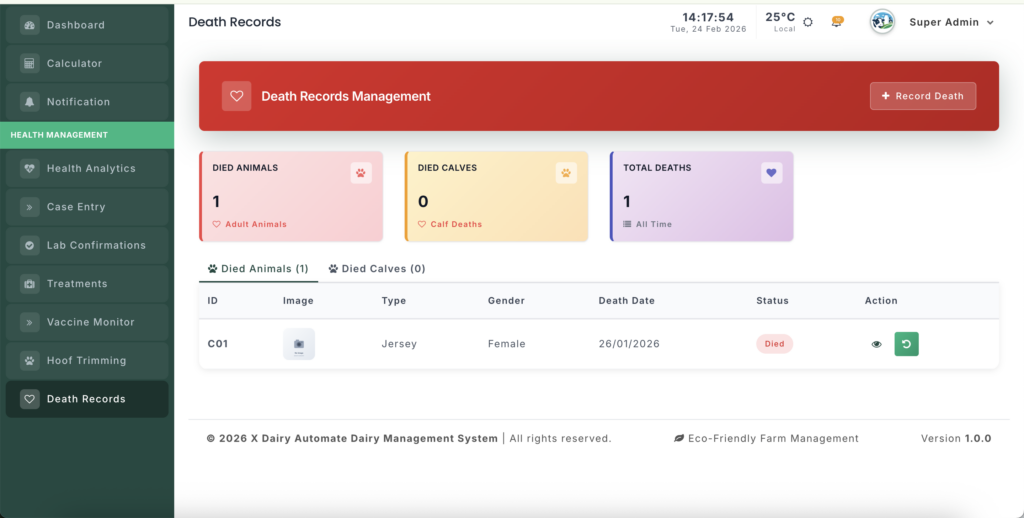
The Death Records module is used to track and manage animal mortality within the dairy farm. It ensures accurate herd counts, maintains historical records, and supports mortality trend analysis.
Proper death recording is essential for herd analytics, financial reporting, and health monitoring.
Feature Overview #
The module allows you to:
- Record Mortality
Log deaths for both adult animals and calves. - Track Causes
Record death dates and detailed notes about suspected causes. - Maintain Historical Records
View categorized lists of deceased animals. - Restore Records (If Needed)
Reactivate an animal if the death entry was created in error.
How to Manage Death Records #
1️⃣ Dashboard Overview #
The main page provides a clear summary and organizes records into two tabs:
🐄 Died Animals #
- Adult cows and bulls that have died
- Organized in a searchable list
🐮 Died Calves #
- All recorded calf mortalities
📊 Summary Cards #
Quick overview showing:
- Total Died Animals
- Total Died Calves
- Overall Mortality Count
This helps management monitor mortality trends at a glance.
2️⃣ Recording a New Death #
To log a death:
Step 1: Click Record Death #
Located in the header section.
Step 2: Select Animal Type #
Choose:
- Adult Animal
- Calf
Step 3: Filter & Select Animal #
- For adult animals, filter by Group (Shed) for faster searching
- Select the specific animal from the dropdown
Step 4: Enter Death Details #
- Death Date — Select from calendar
- Death Note / Cause — Describe the reason or suspected cause
- Examples:
- Severe bloating
- Old age
- Calving complications
- Infectious disease
- Examples:
Step 5: Save #
Click Record Death.
The system will:
- Remove the animal from active herd lists
- Update herd counts
- Move the record to the appropriate Death Records tab
3️⃣ Restoring an Animal (Error Correction) #
If a death was recorded incorrectly:
- Locate the animal in Died Animals or Died Calves
- Click the Restore button (undo icon)
- Confirm restoration
The system will:
- Move the animal back to Active status
- Clear the death date
- Reinclude the animal in herd totals
⚠ Use this feature only for data entry mistakes.
4️⃣ Viewing Animal Profile History #
Click the View Profile (eye icon) to access:
- Full health history
- Treatment records
- Vaccination records
- Breeding history
- Pedigree information
This provides valuable insight into patterns that may have contributed to mortality.
💡 Best Practices #
⏱ Record Deaths Immediately #
Timely recording ensures:
- Accurate herd count
- Correct milk production statistics
- Reliable financial and inventory data
📝 Always Document the Cause #
Detailed notes help:
- Identify disease outbreaks
- Detect environmental risks
- Analyze shed-level mortality trends
- Improve future prevention strategies
🔁 Restore Only for Errors #
The Restore function is for:
- Accidental entries
- Incorrect animal selection
For historical integrity, genuine deaths should remain recorded permanently.
📊 Management Insight #
Mortality tracking is not just record-keeping — it is a critical management metric.
Accurate death records help you:
- Monitor herd health performance
- Evaluate veterinary effectiveness
- Detect recurring health threats
- Improve housing, hygiene, and nutrition strategies
- Provide reliable compliance documentation


Leave a Reply
You must be logged in to post a comment.