
The Vaccine Monitor is a proactive herd health management tool. It automatically tracks cow and calf ages against configured vaccination protocols, alerts you when doses are due, and manages real-time vaccine inventory usage.
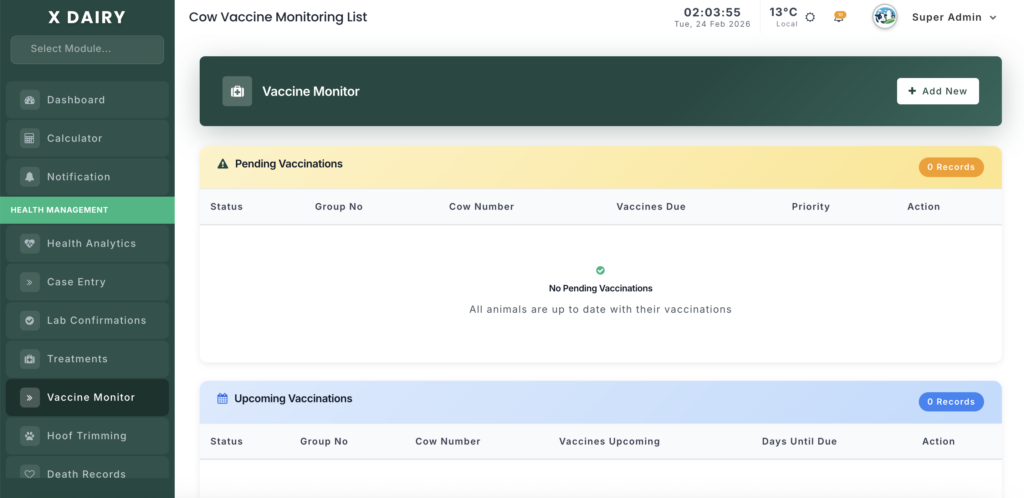
Module URL:http://127.0.0.1:8001/vaccine-monitor
✅ Management Steps #
Step 1: Review the Vaccination Dashboard #
When opening the module, first review the alert panels:
🔴 Pending Vaccinations (High Priority) #
Animals that are:
- Overdue
- Due Today
These require immediate attention.
🟡 Upcoming Vaccinations #
Animals scheduled for vaccination within the next 1–5 days.
Use this panel to:
- Prepare staff schedules
- Ensure sufficient vaccine stock
- Prevent last-minute shortages
Step 2: Record a Vaccination #
You can create a record in two ways:
- Click directly on an animal from the Pending/Upcoming list (auto-fills details)
- Click “Add New”
Required Information: #
- Select Animal: Choose Shed/Group → Select Cow or Calf
- Vaccination Date: Confirm administration date
- Performed By: Select veterinarian or trained staff
Step 3: Log Vaccine Details & Inventory #
In the Vaccine Details section:
Select Vaccine #
Choose from the dropdown list.
Note: Vaccine schedules (age rules, booster intervals, repeat cycles) are configured in Catalog Management → Vaccines.
Enter Dose Information #
- Dose Amount: (e.g., 2 ml)
- Unit: ml, dose, etc.
Link Stock Item (Critical Step) #
- Select the exact bottle or batch from inventory
- Ensures traceability and batch-level accountability
Automatic Stock Deduction #
Upon submission:
- The system converts the dose into stock units
- Deducts the exact amount from the selected bottle
- Updates your Stock Management inventory in real time
Step 4: Add Multiple Vaccines (Optional) #
If administering multiple vaccines in one visit:
- Click “+” (Add Row)
- Add additional vaccine entries
- Submit once all entries are complete
This allows bundled vaccination records in a single visit log.
Step 5: Audit & Reversals #
Vaccination History #
The main list provides:
- Complete herd vaccination history
- Date tracking
- Staff accountability
- Inventory linkage records
Mistake Correction #
If a record is deleted:
- The system automatically reverses the stock transaction
- Returns doses to your virtual pharmacy
- Maintains inventory accuracy
📊 Management Insights #
🛡 Proactive Herd Health #
Log into this module weekly to:
- Clear “Pending Vaccinations”
- Maintain protocol compliance
- Prevent preventable disease outbreaks
🐄 Calf Protection Protocol #
The system automatically:
- Tracks calves from birth
- Applies age-based vaccination rules
- Schedules early-life immunizations separately from adult cows
This ensures no critical early booster is missed.
📦 Inventory & Financial Control #
Mandatory stock linkage ensures:
Improved financial reporting in analytics
Reduced vaccine waste
Batch-level traceability
Accurate cost allocation per animal


Leave a Reply
You must be logged in to post a comment.