
The Treatment module is the core of your farm’s veterinary management system. It allows you to prescribe medications, automatically deduct pharmacy inventory, and enforce milk and meat withdrawal periods to ensure food safety compliance.
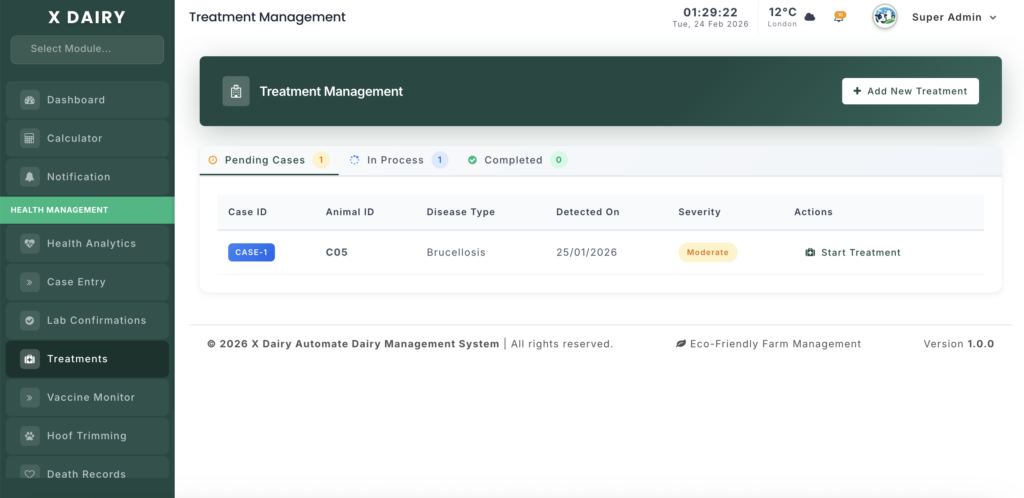
Module URL:http://127.0.0.1:8001/treatment
✅ Management Steps #
Step 1: Initiate a Treatment Plan #
You can start a treatment in two ways:
- Click “Add New” from the Treatment List
- Or start directly from a Pending Case in the dashboard
Select Treatment Type: #
- Symptomatic — Based on observed clinical signs
- Confirmed Diagnosis — Linked to an existing Lab Confirmation record
Step 2: Identify the Patient #
- Link to Case: Select a Case ID to automatically pull animal details and medical history
- Independent Treatment: Select the Animal Tag directly if not linked to a case
- Start Date: Confirm when treatment begins
Step 3: Prescribe Medications #
In the Medications section, add one or more drugs:
Drug Selection #
- Choose from the dropdown list
- Only items classified as Medicines & Veterinary Supplies will appear
Set Dosage & Protocol #
- Dosage Amount: (e.g., 20 ml)
- Frequency: (e.g., SID – Once Daily)
- Route of Administration: (IM, IV, Oral, etc.)
- Duration: Number of treatment days
You may add multiple medications to create a full treatment protocol.
Step 4: Set Withdrawal Periods (Food Safety Compliance) #
Milk Withdrawal #
- Enter the number of hours milk must be discarded
- Automatically syncs with the Discarded Milk module
Meat Withdrawal #
- For each drug, enter the required number of meat withdrawal days
- Prevents premature sale or slaughter
This step is critical for regulatory compliance and food safety.
Step 5: Save and Monitor Inventory #
Click “Submit” to finalize.
Automatic Inventory Management #
- The system converts dosages into stock units
- Deducts inventory automatically
- Calculates treatment cost for Health Analytics
Stock Reversal Protection #
- If a drug entry is deleted or modified
- Stock is automatically returned to inventory
Step 6: Complete the Treatment #
When treatment is finished:
- Go to the Treatment List
- Click “Mark as Completed” (✔ icon)
- The system:
- Sets the End Date
- Moves the record to Completed Archive
📊 Management Insights #
Accurate Cost Tracking #
Every prescribed ml or tablet is:
- Converted to financial value
- Added to the animal’s health cost profile
- Reflected in Health Analytics expense reports
Pending Case Alerts #
Use the Pending Treatment Cases list to ensure:
- No diagnosed animal remains untreated
- All health cases receive proper follow-up
Withdrawal Fail-Safe System #
Animals with active withdrawal periods are automatically flagged during:
- Milk Collection
- Animal Sales
- Culling processes
This prevents contaminated milk or meat from entering the supply chain.


Leave a Reply
You must be logged in to post a comment.