
Table of Contents
The Case Entry module is your primary tool for recording and tracking individual health incidents in livestock. It enables detailed monitoring of symptoms, vital signs, and diagnostic outcomes to ensure timely veterinary intervention.
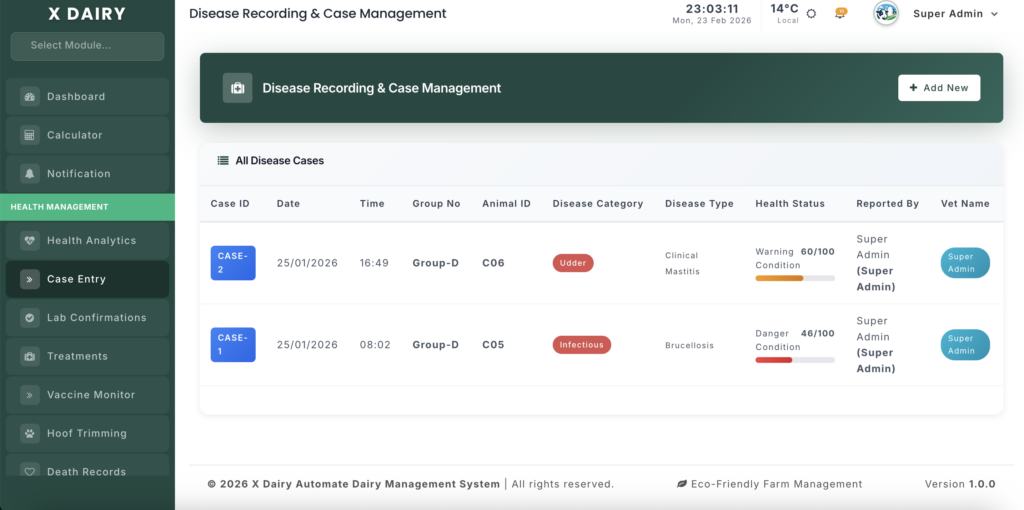
Module URL:http://127.0.0.1:8001/case-entry
✅ Management Steps #
Step 1: Initiate a New Case #
- Click “Add New” to open the case recording form.
- Case ID: The system generates a unique identifier automatically (e.g.,
CASE-5). Confirm it is correct. - Set Dates: Assign:
- Monitoring Date – The date of the check
- Time of Detection – When symptoms were observed
- Onset Date – When symptoms first appeared for timeline tracking
Step 2: Identify the Animal #
- Select Shed/Stall: Choose the group where the animal is located.
- Select Animal: Pick the specific cow or calf tag.
- Visual Evidence: Upload images of the animal or symptoms for veterinary reference.
Step 3: Record Symptoms & Vital Signs #
- Clinical Signs: Select relevant symptoms (e.g., Loss of Appetite, Limping, Dullness).
- Vital Parameters: Enter Temperature, Heart Rate, and Respiratory Rate. These contribute to the animal’s Health Score.
- Disease Details: Record Disease Category and Disease Type if known.
Step 4: Assign Clinical Responsibility #
- Responsible Vet: Assign a veterinarian to the case for accountability.
- Staff Notes: Add observations from herdsmen or shift workers who identified the case.
Step 5: Save and Monitor #
- Click “Submit” to finalize the case entry.
- Verification: Check the Case List to confirm the new record.
- View Details: Use the “View” (Eye icon) to access the full clinical profile, including images and health score history.
- Treatment Sync: Proceed to the Treatment module to log medications and follow-up care.
📊 Management Insights #
- Health Score Calculation: Accurate recording of vital signs ensures correct prioritization of critical cases on the Health Analytics dashboard.
- Audit Trail: Every case logs the creator to maintain accountability for shift-based management.
- Death Prevention: The system blocks entries for animals marked as “Died” to prevent data errors.


Leave a Reply
You must be logged in to post a comment.