
Table of Contents
The Calf Milk Feeding module helps you ensure proper nutrition for young livestock by recording feeding sessions and tracking which milk batch was used.
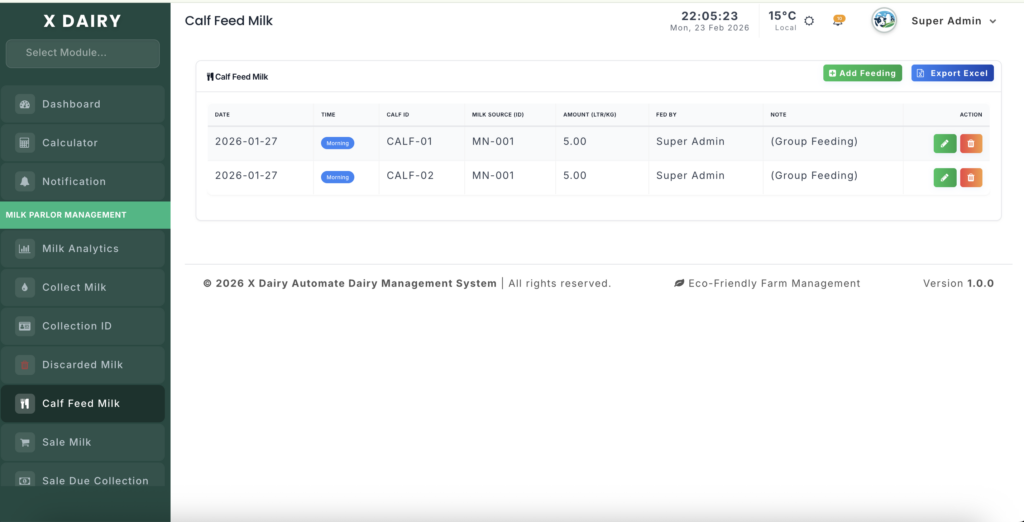
Module URL:http://127.0.0.1:8001/calf-milk-feeding
✅ Management Steps #
Step 1: Start a Feeding Session #
To begin recording feeding:
- Click “Add New” from the feeding list.
- Select Date: Choose the feeding date.
- Select Time of Day: Pick the feeding shift:
- Morning
- Afternoon
- Evening
This helps track feeding consistency across daily schedules.
Step 2: Choose Feeding Method #
You can record feeding in two ways:
Individual Feeding #
- Select a specific Calf Tag.
- Best for:
- Medical feeding
- Special nutrition plans
- Monitoring individual growth
Group Feeding #
- Leave the calf tag blank.
- Select a Shed/Stall.
The system will:
- Identify all active calves in that shed
- Automatically distribute milk equally
- Create individual feeding records for each calf
Step 3: Enter Nutrition Details #
Provide feeding data:
- Milk Amount: Enter total liters fed.
- Collection ID: Select the linked Milk Collection Account.
This ensures:
- Accurate milk inventory tracking
- Proper deduction from farm milk balance
- Correct analytics reporting
Step 4: Assign Responsibility #
Record who performed the feeding:
- Fed By: Select the staff member or feeder.
- Notes: Add observations if needed, such as:
- Slow drinking
- Health concerns
- Special milk used
Step 5: Save and Verify #
- Click “Submit” to save the feeding record.
- The system will automatically:
- Block entries for sold or deceased calves
- Sync feeding data with calf profiles
Review the feeding list to ensure no sessions were missed.
📊 Management Insights #
Automatic Record Creation #
During group feeding:
- The system generates individual feeding records for each calf.
- This allows easy tracking of feeding history on each calf’s profile.
Accurate Financial Tracking #
Linking feeding sessions to Collection IDs ensures:
- Proper accounting of internal milk usage
- No over-reporting of milk waste
- Accurate profit and efficiency analytics
Shift Performance Monitoring #
Use feeding time filters to:
- Monitor staff performance
- Ensure consistent nutrition delivery
- Identify missed feeding sessions quickly


Leave a Reply
You must be logged in to post a comment.