
Table of Contents
The Animal List module serves as the central hub for managing your herd. It organizes all active, pregnant, milking, and sold animals into easy-to-navigate categories for efficient herd management.
Module URL: http://127.0.0.1:8000/animal
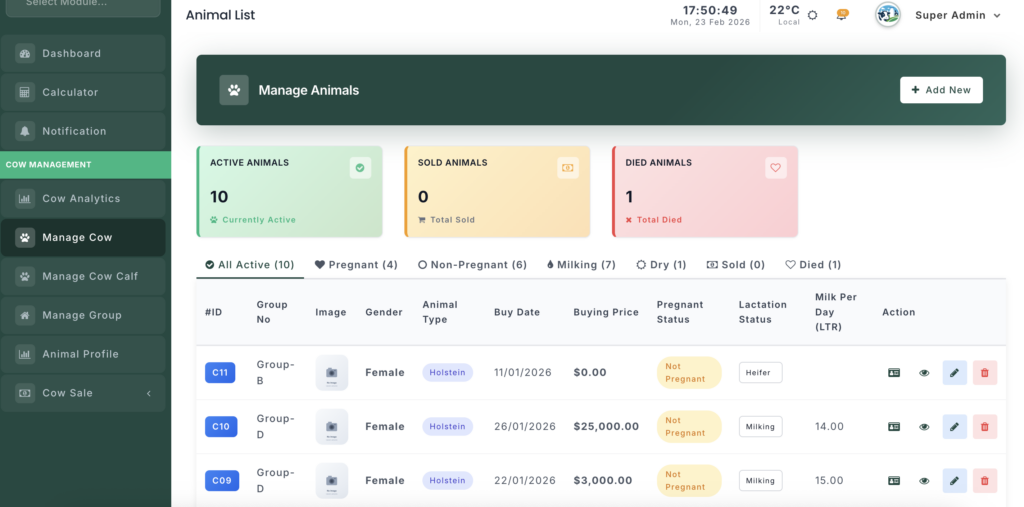
Key Features #
1. Management Tabs #
The list is divided into specialized tabs for quick access:
- All Active — All animals currently on the farm.
- Pregnant — Only females currently in pregnancy.
- Non-Pregnant — Open females available for breeding.
- Milking — Cows currently producing milk.
- Dry — Cows in their resting period.
- Sold/Died — Historical records of animals no longer in the herd.
2. Status Summary Cards #
Top-level cards provide a quick overview of herd status:
- Active Animals — Count of all active animals.
- Total Sold — Count of animals sold.
- Total Died — Count of animals that have died.
3. Inline Management #
- Lactation Status — Change a cow’s production stage (Milking, Dry, Heifer) directly from the list.
- Quick Links — One-click access to the animal’s full Profile, Detailed View, or Edit Form.
Operations #
1. View & Filter #
- Use category tabs at the top to quickly browse animals by status.
- Check the Tag ID / Cow ID badge for fast identification.
2. Manage Production #
- For female cows, update the Lactation Status using the dropdown in the list.
- Changing the status to Dry automatically records the current date as the dry-off date.
3. Record Management #
- Add New — Click the green “Add New” button to register a new animal.
- Profile — Access the full history, medical records, and pedigree of a specific animal.
- Edit/Delete — Update details or remove incorrect entries using the pencil (✏️) and trash (🗑️) icons.


Leave a Reply
You must be logged in to post a comment.